1. પરિચય
The ZENEC Z-E3756 is a sophisticated 2-Din Naviceiver specifically engineered for seamless integration into Fiat Ducato III, Citroen Jumper II, and Peugeot Boxer II vehicles. This unit combines advanced multimedia features with a comprehensive navigation system, all controlled via a responsive 7-inch (17.8 cm) capacitive touchscreen. It offers a wide range of functionalities to enhance your driving experience, including digital radio, Bluetooth connectivity, and smartphone integration.
2. સેટઅપ અને ઇન્સ્ટોલેશન
The Z-E3756 is designed for direct fitment into the dashboard of compatible vehicles. Professional installation is recommended to ensure correct wiring and optimal performance. The unit integrates with the vehicle's steering wheel remote control for convenient operation.
૨.૧ વાહન સુસંગતતા
- Fiat Ducato III: Models 250/251 (2006 – 2011), 250/251 (2011 – 2014), 250/251 (X290) (from 2014), Serie 8 (from 2021, requires assembly kit N-XFDucduc.8)
- Citroen Jumper II: Models 250/250D/250L (from 2006)
- Peugeot Boxer II: Models 250/251 (from 2006)
- Opel Movano Type C: 2021 થી
૩.૩ પ્રારંભિક પાવર-અપ અને ગોઠવણી
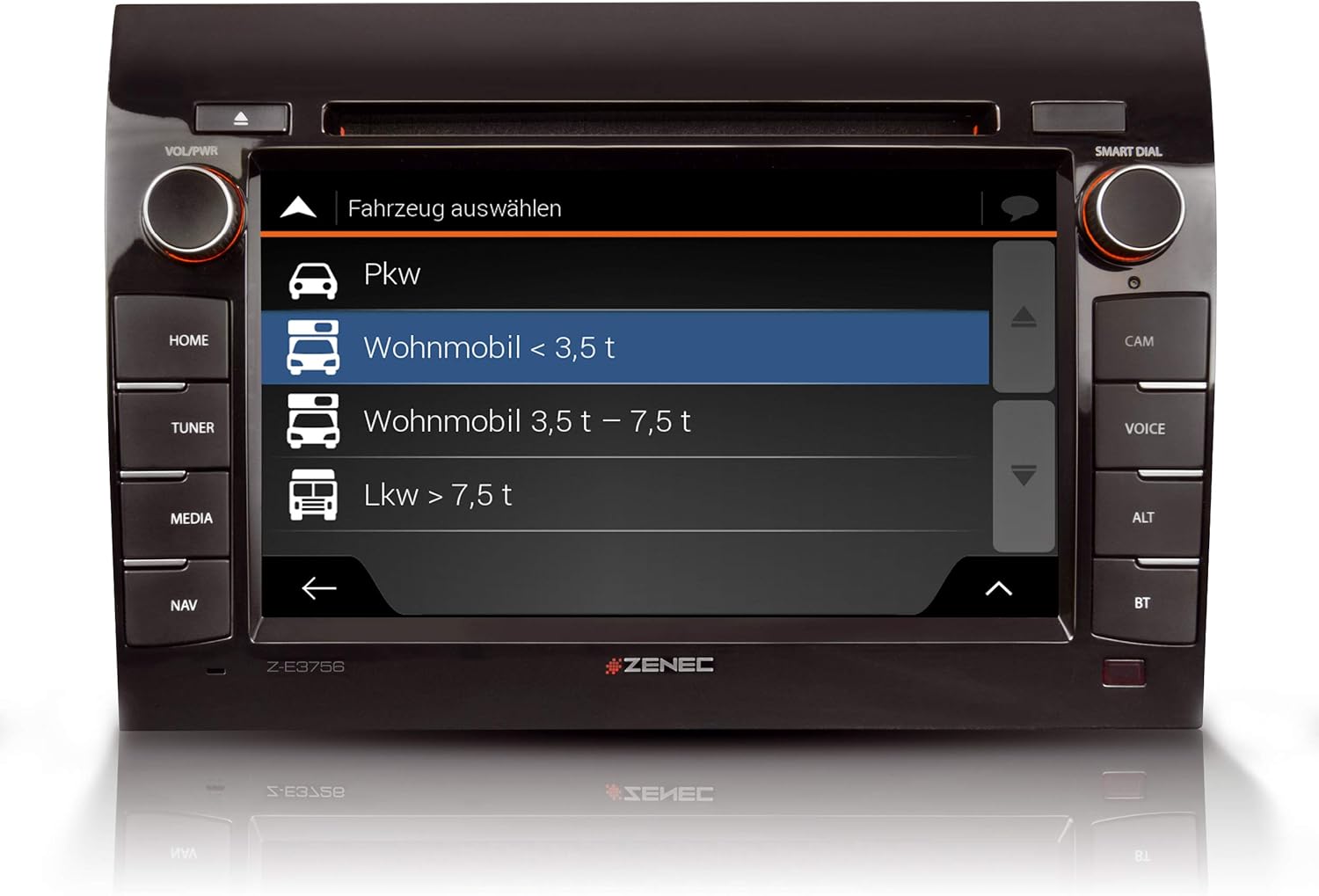
Upon initial power-up, follow the on-screen prompts to configure basic settings such as language, time, and region. For navigation, select the appropriate vehicle profile (e.g., 'Wohnmobil < 3.5 t' for motorhomes under 3.5 tons) and input vehicle-specific data to optimize route planning.

3. ઓપરેટિંગ સૂચનાઓ
The Z-E3756 features a user-friendly interface accessible via its capacitive touchscreen and physical buttons. The main menu provides access to all primary functions.
૪.૧ મુખ્ય ઇન્ટરફેસ અને નેવિગેશન
The home screen typically displays quick access icons for key functions such as DAB+, Navigation, and Bluetooth. Swipe gestures or direct touches activate desired applications.

૩.૩ મલ્ટીમીડિયા કાર્યો
- DAB+ ડિજિટલ રેડિયો: Access a wide range of digital radio stations with enhanced sound quality. The dual tuner ensures stable reception.
- એફએમ રેડિયો: Standard FM radio reception is also available.
- બ્લૂટૂથ: Connect your smartphone for hands-free calling and audio streaming. Manage contacts and call history directly from the unit.
- સીડી/ડીવીડી પ્લેયર: Insert CDs or DVDs into the integrated drive for audio or video playback.
- યુએસબી પોર્ટ્સ: Two USB ports allow connection of external storage devices for media playback or charging.
- એચડીએમઆઈ: Connect compatible devices via HDMI for high-definition audio and video input.
- આઇપોડ/આઇફોન સુસંગતતા: Direct control and playback from Apple devices.


૫.૧ નેવિગેશન સિસ્ટમ
The integrated navigation system includes map data for 47 European countries. It features a dedicated Camping P.O.I. (Points of Interest) database with approximately 20,000 campsites and motorhome pitches, along with 6.5 million premium P.O.I.s. Route planning is optimized by selecting a vehicle profile and entering specific vehicle dimensions.

3.4 Android Auto Integration
Connect your Android smartphone to access compatible apps, including navigation applications, directly on the Z-E3756's display. Control functions via the touchscreen or Google Voice Assistant.

3.5 કેમેરા ઇનપુટ્સ
The unit features three camera inputs with micro-input, allowing for connection of rear-view cameras or other auxiliary cameras to enhance safety and maneuverability.

4. જાળવણી
To ensure the longevity and optimal performance of your Z-E3756 Naviceiver, follow these general maintenance guidelines:
- સ્ક્રીનની સફાઈ: ટચસ્ક્રીનને હળવેથી સાફ કરવા માટે નરમ, લિન્ટ-ફ્રી કાપડનો ઉપયોગ કરો. હઠીલા ડાઘ માટે, સહેજ ડીampen the cloth with water or a screen-safe cleaning solution. Avoid abrasive materials or harsh chemicals.
- સીડી/ડીવીડી ડ્રાઇવ: Keep the CD/DVD slot free from dust and debris. Avoid inserting damaged or dirty discs.
- સૉફ્ટવેર અપડેટ્સ: Periodically check the ZENEC website for available software and map updates to ensure you have the latest features and navigation data.
5. મુશ્કેલીનિવારણ
If you encounter issues with your Z-E3756, consider the following basic troubleshooting steps:
- કોઈ શક્તિ નથી: Check the vehicle's fuse box and ensure all power connections to the unit are secure.
- કોઈ ઑડિયો નથી: Verify speaker connections, volume settings, and ensure the mute function is not active.
- Navigation Issues: ખાતરી કરો કે GPS એન્ટેના યોગ્ય રીતે જોડાયેલ છે અને સ્પષ્ટ છે view of the sky. Check for available map updates.
- બ્લૂટૂથ કનેક્ટિવિટી સમસ્યાઓ: Ensure Bluetooth is enabled on both the Naviceiver and your mobile device. Try unpairing and re-pairing the devices.
- સ્ક્રીન પ્રતિભાવવિહીન: Perform a soft reset by pressing and holding the power button for a few seconds, or consult the full manual for specific reset procedures.
For persistent issues, please refer to the comprehensive troubleshooting section in the full product manual or contact ZENEC customer support.
6. સ્પષ્ટીકરણો
| લક્ષણ | સ્પષ્ટીકરણ |
|---|---|
| બ્રાન્ડ | ZENEC |
| મોડલ નંબર | 02027E3756 |
| સ્ક્રીન માપ | 7 ઇંચ (17.8 સે.મી.) |
| ડિસ્પ્લે પ્રકાર | કેપેસિટીવ ટચસ્ક્રીન |
| કનેક્ટિવિટી ટેકનોલોજી | Vehicle-specific wired connection |
| ખાસ લક્ષણો | Touchscreen, Bluetooth, DAB+, Android Auto, CD/DVD, HDMI, USB |
| નકશાનો પ્રકાર | Europe (47 countries) |
| ઓડિયો આઉટપુટ મોડ | સ્ટીરિયો |
| સમાવાયેલ ઘટકો | Power supply, holder |
| માઉન્ટિંગ પ્રકાર | ડેશબોર્ડ માઉન્ટ |
| પેકેજ પરિમાણો | 31.6 x 28 x 21.5 સેમી |
| વસ્તુનું વજન | 3.7 કિગ્રા |
7. વોરંટી અને સપોર્ટ
For detailed warranty information, please refer to the warranty card included with your product or visit the official ZENEC website. For technical support, product registration, or service inquiries, please contact your authorized ZENEC dealer or the manufacturer's customer service department. Keep your proof of purchase and model number (Z-E3756) readily available when contacting support.


