1. પરિચય
Thank you for choosing the Timex TIME Machines® 29mm Elastic Fabric Kids Watch. This digital watch is designed for children, featuring a durable resin case, an easy-to-read digital display, and a comfortable elastic fabric strap. It includes essential functions such as a chronograph, alarm, and day-date calendar, along with the Indiglo light-up watch dial for visibility in low light conditions. This manual provides detailed instructions for setting up, operating, and maintaining your watch.

આકૃતિ 1: ફ્રન્ટ view of the Timex TIME Machines Watch.
2. સલામતી માહિતી
Please read the following safety guidelines carefully before using your watch:
- પાણી પ્રતિકાર: This watch is water resistant to 50 meters (165 feet). It is suitable for short periods of recreational swimming but is નથી recommended for diving or snorkeling. Avoid pressing buttons underwater.
- બેટરી: The watch contains a lithium metal battery. Do not attempt to open the watch case or replace the battery yourself, as this may damage the watch and void the warranty. Contact authorized service for battery replacement.
- સફાઈ: સોફ્ટનો ઉપયોગ કરો, ડીamp cloth for cleaning. Avoid harsh chemicals or abrasive materials.
- તાપમાન: Avoid exposing the watch to extreme temperatures, either hot or cold, as this can affect battery life and watch performance.
3. ઘટકો
Familiarize yourself with the main components of your Timex TIME Machines watch:
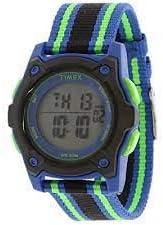
આકૃતિ 2: બાજુ view of the watch, illustrating the resin case and fabric strap.
- પ્રદર્શન: Digital screen showing time, date, and other functions.
- સેટ બટન: Used to enter and confirm settings.
- મોડ બટન: Used to cycle through different watch modes (Time, Chronograph, Alarm).
- સ્ટાર્ટ/સ્ટોપ બટન: Used to start/stop functions in chronograph mode and adjust settings.
- INDIGLO Button: Activates the Indiglo night-light for the display.
- Elastic Fabric Strap: Adjustable strap with hook-and-loop closure for a secure and comfortable fit.
4. સેટઅપ
4.1 સમય અને તારીખ સેટ કરવી
તમારી ઘડિયાળ પર સમય અને તારીખ સેટ કરવા માટે:
- From the normal time display, press and hold the સેટ સેકન્ડ ફ્લેશ થવા લાગે ત્યાં સુધી બટન.
- દબાવો મોડ button to advance to the next setting (seconds, hours, minutes, year, month, day).
- નો ઉપયોગ કરો સ્ટાર્ટ/સ્ટોપ ફ્લેશિંગ મૂલ્યને સમાયોજિત કરવા માટે બટન.
- બધી ઇચ્છિત સેટિંગ્સ ગોઠવાય ત્યાં સુધી પગલાં 2 અને 3 ને પુનરાવર્તિત કરો.
- દબાવો સેટ button again to exit the setting mode and save changes.
4.2 એલાર્મ સેટ કરવું
Your watch features a single alarm. To set it:
- સામાન્ય સમય પ્રદર્શનમાંથી, દબાવો મોડ button repeatedly until "ALARM" appears on the display.
- દબાવો અને પકડી રાખો સેટ button until the alarm hour begins to flash.
- નો ઉપયોગ કરો સ્ટાર્ટ/સ્ટોપ અલાર્મ કલાકને સમાયોજિત કરવા માટે બટન.
- દબાવો મોડ button to advance to the alarm minutes.
- નો ઉપયોગ કરો સ્ટાર્ટ/સ્ટોપ એલાર્મ મિનિટ ગોઠવવા માટેનું બટન.
- દબાવો સેટ એલાર્મનો સમય બચાવવા માટે બટન.
- એલાર્મ ચાલુ/બંધ કરવા માટે, દબાવો સ્ટાર્ટ/સ્ટોપ button while in alarm mode. An alarm icon will appear when the alarm is active.
5. ઓપરેટિંગ સૂચનાઓ
૪.૩ ક્રોનોગ્રાફ (સ્ટોપવોચ) નો ઉપયોગ
The chronograph function allows you to measure elapsed time:
- સામાન્ય સમય પ્રદર્શનમાંથી, દબાવો મોડ button repeatedly until "CHRONO" or "STOPWATCH" appears.
- દબાવો સ્ટાર્ટ/સ્ટોપ button to start the chronograph.
- દબાવો સ્ટાર્ટ/સ્ટોપ button again to pause the chronograph.
- To reset the chronograph to zero, press the સેટ button while the chronograph is paused.
5.2 Indiglo Night-Light
દબાવો ભારત button (typically on the side of the watch) to illuminate the watch display for a few seconds, making it easy to read in the dark.
૪.૧ પટ્ટાને સમાયોજિત કરવું
The elastic fabric strap features a hook-and-loop closure for easy adjustment. Simply pull the strap through the buckle and secure the hook-and-loop sections to achieve a comfortable and snug fit on the wrist.

Figure 3: The watch with its adjustable elastic fabric strap.
6. જાળવણી
૪.૧ તમારી ઘડિયાળ સાફ કરવી
To keep your watch looking its best:
- Wipe the watch case and strap with a soft, slightly damp કાપડ
- For the fabric strap, a mild soap solution can be used, but ensure it is thoroughly rinsed and air-dried before wearing.
- Avoid using chemical cleaners, solvents, or abrasive materials, as these can damage the watch's finish or components.
6.2 બેટરી રિપ્લેસમેન્ટ
The watch is powered by a long-lasting lithium metal battery. When the display becomes dim or functions are erratic, it may be time for a battery replacement. It is highly recommended to have the battery replaced by an authorized Timex service center or a professional watch repairer to ensure proper sealing and maintain water resistance.
7. મુશ્કેલીનિવારણ
If you encounter any issues with your Timex TIME Machines watch, refer to the following common problems and solutions:
| સમસ્યા | સંભવિત કારણ | ઉકેલ |
|---|---|---|
| ડિસ્પ્લે ખાલી અથવા ઝાંખું છે. | ઓછી બેટરી. | Replace the battery (professional service recommended). |
| ઘડિયાળ ચોક્કસ સમય રાખતી નથી. | ખોટી સમય સેટિંગ અથવા ઓછી બેટરી. | Reset the time and date (refer to Section 4.1). If problem persists, replace battery. |
| બટનો પ્રતિભાવવિહીન છે. | ઘડિયાળ લૉક મોડમાં હોઈ શકે છે અથવા આંતરિક સમસ્યા હોઈ શકે છે. | Try pressing all buttons to see if any respond. If not, a battery reset (by professional) might be needed. |
| એલાર્મ વાગતું નથી. | એલાર્મ સક્રિય થયેલ નથી અથવા ખોટી રીતે સેટ થયેલ નથી. | Ensure the alarm is set and the alarm icon is visible on the display (refer to Section 4.2). |
If the issue persists after trying these solutions, please contact Timex customer support for further assistance.
8. સ્પષ્ટીકરણો
- મોડલ નંબર: TW7C260009J
- કેસ સામગ્રી: રેઝિન
- લેન્સ સામગ્રી: એક્રેલિક
- સ્ટ્રેપ સામગ્રી: Elastic Fabric (Nylon)
- પટ્ટાની પહોળાઈ: 18 મીમી
- કેસ વ્યાસ: 29 મીમી
- પાણી પ્રતિકાર: 50 મીટર (165 ફૂટ)
- બેટરીનો પ્રકાર: 1 લિથિયમ મેટલ બેટરી (શામેલ)
- ભલામણ કરેલ ઉંમર: 4 વર્ષ અને તેથી વધુ
- વિશેષતાઓ: Chronograph, Alarm, Day-Date Calendar, Indiglo Night-Light
9. વોરંટી અને સપોર્ટ
Timex stands behind its products. This watch is covered by the Timex Kids Loss Protection Plan, which offers a replacement for up to one year from the original date of purchase, with no questions asked. Please refer to the official Timex website or the original packaging for full warranty details and terms.
For customer support, service, or to inquire about battery replacement, please visit the official Timex website or contact their customer service department. You can find more information and support resources at the એમેઝોન પર ટાઇમેક્સ સ્ટોર.


