1. પરિચય
This manual provides comprehensive instructions for the installation, operation, and maintenance of the DIGI WR11-M400-DE1-XB Cellular Router. This device is designed to provide reliable 4G LTE cellular connectivity and Ethernet networking for various applications. Please read this manual thoroughly before using the product to ensure proper setup and functionality.
2. સલામતી માહિતી
Observe the following safety precautions to prevent damage to the device or injury to personnel:
- પાવર સપ્લાય વોલ્યુમની ખાતરી કરોtage ઉપકરણની જરૂરિયાતો સાથે મેળ ખાય છે.
- ઉપકરણને પાણી અથવા વધુ પડતા ભેજના સંપર્કમાં ન લાવો.
- ઉપકરણને ગરમીના સ્ત્રોતોની નજીક અથવા સીધા સૂર્યપ્રકાશમાં રાખવાનું ટાળો.
- ઉપકરણ ખોલશો નહીં casing; બધી સેવા લાયક કર્મચારીઓને સોંપવી.
- Use only approved accessories and antennas with the router.
3. પેકેજ સામગ્રી
ખાતરી કરો કે બધી વસ્તુઓ પેકેજમાં હાજર છે:
- DIGI WR11-M400-DE1-XB Cellular Router
- પાવર એડેપ્ટર (પ્રદેશ પ્રમાણે બદલાઈ શકે છે)
- ઝડપી પ્રારંભ માર્ગદર્શિકા
- Mounting Hardware (if applicable)
Note: Antennas are not included with this model and must be purchased separately.
4. ઉત્પાદન ઓવરview
The DIGI WR11-M400-DE1-XB is a compact and robust cellular router designed for reliable connectivity. Below is an image of the device with key features highlighted.
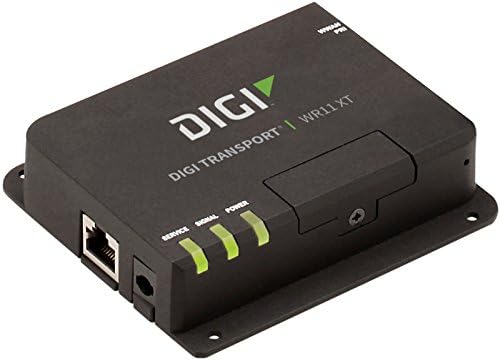
છબી: આગળ view of the DIGI WR11-M400-DE1-XB Cellular Router, showing the Ethernet port, power input, and three LED indicators for Service, Signal, and Power. The device is black with the "DIGI TRANSPORT WR11 XT" logo.
ફ્રન્ટ પેનલ સૂચકાંકો
- સેવા LED: Indicates cellular service status. (e.g., Solid Green: Connected, Blinking: Attempting connection, Off: No service)
- સિગ્નલ એલઇડી: Indicates cellular signal strength. (e.g., Green: Strong, Amber: Medium, Red: Weak)
- પાવર એલઇડી: Indicates power status. (e.g., Solid Green: Power on, Off: Power off)
બંદરો અને કનેક્ટર્સ
- ઇથરનેટ પોર્ટ (LAN): One RJ45 port for wired network connection.
- પાવર ઇનપુટ: Connector for the DC power adapter.
- એન્ટેના કનેક્ટર્સ: (Not visible in image, but typically present on cellular routers for external antennas, though this model states "NO Antenna" in description, implying internal or separate purchase). Note: This model does not include antennas. External antennas must be connected to the appropriate ports (if available) for cellular connectivity.
5. સેટઅપ
પ્રારંભિક સેટઅપ
- સ્થિતિ: Place the router in a central location, away from obstructions and other electronic devices that may cause interference. Ensure good cellular signal reception.
- સિમ કાર્ડ ઇન્સ્ટોલેશન: If applicable, insert your activated 4G LTE SIM card into the designated SIM card slot. Ensure it is inserted correctly according to the diagram on the device or in the Quick Start Guide.
- એન્ટેના કનેક્શન: If using external antennas (recommended for optimal performance, and necessary for this model as it ships without antennas), connect them securely to the antenna ports.
- પાવર કનેક્શન: Connect the power adapter to the router's power input port, then plug the adapter into a power outlet. The Power LED should illuminate.
નેટવર્ક કનેક્શન
- વાયર્ડ કનેક્શન: Connect an Ethernet cable from the router's LAN port to your computer or network switch.
- કનેક્ટિવિટી ચકાસો: Once powered on, the router will attempt to establish a cellular connection. Monitor the Service and Signal LEDs. The Service LED should turn solid green, and the Signal LED should indicate good signal strength.
6. ઓપરેટિંગ સૂચનાઓ
મૂળભૂત કામગીરી
Once the router is powered on and has established a cellular connection (indicated by the Service and Signal LEDs), devices connected to its Ethernet port will be able to access the internet via the 4G LTE network.
ઍક્સેસ કરી રહ્યું છે Web ઈન્ટરફેસ
For advanced configuration and monitoring, you can access the router's web-આધારિત મેનેજમેન્ટ ઈન્ટરફેસ:
- Ensure your computer is connected to the router via Ethernet.
- ખોલો એ web બ્રાઉઝર (દા.ત., ક્રોમ, ફાયરફોક્સ, એજ).
- In the address bar, type the router's default IP address (commonly
192.168.1.1or192.168.0.1, refer to the Quick Start Guide or device label for the exact address) and press Enter. - Enter the default username and password when prompted (typically
adminfor both, or as specified in the Quick Start Guide). - You can now configure network settings, security, and monitor device status.
7. જાળવણી
નિયમિત જાળવણી તમારા રાઉટરની આયુષ્ય અને શ્રેષ્ઠ કામગીરી સુનિશ્ચિત કરવામાં મદદ કરે છે:
- સફાઈ: રાઉટરના બાહ્ય ભાગને સાફ કરવા માટે નરમ, સૂકા કપડાનો ઉપયોગ કરો. પ્રવાહી ક્લીનર્સ અથવા એરોસોલ્સનો ઉપયોગ કરશો નહીં.
- ફર્મવેર અપડેટ્સ: સમયાંતરે ઉત્પાદકની તપાસ કરો website for firmware updates. Keeping the firmware updated can improve performance, add features, and enhance security.
- વેન્ટિલેશન: ઓવરહિટીંગ અટકાવવા માટે રાઉટર સારી રીતે વેન્ટિલેટેડ વિસ્તારમાં મૂકવામાં આવ્યું છે તેની ખાતરી કરો. વેન્ટિલેશન ઓપનિંગ્સને અવરોધશો નહીં.
- પાવર સાયકલ: If the router experiences issues, try power cycling it by disconnecting the power adapter for 10 seconds and then reconnecting it.
8. મુશ્કેલીનિવારણ
This section addresses common issues you might encounter with the DIGI WR11-M400-DE1-XB Cellular Router.
| સમસ્યા | સંભવિત કારણ | ઉકેલ |
|---|---|---|
| No Power (Power LED Off) | પાવર એડેપ્ટર કનેક્ટેડ નથી અથવા ખામીયુક્ત આઉટલેટ છે. | Check power connections. Try a different power outlet. Ensure the power adapter is functioning. |
| No Cellular Service (Service LED Off/Blinking) | No SIM card, inactive SIM, poor signal, or network issue. | Ensure SIM card is correctly inserted and activated. Relocate the router for better signal. Contact your cellular provider. |
| Poor Signal Strength (Signal LED Red/Amber) | Router location, external interference, or antenna issue. | Move the router to an area with better cellular reception. Ensure external antennas (if used) are properly connected and positioned. |
| No Internet Access via Ethernet | No cellular connection, incorrect network settings, or faulty Ethernet cable. | Verify cellular connection status (Service LED). Check Ethernet cable connection. Access web interface to verify network settings. |
| ઍક્સેસ કરી શકાતું નથી Web ઈન્ટરફેસ | Incorrect IP address, network configuration issue, or router not responding. | Verify the router's IP address. Ensure your computer is set to obtain an IP address automatically (DHCP). Try power cycling the router. |
9. સ્પષ્ટીકરણો
Key technical specifications for the DIGI WR11-M400-DE1-XB Cellular Router:
| લક્ષણ | વિગત |
|---|---|
| મોડલ | WR11-M400-DE1-XB |
| બ્રાન્ડ | ડિગી |
| કનેક્ટિવિટી ટેકનોલોજી | Cellular (4G LTE Sprint), Ethernet |
| બંદરોની સંખ્યા | 1 (Ethernet) |
| સુસંગત ઉપકરણો | પર્સનલ કોમ્પ્યુટર |
| નિયંત્રણ પદ્ધતિ | દૂરસ્થ |
| નિયંત્રક પ્રકાર | સ્વિચ કરો |
| ખાસ લક્ષણ | WPS |
| યુપીસી | 665752885062 |
| પ્રથમ ઉપલબ્ધ તારીખ | જુલાઈ 23, 2018 |
10. વોરંટી અને સપોર્ટ
For information regarding product warranty, technical support, or service, please refer to the warranty card included with your product or visit the official Digi International website. Support resources, including FAQs, documentation, and contact information, are typically available online.
કૃપા કરીને વોરંટી દાવા માટે તમારી ખરીદીનો પુરાવો જાળવી રાખો.


