1. ઓવરview
The Motorola PMNN4544A IMPRES Li-Ion battery is a high-capacity, submersible power source designed for select Motorola two-way radios. Utilizing IMPRES technology, this battery, when paired with an IMPRES charger, offers advanced features such as automatic, adaptive reconditioning and end-of-life display. This system is engineered to maximize talk-time and optimize battery cycle life automatically, ensuring reliable performance for your communication needs.

Figure 1: Motorola PMNN4544A IMPRES Li-Ion Battery
મુખ્ય લક્ષણો:
- રસાયણશાસ્ત્ર: Lithium Ion (Li-Ion) for reliable power.
- ક્ષમતા: 2450mAh (Typical), 2300mAh (Minimum) for extended operational time.
- ભાગtage: 7.4V.
- ટકાઉપણું: IP68 rated, indicating high resistance to dust and water ingress.
- પરિમાણો: Approximately 112.35 x 51.65 x 23.4 mm (H x W x D).
- કાર્યકારી સમય: Approximately 22/17 hours (Digital/Analogue – DP4000e Series) and 17/12 hours (Digital/Analogue – DP4000 Series).
- IMPRES Technology: Enables automatic reconditioning and optimized battery life when used with an IMPRES charger.
2. સેટઅપ અને ઇન્સ્ટોલેશન
Before initial use, ensure the battery is fully charged. This battery is designed for easy attachment and removal from compatible Motorola two-way radios.
બેટરી ઇન્સ્ટોલેશન:
- Align the battery with the battery compartment on the back of your compatible Motorola radio.
- Slide the battery upwards until it clicks securely into place. Ensure there is no gap between the battery and the radio body.
- To remove, locate the battery release latch (if present on your radio model), press it, and slide the battery downwards to detach.
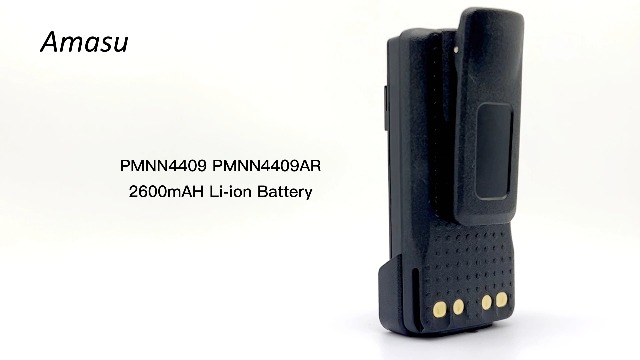
Figure 2: Motorola PMNN4544A battery with an attached belt clip (belt clip may be sold separately or included depending on package).
Unboxing and Features Video:
Video 1: This video demonstrates the unboxing of a Motorola battery, showcasing its physical appearance and features. It provides a visual guide to the product's design and components.
3. ચાર્જિંગ
The Motorola PMNN4544A battery is an IMPRES battery, designed to be charged with compatible IMPRES chargers (e.g., WPLN4232A, WPLN4232, WPLN4137, WPLN4226). Using an IMPRES charger optimizes battery life and performance.
ચાર્જ કરવાની પ્રક્રિયા:
- Connect the IMPRES charger to a power source.
- Insert the PMNN4544A battery into the charging slot of the IMPRES charger. Ensure the battery is seated correctly.
- Observe the charger's LED indicator:
- લાલ પ્રકાશ: સૂચવે છે કે બેટરી હાલમાં ચાર્જ થઈ રહી છે.
- લીલો પ્રકાશ: સૂચવે છે કે બેટરી સંપૂર્ણ ચાર્જ થઈ છે.
- એકવાર સંપૂર્ણ ચાર્જ થઈ ગયા પછી, ચાર્જરમાંથી બેટરી દૂર કરો.
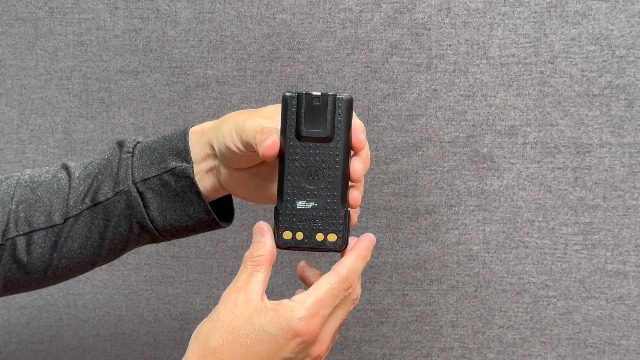
Figure 3: Motorola PMNN4544A battery placed in a compatible IMPRES charger. The charger's LED indicates charging status.
Charging Demonstration Video:
Video 2: This video demonstrates the charging process of a similar Li-ion battery, showing how to properly insert it into a compatible charger and observe the indicator lights.
Ope. Opeપરેટિંગ
The PMNN4544A battery is designed to seamlessly integrate with compatible Motorola two-way radios, providing reliable power for communication. Ensure the battery is fully charged before extended use to maximize talk-time.
સુસંગતતા:
- XPR3300 Series
- XPR3500 Series
- XPR7350 Series
- XPR7550 Series
- DP4400, DP4400e, DP4600, DP4600e, DP4800, DP4800e
For optimal performance, always use the battery with radios and chargers specified as compatible by Motorola.
Battery Details Video:
Video 3: This video provides an introduction to the relevant details of a PMNN4409 battery, offering insights into its features and specifications, which are largely similar to the PMNN4544A.
5. જાળવણી
Proper maintenance ensures the longevity and optimal performance of your Motorola PMNN4544A battery.
સંભાળ અને સંગ્રહ:
- તાપમાન: Store batteries in a cool, dry place, ideally between 15°C and 25°C (59°F and 77°F). Avoid extreme temperatures, as they can degrade battery performance and life.
- ચાર્જિંગ: Always use an original Motorola IMPRES charger for best results. Avoid overcharging or deep discharging the battery.
- સફાઈ: Keep battery contacts clean using a dry, lint-free cloth. Avoid using harsh chemicals or abrasive materials.
- નિકાલ: Dispose of old or damaged batteries according to local regulations. Do not incinerate or puncture batteries.
6. મુશ્કેલીનિવારણ
If you encounter issues with your PMNN4544A battery, consider the following common troubleshooting steps:
- બેટરી ચાર્જ થતી નથી:
- ખાતરી કરો કે ચાર્જર કાર્યરત પાવર આઉટલેટમાં યોગ્ય રીતે પ્લગ થયેલ છે.
- ખાતરી કરો કે બેટરી ચાર્જરમાં યોગ્ય રીતે બેઠી છે.
- Check for any debris or corrosion on the battery and charger contacts. Clean if necessary.
- If using an IMPRES charger, check the charger's error indicators.
- ટૂંકી બેટરી જીવન:
- ખાતરી કરો કે ઉપયોગ કરતા પહેલા બેટરી સંપૂર્ણ ચાર્જ થઈ ગઈ છે.
- Check the battery's age; Li-Ion batteries degrade over time.
- Verify that the radio settings (e.g., transmit power, backlight usage) are optimized for battery conservation.
- If using an IMPRES system, the charger may indicate if recalibration or replacement is needed.
- બેટરી ઓવરહિટીંગ:
- Immediately remove the battery from the radio or charger.
- Allow the battery to cool down in a well-ventilated area.
- Do not use the battery if it shows signs of swelling, leakage, or damage. Contact support.
7. સ્પષ્ટીકરણો
| લક્ષણ | વિગત |
|---|---|
| મોડલ નંબર | PMNN4544A (Also known as PMNN4544) |
| વસ્તુ મોડેલ નંબર (ઉત્પાદક) | 6543830668 |
| બેટરી રસાયણશાસ્ત્ર | લિથિયમ આયન (લિ-આયન) |
| ભાગtage | 7.4 વી |
| Capacity (Typical) | 2450 એમએએચ |
| Capacity (Minimum) | 2300 એમએએચ |
| ઇન્ગ્રેસ પ્રોટેક્શન (IP) રેટિંગ | IP68 (સબમર્સિબલ) |
| પરિમાણો (H x W x D) | ૩૭૦ x ૨૫૪ x ૧૧૦ મીમી (આશરે ૧૪.૫ x ૧૦ x ૪.૩ ઇંચ) |
| વસ્તુનું વજન | 4.8 ઔંસ |
| Operational Time (Digital/Analogue – DP4000e Series) | 22/17 hours (approx.) |
| Operational Time (Digital/Analogue – DP4000 Series) | 17/12 hours (approx.) |
| ભલામણ કરેલ ઉપયોગ | ટુ-વે રેડિયો |
8. વોરંટી અને સપોર્ટ
This Motorola PMNN4544A IMPRES Li-Ion battery is covered by Motorola's standard warranty. For specific warranty terms and conditions, please refer to the documentation included with your purchase or visit the official Motorola webસાઇટ
ગ્રાહક આધાર:
For technical assistance, troubleshooting, or warranty claims, please contact Motorola Customer Support through their official channels. You can typically find contact information on the Motorola webસાઇટ પર અથવા તમારા ઉત્પાદનના પેકેજિંગમાં.
Supportનલાઇન સપોર્ટ: Visit the official Motorola webવારંવાર પૂછાતા પ્રશ્નો, સહાયક લેખો અને સંપર્ક વિકલ્પો માટેની સાઇટ.
ફોન સપોર્ટ: Refer to your regional Motorola support contact numbers.


