પરિચય
This manual provides comprehensive instructions for the safe and efficient operation, maintenance, and troubleshooting of your Leitz IQ Office Pro Shredder. Please read this manual thoroughly before using the device to ensure optimal performance and longevity.
The Leitz IQ Office Pro Shredder is a high-quality, powerful shredder designed for daily use in larger offices, retail, and commercial environments. It features particle cut security level P4, capable of shredding up to 20 sheets (80 g/m²) or 22 sheets (70 g/m²) in one pass, creating approximately 400 pieces per A4 sheet (4 x 40 mm). It is TÜV SÜD & GS certified, ensuring secure and efficient destruction of confidential documents in compliance with GDPR. The shredder operates very quietly (55 dB) and supports up to 4 hours of continuous operation, making it ideal for a quiet working environment. It includes Touch-Control and Anti-Paper Jam technology, a pull-out 30L waste bin (capacity for 275 A4 pages), and an ECO sleep mode. Its four high-quality wheels allow for easy movement.
બૉક્સમાં શું છે
- 1x Leitz IQ Office Pro P4 Shredder
- વપરાશકર્તા માર્ગદર્શિકા
- Waste Bags (initial supply)

Figure 1: Contents of the box, including the shredder, user manual, and waste bags.
સેટઅપ
- અનપેકીંગ: Carefully remove the shredder and all accessories from the packaging. Retain packaging for future transport or storage.
- પ્લેસમેન્ટ: Position the shredder on a flat, stable surface. Ensure adequate ventilation around the unit. The shredder is equipped with four high-quality wheels for easy movement.
- પાવર કનેક્શન: પાવર કોર્ડને ગ્રાઉન્ડેડ ઇલેક્ટ્રિકલ આઉટલેટ સાથે જોડો. ખાતરી કરો કે વોલ્યુમtage matches the specifications of the shredder.
- કચરાપેટીનું સ્થાપન: Ensure the 30L pull-out waste bin is correctly inserted into the shredder. The shredder will not operate if the bin is not properly seated.

Figure 2: The Leitz IQ Office Pro Shredder ready for setup.
ઓપરેટિંગ સૂચનાઓ
મૂળભૂત કામગીરી
- પાવર ચાલુ: Press the power button on the control panel to turn on the shredder. The shredder will enter standby mode.
- ખોરાક આપવાના દસ્તાવેજો: Insert paper into the shredding slot. The shredder will automatically start when paper is detected.
- ક્ષમતા: The shredder can process up to 20 sheets (80 g/m²) or 22 sheets (70 g/m²) simultaneously. Do not exceed this capacity to prevent jams.
- Accepted Materials: Paper (including folded, glossy), office staples, and paper clips.
- સુરક્ષા સ્તર: The shredder produces 4 x 40 mm particle cut pieces, meeting security level P4 for confidential documents.
- સતત કામગીરી: The Leitz IQ Office Pro is designed for 4 hours of continuous operation, suitable for high-volume shredding tasks.
- શાંત કામગીરી: The shredder operates at a very low noise level of 55 dB, ensuring a quiet working environment.
- વિપરીત કાર્ય: If a paper jam occurs, use the reverse button (R) on the Touch-Control panel to clear the jam.
- ECO Sleep Mode: The shredder features an ECO sleep mode to conserve energy when not in use.

Figure 3: Key specifications: 20 sheets capacity, P4 security level, and 30-liter bin.

Figure 4: The shredder supports up to 4 hours of continuous operation.
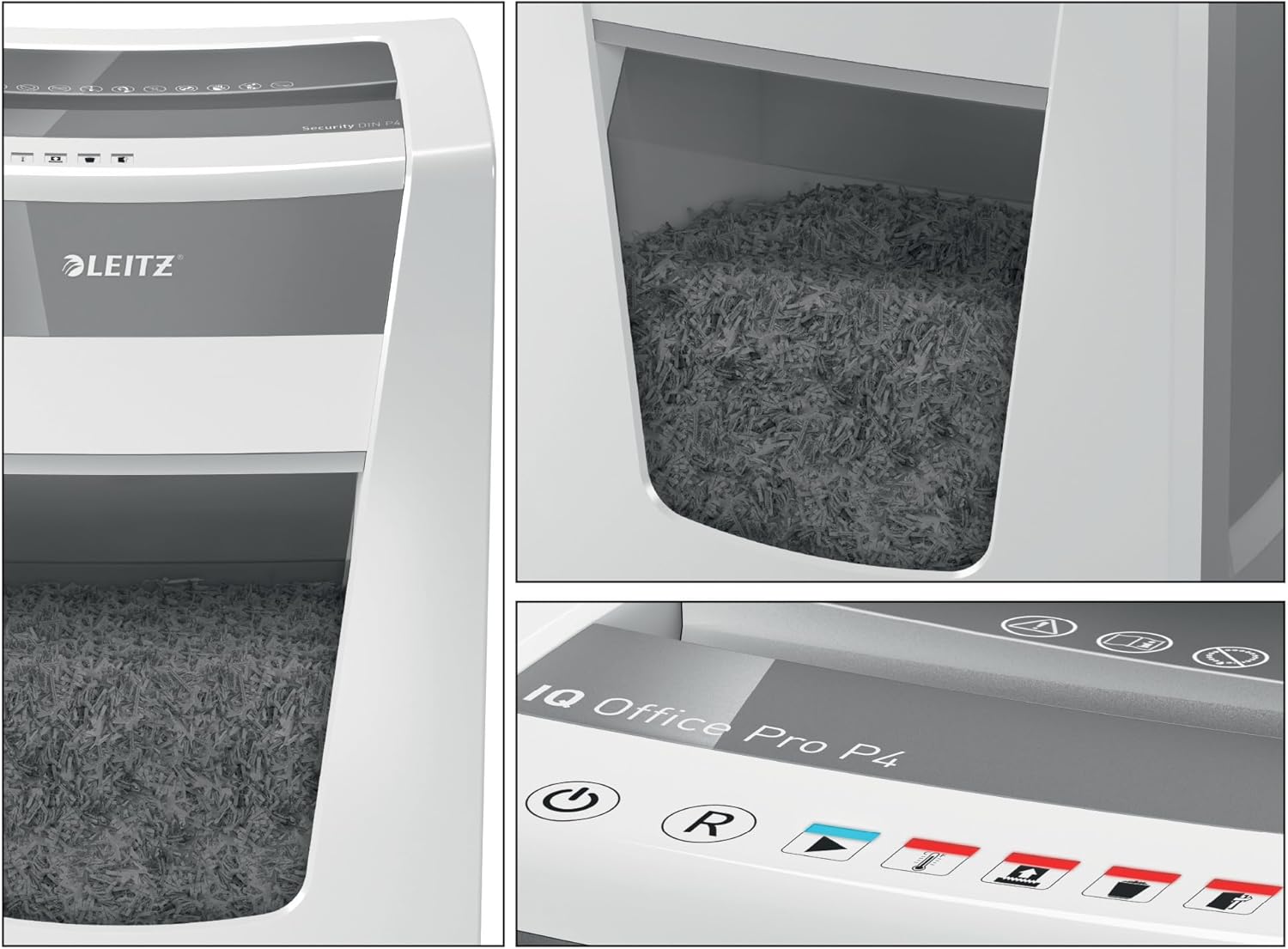
Figure 5: Detail of the Touch-Control panel and the transparent waste bin window.
જાળવણી
કચરાના ડબ્બા ખાલી કરી રહ્યા છીએ
When the waste bin is full, the shredder will stop operating. Pull out the 30L waste bin from the front of the unit. Dispose of the shredded material responsibly. Reinsert the bin firmly until it clicks into place.
ભાગ 1 કટકા કરનારને તેલ લગાવો
Regular use of Leitz oil paper (model 80070000) is recommended to maintain optimal performance and extend the lifespan of the shredder's cutting mechanism. Follow the instructions provided with the oil paper.
મુશ્કેલીનિવારણ
| સમસ્યા | સંભવિત કારણ | ઉકેલ |
|---|---|---|
| શ્રેડર ચાલુ થતું નથી. | No power, waste bin not properly inserted, or shredder overheated. | Check power connection. Ensure waste bin is fully inserted. Allow shredder to cool down if it has been in continuous operation. |
| પેપર જામ. | Too many sheets inserted, or material not suitable for shredding. | Use the reverse function (R button) to clear the jam. Reduce the number of sheets for future shredding. Do not shred items not listed as acceptable. |
| ઓપરેશન દરમિયાન શ્રેડર અટકી જાય છે. | Waste bin full, shredder overheated, or safety mechanism activated. | Empty the waste bin. Allow the shredder to cool down. Check for any obstructions. |
| Increased noise or reduced performance. | Cutting mechanism requires lubrication. | Use Leitz oil paper (80070000) to lubricate the cutting blades. |
If problems persist after attempting these solutions, please contact Leitz customer support.
વિશિષ્ટતાઓ
| લક્ષણ | વિગત |
|---|---|
| બ્રાન્ડ | લીટ્ઝ |
| મોડલ નંબર | 80060000 |
| ઉત્પાદનના પરિમાણો (LxWxH) | 32 x 40.6 x 60.5 સેમી |
| વસ્તુનું વજન | 17.1 કિલોગ્રામ |
| રંગ | Shredder (White/Grey) |
| સામગ્રી | પ્લાસ્ટિક અને મેટલ |
| કટકો પ્રકાર | Particle Cut (Cross-cut) |
| સુરક્ષા સ્તર | P4 (4 x 40 mm particles) |
| Sheet Capacity (80 g/m²) | 20 શીટ્સ સુધી |
| Sheet Capacity (70 g/m²) | 22 શીટ્સ સુધી |
| બિન ક્ષમતા | 30 Liters (approx. 275 A4 pages) |
| સતત રન સમય | 4 કલાક |
| અવાજ સ્તર | 55 ડીબી |
| લક્ષણો | Touch-Control, Anti-Paper Jam Technology, ECO Sleep Mode, Wheels |
| પ્રમાણપત્રો | TÜV SÜD & GS certified |

આકૃતિ 6: યોગ્ય પ્લેસમેન્ટ માટે ઉત્પાદનના પરિમાણો.

Figure 7: Visual representation of different security levels, highlighting P4 particle size.
વોરંટી અને આધાર
The Leitz IQ Office Pro Shredder comes with a standard warranty. You can extend the warranty from 2 to 3 years by registering your product. Please refer to the product registration instructions provided with your purchase or visit the official Leitz webવિગતો માટે સાઇટ.
For technical support, spare parts, or further assistance, please contact Leitz customer service. Contact information can typically be found on the Leitz official webસાઇટ પર અથવા ઉત્પાદન પેકેજિંગ પર.

Figure 8: Information on extended warranty and Anti-Jam technology.


