1. પરિચય
This manual provides detailed instructions for the installation, operation, and maintenance of the UHPPOTE HBK-R01 433.92MHz 12VDC Remote Control System. This system is designed to provide wireless control for access control locks, allowing remote operation of door locking and unlocking mechanisms.
1.1 મુખ્ય લક્ષણો
- Wireless RF remote operation for access control locks.
- Supports programming of up to 40 remote controls.
- Operating range of up to 164 feet (50 meters) in open areas.
- Adjustable auto-lock time delay: 0, 5, or 10 seconds.
- Selectable working modes: Momentary or Toggle.
- Operating Frequency: 433.92MHz.
- Encoding Type: Learning code.
- Integrated buzzer with On/Off switch.
1.2 પેકેજ સામગ્રી
ઇન્સ્ટોલેશન સાથે આગળ વધતા પહેલા ખાતરી કરો કે બધા ઘટકો હાજર છે.
- 1 x UHPPOTE HBK-R01 Receiver
- 2 x Wireless Remote Controls
- 1 x DC 12V પાવર એડેપ્ટર
- 1 x DC Power Connector Cable

છબી 1.1: ઓવરview of the UHPPOTE HBK-R01 remote control system, including the receiver, two remote controls, a power adapter, and a DC power connector cable.
2. સેટઅપ અને ઇન્સ્ટોલેશન
Careful installation is essential for proper system function. Ensure power is disconnected before making any wiring connections.
2.1 રીસીવર ઓવરview
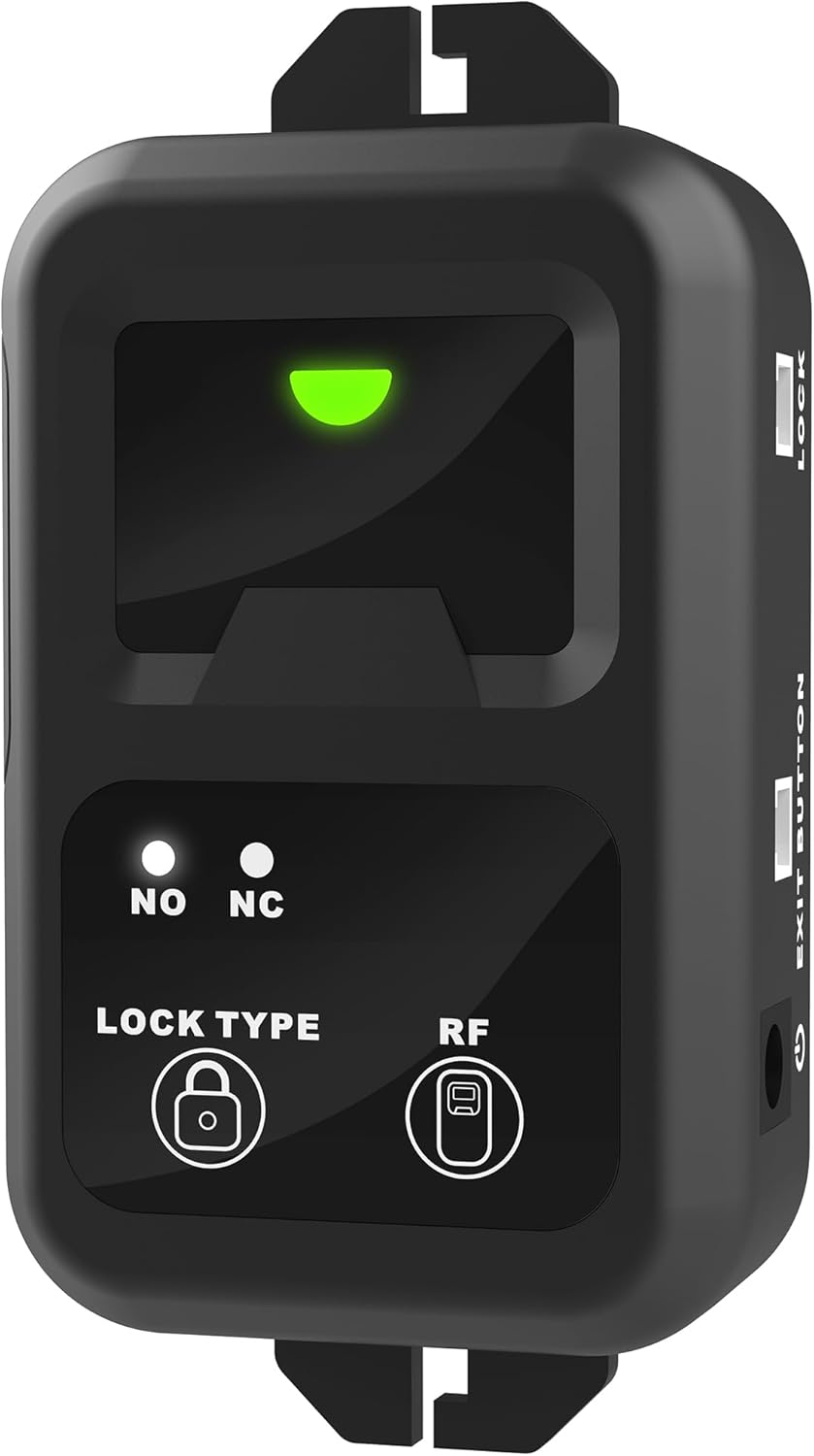
છબી 2.1: આગળ view of the HBK-R01 receiver, showing the lock type indicators (NO/NC) and RF signal indicator.

છબી ૪.૧: બાજુ view of the HBK-R01 receiver, highlighting the access keypad connection terminals.
2.2 વાયરિંગ ડાયાગ્રામ
The following diagram illustrates typical wiring connections for the HBK-R01 receiver with an access keypad, exit button, and a fail-safe lock. Ensure correct polarity and connection types (Normally Open/Normally Closed) for your specific lock and access control components.

Image 2.3: Detailed wiring diagram showing connections for power, access keypad, exit button, and a fail-safe lock to the HBK-R01 receiver.
2.2.1 પાવર કનેક્શન
- Connect the provided DC 12V power adapter to the receiver's DC power input port.
- Ensure the power adapter is connected to a suitable power source.

Image 2.4: The included DC 12V power adapter.
2.2.2 લૉક કનેક્શન
The receiver provides Normally Open (NO) and Normally Closed (NC) contacts for connecting to your access control lock. Refer to your lock's specifications to determine the correct connection type.
- ના (સામાન્ય રીતે ખુલે છે): The circuit is open (no current flows) when the relay is de-energized. It closes when the relay is energized. Use for locks that require power to unlock (fail-secure).
- NC (સામાન્ય રીતે બંધ): The circuit is closed (current flows) when the relay is de-energized. It opens when the relay is energized. Use for locks that require power to lock (fail-safe).
2.2.3 Exit Button / Access Keypad Connection
Connect an optional exit button or access keypad to the designated terminals on the receiver as shown in the wiring diagram (Image 2.3).
3. ઓપરેટિંગ સૂચનાઓ
This section details how to program remote controls and adjust the receiver's settings.
3.1 Programming Remote Controls
The HBK-R01 receiver uses a learning code system to pair with remote controls. Up to 40 remotes can be programmed.

છબી ૨.૧: પાછળ view of the HBK-R01 receiver, showing the 'MODE', 'TIME', and 'BUZZER' switches, and the learning button (often labeled 'RF' or similar, or a small button near the RF indicator).
- ખાતરી કરો કે રીસીવર ચાલુ છે.
- Locate the learning button on the receiver (refer to Image 3.1, typically a small button near the 'RF' indicator or labeled 'Learn').
- Press and hold the learning button for approximately 3 seconds until the RF indicator light on the receiver illuminates or flashes, indicating it is in learning mode.
- While the receiver is in learning mode, press any button on the remote control you wish to program.
- The RF indicator light on the receiver should flash or turn off, confirming successful programming.
- To program additional remotes, repeat steps 3-5 for each remote.
- To clear all programmed remotes, press and hold the learning button for approximately 8 seconds until the RF indicator light flashes rapidly and then turns off. This will erase all stored remote codes.

Image 3.2: A hand pressing the button on a UHPPOTE remote control, indicating activation.
3.2 Adjusting Settings (Mode, Time, Buzzer)
The HBK-R01 receiver features external switches for easy adjustment of operating mode, auto-lock time delay, and buzzer function. These switches are located on the back of the receiver (refer to Image 3.1).
3.2.1 Working Mode Selection
The 'MODE' switch allows selection between Momentary and Toggle modes:
- Momentary Mode (M): The lock will activate (unlock or lock, depending on wiring) only while the remote button is pressed. Releasing the button returns the lock to its default state.
- Toggle Mode (T): Pressing the remote button once will activate the lock, and it will remain in that state until the button is pressed again to revert it.
3.2.2 Auto-Lock Time Delay
The 'TIME' switch adjusts the duration the lock remains activated after a remote signal is received (in Momentary mode) or after the initial press in Toggle mode before automatically reverting. Options are 0, 5, or 10 seconds.
- 0 સેકન્ડ: Instantaneous activation/deactivation.
- 5 સેકન્ડ: Lock remains active for 5 seconds. (Default setting)
- 10 સેકન્ડ: Lock remains active for 10 seconds.
3.2.3 Buzzer Function
The 'BUZZER' switch allows you to enable or disable the audible buzzer sound from the receiver.
- ચાલુ: The receiver will emit an audible beep when a remote signal is received.
- બંધ: The receiver will operate silently.
4. જાળવણી
Regular maintenance ensures optimal performance and longevity of your remote control system.
૪.૨ રિમોટ કંટ્રોલ બેટરી રિપ્લેસમેન્ટ
The remote controls require 2 CR2 batteries. If the remote's indicator light does not illuminate or its range decreases significantly, it may be time to replace the batteries.
- રીમોટ કંટ્રોલ કાળજીપૂર્વક ખોલો casing.
- Remove the old CR2 batteries.
- Insert new CR2 batteries, ensuring correct polarity.
- રિમોટ કંટ્રોલ બંધ કરો casing સુરક્ષિત રીતે.

છબી 4.1: ક્લોઝ-અપ view of a UHPPOTE remote control, which uses CR2 batteries.
.4.2.૧ સામાન્ય કાળજી
- Keep the receiver and remote controls dry and away from excessive moisture.
- Avoid exposing the devices to extreme temperatures.
- Clean the devices with a soft, dry cloth. Do not use harsh chemicals or abrasive cleaners.
5. મુશ્કેલીનિવારણ
If you encounter issues with your UHPPOTE HBK-R01 system, refer to the following common problems and solutions.
૫.૩ રિમોટ કંટ્રોલ કામ કરતું નથી
- બેટરી તપાસો: Ensure the remote control batteries are correctly installed and not depleted. Replace if necessary (refer to Section 4.1).
- શ્રેણી: Verify that you are within the operating range of 164 feet (50 meters) and that there are no significant obstructions (e.g., thick walls, metal structures) between the remote and the receiver.
- Re-program Remote: The remote may have lost its pairing with the receiver. Follow the programming steps in Section 3.1 to re-pair the remote.
- હસ્તક્ષેપ: Other 433MHz devices nearby may cause interference. Try operating the remote in a different location or temporarily disabling other 433MHz devices to test.
5.2 Lock Not Responding
- પાવર સપ્લાય: Ensure the receiver is properly powered and the DC 12V adapter is functioning.
- વાયરિંગ: Double-check all wiring connections between the receiver and the lock, as well as any exit buttons or keypads. Ensure correct NO/NC connections for your lock type.
- Receiver Indicator: Observe the RF indicator light on the receiver. If it does not illuminate when the remote is pressed, the remote may not be transmitting or is out of range.
- લોક કાર્યક્ષમતા: Test the lock independently to ensure it is functioning correctly without the remote system.
6. સ્પષ્ટીકરણો
| લક્ષણ | સ્પષ્ટીકરણ |
|---|---|
| મોડલ નંબર | HBK-R01 |
| સંચાલન ભાગtage | 12વીડીસી |
| ઓપરેટિંગ આવર્તન | 433.92MHz |
| એન્કોડિંગ પ્રકાર | લર્નિંગ કોડ |
| Max Remotes Supported | 40 |
| દૂરસ્થ શ્રેણી | 164 ફૂટ (50 મીટર) સુધી |
| Auto-Lock Time Delay | 0, 5, 10 seconds (adjustable) |
| વર્કિંગ મોડ્સ | Momentary / Toggle (adjustable) |
| સુસંગત ઉપકરણો | Access Control Locks |
| રીસીવર પરિમાણો | 0.39 x 0.31 x 0.2 inches (approximate, based on product dimensions) |
| રીસીવર વજન | 0.064 ounces (approximate, based on product weight) |
| રિમોટ બેટરીનો પ્રકાર | 2 x CR2 બેટરી |
7. વોરંટી અને સપોર્ટ
For warranty information and technical support, please contact UHPPOTE directly or refer to the seller's policies where the product was purchased.
You can visit the official UHPPOTE store for more information: UHPPOTE Store on Amazon


