1. પરિચય
Thank you for choosing the AWOW Mini Smart Socket WiFi Outlet. This device allows you to control your home electronics from anywhere using your smartphone or voice commands. This manual provides detailed instructions for setup, operation, and troubleshooting to ensure optimal performance and safety.

Image 1.1: Four AWOW Mini Smart Sockets, showcasing the compact design and standard US plug type.
2. સલામતી માહિતી
Please read and follow all safety instructions carefully before using the AWOW Mini Smart Socket.
- આ ઉપકરણ ફક્ત અંદરના ઉપયોગ માટે રચાયેલ છે.
- Do not exceed the maximum load of 10A (120V AC). Overloading may cause damage to the device or connected appliances.
- Ensure the smart socket is securely plugged into a wall outlet.
- ઉપકરણને ડિસએસેમ્બલ અથવા સંશોધિત કરશો નહીં.
- પાણી, ભેજ અને ઊંચા તાપમાનથી દૂર રહો.
- The product is ETL and FCC certified and constructed with 5VA fire-retardant material, offering protection against overheating, overcurrent, and overvoltage.
- A secure 2.4 GHz Wi-Fi network is required for operation. This device does not support 5 GHz Wi-Fi networks.
3. પેકેજ સામગ્રી
પેકેજમાં સામાન્ય રીતે શામેલ છે:
- 4 x AWOW Mini Smart Socket WiFi Outlet (Model X5P)
- ૧ x વપરાશકર્તા માર્ગદર્શિકા (આ દસ્તાવેજ)
4. ઉત્પાદન સુવિધાઓ
The AWOW Mini Smart Socket offers a range of convenient features:
- રીમોટ કંટ્રોલ: Control connected devices from anywhere using the Smart Life app on your smartphone.
- અવાજ નિયંત્રણ: હેન્ડ્સ-ફ્રી ઓપરેશન માટે એમેઝોન એલેક્સા અને ગૂગલ આસિસ્ટન્ટ સાથે સુસંગત.
- સમયપત્રક અને ટાઈમર: Set custom schedules and countdown timers to automatically turn devices on or off.
- કોઈ હબ જરૂરી નથી: તમારા હાલના 2.4 GHz Wi-Fi નેટવર્ક સાથે સીધા કનેક્ટ થાય છે.
- કોમ્પેક્ટ ડિઝાઇન: Minimizes obstruction of adjacent outlets.
- ઉપકરણ શેરિંગ: Share control of your smart sockets with family members through the app.

Image 4.1: Diagram illustrating the smart plug's capabilities, including remote control, device sharing, and compatibility with voice assistants.
5. સેટઅપ માર્ગદર્શિકા
Follow these steps to set up your AWOW Mini Smart Socket:
5.1. સ્માર્ટ લાઇફ એપ ડાઉનલોડ કરો
- Scan the QR code provided in the product packaging or search for "Smart Life" in the Apple App Store (for iOS) or Google Play Store (for Android).
- એપ્લિકેશન ડાઉનલોડ કરો અને ઇન્સ્ટોલ કરો.
5.2. Register and Log In
- સ્માર્ટ લાઇફ એપ્લિકેશન ખોલો.
- If you are a new user, tap "Register" and follow the on-screen instructions to create an account.
- If you already have an account, log in with your credentials.
5.3. ઉપકરણ ઉમેરો
- Plug the AWOW Mini Smart Socket into a wall outlet. The indicator light on the plug should blink rapidly. If it does not, press and hold the power button on the plug for 5-10 seconds until it blinks rapidly.
- Open the Smart Life app, tap the "+" icon in the top right corner, and select "Electrical Outlet" or "Socket (Wi-Fi)" from the device list.
- Confirm that the indicator light on the smart socket is blinking rapidly.
- Enter your 2.4 GHz Wi-Fi network name and password. Ensure your smartphone is connected to the same 2.4 GHz Wi-Fi network.
- Tap "Confirm" and wait for the app to connect to the device. This process may take a few moments.
- Once connected, you can rename the device for easier identification (e.g., "Living Room Lamp").

Image 5.1: A smartphone displaying the Smart Life app's 'Connecting' screen, showing the device pairing process with a smart plug.
6. ઓપરેટિંગ સૂચનાઓ
6.1. Remote Control via Smart Life App
After successful setup, you can control your smart socket from anywhere:
- Open the Smart Life app and tap on the device name.
- Use the on/off toggle button to control the power to the connected appliance.
6.2. Voice Control with Amazon Alexa or Google Assistant
To enable voice control, you need to link your Smart Life account with your Amazon Alexa or Google Assistant account.
- એમેઝોન એલેક્સા માટે: Open the Alexa app, go to "Skills & Games," search for "Smart Life," enable the skill, and link your Smart Life account.
- ગૂગલ સહાયક માટે: Open the Google Home app, go to "Set up device" > "Works with Google," search for "Smart Life," and link your Smart Life account.
- એકવાર લિંક થઈ ગયા પછી, તમે વૉઇસ કમાન્ડનો ઉપયોગ કરી શકો છો જેમ કે:
- "એલેક્સા, [ડિવાઇસ નામ] ચાલુ કરો"
- "હેય ગૂગલ, [ડિવાઇસ નામ] બંધ કરો"
- "Alexa, set [Device Name] to 50%" (if applicable for dimmable devices, though this plug is on/off only)

Image 6.1: AWOW smart plugs integrated with Google Home and Amazon Echo devices, demonstrating seamless voice control capabilities.

Image 6.2: A smart plug in a wall outlet, with a speech bubble indicating an Alexa voice command: "Alexa, start my day."
6.3. સમયપત્રક અને ટાઈમર
The Smart Life app allows you to create schedules and set timers for your smart socket:
- સમયપત્રક: In the device control interface, tap "Schedule" or "Timer" to set specific times for the smart socket to turn on or off daily or on selected days of the week.
- કાઉન્ટડાઉન ટાઈમર: Set a countdown timer for the smart socket to turn off after a specified duration.
6.4. ઉપકરણ શેરિંગ
You can share control of your smart sockets with other Smart Life app users:
- In the device settings within the Smart Life app, look for the "Share Device" option.
- Enter the Smart Life account (email or phone number) of the person you wish to share with.
7. જાળવણી
To ensure the longevity and proper functioning of your AWOW Mini Smart Socket:
- સફાઈ કરતા પહેલા ઉપકરણને દિવાલના આઉટલેટમાંથી અનપ્લગ કરો.
- Wipe the exterior with a dry, soft cloth.
- Do not use liquid cleaners or immerse the device in water.
- ઉપકરણને લાંબા સમય સુધી અતિશય તાપમાન અથવા સીધા સૂર્યપ્રકાશમાં રાખવાનું ટાળો.
8. મુશ્કેલીનિવારણ
If you encounter issues with your AWOW Mini Smart Socket, refer to the following common problems and solutions:
- Device cannot connect to Wi-Fi:
- Ensure your Wi-Fi network is 2.4 GHz. The smart socket does not support 5 GHz networks.
- ચોકસાઈ માટે તમારા Wi-Fi પાસવર્ડ તપાસો.
- Make sure the smart socket is within range of your Wi-Fi router.
- Try resetting the smart socket by unplugging it for 10 seconds and plugging it back in, then attempt pairing again.
- If the indicator light is not blinking rapidly, press and hold the power button on the plug for 5-10 seconds to enter pairing mode.
- Device is unresponsive in the app:
- તમારું ઇન્ટરનેટ કનેક્શન તપાસો.
- Ensure the smart socket is powered on.
- Try restarting the Smart Life app.
- Voice control is not working:
- Verify that your Smart Life account is correctly linked to Amazon Alexa or Google Assistant.
- Ensure the device name used in voice commands matches the name set in the Smart Life app.
- Check if your voice assistant device (e.g., Echo, Google Home) is online and functioning correctly.
9. સ્પષ્ટીકરણો
| પરિમાણ | મૂલ્ય |
|---|---|
| મોડલ | એક્સ 5 પી |
| ઇનપુટ વોલ્યુમtage | AC 120V |
| મહત્તમ લોડ વર્તમાન | 10A |
| Wi-Fi માનક | માત્ર 2.4 ગીગાહર્ટ્ઝ |
| સામગ્રી | એક્રેલોનિટ્રિલ બુટાડીએન સ્ટાયરેન |
| પરિમાણો (L x W x H) | 46 x 52 x 32 mm (1.8 x 2.04 x 1.25 ઇંચ) |
| પ્રમાણપત્રો | ETL, FCC |
| ઓપરેટિંગ તાપમાન | 92°F (33°C) સુધી |
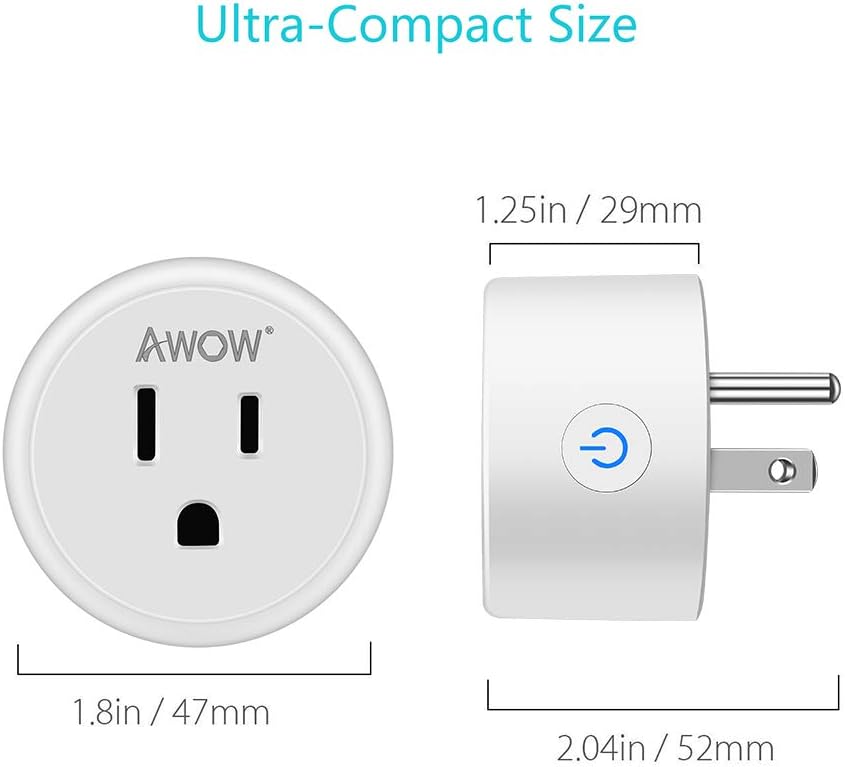
Image 9.1: Detailed dimensions of the AWOW Mini Smart Socket, highlighting its ultra-compact size.
10. વોરંટી અને સપોર્ટ
AWOW provides a 2-year buyer warranty for this product, covering manufacturing defects and malfunctions under normal use. Additionally, lifetime technical support is available to assist you with any product-related inquiries or issues.
For support, please refer to the contact information provided with your purchase or visit the official AWOW webસાઇટ