1. પરિચય
This manual provides essential information for the safe and efficient operation of your TCL 55P8 55-inch AI 4K UHD Android Smart LED TV. Please read it thoroughly before using the product and retain it for future reference. This television combines advanced display technology with smart features for an enhanced viewઅનુભવ.

છબી 1.1: આગળ view of the TCL 55P8 TV displaying a vibrant image.
2. સલામતી માહિતી
સલામત કામગીરી સુનિશ્ચિત કરવા અને નુકસાન અટકાવવા માટે, નીચેની સાવચેતીઓનું પાલન કરો:
- પાવર સપ્લાય: ટીવીને ફક્ત ઉલ્લેખિત વોલ્યુમની અંદર AC પાવર સ્ત્રોત સાથે કનેક્ટ કરોtage range. Ensure the power cord is not damaged or pinched.
- વેન્ટિલેશન: વેન્ટિલેશનના છિદ્રોને અવરોધશો નહીં. ટીવીની આસપાસ યોગ્ય હવા પ્રવાહ માટે પૂરતી જગ્યા રાખો જેથી વધુ ગરમ થવાથી બચી શકાય.
- પાણી અને ભેજ: ટીવીને વરસાદ, ભેજના સંપર્કમાં ન લાવો, અથવા ટીવી પર અથવા તેની નજીક પ્રવાહીથી ભરેલી વસ્તુઓ ન મૂકો.
- સફાઈ: સફાઈ કરતા પહેલા ટીવીને અનપ્લગ કરો. નરમ, સૂકા કપડાનો ઉપયોગ કરો. પ્રવાહી અથવા એરોસોલ ક્લીનર્સનો ઉપયોગ કરશો નહીં.
- પ્લેસમેન્ટ: ટીવીને સ્થિર, સમતલ સપાટી પર મૂકો અથવા તેને દિવાલ પર સુરક્ષિત રીતે લગાવો. તેને સીધા સૂર્યપ્રકાશમાં અથવા ગરમીના સ્ત્રોતોની નજીક રાખવાનું ટાળો.
- સર્વિસિંગ: ટીવીની જાતે સર્વિસ કરવાનો પ્રયાસ કરશો નહીં. બધી સર્વિસિંગ લાયકાત ધરાવતા સેવા કર્મચારીઓને સોંપો.
3. બોક્સમાં શું છે
Upon unpacking your TCL 55P8 TV, verify that all the following components are included:
- 1 x TCL 55P8 LED TV
- ૧ x ટેબલ ટોપ સ્ટેન્ડ (સેટ)
- 1 x Wall Mount Bracket (Note: Wall mount is provided, but installation service is separate for TVs above 55 inches.)
- 1 x વપરાશકર્તા માર્ગદર્શિકા
- 1 x વોરંટી કાર્ડ
- 1 x રીમોટ કંટ્રોલ
- 2 x AAA બેટરી (રિમોટ કંટ્રોલ માટે)
- 1 x AV-RCA Adapter
4. સેટઅપ
4.1 ભૌતિક સ્થાપન
You can install your TV using the included tabletop stand or a wall mount bracket.
Tabletop Stand Installation:
- સ્ક્રીનને નુકસાન ન થાય તે માટે ટીવીનો ચહેરો નરમ, સપાટ સપાટી પર કાળજીપૂર્વક નીચે રાખો.
- Attach the stand bases to the designated slots at the bottom of the TV.
- આપેલા સ્ક્રૂ વડે સ્ટેન્ડને સુરક્ષિત કરો.
- ટીવીને સ્થિર, સ્તરની સપાટી પર સીધું રાખો.

Image 4.1: The TCL 55P8 TV securely placed on its tabletop stand.
વોલ માઉન્ટ ઇન્સ્ટોલેશન:
If you choose to wall mount the TV, use the provided wall mount bracket. For TVs above 55 inches, professional installation is recommended. Ensure the wall can support the TV's weight (approximately 12 kg). Refer to the wall mount bracket's specific instructions for detailed steps.
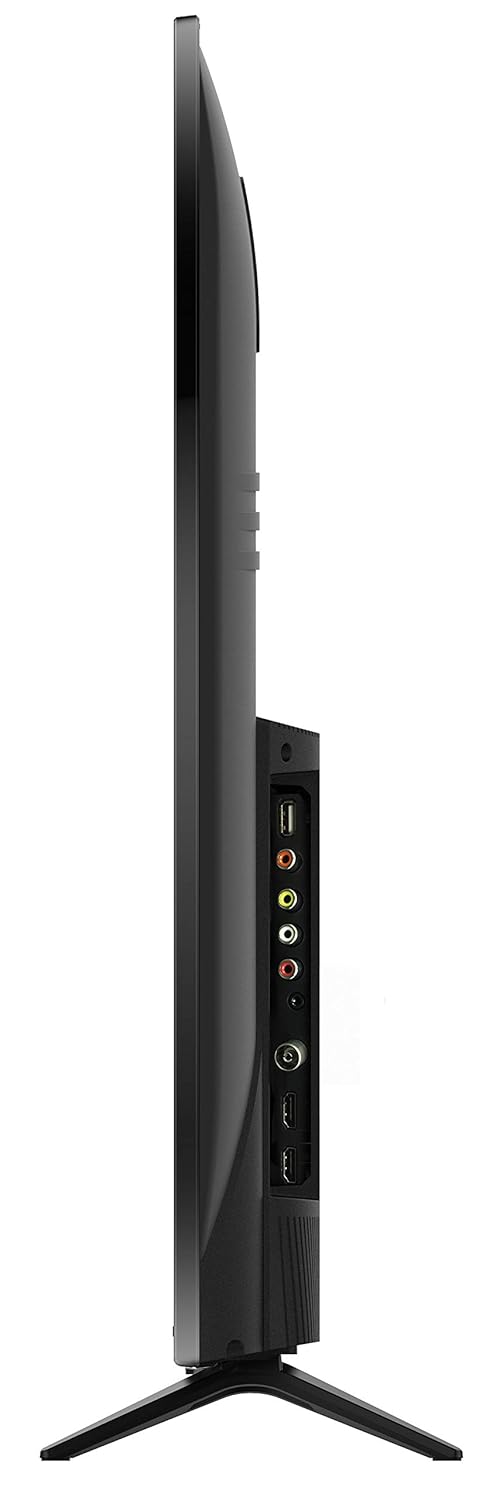
છબી 4.2: પાછળ view of the TCL 55P8 TV, indicating VESA mounting points for wall installation.
૫.૩ બાહ્ય ઉપકરણોને જોડવા
Your TCL 55P8 TV offers various ports for connecting external devices:
- HDMI પોર્ટ્સ (x3): સેટ-ટોપ બોક્સ, બ્લુ-રે પ્લેયર્સ, ગેમિંગ કન્સોલ અથવા અન્ય HDMI-સક્ષમ ઉપકરણોને કનેક્ટ કરો.
- USB પોર્ટ (x2): Connect USB flash drives or external hard drives for media playback.
- LAN પોર્ટ: વાયર્ડ ઇન્ટરનેટ કનેક્શન માટે ઇથરનેટ કેબલ કનેક્ટ કરો.
- AV ઇનપુટ: Use the provided AV-RCA adapter to connect older devices with composite video and stereo audio outputs.
- હેડફોન જેક: ખાનગી સાંભળવા માટે હેડફોન કનેક્ટ કરો.
- ડિજિટલ ઓડિયો આઉટ: ઉન્નત ઑડિઓ માટે સાઉન્ડબાર અથવા હોમ થિયેટર સિસ્ટમ સાથે કનેક્ટ કરો.

Image 4.3: Diagram illustrating the various connectivity ports available on the TCL 55P8 TV.
5. ઓપરેટિંગ સૂચનાઓ
5.1 પાવર ચાલુ/બંધ
Press the power button on the remote control or on the TV to turn it on or off. The TV may take a few moments to boot up due to its Android operating system.
5.2 રીમોટ કંટ્રોલ
The included remote control allows you to navigate the TV's features. It supports both IR and Bluetooth technology. Insert the two AAA batteries into the remote control, ensuring correct polarity.
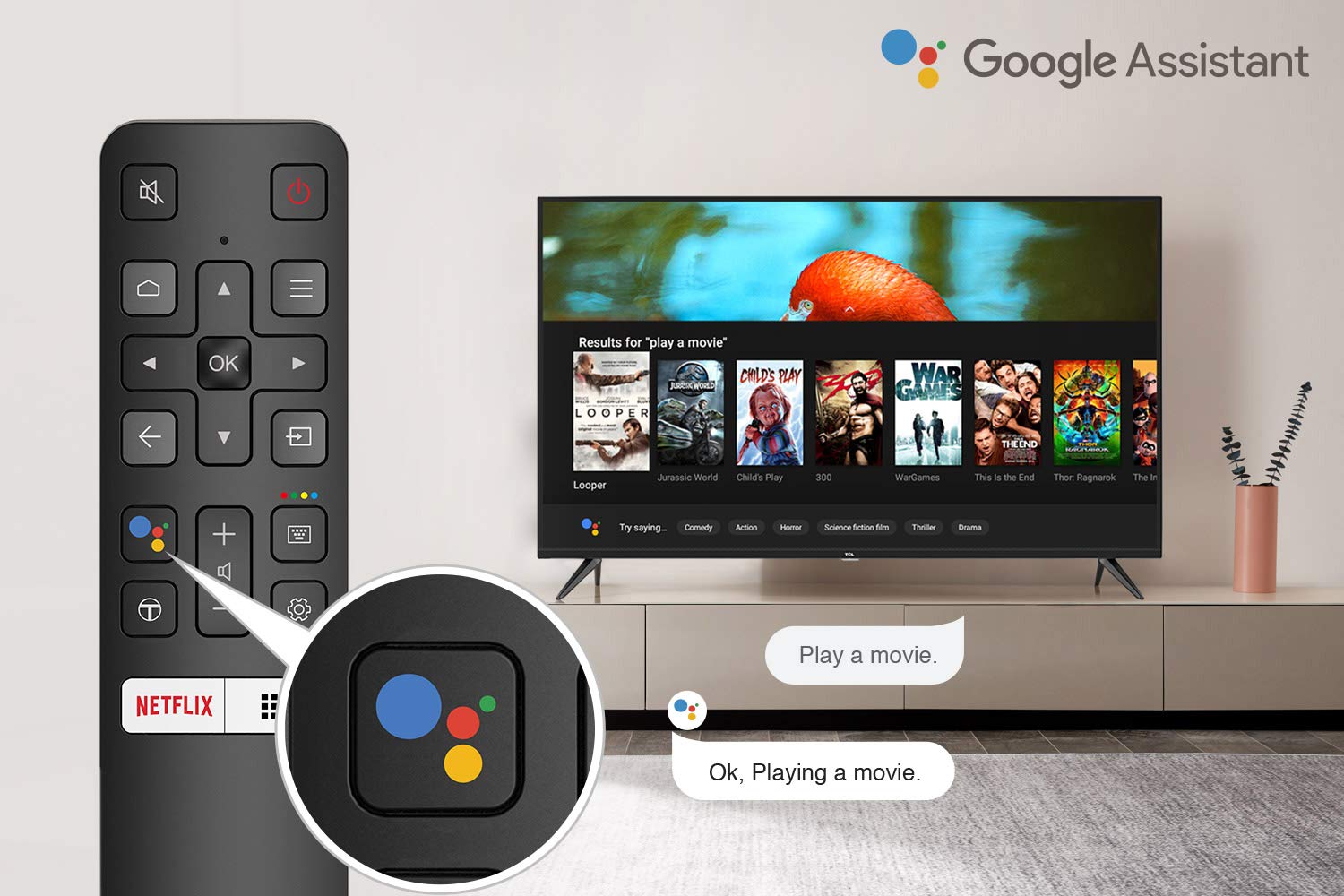
Image 5.1: The remote control for the TCL 55P8 TV, highlighting the Google Assistant button for voice commands.
5.3 Smart TV Features (Android TV 9.0)
Your TCL 55P8 TV runs on Android TV 9.0, offering a wide range of smart functionalities:
- AI-Google Assistant: સામગ્રી શોધવા, સ્માર્ટ હોમ ડિવાઇસને નિયંત્રિત કરવા અને માહિતી મેળવવા માટે રિમોટ કંટ્રોલ દ્વારા વૉઇસ કમાન્ડનો ઉપયોગ કરો.
- Google Cast (Chromecast built-in): Cast content from your compatible smartphone, tablet, or computer directly to the TV screen.
- T-cast: Utilize the T-cast app for additional smart features and screen mirroring.
- બ્લૂટૂથ: હેડફોન અથવા ગેમ કંટ્રોલર જેવા બ્લૂટૂથ-સક્ષમ ઉપકરણોને કનેક્ટ કરો.
- એપ્લિકેશન ઍક્સેસ: Download and install various applications from the Google Play Store, including streaming services like Netflix, Amazon Prime Video, YouTube, Hotstar, Sony Liv, and Zee5.
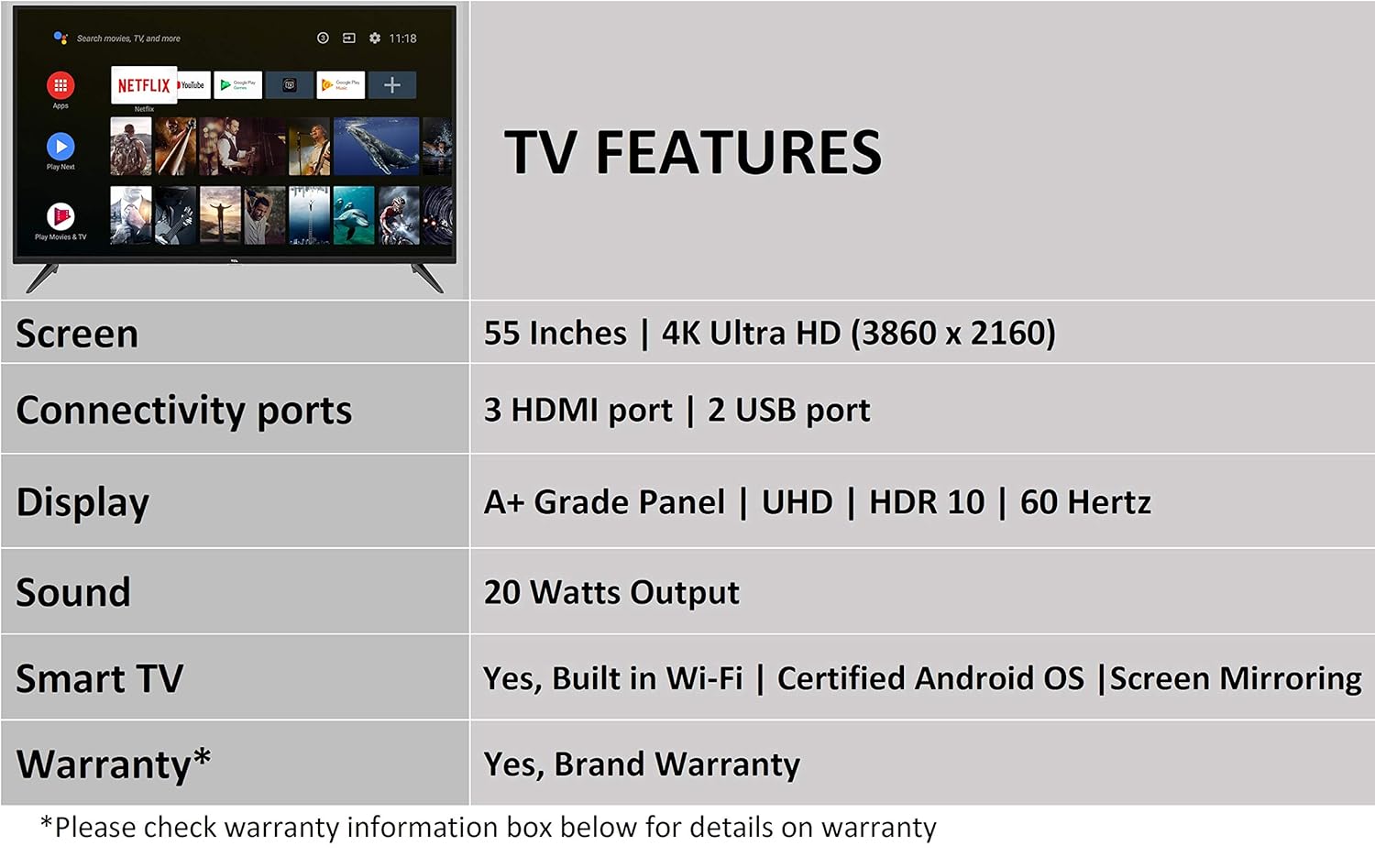
Image 5.2: The Android TV home screen on the TCL 55P8, displaying icons for popular streaming applications.
૩.૪ ચિત્ર અને ધ્વનિ સેટિંગ્સ
- ચિત્ર: Navigate to the picture settings menu to adjust brightness, contrast, color, and sharpness. The TV supports 4K Ultra HD resolution, HDR10, and features Micro Dimming for enhanced contrast.
- ધ્વનિ: Access sound settings to adjust volume, equalizer, and select audio output modes. The TV provides 20 Watts of audio output and supports Dolby Audio.
6. જાળવણી
૪.૧ ટીવી સાફ કરવું
- સ્ક્રીન: Gently wipe the screen with a soft, lint-free, dry cloth. For stubborn marks, slightly dampપાણીથી કપડાને ઢાંકી દો (સીધા સ્ક્રીન પર સ્પ્રે કરશો નહીં).
- શરીર: ટીવી ફ્રેમ સાફ કરો અને નરમ, સૂકા કપડાથી ઊભા રહો.
- સાવધાન: Do not use abrasive cleaners, alcohol, benzene, or thinners, as these can damage the TV's surface.
6.2 સોફ્ટવેર અપડેટ્સ
Your Android TV may receive periodic software updates. Ensure your TV is connected to the internet to receive these updates, which can improve performance and add new features. You can usually check for updates in the TV's settings menu.
7. મુશ્કેલીનિવારણ
જો તમને તમારા ટીવીમાં સમસ્યાઓ આવે, તો નીચેના સામાન્ય ઉકેલોનો સંદર્ભ લો:
| સમસ્યા | શક્ય ઉકેલ |
|---|---|
| નો પાવર | Check if the power cord is securely plugged into the TV and the wall outlet. Ensure the power outlet is functional. |
| કોઈ ચિત્ર નથી, પણ અવાજ હાજર છે | Verify the correct input source is selected. Check HDMI/AV cable connections. Try restarting the TV. |
| અવાજ નથી, પણ ચિત્ર હાજર છે. | Check the volume level and ensure the TV is not muted. Verify audio cable connections if using external speakers. Check audio output settings. |
| રીમોટ કંટ્રોલ કામ કરતું નથી | Replace batteries. Ensure there are no obstructions between the remote and the TV's IR sensor. Re-pair the Bluetooth remote if necessary. |
| નેટવર્ક કનેક્શન સમસ્યાઓ | Check Wi-Fi password. Restart your router. Ensure the TV is within range of the Wi-Fi signal or the Ethernet cable is properly connected. |
| Slow Performance / App Crashes | Close unused applications. Clear cache for problematic apps. Restart the TV. Consider a factory reset if issues persist (note: this will erase all data). |
If the problem persists after attempting these solutions, please contact TCL customer support.
8. સ્પષ્ટીકરણો
Detailed technical specifications for the TCL 55P8 55-inch AI 4K UHD Android Smart LED TV:
| લક્ષણ | સ્પષ્ટીકરણ |
|---|---|
| મોડલ | 55P8 |
| સ્ક્રીન માપ | 55 ઇંચ (138.78 સે.મી.) |
| ઠરાવ | 4K અલ્ટ્રા HD (3840 x 2160 પિક્સેલ્સ) |
| તાજું દર | 60 હર્ટ્ઝ |
| Viewએન્ગલ | 178 ડિગ્રી |
| ડિસ્પ્લે પ્રકાર | LED, A+ ગ્રેડ પેનલ |
| HDR સપોર્ટ | HDR 10 |
| ઓપરેટિંગ સિસ્ટમ | એન્ડ્રોઇડ 9.0 |
| પ્રોસેસર | Quad-core A55 (1.1GHz) |
| ગ્રાફિક્સ કોપ્રોસેસર | Mali470x3 (600MHz-800MHz) |
| રેમ | 2 જીબી |
| આંતરિક સંગ્રહ | 16 જીબી |
| ઓડિયો આઉટપુટ | 20 વોટ્સ |
| ઓડિયો ટેકનોલોજી | AI Sound Engine, Dolby Audio |
| HDMI પોર્ટ્સ | 3 (HDMI 2.0, HDCP2.2, ARC on Port 1) |
| યુએસબી પોર્ટ્સ | 2 (USB 2.0) |
| કનેક્ટિવિટી | Wi-Fi (2x2 b/g/n 2.4GHz), Ethernet, Bluetooth 5.0 |
| ખાસ લક્ષણો | AI-Google Assistant, Google Cast, T-cast, Micro Dimming |
| ઉત્પાદનના પરિમાણો (LxWxH) | ૧૯.૫૬ x ૫૬.૯ x ૪૨.૯૩ સેમી (સ્ટેન્ડ સાથે) |
| વસ્તુનું વજન | 12 કિગ્રા |

Image 8.1: Dimensional diagram of the TCL 55P8 TV, showing height, width, and depth measurements.
9. વોરંટી અને સપોર્ટ
9.1 વોરંટી માહિતી
Your TCL 55P8 TV comes with an 18-મહિનાની વોરંટી provided by TCL from the date of purchase. Please retain your purchase receipt and warranty card for any warranty claims.
9.2 Installation and Customer Support
For requesting installation, wall mounting, or a product demonstration after delivery, please contact TCL customer service:
- ટોલ-ફ્રી નંબરો: 18004190622 અથવા 18001020622
For any other technical assistance or support, please refer to the contact information provided on your warranty card or the official TCL webસાઇટ
૭.૨ રિટર્ન પોલિસી
This product is eligible for replacement or refund within 10 days of delivery in case of any product defects, damage, or features not matching the description provided. Please refer to the retailer's return policy for detailed terms and conditions.


