1. પરિચય
This manual provides detailed instructions for the installation, operation, and maintenance of your Panamalar IP Wi-Fi 1080P Indoor Surveillance Camera. This camera is designed for indoor use, offering high-definition video monitoring, two-way audio communication, and smart detection features. Please read this manual thoroughly before using the product to ensure proper setup and functionality.

Image 1.1: Panamalar IP Wi-Fi 1080P Indoor Surveillance Camera. This image shows the black camera unit next to a smartphone displaying a live feed of a child playing.
2. પેકેજ સામગ્રી
ખાતરી કરો કે નીચે સૂચિબદ્ધ બધી વસ્તુઓ તમારા પેકેજમાં શામેલ છે. જો કોઈ વસ્તુ ખૂટે છે અથવા ક્ષતિગ્રસ્ત છે, તો કૃપા કરીને ગ્રાહક સપોર્ટનો સંપર્ક કરો.
- 1 x Panamalar IP Wi-Fi Camera
- 1 x પાવર એડેપ્ટર
- 1 x USB કેબલ
- 1 x કેમેરા કૌંસ
- 1 x વપરાશકર્તા માર્ગદર્શિકા
- 2 x સ્ક્રૂ
3. ઉત્પાદન ઓવરview
3.1 મુખ્ય લક્ષણો
- Full HD 1080P Video: Provides clear and detailed video resolution.
- પેન અને ટિલ્ટ કાર્યક્ષમતા: Horizontal rotation of 350° and vertical rotation of 100° for comprehensive coverage.
- દ્વિ-માર્ગી ઓડિયો: રીઅલ-ટાઇમ કોમ્યુનિકેશન માટે બિલ્ટ-ઇન માઇક્રોફોન અને સ્પીકર.
- નાઇટ વિઝન: Infrared LEDs provide clear vision up to 32 feet in low-light conditions.
- ગતિ અને ધ્વનિ શોધ: Sends alerts to your smartphone upon detecting activity.
- બહુવિધ કનેક્ટિવિટી વિકલ્પો: Supports both 2.4GHz Wi-Fi and Ethernet cable connection.
- એલેક્સા વૉઇસ કંટ્રોલ: Compatible with Amazon Echo Show for voice commands.
- સ્થાનિક અને ક્લાઉડ સ્ટોરેજ: Supports Micro SD card (not included) and optional cloud storage via the MIPC app.
૪.૧ કેમેરા ઘટકો
કેમેરાના ભૌતિક ઘટકોથી પરિચિત થાઓ:
- લેન્સ: વિડિઓ કેપ્ચર.
- ઇન્ફ્રારેડ એલઇડી: Provide night vision.
- માઇક્રોફોન: દ્વિ-માર્ગી સંચાર માટે ઑડિઓ કેપ્ચર કરે છે.
- વક્તા: દ્વિ-માર્ગી સંચાર માટે ઑડિઓ આઉટપુટ કરે છે.
- પાવર પોર્ટ: પાવર એડેપ્ટર સાથે જોડાય છે.
- ઇથરનેટ બંદર: વાયર્ડ નેટવર્ક કનેક્શન માટે.
- રીસેટ બટન: કેમેરાને ફેક્ટરી સેટિંગ્સ પર રીસેટ કરવા માટે વપરાય છે.
- માઇક્રો એસડી કાર્ડ સ્લોટ: સ્થાનિક વિડિઓ સ્ટોરેજ માટે.
4. સેટઅપ
4.1 Powering On the Camera
- USB કેબલને કેમેરાના પાવર પોર્ટ સાથે જોડો.
- પાવર એડેપ્ટરને પ્રમાણભૂત ઇલેક્ટ્રિકલ આઉટલેટમાં પ્લગ કરો.
- The camera will power on, and its indicator light will begin to flash, indicating it is ready for setup.
૩.૧ એપ ડાઉનલોડ અને એકાઉન્ટ રજીસ્ટ્રેશન
- ડાઉનલોડ કરો "MIPC" એપ સ્ટોર (iOS) અથવા ગૂગલ પ્લે સ્ટોર (Android) માંથી એપ્લિકેશન.
- Open the MIPC app and follow the on-screen instructions to register a new account or log in if you already have one.
4.3 નેટવર્ક કનેક્શન
The camera supports both Wi-Fi and Ethernet connections. Choose the method that best suits your needs.

Image 4.1: Diagram illustrating both Wi-Fi and Ethernet connection methods for the Panamalar camera. The top panel shows a camera connected wirelessly to a router, while the bottom panel shows a camera connected via an Ethernet cable to a router.
4.3.1 Wi-Fi Connection (2.4GHz Only)
મહત્વપૂર્ણ: The camera only supports 2.4GHz Wi-Fi networks. It is not compatible with 5GHz Wi-Fi networks.
- ખાતરી કરો કે તમારો સ્માર્ટફોન 2.4GHz Wi-Fi નેટવર્ક સાથે જોડાયેલ છે.
- In the MIPC app, tap the "+" icon to add a new device.
- Select your camera model or scan the QR code located on the camera.
- Follow the in-app instructions to connect the camera to your Wi-Fi network. This typically involves entering your Wi-Fi password and allowing the camera to scan a QR code displayed on your phone screen.
- Once connected, the camera's indicator light will turn solid, and you will hear a confirmation sound.
4.3.2 ઇથરનેટ કનેક્શન
- Connect one end of an Ethernet cable (not included) to the camera's Ethernet port.
- ઇથરનેટ કેબલના બીજા છેડાને તમારા રાઉટર પર ઉપલબ્ધ LAN પોર્ટ સાથે કનેક્ટ કરો.
- In the MIPC app, tap the "+" icon to add a new device.
- Select your camera model or scan the QR code. The app should automatically detect the camera via the wired connection.
- Follow any remaining in-app instructions to complete the setup.
૫.૪ માઇક્રો એસડી કાર્ડ ઇન્સ્ટોલેશન (વૈકલ્પિક)
To enable local video recording, install a Micro SD card (up to 128GB, Class 10 or higher recommended).
- Power off the camera before inserting or removing the Micro SD card.
- કેમેરા પર માઇક્રો SD કાર્ડ સ્લોટ શોધો.
- જ્યાં સુધી તે જગ્યાએ ક્લિક ન થાય ત્યાં સુધી માઈક્રો SD કાર્ડને ધીમેથી સ્લોટમાં દાખલ કરો.
- Power on the camera. You may need to format the SD card via the MIPC app settings before use.
5. કેમેરાનું સંચાલન
5.1 જીવંત View અને પેન/ટિલ્ટ નિયંત્રણ
Once the camera is connected, open the MIPC app and select your camera to view જીવંત ફીડ.

Image 5.1: Diagram illustrating the 350° horizontal and 100° vertical rotation capabilities of the Panamalar camera, showing its wide viewકોણ કોણ.
- પાન (આડી): Swipe left or right on the live view screen in the app to rotate the camera horizontally up to 350°.
- ટિલ્ટ (ઊભી): Swipe up or down on the live view screen to tilt the camera vertically up to 100°.
- ડિજિટલ ઝૂમ: Pinch in or out on the live view screen to digitally zoom.
૫.૨ ટુ-વે ઓડિયો
The two-way audio feature allows you to listen and speak through the camera.
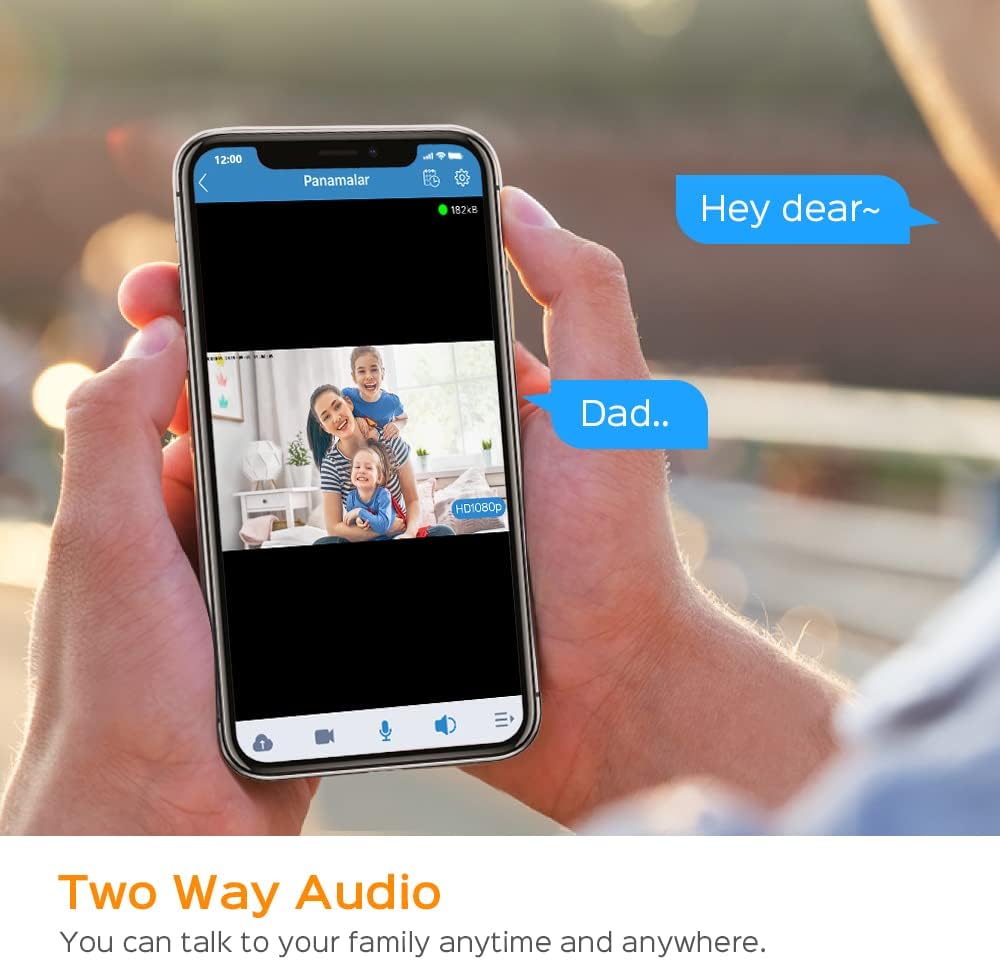
Image 5.2: A smartphone screen displaying a live video feed of a family, with chat bubbles indicating two-way audio communication.
- લાઇવ પર view screen, tap the microphone icon to enable speaking. Hold the icon to speak, and release to listen.
- Tap the speaker icon to enable or disable listening to the camera's environment.
5.3 નાઇટ વિઝન
The camera automatically switches to night vision mode in low-light conditions, providing clear black and white video.
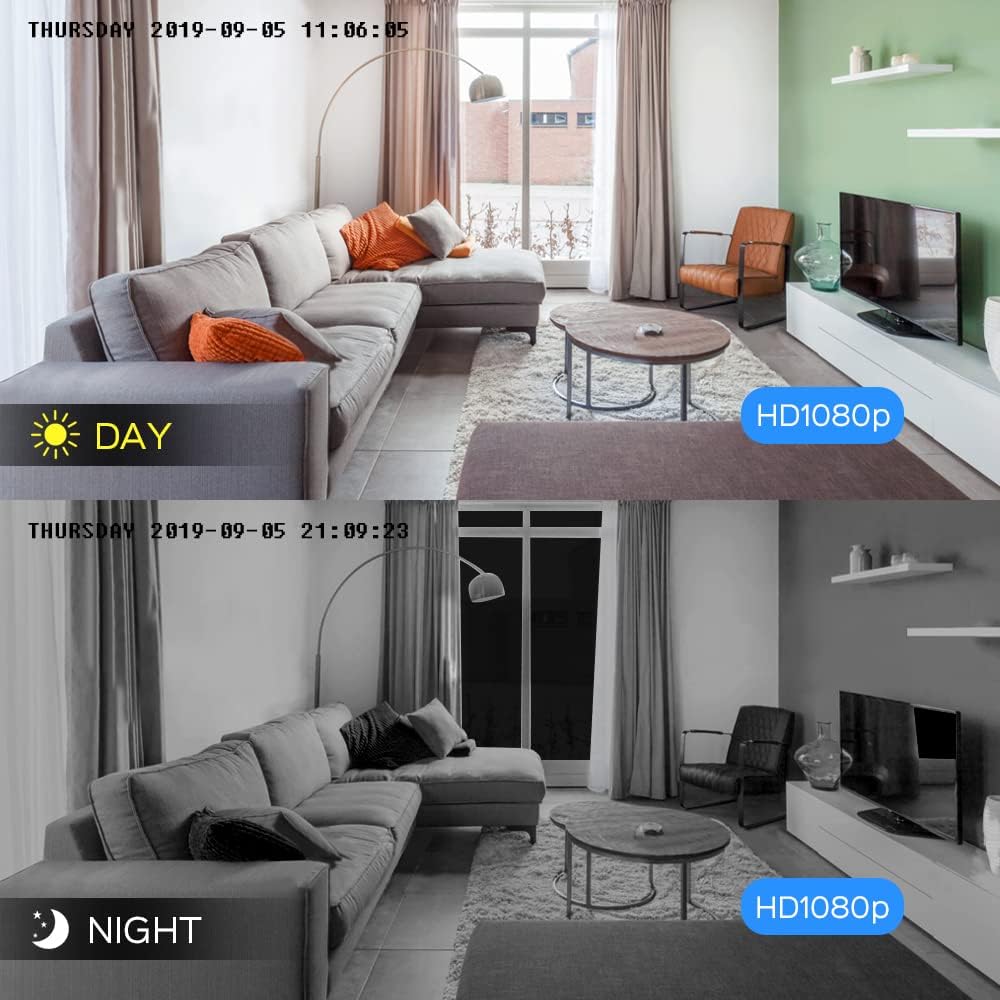
Image 5.3: A split image showing the camera's view during the day in full color and during the night in black and white, both in HD 1080p resolution.
- The camera uses infrared technology to provide clear images in darkness up to 32 feet.
- This feature is automatic and does not require manual activation.
5.4 Motion and Sound Detection Alerts
Configure the camera to send alerts to your smartphone when motion or sound is detected.

Image 5.4: A smartphone screen displaying a "Panamalar: Motion Detection Alert" notification, with two cats in the background, one appearing to trigger the alert.
- Navigate to the camera settings in the MIPC app.
- Locate the "Detection Settings" or "Alarm Settings" section.
- Enable "Motion Detection" and/or "Sound Detection."
- સંવેદનશીલતા સ્તરને સમાયોજિત કરો અને જરૂર મુજબ શોધ ઝોન સેટ કરો.
- Ensure app notifications are enabled on your smartphone to receive alerts.
૬.૧ એલેક્સા વોઇસ કંટ્રોલ
Integrate your camera with Amazon Alexa for convenient voice control.

Image 5.5: An Amazon Echo Show device displaying a live feed from the camera, with a speech bubble indicating an Alexa voice command: "Alexa, show me the baby room."
- Ensure your Amazon Echo Show device is set up and connected to the internet.
- તમારા સ્માર્ટફોન પર એલેક્સા એપ ખોલો.
- Go to "Skills & Games" and search for the "MIPC" skill.
- Enable the MIPC skill and link your MIPC account.
- Discover devices. Once discovered, you can use voice commands such as: "Alexa, show me the [camera name]" (e.g., "Alexa, show me the baby room").
6. જાળવણી
૪.૧ કેમેરા સાફ કરવો
- સફાઈ કરતા પહેલા ખાતરી કરો કે કેમેરા બંધ છે.
- કેમેરા બોડી સાફ કરવા માટે નરમ, સૂકા કપડાનો ઉપયોગ કરો.
- For the lens, use a lens cleaning cloth to gently remove dust or smudges. Avoid harsh chemicals or abrasive materials.
6.2 ફર્મવેર અપડેટ્સ
- Periodically check the MIPC app for available firmware updates.
- Firmware updates can improve performance, add new features, and enhance security.
- Follow the in-app instructions carefully when performing an update. Do not power off the camera during the update process.
7. મુશ્કેલીનિવારણ
૫.૧ કેમેરા Wi-Fi થી કનેક્ટ થતો નથી
- Check Wi-Fi Band: Ensure your router is broadcasting a 2.4GHz Wi-Fi signal. The camera does not support 5GHz networks.
- Wi-Fi પાસવર્ડ: Double-check that you have entered the correct Wi-Fi password in the MIPC app.
- સિગ્નલ સ્ટ્રેન્થ: Place the camera closer to your Wi-Fi router to ensure a strong signal.
- રાઉટર સેટિંગ્સ: Ensure your router's firewall or security settings are not blocking the camera.
- કેમેરા રીસેટ કરો: Press and hold the reset button on the camera for 5-10 seconds until you hear a prompt, then try connecting again.
૬.૩ નબળી વિડિઓ ગુણવત્તા
- ઈન્ટરનેટ ઝડપ: Ensure your internet connection has sufficient upload and download speeds.
- Wi-Fi સિગ્નલ: A weak Wi-Fi signal can lead to lower video quality. Try moving the camera closer to the router or using an Ethernet connection.
- એપ્લિકેશન સેટિંગ્સ: Check the video quality settings in the MIPC app. You may be able to adjust it to a higher resolution if your network supports it.
- લેન્સની સ્વચ્છતા: જાળવણી વિભાગમાં વર્ણવ્યા મુજબ કેમેરા લેન્સ સાફ કરો.
7.3 Motion/Sound Alerts Not Received
- એપ્લિકેશન સૂચનાઓ: Ensure notifications are enabled for the MIPC app in your smartphone's settings.
- ઇન-એપ સેટિંગ્સ: Verify that motion and sound detection are enabled in the camera's settings within the MIPC app. Adjust sensitivity levels if necessary.
- તપાસ ઝોન: If you have set specific detection zones, ensure the activity is occurring within those zones.
- ઇન્ટરનેટ કનેક્શન: A stable internet connection is required for receiving real-time alerts.
7.4 Micro SD Card Not Recording
- કાર્ડ ફોર્મેટ: Ensure the Micro SD card is formatted correctly via the MIPC app.
- કાર્ડ ક્ષમતા: Verify the card capacity is within the supported range (up to 128GB).
- કાર્ડનો પ્રકાર: Use a Class 10 or higher Micro SD card for optimal performance.
- ઉમેરવુ: Ensure the Micro SD card is inserted correctly and fully into the slot.
- રેકોર્ડિંગ સેટિંગ્સ: Check the recording settings in the MIPC app to ensure continuous or event-based recording is enabled.
8. સ્પષ્ટીકરણો
| લક્ષણ | વિગત |
|---|---|
| મોડલ | EU-IP003 |
| છબી સેન્સર | ૧/૨.૭" સીએમઓએસ |
| વિડિઓ રિઝોલ્યુશન | 1080P FHD (1920x1080) |
| વિડિઓ કમ્પ્રેશન | સ્માર્ટ એચ .264 |
| પાન એંગલ | 350° |
| ટિલ્ટ એંગલ | 100° |
| નાઇટ વિઝન રેન્જ | 32 ફૂટ (10 મીટર) સુધી |
| ઓડિયો | ટુ-વે ઓડિયો (બિલ્ટ-ઇન માઇક અને સ્પીકર) |
| વાયરલેસ કનેક્ટિવિટી | વાઇ-ફાઇ (ફક્ત 2.4GHz) |
| વાયર્ડ કનેક્ટિવિટી | ઇથરનેટ પોર્ટ |
| સંગ્રહ વિકલ્પો | Micro SD Card (up to 128GB), Cloud Storage (optional) |
| પાવર ઇનપુટ | ડીસી 5V 1.2A |
| પાવર વપરાશ | 5 વોટ્સ |
| પરિમાણો | 8.5 x 8.5 x 12 સેમી |
| વજન | 238 ગ્રામ |
| સામગ્રી | ધાતુ |
9. વોરંટી અને સપોર્ટ
9.1 વોરંટી માહિતી
This Panamalar IP Wi-Fi 1080P Indoor Surveillance Camera comes with a 12-મહિનાની ગુણવત્તાની ગેરંટી ખરીદીની તારીખથી. આ વોરંટી સામાન્ય ઉપયોગ હેઠળ ઉત્પાદન ખામીઓ અને ખામીઓને આવરી લે છે. તે દુરુપયોગ, અકસ્માતો, અનધિકૃત ફેરફારો અથવા કુદરતી આફતોને કારણે થતા નુકસાનને આવરી લેતી નથી.
9.2 ગ્રાહક સપોર્ટ
For any questions, technical assistance, or warranty claims, please contact our customer support team. We offer 7/24 online customer service.
ઈમેલ: panamalar_us@outlook.com
When contacting support, please provide your product model (EU-IP003) and a detailed description of the issue.


