1. પરિચય
This manual provides comprehensive instructions for the installation, operation, and maintenance of the Byron DBY-22316 Wireless Doorbell Kit. This kit ensures you are always alerted to visitors with its reliable wireless signal and versatile chime options.
ઉત્પાદન ઓવરview
The Byron DBY-22316 Wireless Doorbell Kit includes a weatherproof doorbell push button, a plug-in chime unit, and a portable chime unit. It offers a wireless range of up to 150 meters, 16 selectable melodies, and 4 adjustable volume levels.
મુખ્ય લક્ષણો
- Maximum 150m wireless range.
- ૧૬ પસંદગીના ધૂન.
- 4 એડજસ્ટેબલ વોલ્યુમ સ્તર.
- IP44 weatherproof doorbell push button.
- Includes both a plug-in chime and a portable chime for flexible placement.
- સરળ સ્થાપન.
2. પેકેજ સામગ્રી
બધી વસ્તુઓ હાજર છે તેની ખાતરી કરવા માટે કૃપા કરીને પેકેજની સામગ્રી તપાસો:
- 1x Doorbell Push Button
- 1x Plug-in Chime Unit
- 1x Portable Chime Unit
- 1x CR2032 Battery (for Push Button)
- ડબલ-સાઇડ ટેપ
- વપરાશકર્તા માર્ગદર્શિકા
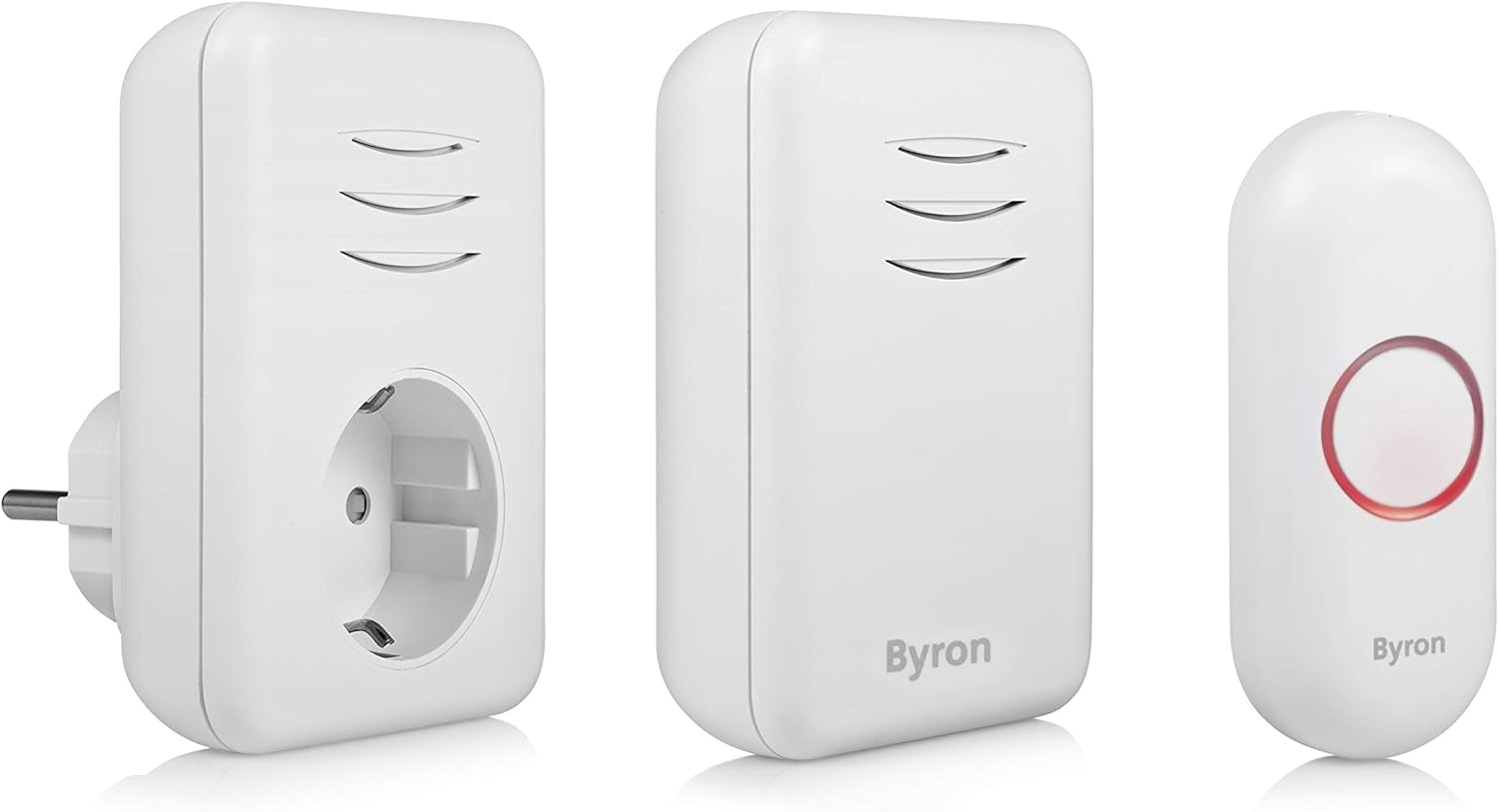
Image 2.1: All components of the Byron DBY-22316 Wireless Doorbell Kit.
3. સેટઅપ
3.1. Installing the Doorbell Push Button
- બેટરી દાખલ કરો: Open the battery compartment on the back of the doorbell push button. Insert the supplied CR2032 battery, ensuring correct polarity (+/-). Close the compartment securely.
- સ્થાન પસંદ કરો: Select a suitable location near your door or gate, ensuring it is easily accessible to visitors. The push button is IP44 weatherproof, suitable for outdoor use.
- માઉન્ટ કરવાનું: Clean the mounting surface thoroughly. Use the provided double-sided tape to firmly attach the push button to the desired location. Alternatively, you can use screws (not included) for a more permanent fixture.

Image 3.1: Doorbell push button installed on a door frame, demonstrating its weatherproof capability.
3.2. Installing the Plug-in Chime
- આઉટલેટ પસંદ કરો: Choose a standard wall outlet within the 150m wireless range of the push button.
- પ્લગ ઇન: Insert the plug-in chime unit directly into the wall outlet. Ensure it is securely seated.

Image 3.2: Plug-in chime unit connected to a wall socket.
3.3. Setting Up the Portable Chime
- બેટરી દાખલ કરો: Open the battery compartment on the back of the portable chime. Insert the required batteries (type not specified in product data, typically AA or AAA, refer to product packaging if available). Ensure correct polarity. Close the compartment securely.
- પ્લેસમેન્ટ: Place the portable chime in any desired location within the wireless range. It can be moved freely around your home.

Image 3.3: Portable chime unit on a shelf.
3.4. Pairing Additional Chimes/Push Buttons (Optional)
The Byron DBY-22316 kit supports up to 6 chimes. If you have purchased additional chimes or push buttons, follow the pairing instructions provided with those specific units. Generally, pairing involves pressing a pairing button on the chime and then activating the push button within a short timeframe.
4. ઓપરેટિંગ સૂચનાઓ
૫.૧. બદલાતા સૂર
To change the melody, locate the melody selection button on the chime unit (both plug-in and portable chimes typically have one). Press this button repeatedly to cycle through the 16 available melodies until you find your preferred one.
4.2. વોલ્યુમ એડજસ્ટ કરવું
To adjust the volume, locate the volume control button on the chime unit. Press this button to cycle through the 4 available volume levels (low, medium, high, mute) until you reach your desired setting.
4.3. સિસ્ટમનું પરીક્ષણ
After installation, press the doorbell push button to test the system. Both chime units should sound the selected melody and illuminate (if applicable). If they do not, refer to the Troubleshooting section.
5. જાળવણી
5.1. Battery Replacement (Doorbell Push Button)
When the doorbell push button's indicator light no longer illuminates or the chime units do not respond, it may be time to replace the battery.
- Carefully remove the push button from its mounting location.
- પાછળનો બેટરીનો ડબ્બો ખોલો.
- Remove the old CR2032 battery and dispose of it responsibly.
- સાચી ધ્રુવીયતા સુનિશ્ચિત કરીને નવી CR2032 બેટરી દાખલ કરો.
- Close the battery compartment and re-mount the push button.
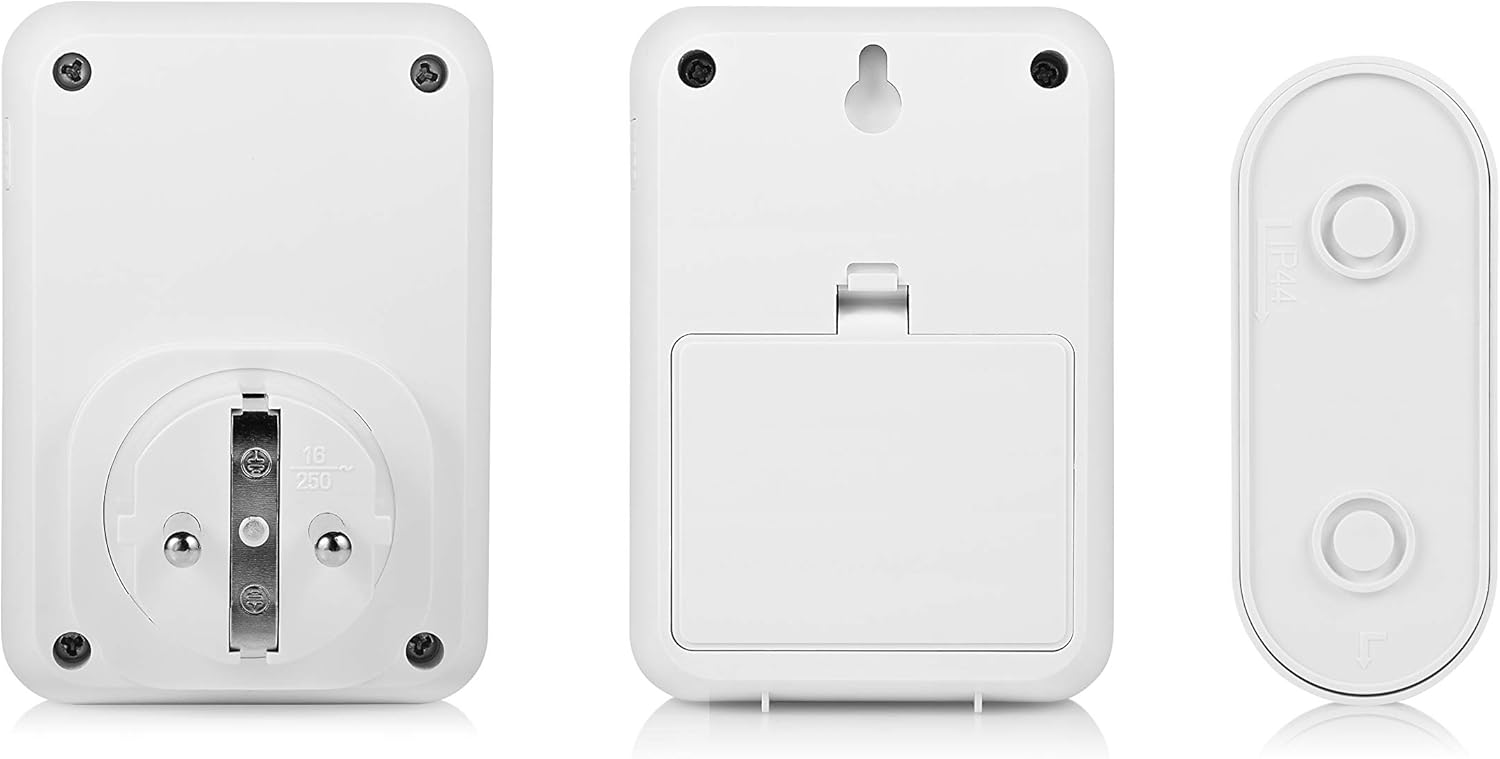
છબી ૨.૧: પાછળ view of the doorbell components, showing battery access.
5.2. સફાઈ
Wipe the doorbell push button and chime units with a soft, damp કાપડ. ઘર્ષક ક્લીનર્સ અથવા સોલવન્ટ્સનો ઉપયોગ કરશો નહીં, કારણ કે આ ફિનિશ અથવા આંતરિક ઘટકોને નુકસાન પહોંચાડી શકે છે.
6. મુશ્કેલીનિવારણ
- ઘંટડી વાગી રહી નથી:
- Check if the chime unit is plugged in and powered on (for plug-in chime).
- Check the batteries in the portable chime and doorbell push button. Replace if necessary.
- Ensure the chime is not set to mute. Adjust the volume.
- Verify that the push button and chime units are within the specified wireless range (150m maximum). Obstacles like thick walls or metal structures can reduce range.
- Re-pair the push button and chime units if they have lost connection (refer to specific pairing instructions if provided with your product).
- Poor wireless range:
- Relocate the chime units closer to the push button.
- Avoid placing units near large metal objects, concrete walls, or other electronic devices that may cause interference.
- Interference from other devices:
- If experiencing false alarms or inconsistent operation, try changing the operating frequency or pairing code if your model supports this feature (consult product-specific documentation).
7. સ્પષ્ટીકરણો
| ઉત્પાદક | બાયરન |
| મોડલ નંબર | DBY-22316 |
| ઉત્પાદનના પરિમાણો (L x W x H) | 6.98 x 23.8 x 19.3 સેમી |
| ઉત્પાદન વજન | 170 ગ્રામ |
| વાયરલેસ રેંજ | ૧૦૦ મીટર સુધી (ખુલ્લી હવામાં) |
| ધૂન | 16 |
| વોલ્યુમ સ્તરો | 4 |
| Doorbell Push Button Weather Rating | IP44 |
| પુશ બટન બેટરી | 1x CR2032 (Lithium, included) |
| Plug-in Chime Voltage | 220 વોલ્ટ |
| મૂળ દેશ | ચીન |
8. વોરંટી અને સપોર્ટ
For warranty information and customer support, please refer to the documentation included with your purchase or visit the official Byron webસાઇટ. ચોક્કસ વોરંટી શરતો પ્રદેશ અને રિટેલર દ્વારા બદલાઈ શકે છે.


