1. પરિચય અને ઓવરview
The Escort EDM 1111A is a versatile digital multimeter designed for accurate measurement of various electrical parameters. This device is essential for electricians, technicians, and hobbyists for testing circuits, components, and power sources. It features a clear digital display and a rotary dial for selecting different measurement functions.

The Escort EDM 1111A Digital Multimeter with red and black test leads connected, ready for use.
Key functions include:
- ડીસી વોલ્યુમtage (DCV) measurement
- એસી વોલ્યુમtage (ACV) measurement
- DC Current (DCA) measurement
- AC Current (ACA) measurement
- પ્રતિકાર (Ω) માપન
- Capacitance (CX) measurement
- Diode and Transistor (hFE) testing
2. સેટઅપ
2.1 બેટરી ઇન્સ્ટોલેશન
The Escort EDM 1111A requires a DC 9V 006P battery for operation. To install or replace the battery:
- ખાતરી કરો કે મલ્ટિમીટર બંધ છે.
- યુનિટની પાછળ બેટરીનો ડબ્બો શોધો.
- Carefully slide open or unscrew the battery cover.
- Insert a new 9V 006P battery, observing the correct polarity (+/-).
- બેટરી કવર સુરક્ષિત રીતે બદલો.

પાછળનો view of the Escort EDM 1111A Digital Multimeter, showing the battery compartment cover and the product label.
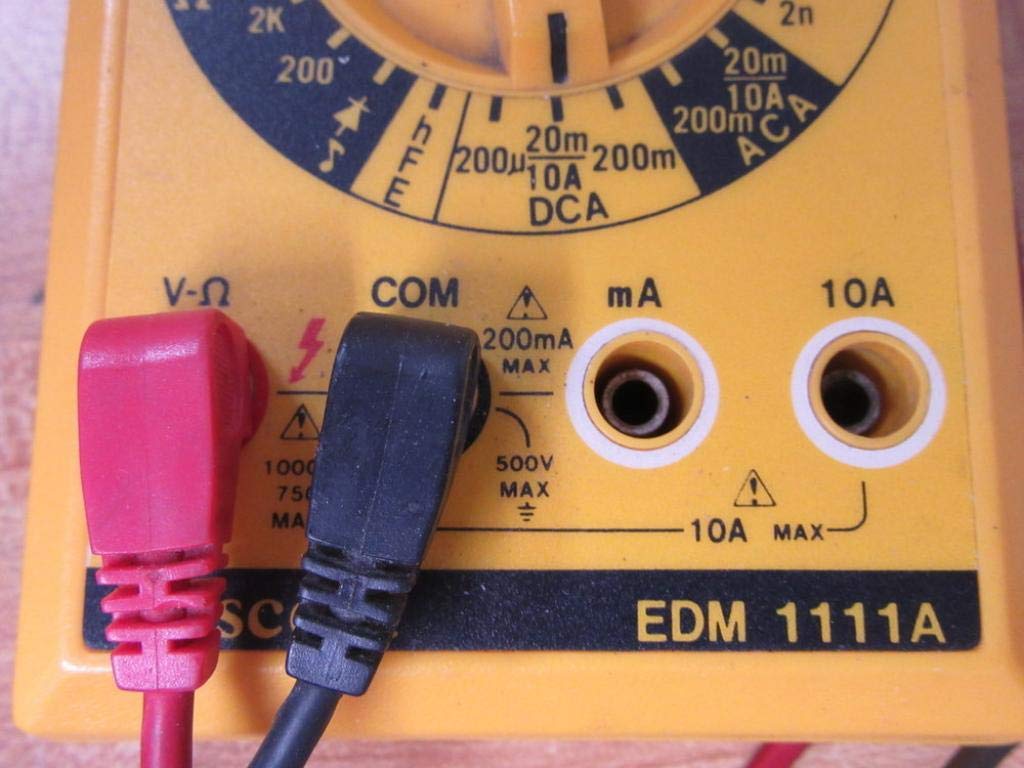
૬.૨ કનેક્ટિંગ ટેસ્ટ લીડ્સ
The multimeter comes with two test leads, typically one red (positive) and one black (negative/common). Proper connection is crucial for accurate and safe measurements.
- For most voltage, resistance, and low current measurements, connect the black lead to the 'COM' (Common) jack.
- Connect the red lead to the 'V-Ω-mA' jack for voltage, resistance, and milliampere current measurements.
- ઉચ્ચ પ્રવાહ માપન (10A સુધી) માટે, લાલ લીડને '10A' જેક સાથે જોડો. Always ensure the correct jack is used to prevent damage to the meter or circuit.

A closer look at the input jacks (V-Ω, COM, mA, 10A) and the lower portion of the rotary dial, indicating current measurement ranges.

The red and black test probes (leads) used with the Escort EDM 1111A Digital Multimeter, featuring pointed tips for electrical contact.
3. ઓપરેટિંગ સૂચનાઓ
Before taking any measurements, ensure the test leads are correctly connected and the rotary dial is set to the appropriate function and range.

વિગતવાર view of the rotary selector dial on the Escort EDM 1111A Digital Multimeter, displaying various measurement functions such as DCV, ACV, Ω, DCA, ACA, and CX.
૫.૪.૫ ડીસી વોલ્યુમ માપવાtage (DCV)
- Set the rotary dial to the desired DCV range (e.g., 200m, 2, 20, 200, 1000). Choose a range higher than the expected voltage.
- Connect the red lead to the positive (+) side of the circuit and the black lead to the negative (-) side.
- ભાગ વાંચોtagડિસ્પ્લે પર e મૂલ્ય.
૫.૪.૬ એસી વોલ્યુમ માપવાtage (ACV)
- Set the rotary dial to the desired ACV range (e.g., 200m, 2, 20, 200, 750). Choose a range higher than the expected voltage.
- Connect the test leads across the AC voltage source. Polarity does not matter for AC voltage.
- ભાગ વાંચોtagડિસ્પ્લે પર e મૂલ્ય.
3.3 Measuring Resistance (Ω)
- Ensure the circuit or component is de-energized before measuring resistance.
- Set the rotary dial to the desired Ω range (e.g., 200, 2K, 20K, 200K, 2M, 20M, 200M).
- માપવાના ઘટક પર ટેસ્ટ લીડ્સ જોડો.
- ડિસ્પ્લે પર પ્રતિકાર મૂલ્ય વાંચો.
3.4 Measuring DC Current (DCA)
- ખાતરી કરો કે સર્કિટ ડી-એનર્જાઇઝ્ડ છે.
- Set the rotary dial to the desired DCA range (e.g., 200µ, 2m, 20m, 200m, 10A).
- મહત્વપૂર્ણ: For currents up to 200mA, use the 'V-Ω-mA' jack for the red lead. For currents up to 10A, use the '10A' jack.
- Break the circuit and connect the multimeter in series with the load. The current must flow through the multimeter.
- Re-energize the circuit and read the current value.
3.5 Measuring AC Current (ACA)
- ખાતરી કરો કે સર્કિટ ડી-એનર્જાઇઝ્ડ છે.
- Set the rotary dial to the desired ACA range (e.g., 200µ, 2m, 20m, 200m, 10A).
- મહત્વપૂર્ણ: For currents up to 200mA, use the 'V-Ω-mA' jack for the red lead. For currents up to 10A, use the '10A' jack.
- Break the circuit and connect the multimeter in series with the load.
- Re-energize the circuit and read the current value.
3.6 Measuring Capacitance (CX)
- Ensure the capacitor is fully discharged before testing.
- Set the rotary dial to the CX range (e.g., 2n, 20n, 200n, 2µ, 20µ).
- કેપેસિટર ટર્મિનલ્સ પર ટેસ્ટ લીડ્સ જોડો.
- ડિસ્પ્લે પર કેપેસીટન્સ વેલ્યુ વાંચો.
3.7 Diode and Transistor (hFE) Testing
Refer to the specific markings on the dial for diode and transistor testing functions. Typically, diode test mode allows checking the forward voltage drop of a diode, and hFE mode is used for measuring the DC current gain of transistors.
4. જાળવણી
4.1 બેટરી રિપ્લેસમેન્ટ
Replace the 9V 006P battery when the low battery indicator appears on the display or if the multimeter fails to power on. Follow the instructions in Section 2.1.
4.2 સફાઈ
To clean the multimeter, use a soft, damp cloth. Do not use abrasive cleaners or solvents, as they may damage the casing or display. Ensure the device is turned off and disconnected from any circuits before cleaning.
4.3 સંગ્રહ
When not in use for extended periods, store the multimeter in a cool, dry place, away from direct sunlight and extreme temperatures. Consider removing the battery to prevent leakage, which could damage the internal components.
5. મુશ્કેલીનિવારણ
| સમસ્યા | સંભવિત કારણ | ઉકેલ |
|---|---|---|
| કોઈ ડિસ્પ્લે નહીં અથવા ઝાંખું ડિસ્પ્લે નહીં | ઓછી અથવા મૃત બેટરી | Replace the 9V 006P battery. |
| ખોટું વાંચન | Incorrect range selected Poor lead connection Damaged test leads Incorrect input jack used | યોગ્ય શ્રેણી પસંદ કરો. Ensure leads are firmly connected. Inspect and replace damaged leads. Verify leads are in the correct V-Ω-mA or 10A jack. |
| "OL" (Overload) displayed | Measurement exceeds selected range | ઉચ્ચ શ્રેણી પર સ્વિચ કરો. |
| No continuity beep | Continuity function not selected ઓપન સર્કિટ | Ensure dial is on continuity/diode test. Check the circuit for breaks. |
6. સ્પષ્ટીકરણો
| પરિમાણ | મૂલ્ય |
|---|---|
| મોડલ | EDM 1111A |
| ઉત્પાદનના પરિમાણો (L x W x H) | 8 x 4 x 2 ઇંચ |
| વસ્તુનું વજન | 1.84 પાઉન્ડ |
| પાવર સ્ત્રોત | DC 9V 006P Battery |
| માપન પ્રકાર | મલ્ટિમીટર |
| ઉત્પાદક | એસ્કોર્ટ |
| તારીખ પ્રથમ ઉપલબ્ધ | નવેમ્બર 21, 2019 |
| ડીસી વોલ્યુમtage રેન્જ | 200mV, 2V, 20V, 200V, 1000V |
| એસી વોલ્યુમtage રેન્જ | 200mV, 2V, 20V, 200V, 750V |
| DC Current Ranges | 200µA, 2mA, 20mA, 200mA, 10A |
| AC Current Ranges | 200µA, 2mA, 20mA, 200mA, 10A |
| પ્રતિકાર શ્રેણી | 200Ω, 2KΩ, 20KΩ, 200KΩ, 2MΩ, 20MΩ, 200MΩ |
| Capacitance Ranges | 2nF, 20nF, 200nF, 2µF, 20µF |
7. વોરંટી માહિતી
For specific warranty details regarding your Escort EDM 1111A Digital Multimeter, please refer to the documentation provided at the time of purchase or contact the manufacturer directly. Warranty terms typically cover defects in materials and workmanship under normal use.
8. ગ્રાહક આધાર
If you encounter any issues or have questions not covered in this manual, please contact Escort customer support. Have your product model number (EDM 1111A) and serial number (if applicable, found on the back label) ready when contacting support for faster assistance.
The product label on the back of the Escort EDM 1111A, indicating 'DIGITAL MULTIMETER DC 9V 006P BATTERY', serial number, and 'MADE IN TAIWAN R.O.C.'.


