1. પરિચય
This manual provides essential information for the safe and efficient operation of your VOLTCRAFT FG-32502T Function Generator. Please read this manual thoroughly before using the device and keep it for future reference. The FG-32502T is a versatile 2-channel arbitrary waveform generator capable of producing various waveforms including sine, square, pulse, ramp, noise, and arbitrary signals across a frequency range of 1µHz to 250MHz.
2. સલામતી સૂચનાઓ
WARNING: Failure to follow these safety instructions may result in electric shock, fire, or damage to the device.
- ઉપકરણને હંમેશા ગ્રાઉન્ડેડ પાવર આઉટલેટ સાથે કનેક્ટ કરો.
- ઉપકરણ ખોલશો નહીં casing. અંદર કોઈ ઉપયોગ કરી શકાય તેવા ભાગો નથી. બધી સર્વિસિંગ લાયક કર્મચારીઓને સોંપો.
- Avoid operating the device in wet or damp શરતો
- ઓવરહિટીંગને રોકવા માટે યોગ્ય વેન્ટિલેશનની ખાતરી કરો.
- Use only the power cord supplied with the device.
- Disconnect power before cleaning or moving the device.
Observe all warning labels on the device. The rear panel of the device contains important safety warnings, including a German warning indicating that the protective conductor must be connected to counteract electric shocks and that there are no user-serviceable parts inside. It also states not to remove covers and to always leave maintenance work to qualified personnel.

છબી: Rear panel of the VOLTCRAFT FG-32502T Function Generator, featuring warning labels in German, various input/output ports such as USB, LAN, and power input, and regulatory markings.
3. પેકેજ સામગ્રી
અનપેક કરતી વખતે ખાતરી કરો કે બધી વસ્તુઓ હાજર છે અને સારી સ્થિતિમાં છે:
- VOLTCRAFT FG-32502T Function Generator (1 unit)
- પાવર કોર્ડ (1 યુનિટ)
- વપરાશકર્તા માર્ગદર્શિકા (આ દસ્તાવેજ)
- USB Cable (for PC connection)
જો કોઈ વસ્તુ ખૂટે છે અથવા ક્ષતિગ્રસ્ત છે, તો કૃપા કરીને તાત્કાલિક તમારા સપ્લાયરનો સંપર્ક કરો.
4. ઉત્પાદન ઓવરview
4.1 ફ્રન્ટ પેનલ
The front panel features the main display, control buttons, a rotary encoder, and output connectors for Channel 1 (CH1) and Channel 2 (CH2).
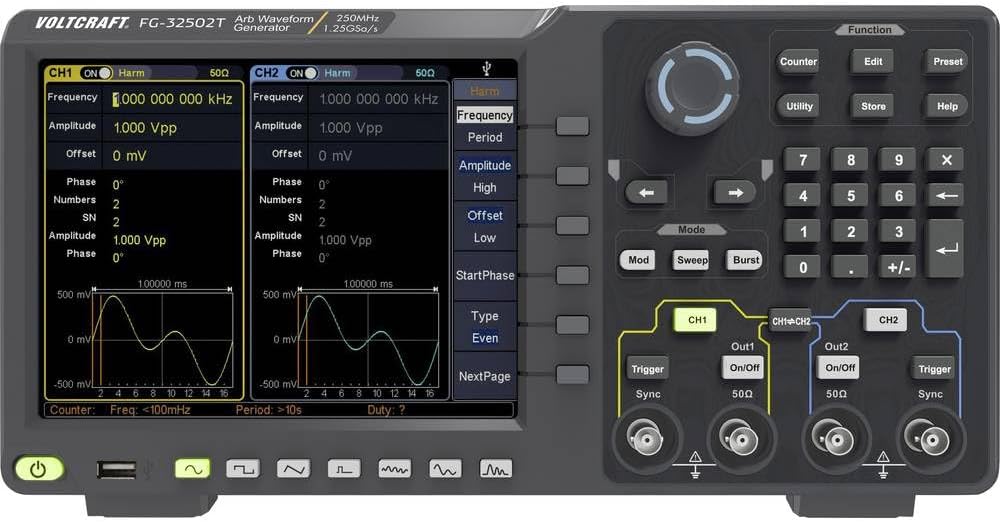
છબી: Front panel of the VOLTCRAFT FG-32502T Function Generator, showing the display with two active channels (CH1 and CH2) displaying sine waves, various function buttons, a rotary encoder, and output connectors.
4.2 રીઅર પેનલ
The rear panel includes the power input, USB host, USB device, LAN interface, external modulation input, external reference clock input, and external trigger input.
છબી: Rear panel of the VOLTCRAFT FG-32502T Function Generator, featuring warning labels in German, various input/output ports such as USB, LAN, and power input, and regulatory markings.
5. સેટઅપ
- પ્લેસમેન્ટ: Place the function generator on a stable, level surface with adequate ventilation.
- પાવર કનેક્શન: Connect the supplied power cord to the power input on the rear panel of the device, then plug the other end into a grounded AC power outlet (100-240V, 50/60Hz).
- પાવર ચાલુ: Press the power button located on the front panel to turn on the device. The display will illuminate, and the system will perform a self-test.
- આઉટપુટ કનેક્શન: Connect your test leads or cables to the desired output channels (CH1 or CH2) on the front panel.
6. ઓપરેટિંગ સૂચનાઓ
The FG-32502T offers a wide range of waveform generation and modulation capabilities. The main display shows the settings for both channels, and dedicated buttons and a rotary encoder allow for precise control.
6.1 Basic Waveform Generation (Sine, Square, Pulse, Ramp)
- ચેનલ પસંદ કરો: Press the CH1 or CH2 button to select the channel you wish to configure.
- Select Waveform: Press the 'Function' button, then use the navigation keys or rotary encoder to select the desired basic waveform (e.g., Sine, Square, Pulse, Ramp).
- પરિમાણો સમાયોજિત કરો: Use the dedicated parameter buttons (e.g., Frequency, Amplitude, Offset) and the rotary encoder to adjust the waveform characteristics.
Example: Pulse Waveform Setup
To set up a pulse waveform, select 'Pulse' from the function menu. You can then adjust parameters such as Frequency, Amplitude, Offset, Width, Rising Edge, and Falling Edge.
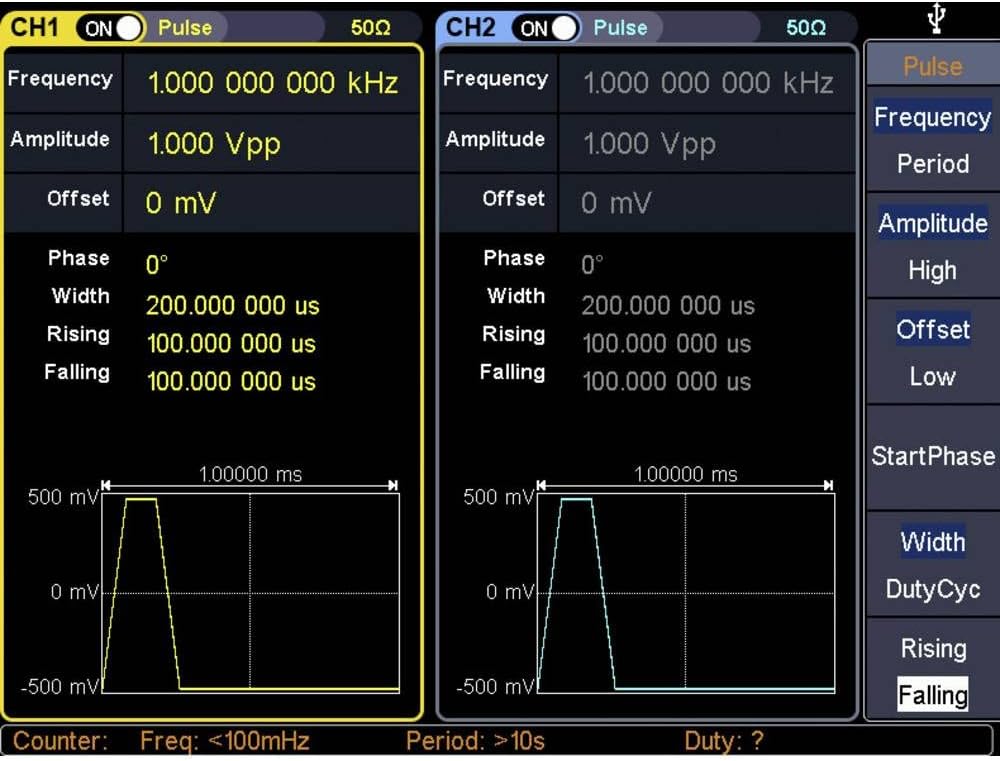
છબી: Close-up of the VOLTCRAFT FG-32502T display, illustrating the settings for a Pulse waveform on both channels, including frequency, amplitude, offset, width, rising, and falling edge parameters.
Example: Square Waveform Setup
To set up a square waveform, select 'Square' from the function menu. You can adjust parameters such as Frequency, Amplitude, and Offset.

છબી: Close-up of the VOLTCRAFT FG-32502T display, illustrating the settings for a Square waveform on both channels, including frequency, amplitude, and offset parameters.
6.2 Arbitrary Waveforms
The device supports 152 built-in arbitrary waveform groups. To use an arbitrary waveform:
- Select 'Arb' from the function menu.
- Navigate through the available arbitrary waveform groups using the rotary encoder.
- Adjust parameters like frequency and amplitude as needed.
6.3 Modulation Options
The FG-32502T offers various modulation types, including AM, FM, PM, FSK, ASK, BPSK, PSK, PWM, and 3FSK. To apply modulation:
- Select the desired waveform for the carrier signal.
- Press the 'Mod' button.
- Select the modulation type and adjust its parameters (e.g., modulation depth, frequency, source).
6.4 Counter Function
The device includes a frequency counter. To use the counter:
- Connect the signal to be measured to the counter input.
- Press the 'Counter' button to activate the function.
- The display will show the measured frequency.
7. જાળવણી
7.1 સફાઈ
To clean the device, disconnect it from the power supply. Use a soft, dry cloth to wipe the exterior. For stubborn dirt, a slightly damp cloth with mild detergent can be used, ensuring no liquid enters the device. Do not use abrasive cleaners or solvents.
7.2 સંગ્રહ
When not in use for extended periods, store the function generator in a dry, dust-free environment, away from direct sunlight and extreme temperatures.
8. મુશ્કેલીનિવારણ
- ઉપકરણ ચાલુ થતું નથી:
- Check if the power cord is securely connected to both the device and the power outlet.
- ખાતરી કરો કે પાવર આઉટલેટ કાર્યરત છે.
- કોઈ આઉટપુટ સિગ્નલ નથી:
- Verify that the output channel (CH1/CH2) is enabled.
- તપાસો amplitude settings; ensure it is not set to 0V.
- Ensure the output cables are correctly connected and not damaged.
- Incorrect waveform displayed:
- Review the waveform type and parameter settings on the display.
- Perform a factory reset if settings appear corrupted (refer to the utility menu for this option).
For issues not covered here, please contact VOLTCRAFT customer support.
9. સ્પષ્ટીકરણો
| લક્ષણ | સ્પષ્ટીકરણ |
|---|---|
| મોડલ નંબર | FG-32502T |
| ઉત્પાદક | વOLલ્ટ્રાફ્ટ |
| ચેનલો | 2 |
| આવર્તન શ્રેણી | 1µHz - 250MHz (for basic waveforms) |
| Basic Waveforms | સાઈન, સ્ક્વેર, પલ્સ, આરamp, અવાજ |
| Arbitrary Waveforms | 152 built-in groups, 2 points to 1 Mpts length |
| Modulation Options | AM, FM, PM, FSK, ASK, BPSK, PSK, PWM, 3FSK, Burst, Sweep |
| કોમ્યુનિકેશન ઈન્ટરફેસ | USB Host, USB Device, LAN, External Modulation, External Reference Clock, External Trigger |
| Frequency Counter Resolution | 7 digits (Input frequency range: 100 - 200 MHz) |
| પાવર સપ્લાય | Mains Powered (100-240V, 50/60Hz) |
| વસ્તુનું વજન | 2.5 કિગ્રા |
| તારીખ પ્રથમ ઉપલબ્ધ | 21 ડિસેમ્બર 2019 |
10. વોરંટી અને સપોર્ટ
For warranty information, technical support, or service requests, please refer to the documentation included with your product or visit the official VOLTCRAFT webસાઇટ. ખરીદીના પુરાવા તરીકે તમારી ખરીદી રસીદ રાખો.


