1. પરિચય
The BlackVue DR900X-2CH is a high-performance 4K UHD cloud dashcam system designed to provide comprehensive vehicle surveillance. It features a front 4K UHD camera and a Full HD rear camera, built-in Wi-Fi, GPS, and advanced parking mode capabilities. This manual provides detailed instructions for installation, operation, and maintenance, ensuring you get the most out of your BlackVue dashcam.
2. પેકેજ સામગ્રી
ઇન્સ્ટોલેશન શરૂ કરતા પહેલા, કૃપા કરીને ચકાસો કે તમારા પેકેજમાં બધા ઘટકો હાજર છે:
- BlackVue DR900X-2CH Front Camera Unit
- BlackVue Rear Camera
- Rear Camera Connection Cable (Coaxial)
- Power Cord (Cigarette Lighter Plug)
- Hardwiring Power Cable
- MicroSD Card (32GB included)
- માઇક્રોએસડી કાર્ડ રીડર
- Cable Clips (8ea)
- પ્રાય ટૂલ
- ફાજલ માઉન્ટિંગ ટેપ
- ઝડપી પ્રારંભ માર્ગદર્શિકા

3. ઉત્પાદન ઓવરview
Familiarize yourself with the main components and their functions.
3.1 Front Camera Unit

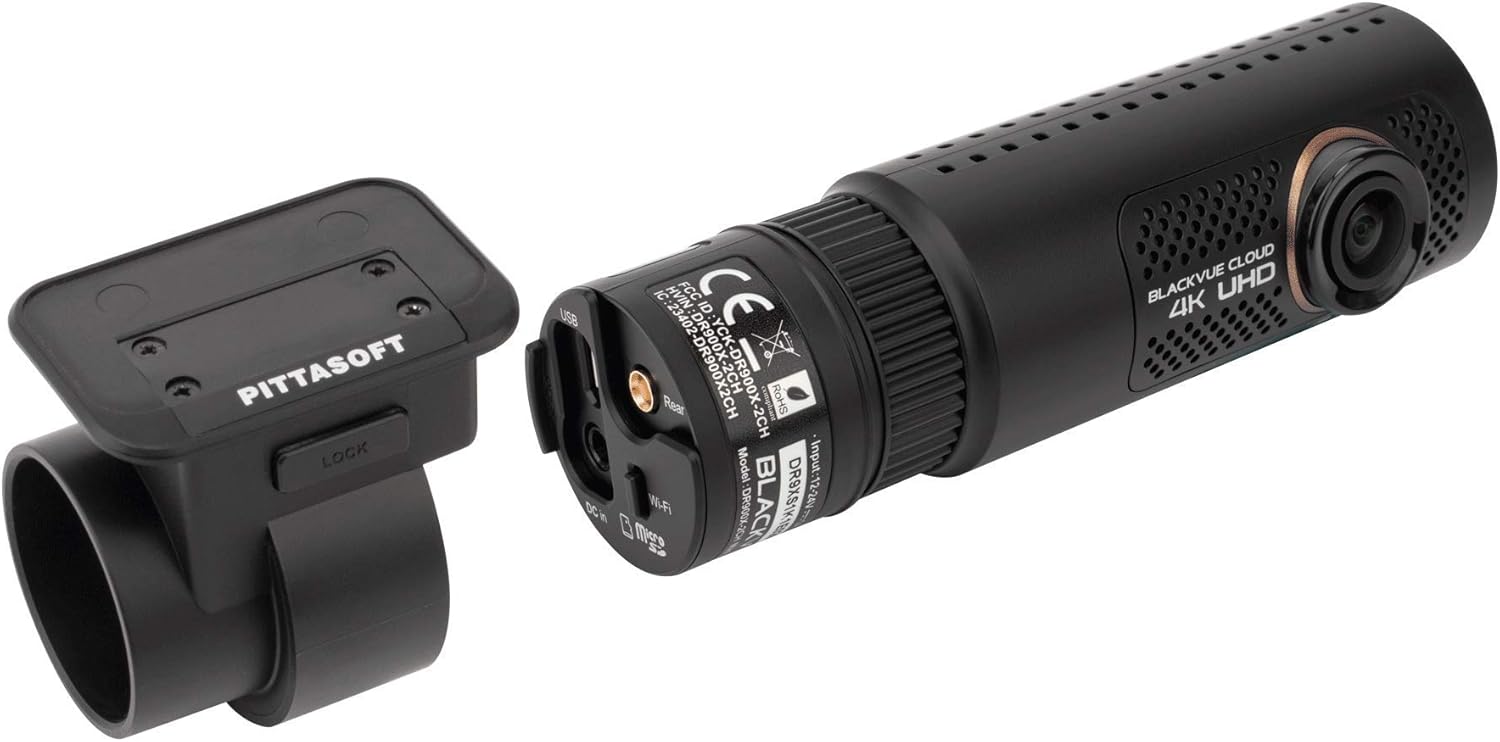
The front camera unit houses the main processor, 4K UHD lens, Wi-Fi module, GPS, and various ports for power, the rear camera, and the optional LTE module.

- ફ્રન્ટ લેન્સ: Captures 4K UHD video.
- Wi-Fi બટન: Activates/deactivates Wi-Fi.
- માઇક્રોએસડી કાર્ડ સ્લોટ: For inserting the memory card.
- ડીસી ઇન: પાવર ઇનપુટ બંદર.
- Rear Camera Port: Connects the rear camera via coaxial cable.
- યુએસબી પોર્ટ: For connecting the optional CM100 LTE module.
- વક્તા: For voice prompts.
- એલઇડી સૂચકાંકો: Indicate recording status, GPS, Wi-Fi, and LTE connectivity.
3.2 Rear Camera Unit
The rear camera unit captures Full HD video and connects to the front unit via the provided coaxial cable.
4. સેટઅપ અને ઇન્સ્ટોલેશન
Proper installation is crucial for optimal performance and video quality.
૪.૪ માઇક્રોએસડી કાર્ડ દાખલ કરવું
- Ensure the dashcam is powered off.
- Open the microSD card cover on the side of the front camera unit.
- Insert the microSD card into the slot with the gold contacts facing away from the lens until it clicks into place.
- કવરને સુરક્ષિત રીતે બંધ કરો.
૨.૨ ડેશકેમ માઉન્ટ કરવું
- Clean the windshield area where you intend to mount the dashcam. Ensure it is free of dust and grease.
- Attach the front camera unit to its mounting bracket.
- Peel off the protective film from the mounting tape on the bracket.
- Mount the front camera on the center of your windshield, ideally behind the rearview અરીસો, ખાતરી કરો કે તે તમારા view. Press firmly for 30 seconds.
- Mount the rear camera on the rear windshield, ensuring the lens has a clear view.

4.3 Wiring the Dashcam
There are two primary wiring options:
- સિગારેટ લાઇટર પાવર કેબલ: For basic operation, plug the power cable into your vehicle's cigarette lighter socket. The dashcam will power on/off with the vehicle's ignition.
- હાર્ડવાયરિંગ પાવર કેબલ: For advanced parking mode functionality, connect the hardwiring cable to your vehicle's fuse box. This allows the dashcam to continue recording when the vehicle is parked. Refer to your vehicle's manual for fuse box location and proper connection points (ACC, BATT+, GND). It is recommended to have this installed by a professional if you are unsure.
- Connect the power cable to the DC In port on the front camera unit.
- Route the power cable along the edge of the windshield and down to the power source, using the provided cable clips and pry tool to tuck the cable neatly.
- Connect the rear camera cable to the Rear Camera port on the front unit.
- Route the rear camera cable to the rear of the vehicle, ensuring it does not interfere with airbags or other vehicle components.
4.4 Initial Setup with BlackVue App
- Download the BlackVue App from your smartphone's app store (iOS/Android).
- ડેશકેમ પર પાવર.
- On your smartphone, go to Wi-Fi settings and connect to the BlackVue dashcam's Wi-Fi network (SSID: DR900X-2CH-XXXXXX, Password: blackvue).
- Open the BlackVue App. The app will automatically connect to the dashcam.
- Follow the on-screen prompts to set up basic settings like time zone, recording quality, and parking mode options.
5. ડેશકેમનું સંચાલન
Understand the various recording modes and features of your BlackVue dashcam.
૩.૨ રેકોર્ડિંગ મોડ્સ
- સામાન્ય રેકોર્ડિંગ: Continuous recording while driving. Files are saved in segments and overwritten oldest first when the microSD card is full.
- ઇવેન્ટ રેકોર્ડિંગ: Triggered by impacts detected by the G-sensor or manual events (e.g., pressing the touch sensor on the dashcam). These files ઓવરરાઈટ થવાથી સુરક્ષિત છે.
- Parking Mode Recording: Activated when the vehicle's ignition is turned off (requires hardwiring). Records only when motion or impact is detected, conserving power and storage.
5.2 LED Indicators and Voice Prompts
The dashcam provides visual and audible cues for its status:
- REC LED: Indicates recording status (e.g., solid for normal, blinking for event).
- જીપીએસ એલઇડી: Solid when GPS signal is acquired.
- Wi-Fi LED: Solid when Wi-Fi is active, blinking during connection.
- LTE LED: (If CM100 LTE module is connected) Indicates LTE connectivity.
- વૉઇસ પ્રોમ્પ્ટ્સ: The dashcam will announce status changes, such as
સંબંધિત દસ્તાવેજો - DR900X-2CH

ક્લાઉડ કનેક્ટિવિટી માટે બ્લેકવ્યુ સિમ સક્રિયકરણ માર્ગદર્શિકા
તમારા સિમ કાર્ડને સક્રિય કરવા અને તમારા બ્લેકવ્યુ ડેશકેમને બ્લેકવ્યુ ક્લાઉડ સેવા સાથે કનેક્ટ કરવા માટેની એક વ્યાપક માર્ગદર્શિકા. આ માર્ગદર્શિકામાં કનેક્ટિવિટી વિગતો શોધવા, એકાઉન્ટ બનાવવા, તમારા ડેશકેમને નોંધણી કરાવવા અને ઉન્નત સુવિધાઓ માટે સિમ સક્રિયકરણ પ્રક્રિયાનો સમાવેશ થાય છે.
બ્લેકવ્યુ DR970X બોક્સ-2CH પ્લસ સિરીઝ ઇન્સ્ટોલેશન અને વપરાશકર્તા માર્ગદર્શિકા
બ્લેકવ્યુ DR970X બોક્સ-2CH પ્લસ સિરીઝ ડેશકેમ ઇન્સ્ટોલ કરવા અને તેનો ઉપયોગ કરવા માટેની એક વ્યાપક માર્ગદર્શિકા, જેમાં રીઅર કેમેરા સેટઅપ, GNSS મોડ્યુલ ઇન્સ્ટોલેશન, કનેક્ટિવિટી મોડ્યુલ ઇન્સ્ટોલેશન, પાવર કેબલ વિકલ્પો અને એપ્લિકેશન ઉપયોગનો સમાવેશ થાય છે.
બ્લેકવ્યુ DR900X પ્લસ ક્વિક સ્ટાર્ટ ગાઇડ
બ્લેકવ્યુ DR900X પ્લસ ડેશકેમ માટે વ્યાપક ઝડપી શરૂઆત માર્ગદર્શિકા, જેમાં ઇન્સ્ટોલેશન, સેટઅપ, પ્લેબેક, ક્લાઉડ કનેક્ટિવિટી, પ્રોડક્ટ સ્પષ્ટીકરણો અને વોરંટી માહિતીનો સમાવેશ થાય છે.
બ્લેકવ્યુ DR650S-2CH IR વપરાશકર્તા માર્ગદર્શિકા: ઇન્ફ્રારેડ ઇન્ટિરિયર કેમેરા
બ્લેકવ્યુ DR650S-2CH IR ડેશકેમ માટે વપરાશકર્તા માર્ગદર્શિકા, જેમાં ઇન્ફ્રારેડ ઇન્ટિરિયર કેમેરા માટે તેની સુવિધાઓ, સ્પષ્ટીકરણો અને ઇન્સ્ટોલેશન સૂચનાઓની વિગતો આપવામાં આવી છે.
બ્લેકવ્યુ DR770X-2CH IR LTE ડેશકેમ: કમ્પોનન્ટ ઓવરview
ઉપર વિગતવારview BlackVue DR770X-2CH IR LTE ડ્યુઅલ-ચેનલ ડેશકેમના ઘટકો અને સુવિધાઓ, જેમાં આગળ, પાછળ અને આંતરિક કેમેરા ભાગો, LEDs, પોર્ટ્સ અને માઉન્ટિંગ સૂચનાઓનો સમાવેશ થાય છે.
બ્લેકવ્યુ વાઇ-ફાઇ 2CH DR550GW-2CH વપરાશકર્તા માર્ગદર્શિકા
પિટ્ટાસોફ્ટ કંપની લિમિટેડ દ્વારા બ્લેકવ્યુ વાઇ-ફાઇ 2CH DR550GW-2CH કાર ડેશકેમ માટે વપરાશકર્તા માર્ગદર્શિકા, જેમાં ડ્રાઇવિંગ સલામતી વધારવા માટે ઇન્સ્ટોલેશન, સંચાલન, સુવિધાઓ અને મુશ્કેલીનિવારણની વિગતો આપવામાં આવી છે.