પરિચય
This manual provides essential information for the safe and efficient use of your Motorola moto g5G plus smartphone. Please read this guide thoroughly before operating your device.
મહત્વપૂર્ણ નોંધ: આ ઉપકરણ આંતરરાષ્ટ્રીય બજારો માટે રચાયેલ છે અને યુએસએ માર્કેટમાં કામ કરતું નથી. It is unlocked worldwide.
પેકેજ સામગ્રી
ચકાસો કે તમારા પેકેજમાં નીચેની વસ્તુઓ છે:
- Motorola moto g5G plus Smartphone
- પાવર એડેપ્ટર
- યુએસબી કેબલ
- Handsfree (Earphones)
જો કોઈ વસ્તુ ખૂટે છે અથવા ક્ષતિગ્રસ્ત છે, તો કૃપા કરીને તમારા રિટેલરનો સંપર્ક કરો.
ઉપકરણ ઓવરview
Familiarize yourself with the physical components of your moto g5G plus.

છબી: આગળ અને પાછળ view of the Motorola moto g5G plus smartphone, showcasing the display with the Motorola logo and the quad-camera setup on the rear. The phone is in a surfing blue color.
- ફ્રન્ટ ડિસ્પ્લે: 6.7-inch screen with dual punch-hole cameras.
- રીઅર કેમેરા સિસ્ટમ: Quad-camera setup with flash.
- ફિંગરપ્રિન્ટ સેન્સર: Integrated into the power button on the side.
- વોલ્યુમ બટનો: બાજુ પર સ્થિત છે.
- યુએસબી ટાઇપ-સી પોર્ટ: ચાર્જિંગ અને ડેટા ટ્રાન્સફર માટે.
- 3.5mm હેડફોન જેક: ઓડિયો એસેસરીઝ માટે.
- સિમ/માઈક્રોએસડી કાર્ડ ટ્રે: બાજુ પર સ્થિત છે.
સેટઅપ
Inserting SIM and microSD Cards
- તમારા ઉપકરણને પાવર બંધ કરો.
- Locate the SIM/microSD card tray on the side of the phone.
- Insert the SIM ejector tool (not included, but typically comes with phones) into the small hole next to the tray to pop it open.
- ટ્રે કાળજીપૂર્વક બહાર કાઢો.
- Place your Nano-SIM card(s) and/or microSD card into the designated slots on the tray. Ensure the gold contacts face down. This device supports Dual SIM functionality.
- ટ્રેને ધીમેથી ફોનમાં પાછી ધકેલી દો જ્યાં સુધી તે જગ્યાએ ક્લિક ન થાય.

છબી: ક્લોઝ-અપ બાજુ view of the Motorola moto g5G plus, showing the SIM card tray slot.
પ્રારંભિક પાવર ચાલુ અને સેટઅપ
- મોટોરોલા લોગો દેખાય ત્યાં સુધી પાવર બટન (બાજુ પર સ્થિત) દબાવી રાખો.
- તમારી ભાષા પસંદ કરવા, Wi-Fi નેટવર્કથી કનેક્ટ થવા અને તમારું Google એકાઉન્ટ સેટ કરવા માટે ઓન-સ્ક્રીન પ્રોમ્પ્ટ્સને અનુસરો.
- You will be guided through setting up a screen lock (PIN, pattern, password, or fingerprint).
બેટરી ચાર્જ કરી રહી છે
પ્રથમ ઉપયોગ કરતા પહેલા, ઉપકરણને સંપૂર્ણપણે ચાર્જ કરો.
- USB કેબલને પાવર એડેપ્ટર સાથે કનેક્ટ કરો.
- Plug the USB cable into the USB Type-C port at the bottom of your phone.
- પાવર એડેપ્ટરને વોલ આઉટલેટમાં પ્લગ કરો.
- ચાર્જિંગ સૂચક સ્ક્રીન પર દેખાશે.
નોંધ: ફક્ત મોટોરોલા દ્વારા માન્ય ચાર્જર અને કેબલનો ઉપયોગ કરો.
તમારા ઉપકરણનું સંચાલન
મૂળભૂત નેવિગેશન
- પાવર ચાલુ/બંધ: પાવર બટન દબાવો અને પકડી રાખો. "પાવર ઓફ" અથવા "રીસ્ટાર્ટ" પસંદ કરો.
- સ્ક્રીન લોક/અનલોક: Press the Power button briefly. Use your chosen screen lock method to unlock.
- વોલ્યુમ નિયંત્રણ: Use the Volume Up/Down buttons on the side.
- હોમ સ્ક્રીન: Swipe up from the bottom to access the app drawer. Swipe left/right to navigate home screen panels.
- સૂચનાઓ અને ઝડપી સેટિંગ્સ: સ્ક્રીનની ટોચ પરથી નીચે સ્વાઇપ કરો.
કૉલ્સ કરી રહ્યાં છીએ
- ટેપ કરો ફોન ચિહ્ન
- Enter the phone number or select a contact.
- ટેપ કરો કૉલ કરો બટન
સંદેશાઓ મોકલી રહ્યાં છીએ
- ટેપ કરો સંદેશાઓ ચિહ્ન
- ટેપ કરો ચેટ શરૂ કરો અથવા + ચિહ્ન
- Enter the recipient's name or number and type your message.
- ટેપ કરો મોકલો બટન
કેમેરા વપરાશ
Your device features a versatile quad-camera system.
- ટેપ કરો કેમેરા ચિહ્ન
- Select your desired mode (Photo, Video, Portrait, Night Vision, etc.).
- ટેપ કરો શટર કેપ્ચર કરવા માટેનું બટન.
- સેલ્ફી માટે ફ્રન્ટ કેમેરાનો ઉપયોગ કરો.
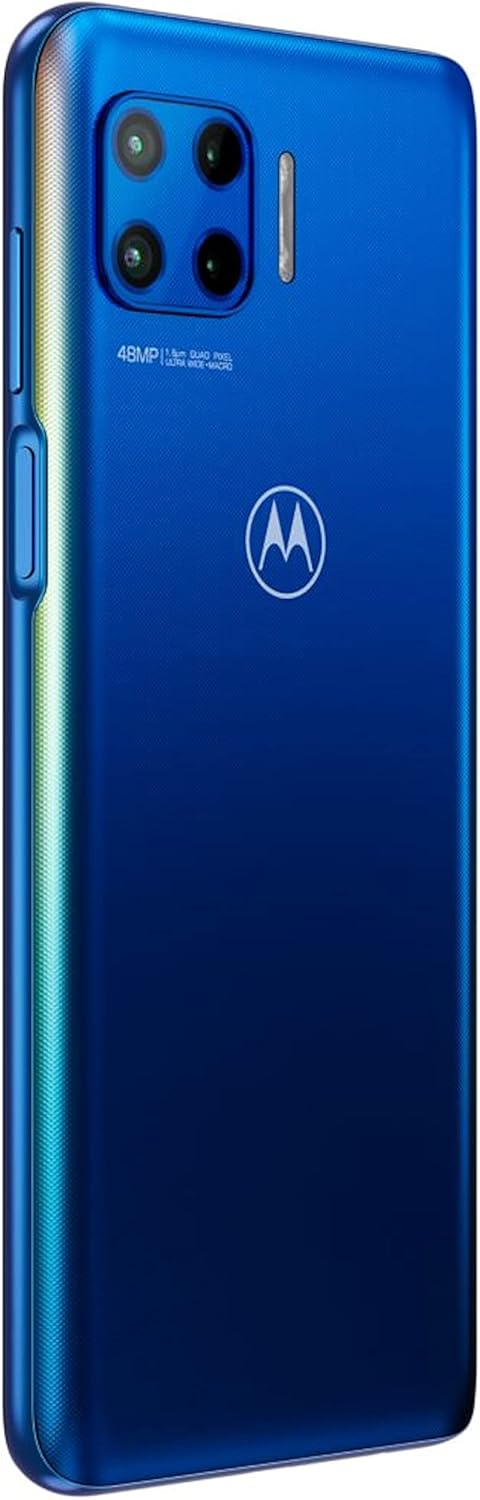
છબી: પાછળનો ભાગ view of the Motorola moto g5G plus, highlighting the 48MP quad-camera system with flash.
કનેક્ટિવિટી
- Wi-Fi: પર જાઓ સેટિંગ્સ > નેટવર્ક અને ઇન્ટરનેટ > વાઇ-ફાઇ ઉપલબ્ધ નેટવર્ક્સ સાથે જોડાવા માટે.
- બ્લૂટૂથ: પર જાઓ સેટિંગ્સ > કનેક્ટેડ ઉપકરણો > કનેક્શન પસંદગીઓ > બ્લૂટૂથ અન્ય ઉપકરણો સાથે જોડી બનાવવા માટે.
- મોબાઇલ ડેટા: Ensure mobile data is enabled in Quick Settings or સેટિંગ્સ > નેટવર્ક અને ઇન્ટરનેટ > મોબાઇલ નેટવર્ક. This device supports 5G connectivity where available.
જાળવણી
તમારા ઉપકરણની સફાઈ
- સ્ક્રીન અને બોડી સાફ કરવા માટે નરમ, લિન્ટ-ફ્રી કાપડનો ઉપયોગ કરો.
- કઠોર રસાયણો, ઘર્ષક ક્લીનર્સ અથવા સંકુચિત હવાનો ઉપયોગ કરવાનું ટાળો.
- ઉપકરણને વધુ પડતા ભેજ માટે ખુલ્લા કરશો નહીં.
બેટરી કેર
- અતિશય તાપમાન ટાળો.
- બેટરી નિયમિતપણે સંપૂર્ણપણે ડિસ્ચાર્જ કરશો નહીં.
- ફક્ત મૂળ અથવા પ્રમાણિત ચાર્જર અને કેબલનો ઉપયોગ કરો.
સૉફ્ટવેર અપડેટ્સ
Keep your device's software updated for optimal performance and security.
- પર જાઓ સેટિંગ્સ> સિસ્ટમ> સિસ્ટમ અપડેટ્સ.
- Check for available updates and follow the on-screen instructions.
અપડેટ શરૂ કરતા પહેલા ખાતરી કરો કે તમારું ઉપકરણ Wi-Fi થી જોડાયેલ છે અને તેમાં પૂરતી બેટરી ચાર્જ છે.
મુશ્કેલીનિવારણ
ઉપકરણ ચાલુ નથી
- Ensure the battery is charged. Connect to a charger for at least 15 minutes.
- Try a force restart: Press and hold the Power button for 10-15 seconds.
એપ્લિકેશનો ક્રેશ થઈ રહી છે અથવા થીજી રહી છે
- એપ્લિકેશન બંધ કરો અને ફરીથી ખોલો.
- એપ્લિકેશનનો કેશ સાફ કરો: સેટિંગ્સ > એપ્લિકેશનો અને સૂચનાઓ > બધી એપ્લિકેશનો જુઓ > [એપ્લિકેશનનું નામ] > સ્ટોરેજ અને કેશ > કેશ સાફ કરો.
- ફોન રીસ્ટાર્ટ કરો.
નબળી નેટવર્ક કનેક્ટિવિટી
- એરપ્લેન મોડ બંધ છે કે નહીં તે તપાસો.
- ઉપકરણ પુનઃપ્રારંભ કરો.
- સિમ કાર્ડ ફરીથી દાખલ કરો.
- નેટવર્ક સેટિંગ્સ રીસેટ કરો: સેટિંગ્સ > સિસ્ટમ > રીસેટ વિકલ્પો > વાઇ-ફાઇ, મોબાઇલ અને બ્લૂટૂથ રીસેટ કરો.
બેટરી ઝડપથી નીકળી જાય છે
- સ્ક્રીનની બ્રાઇટનેસ ઓછી કરો.
- પૃષ્ઠભૂમિમાં ચાલતી બિનઉપયોગી એપ્લિકેશનો બંધ કરો.
- જ્યારે ઉપયોગમાં ન હોય ત્યારે Wi-Fi, Bluetooth અને GPS બંધ કરો.
- બેટરી વપરાશ તપાસો સેટિંગ્સ > બેટરી પાવર-ભૂખ્યા એપ્લિકેશનોને ઓળખવા માટે.
વિશિષ્ટતાઓ
| લક્ષણ | વિગત |
|---|---|
| મોડલ નંબર | XT2075-3 (Item model number: 0840023205491) |
| પરિમાણો | 0.35 x 2.91 x 6.61 ઇંચ (8.9 x 73.9 x 167.9 mm) |
| વજન | 7.3 ઔંસ (207 ગ્રામ) |
| ડિસ્પ્લે | ૨.૪ ઇંચ, ૪૮૦ x ૮૦૦ રિઝોલ્યુશન |
| રેમ | 4 જીબી |
| બેટરી ક્ષમતા | 5000 મિલીamp કલાકો (લિ-આયન) |
| સિમ કાર્ડ સ્લોટની સંખ્યા | ડ્યુઅલ સિમ |
| કનેક્ટિવિટી | USB Type-C, 3.5mm Jack, CDMA, GSM, LTE, 5G |
| વાયરલેસ કેરિયર | Unlocked for All Carriers (excluding USA market) |
વોરંટી અને આધાર
For warranty information, please refer to the warranty card included with your product or visit the official Motorola webતમારા પ્રદેશ માટે સાઇટ.
For technical support, frequently asked questions, or to download the full user manual, please visit the Motorola support webસાઇટ: www.motorola.com/support.
You can also contact Motorola customer service directly through their website or local contact numbers.


