પરિચય અને ઓવરview
The Roxel RCD-S70BT Portable Boombox is a versatile audio system designed for both indoor and outdoor use. It features a CD player, FM radio, USB MP3 playback, 3.5mm AUX input, headphone jack, and wireless music streaming via Bluetooth. Its compact and lightweight design, coupled with the option for battery power, makes it highly portable.
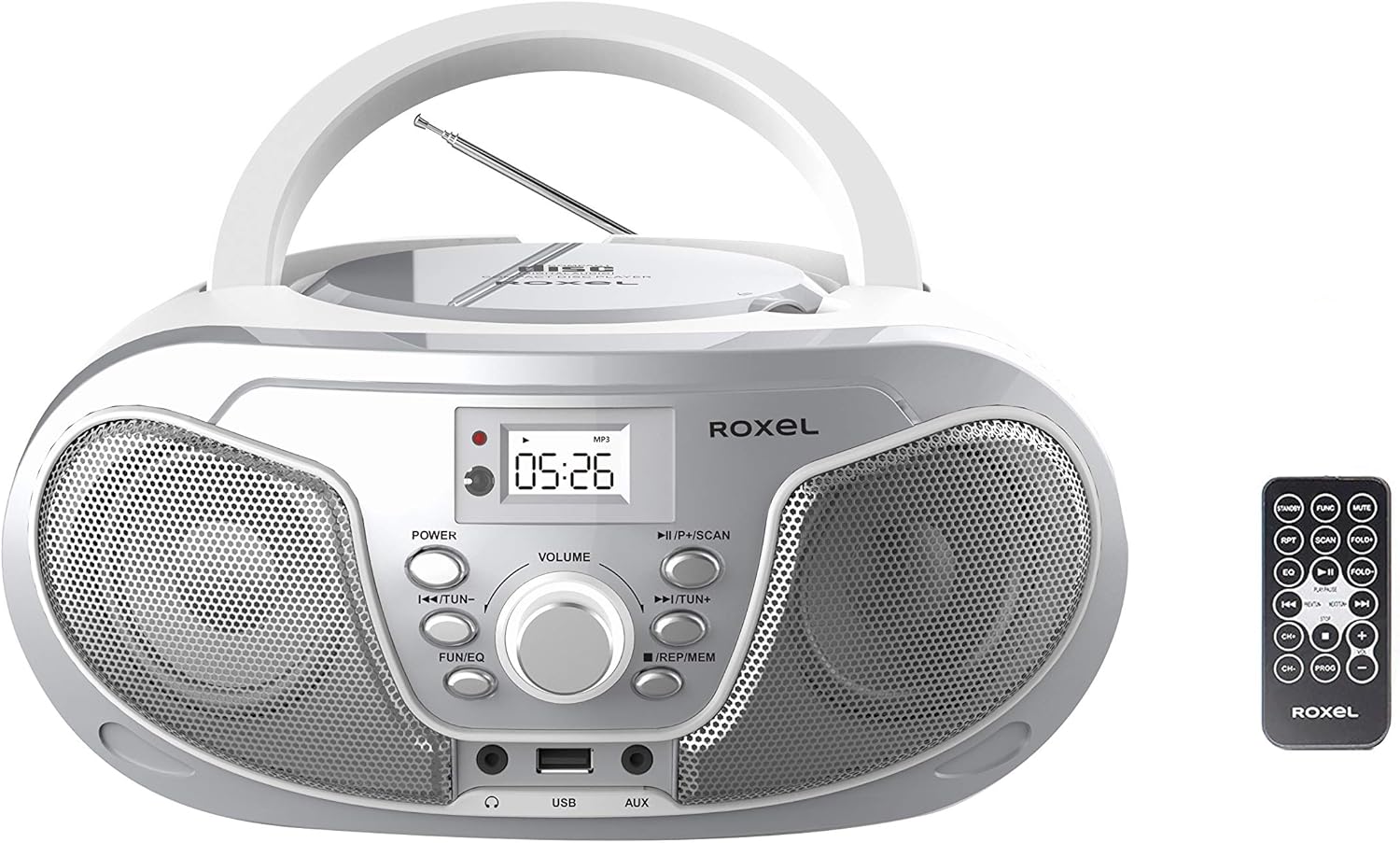
આકૃતિ 1: ફ્રન્ટ view of the Roxel RCD-S70BT Portable Boombox with its remote control.
પેકેજ સામગ્રી
કૃપા કરીને નીચેની વસ્તુઓ માટે બોક્સ ચેક કરો:
- 1 Roxel Boombox (RCD-S70BT)
- 1 પાવર કેબલ
- 1 AUX Line
- 1 વપરાશકર્તા માર્ગદર્શિકા
- 1 રીમોટ કંટ્રોલ
ઉત્પાદન લક્ષણો
- Lightweight and portable design with two powerful 2x4W audio speakers.
- Multiple playback options: Audio CD, USB MP3, Bluetooth, and 3.5mm AUX input.
- Built-in digital FM radio with auto scan and 20 station presets.
- Easy-to-operate 4-digit LCD display.
- અનુકૂળ કામગીરી માટે રિમોટ કંટ્રોલનો સમાવેશ થાય છે.
- Five EQ modes: ROCK, POP, FLAT, CLASS, JAZZ.
- Can be powered by AC voltage (220V/50Hz, 110V/60Hz) or 4 C batteries (not included).
- Features top-loading CD, USB port, AUX-in jack, and earphone jack.
- Electronic digital control buttons for last/previous track, volume, and function selection.
- Auto-stop and repeat play functions for CD/USB.
નિયંત્રણો અને કાર્યો
Familiarize yourself with the main controls and ports on your Roxel Boombox:

આકૃતિ 2: વિગતવાર view of the boombox front panel and included remote control.
- પાવર બટન: યુનિટ ચાલુ અથવા બંધ કરે છે.
- વોલ્યુમ નોબ: ઑડિઓ આઉટપુટ સ્તરને સમાયોજિત કરે છે.
- FUN/EQ Button: Switches between functions (CD, USB, AUX, BT, FM) and cycles through EQ modes (ROCK, POP, FLAT, CLASS, JAZZ).
- PREV/TUN- Button: Skips to the previous track/station or tunes down in FM mode.
- NEXT/TUN+ Button: Skips to the next track/station or tunes up in FM mode.
- ચલાવો/થોભો/સ્કેન બટન: Plays/pauses CD/USB playback, or initiates auto-scan in FM mode.
- REP/MEM Button: Activates repeat function for CD/USB, or saves/recalls radio presets.
- યુએસબી પોર્ટ: MP3/WMA પ્લેબેક માટે USB ફ્લેશ ડ્રાઇવને કનેક્ટ કરવા માટે.
- AUX ઇનપુટ (3.5mm): બાહ્ય ઑડિઓ ઉપકરણોને કનેક્ટ કરવા માટે.
- હેડફોન જેક (3.5 મીમી): ખાનગી સાંભળવા માટે.
- એલઇડી ડિસ્પ્લે: Shows current mode, track number, time, and FM frequency.
- એફએમ એન્ટેના: Extendable antenna for FM radio reception.
સેટઅપ
યુનિટને પાવરિંગ
The Roxel Boombox can be powered by AC power or batteries.
- એસી પાવર: Connect the supplied power cable to the AC input jack on the back of the unit and then to a standard wall outlet (220V/50Hz or 110V/60Hz).
- બેટરી પાવર: For portable use, open the battery compartment on the bottom of the unit and insert 4 x DC1.5V UM-2 (C size) batteries (not included), ensuring correct polarity.
એન્ટેના સેટઅપ
For optimal FM radio reception, fully extend the telescopic FM antenna located on the back of the unit. Adjust its position for the best signal.
ઓપરેટિંગ સૂચનાઓ
સામાન્ય કામગીરી
- પાવર ચાલુ/બંધ: દબાવો પાવર એકમ ચાલુ અથવા બંધ કરવા માટે બટન.
- વોલ્યુમ એડજસ્ટમેન્ટ: ફેરવો વોલ્યુમ knob clockwise to increase volume and counter-clockwise to decrease.
- કાર્ય પસંદગી: દબાવો ફન/EQ button repeatedly to cycle through modes: CD, USB, AUX, BT (Bluetooth), FM.
સીડી પ્લેબેક
- Open the CD compartment lid on top of the unit.
- Place a CD (CD-R/CD-RW compatible) with the label side facing up.
- સીડી કમ્પાર્ટમેન્ટનું ઢાંકણું બંધ કરો.
- દબાવો ફન/EQ button until "CD" mode is selected. The CD will begin playing automatically.
- દબાવો રમો/થોભો પ્લેબેકને થોભાવવા અથવા ફરી શરૂ કરવા માટે.
- દબાવો પાછલું/ટૂન- or NEXT/TUN+ to skip tracks. Hold to fast forward/rewind.
- દબાવો REP/MEM repeatedly to select repeat modes (e.g., repeat one track, repeat all).
USB MP3/WMA Playback
- યુનિટના આગળના USB પોર્ટમાં USB ફ્લેશ ડ્રાઇવ દાખલ કરો.
- દબાવો ફન/EQ button until "USB" mode is selected. Playback will start automatically.
- ઉપયોગ કરો રમો/થોભો, પાછલું/ટૂન-, NEXT/TUN+, અને REP/MEM buttons as with CD playback.
- દબાવો ફન/EQ (after selecting USB mode) to cycle through EQ modes: ROCK, POP, FLAT, CLASS, JAZZ.
એફએમ રેડિયો ઓપરેશન
- એફએમ એન્ટેનાને વિસ્તૃત કરો.
- દબાવો ફન/EQ button until "FM" mode is selected.
- ઓટો સ્કેન: દબાવો અને પકડી રાખો ચલાવો/થોભો/સ્કેન કરો button to automatically scan and save available FM stations. The unit can store up to 20 stations.
- મેન્યુઅલ ટ્યુનિંગ: સંક્ષિપ્તમાં દબાવો પાછલું/ટૂન- or NEXT/TUN+ ફ્રીક્વન્સીને ફાઇન-ટ્યુન કરવા માટે.
- પ્રીસેટ્સ યાદ કરો: સંક્ષિપ્તમાં દબાવો REP/MEM સાચવેલા પ્રીસેટ સ્ટેશનો પર સાયકલ કરવા માટે.
AUક્સ ઇનપુટ
- Connect one end of the supplied 3.5mm AUX cable to the AUX input jack on the boombox.
- Connect the other end to the headphone jack or audio output of your external device (e.g., smartphone, MP3 player).
- દબાવો ફન/EQ "AUX" મોડ પસંદ ન થાય ત્યાં સુધી બટન દબાવો.
- તમારા બાહ્ય ઉપકરણથી પ્લેબેક અને વોલ્યુમ નિયંત્રિત કરો.
બ્લૂટૂથ વાયરલેસ સ્ટ્રીમિંગ
- દબાવો ફન/EQ button until "BT" mode is selected. The display will show "BT" and flash, indicating it's in pairing mode.
- તમારા બ્લૂટૂથ-સક્ષમ ઉપકરણ (સ્માર્ટફોન, ટેબ્લેટ) પર, બ્લૂટૂથ સક્ષમ કરો અને ઉપલબ્ધ ઉપકરણો શોધો.
- Select "Roxel RCD-S70BT" from the list. Once paired, the "BT" indicator on the boombox display will stop flashing.
- You can now play music from your device through the boombox. Use your device or the boombox controls (PLAY/PAUSE, PREV/NEXT) to manage playback.
જાળવણી
To ensure the longevity and optimal performance of your Roxel Boombox, follow these maintenance guidelines:
- સફાઈ: નરમ, સૂકા કપડાથી યુનિટ સાફ કરો. ઘર્ષક ક્લીનર્સ, મીણ અથવા સોલવન્ટનો ઉપયોગ કરશો નહીં કારણ કે તે ફિનિશને નુકસાન પહોંચાડી શકે છે.
- સીડી લેન્સ કેર: જો સીડી લેન્સ ગંદા થઈ જાય, તો પ્રમાણભૂત સીડી લેન્સ ક્લીનરનો ઉપયોગ કરો. લેન્સને સ્પર્શ કરશો નહીં.
- બેટરી રિપ્લેસમેન્ટ: If using batteries, replace all four batteries at the same time. Do not mix old and new batteries or different types of batteries. Remove batteries if the unit will not be used for an extended period.
- સંગ્રહ: Store the unit in a cool, dry place away from direct sunlight, extreme temperatures, and humidity.
- વેન્ટિલેશન: ઓવરહિટીંગ અટકાવવા માટે યુનિટની આસપાસ યોગ્ય વેન્ટિલેશનની ખાતરી કરો. વેન્ટિલેશન ઓપનિંગ્સને અવરોધિત કરશો નહીં.
મુશ્કેલીનિવારણ
If you experience issues with your boombox, refer to the following common problems and solutions:
| સમસ્યા | સંભવિત કારણ | ઉકેલ |
|---|---|---|
| નો પાવર | પાવર કેબલ જોડાયેલ નથી; બેટરી ખાલી થઈ ગઈ છે અથવા ખોટી રીતે દાખલ કરવામાં આવી છે. | Ensure AC cable is securely plugged in. If using batteries, check polarity and replace if necessary. |
| કોઈ અવાજ નથી | અવાજ ખૂબ ઓછો છે; ખોટું કાર્ય પસંદ કરેલ છે; હેડફોન કનેક્ટેડ છે. | Increase volume. Press FUN/EQ to select correct mode. Disconnect headphones. |
| સીડી ચાલી રહી નથી | CD inserted incorrectly; CD dirty/scratched; CD format not supported. | Ensure CD is label side up. Clean CD with a soft cloth. Use CD-R/CD-RW compatible discs. |
| ખરાબ FM રિસેપ્શન | Antenna not extended or positioned correctly; Weak signal. | ટેલિસ્કોપિક એન્ટેનાને સંપૂર્ણપણે વિસ્તૃત કરો અને ગોઠવો. યુનિટને અલગ સ્થાન પર ખસેડવાનો પ્રયાસ કરો. |
| બ્લૂટૂથ કનેક્ટ થઈ રહ્યું નથી | Boombox not in pairing mode; Device Bluetooth off; Device too far. | Ensure boombox is in BT mode and flashing. Turn device Bluetooth off/on. Move device closer (within 10m). |
વિશિષ્ટતાઓ
Key technical specifications for the Roxel RCD-S70BT Boombox:
- ઉત્પાદન મોડલ: Roxel RCD-S70BT
- ઉત્પાદન પરિમાણો: 29 x 23 x 13 સેમી (પહોળાઈ x ઊંડાઈ x ઊંચાઈ) (Note: Dimensions shown in product imagery are 29cm (width), 23cm (depth), and 13cm (height).)
- વસ્તુનું વજન: 1.71 કિલોગ્રામ
- પાવર આઉટપુટ: 2 x 4W સ્પીકર્સ
- એસી વોલ્યુમtage: 220V/50Hz, 110V/60Hz
- ડીસી પાવર: 4 x DC1.5V UM-2 (C size) batteries (not included)
- સપોર્ટેડ ડિસ્ક ફોર્મેટ્સ: CD, CD-R, CD-RW
- Supported USB Formats: MP3, WMA
- એફએમ રેડિયો: Yes, with Auto Scan and 20 presets
- કનેક્ટિવિટી: Bluetooth, USB, 3.5mm AUX-in, 3.5mm Headphone Jack
- પ્રદર્શન: 4-અંકનું LCD
- EQ મોડ્સ: ROCK, POP, FLAT, CLASS, JAZZ

Figure 3: Dimensions of the Roxel RCD-S70BT Boombox.
વોરંટી અને આધાર
The Roxel RCD-S70BT Boombox comes with a one-year warranty. In the event of a malfunction within 12 months of your purchase, Roxel will repair or replace the unit.
For further assistance or warranty claims, please refer to the contact information provided at the point of purchase or visit the official Roxel support webસાઇટ


