1. પરિચય
The Celly FLIP1 True Wireless Bluetooth Earbuds provide a wireless audio experience with Bluetooth 5.0 connectivity. Designed for portability and convenience, these earbuds feature a compact charging case with a lanyard and support both stereo and mono audio modes. They are suitable for various activities, including sports, and offer integrated controls for music and call management.
This manual provides instructions for setting up, operating, and maintaining your Celly FLIP1 earbuds.
2. પેકેજ સામગ્રી
ખાતરી કરો કે બધી વસ્તુઓ પેકેજમાં હાજર છે:
- Celly FLIP1 True Wireless Earbuds (Left and Right)
- Portable Charging Case with Lanyard
- માઇક્રોયુએસબી ચાર્જિંગ કેબલ
- વપરાશકર્તા માર્ગદર્શિકા (આ દસ્તાવેજ)
3. ઉત્પાદન ઓવરview
The Celly FLIP1 earbuds and charging case are designed for ease of use and portability. The earbuds fit securely in the ear, and the charging case protects them while providing additional battery life.

Image 3.1: Celly FLIP1 earbuds removed from the open charging case. The earbuds are white with a small blue indicator light on one, and the charging case is white and silver with battery indicator icons.
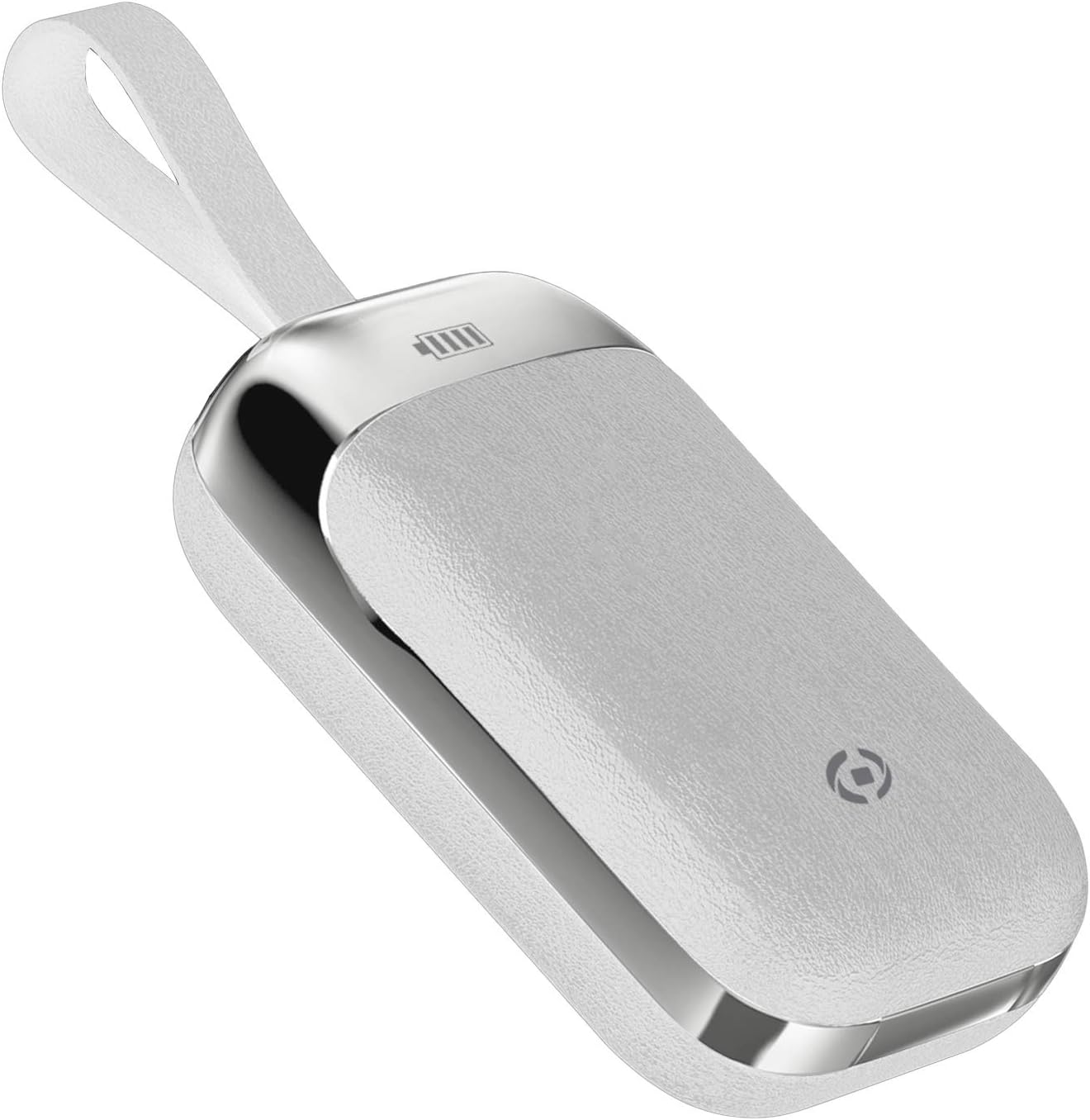
Image 3.2: The Celly FLIP1 charging case in a closed position, showing its compact design and integrated lanyard for easy carrying.

છબી ૪: વિસ્ફોટ થયો view illustrating the internal components of a Celly FLIP1 earbud, including the Bluetooth 5.0 chip, battery, and speaker driver.
4. સેટઅપ
૫.૧ ઇયરબડ્સ અને કેસ ચાર્જ કરવા
પ્રથમ ઉપયોગ કરતા પહેલા, ઇયરબડ્સ અને ચાર્જિંગ કેસને સંપૂર્ણપણે ચાર્જ કરો.
- ઇયરબડ્સને ચાર્જિંગ કેસમાં મૂકો. ખાતરી કરો કે તેઓ તેમના સંબંધિત સ્લોટમાં યોગ્ય રીતે બેઠેલા છે.
- Connect the MicroUSB charging cable to the charging port on the case and the other end to a USB power source (e.g., computer USB port, wall adapter).
- The indicator lights on the case and/or earbuds will show the charging status. Refer to the case for battery level indicators.
- A full charge typically takes approximately 1.5 hours. The charging case has a 400mAh capacity, and each earbud has a 50mAh battery.
Once fully charged, the earbuds provide approximately 4 hours of continuous music playback or talk time.
૩.૨ બ્લૂટૂથ ડિવાઇસ સાથે જોડી બનાવવી
To connect your Celly FLIP1 earbuds to your smartphone or other Bluetooth-enabled device:
- ખાતરી કરો કે ઇયરબડ્સ ચાર્જ થયા છે.
- Open the charging case and remove both earbuds. They will automatically power on and enter pairing mode. You may hear an audio prompt indicating they are ready to pair.
- તમારા ઉપકરણ પર, બ્લૂટૂથ સેટિંગ્સ પર જાઓ.
- માટે શોધો new devices. Select "Celly FLIP1" (or similar name) from the list of available devices.
- Once connected, you will hear a confirmation tone, and the earbuds' indicator lights may change.
- જો જોડી બનાવવામાં નિષ્ફળ જાય, તો ઇયરબડ્સને કેસમાં પાછા મૂકો, તેને બંધ કરો અને પગલાંઓનું પુનરાવર્તન કરો.
The earbuds have a wireless range of up to 10 meters (33 feet) from your connected device.
5. ઓપરેટિંગ સૂચનાઓ
The Celly FLIP1 earbuds feature multifunction keys for controlling audio playback and calls.
5.1 પાવર ચાલુ/બંધ
- પાવર ચાલુ: Remove earbuds from the charging case. They will power on automatically. Alternatively, press and hold the multifunction button on each earbud for a few seconds.
- પાવર બંધ: Place earbuds back into the charging case. They will power off automatically. Alternatively, press and hold the multifunction button on each earbud for several seconds until the indicator light turns off.
5.2 સંગીત પ્લેબેક
- ચલાવો/થોભો: Press the multifunction button once on either earbud.
- આગળનો ટ્રેક: Double-press the multifunction button on the right earbud.
- પાછલો ટ્રેક: Double-press the multifunction button on the left earbud.
- વોલ્યુમ નિયંત્રણ: Volume is typically controlled via your connected device.
૫.૨ કોલ મેનેજમેન્ટ
- જવાબ/કૉલ સમાપ્ત કરો: Press the multifunction button once on either earbud.
- કૉલ નકારો: Press and hold the multifunction button on either earbud for approximately 2 seconds.
- અવાજ સહાયક: Triple-press the multifunction button on either earbud to activate your device's voice assistant (e.g., Siri, Google Assistant).
૫.૫ મોનો/સ્ટીરિયો મોડ
The Celly FLIP1 earbuds support both stereo (using both earbuds) and mono (using a single earbud) modes. Each earbud has an integrated microphone.
- To use in mono mode, simply remove one earbud from the case and leave the other in the case. The single earbud will connect to your device.
- To switch back to stereo, remove the second earbud from the case. It will automatically connect to the first earbud and your device.

Image 5.1: A user wearing Celly FLIP1 earbuds while interacting with a smartphone, demonstrating typical use.
6. જાળવણી
યોગ્ય જાળવણી તમારા ઇયરબડ્સના લાંબા સમય સુધી ટકી રહેવા અને શ્રેષ્ઠ કામગીરીની ખાતરી આપે છે.
- સફાઈ: ઇયરબડ્સ અને ચાર્જિંગ કેસ સાફ કરવા માટે નરમ, સૂકા, લિન્ટ-ફ્રી કાપડનો ઉપયોગ કરો. ઘર્ષક ક્લીનર્સ, આલ્કોહોલ અથવા રાસાયણિક દ્રાવકોનો ઉપયોગ કરશો નહીં.
- સંગ્રહ: When not in use, always store the earbuds in their charging case to protect them from dust, scratches, and damage.
- ભેજ ટાળો: Do not expose the earbuds or charging case to water, rain, or excessive humidity.
- તાપમાન: Avoid storing or using the device in extreme temperatures (hot or cold).
7. મુશ્કેલીનિવારણ
If you encounter issues with your Celly FLIP1 earbuds, refer to the following common solutions:
| સમસ્યા | ઉકેલ |
|---|---|
| ઇયરબડ્સ ચાલુ નથી થઈ રહ્યા. | Ensure earbuds are charged. Place them in the charging case and connect the case to a power source. |
| ઇયરબડ્સ ડિવાઇસ સાથે જોડાઈ રહ્યા નથી. | 1. Ensure Bluetooth is enabled on your device. 2. Place earbuds back in the case, close, then reopen and remove to re-enter pairing mode. 3. Forget/remove "Celly FLIP1" from your device's Bluetooth list and try pairing again. 4. Ensure earbuds are within 10 meters of your device. |
| માત્ર એક ઇયરબડ કામ કરી રહ્યું છે. | 1. Ensure both earbuds are charged. 2. Place both earbuds back in the charging case, close the lid, wait a few seconds, then open and remove both simultaneously. 3. Re-pair the earbuds with your device. |
| ઓછો અવાજ અથવા નબળી અવાજ ગુણવત્તા. | 1. Adjust the volume on your connected device. 2. Ensure earbuds are clean and free of debris. 3. Check the fit of the earbuds in your ears. |
| ચાર્જિંગ કેસ ચાર્જ થઈ રહ્યો નથી. | 1. Ensure the MicroUSB cable is securely connected to both the case and the power source. 2. Try a different MicroUSB cable or power adapter. |
8. સ્પષ્ટીકરણો
| લક્ષણ | વિગત |
|---|---|
| મોડેલનું નામ | FLIP1 |
| આઇટમ મોડલ નંબર | FLIP1WH |
| કનેક્ટિવિટી ટેકનોલોજી | વાયરલેસ (બ્લુટુથ 5.0) |
| વાયરલેસ રેંજ | 10 મીટર (33 ફૂટ) સુધી |
| Earbud બેટરી ક્ષમતા | 50 mAh (દરેક) |
| ચાર્જિંગ કેસ બેટરી ક્ષમતા | 400 એમએએચ |
| ચાર્જિંગ સમય | Approx. 1.5 hours (earbuds and case) |
| Music Playback / Talk Time | આશરે. 4 કલાક |
| સામગ્રી | પ્લાસ્ટિક |
| રંગ | સફેદ |
| વસ્તુનું વજન | 50 ગ્રામ |
| Product Dimensions (Case) | 10 x 17 x 3.5 સેમી |
| સમાવાયેલ ઘટકો | Charging box, Headphones, MicroUSB Cable |
9. સલામતી માહિતી
તમારા ઉપકરણને નુકસાન ન થાય અથવા તમારી જાતને ઈજા ન થાય તે માટે કૃપા કરીને આ સલામતી માર્ગદર્શિકા વાંચો અને તેનું પાલન કરો:
- ઉત્પાદનને ડિસએસેમ્બલ, સમારકામ અથવા સંશોધિત કરશો નહીં.
- ઉપકરણને અતિશય તાપમાન, સીધો સૂર્યપ્રકાશ અને ખુલ્લી જ્વાળાઓથી દૂર રાખો.
- ઉપકરણને પાણી અથવા અન્ય પ્રવાહીના સંપર્કમાં આવવાનું ટાળો.
- Do not use the device at high volume for extended periods to prevent hearing damage.
- બાળકો અને પાલતુ પ્રાણીઓની પહોંચથી દૂર રાખો.
- સ્થાનિક નિયમો અનુસાર ઉત્પાદન અને તેની બેટરીનો જવાબદારીપૂર્વક નિકાલ કરો.
10. વોરંટી અને સપોર્ટ
Celly products are designed and manufactured to the highest quality standards. For information regarding warranty coverage, technical support, or service, please refer to the warranty card included with your purchase or visit the official Celly webસાઇટ
કોઈપણ વોરંટી દાવા માટે કૃપા કરીને તમારી ખરીદીનો પુરાવો રાખો.


