1. પરિચય
The Lepro PR902103-US Smart Table Lamp offers versatile lighting solutions for your home. This LED touch lamp features RGB color changing capabilities, tunable warm to cool white light, and dimmable brightness. It is designed for seamless integration with smart home ecosystems, supporting both Amazon Alexa and Google Assistant for voice control, as well as control via a dedicated mobile application. This manual provides comprehensive instructions for setup, operation, and maintenance.

Figure 1: Lepro Smart Table Lamp શોકasing its app control interface.
2. બોક્સમાં શું છે
Please verify that all components are present in the packaging:
- 1 x Lepro Smart Table Lamp (Model: PR902103-US)
- 1 x 4.9 ft USB Cable
- 1 x પાવર એડેપ્ટર
- ૧ x વપરાશકર્તા માર્ગદર્શિકા (આ દસ્તાવેજ)
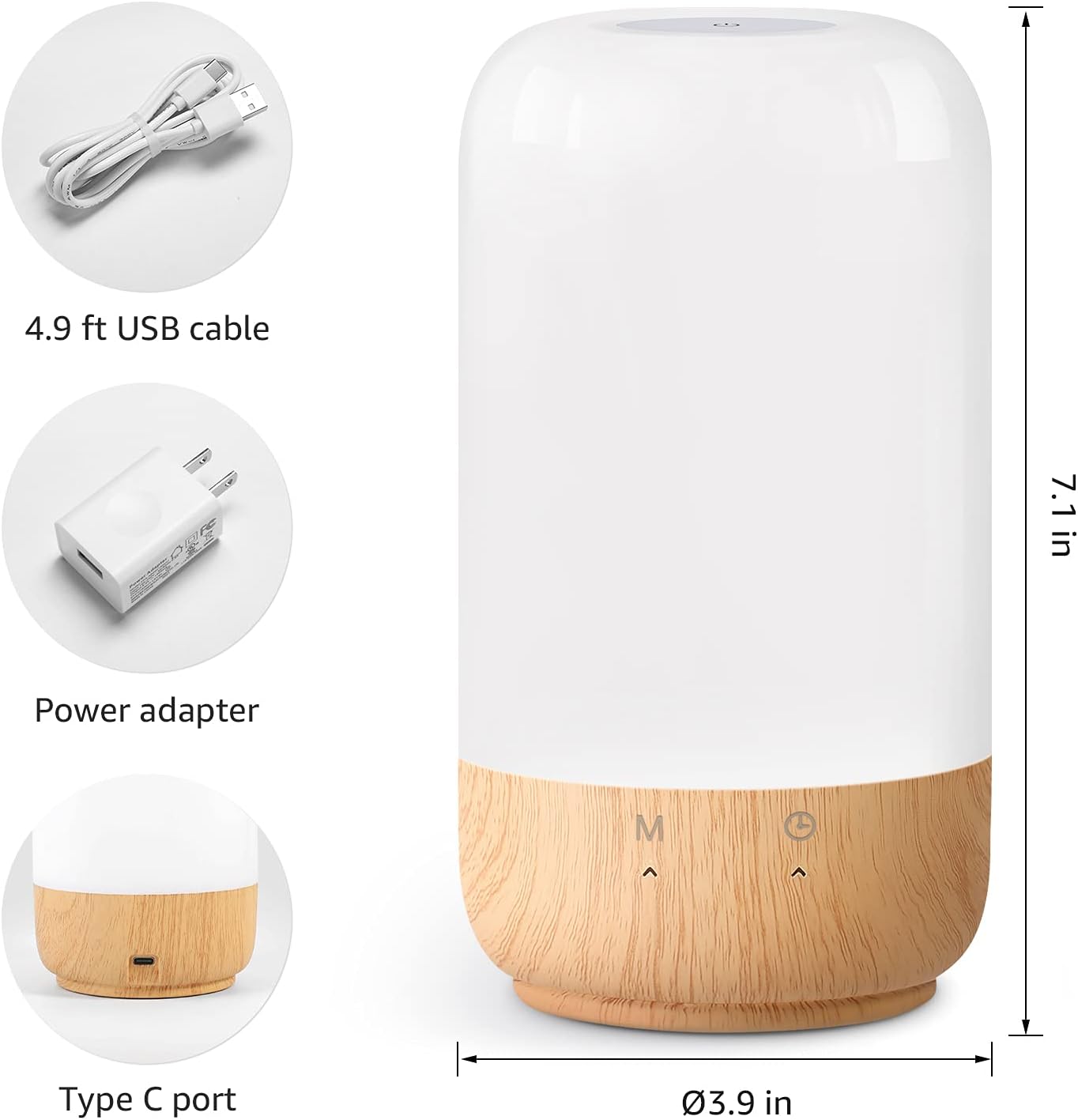
Figure 2: Included components and product dimensions.
3. સેટઅપ
Follow these steps to set up your Lepro Smart Table Lamp:
- પાવર કનેક્શન: પ્રદાન કરેલ USB કેબલને l સાથે જોડોamp's Type-C port and the power adapter. Plug the power adapter into a standard wall outlet. The lamp પ્રકાશિત કરશે.
- એપ્લિકેશન ડાઉનલોડ કરો: Download the 'Lepro LampUX' app from your mobile device's App Store (iOS) or Google Play Store (Android).
- એકાઉન્ટ નોંધણી: Open the 'Lepro LampUX' app and register a new account or log in if you already have one.
- ઉપકરણ જોડી:
- In the app, tap 'Add Device' or the '+' icon.
- Select 'Table Lamp' from the lighting category.
- એલ ખાતરી કરોamp is powered on. Long press the timer button on the lamp's base for at least 5 seconds until the indicator light blinks rapidly.
- Confirm the indicator light is blinking rapidly in the app and proceed.
- Select your 2.4 GHz Wi-Fi network and enter the password. (Note: The lamp only supports 2.4 GHz Wi-Fi networks. If your router is 5 GHz, please set it to 2.4 GHz during setup.)
- The app will begin adding the device. Once successfully added, you can rename your lamp for easier identification.
Video 1: Detailed steps on how to set up your Lepro Smart Lamp મોબાઇલ એપ્લિકેશનનો ઉપયોગ કરીને.
4. ઓપરેટિંગ સૂચનાઓ
The Lepro Smart Table Lamp can be controlled via touch, the mobile app, or voice commands.
4.1. નિયંત્રણોને ટચ કરો
- પાવર ચાલુ/બંધ: Short press the power button (marked 'M') on the lampનો આધાર.
- બ્રાઇટનેસ એડજસ્ટમેન્ટ: Slide your finger along the left side of the lamp's base to adjust brightness.
- Color Change (RGB): Slide your finger along the right side of the lamp's base to cycle through RGB colors.
- મોડ સ્વિચ: Short press the timer button (clock icon) to switch between white light modes (warm white, cool white) and RGB color mode.
4.2. Mobile App Controls
The 'Lepro LampUX' app provides comprehensive control over your lamp:
- Brightness & Color Temperature: Adjust the brightness level and select color temperatures from 2700K (warm white) to 5700K (cool white).
- RGB રંગ પસંદગી: Choose from 16 million colors using the color wheel in the app.
- દ્રશ્યો: Select from pre-set scenes like 'Night', 'Read', 'Meeting', 'Leisure', or customize your own scenes with specific colors and effects.
- Timer & Wake-up: l માટે સમયપત્રક સેટ કરોamp to turn on/off automatically. Utilize the 'Sunrise Simulation' feature to gradually increase light for a gentle wake-up.

Figure 3: Mobile application interface for controlling lamp સેટિંગ્સ

આકૃતિ 4: આ એલamp's timer and wake-up functions in use.
4.3. વૉઇસ નિયંત્રણો
The Lepro Smart Table Lamp is compatible with Amazon Alexa and Google Assistant. To enable voice control:
- ખાતરી કરો કે તમારું એલamp is successfully paired with the 'Lepro LampUX' app.
- એમેઝોન એલેક્સા અથવા ગૂગલ હોમ એપ ખોલો.
- 'સ્કિલ્સ & ગેમ્સ' (એલેક્સા) અથવા 'વર્ક્સ વિથ ગૂગલ' (ગુગલ હોમ) વિભાગ પર નેવિગેટ કરો.
- માટે શોધો and enable the 'Lepro LampUX' skill/service.
- Link your 'Lepro LampUX' account with your Alexa/Google account.
- એકવાર લિંક થઈ ગયા પછી, તમે વૉઇસ કમાન્ડનો ઉપયોગ કરી શકો છો જેમ કે:
- "Alexa, turn on [Lamp Name]."
- "Hey Google, set [Lamp Name] to warm white."
- "Alexa, change [Lamp Name] to blue."
- "Hey Google, dim [Lamp Name] to 50%."

Figure 5: Voice control integration with Amazon Alexa.
Video 2: Demonstration of the Lepro Smart Table Lamp working with Alexa and Google Home.
5. જાળવણી
To ensure the longevity and optimal performance of your Lepro Smart Table Lamp, please follow these maintenance guidelines:
- સફાઈ: સફાઈ કરતા પહેલા પાવર ડિસ્કનેક્ટ કરો. એલ સાફ કરવા માટે નરમ, સૂકા કપડાનો ઉપયોગ કરોamp's surface. Avoid using abrasive cleaners, solvents, or harsh chemicals, as these may damage the finish or electronic components.
- સંગ્રહ: જો એલ સ્ટોર કરી રહ્યા હોયamp for an extended period, ensure it is clean and dry. Store it in a cool, dry place away from direct sunlight and extreme temperatures.
- હેન્ડલિંગ: એલ હેન્ડલamp with care. Avoid dropping it or subjecting it to strong impacts.
6. મુશ્કેલીનિવારણ
If you encounter issues with your Lepro Smart Table Lamp, નીચેની સામાન્ય સમસ્યાઓ અને ઉકેલોનો સંદર્ભ લો:
| સમસ્યા | સંભવિત કારણ | ઉકેલ |
|---|---|---|
| Lamp ચાલુ થતું નથી. | વીજ પુરવઠો નથી. | પાવર એડેપ્ટર સુરક્ષિત રીતે l માં પ્લગ થયેલ છે કે નહીં તે તપાસોamp અને દિવાલનું આઉટલેટ. ખાતરી કરો કે આઉટલેટ કાર્યરત છે. |
| Wi-Fi થી કનેક્ટ કરી શકાતું નથી. | Incorrect Wi-Fi band (5 GHz). ખોટો પાસવર્ડ. નબળું Wi-Fi સિગ્નલ. | Ensure your Wi-Fi network is 2.4 GHz. Verify the Wi-Fi password. Move the lamp closer to your router. |
| વૉઇસ કંટ્રોલ કામ કરતું નથી. | Skill not enabled/linked. Incorrect device name. | Ensure the 'Lepro LampUX' skill is enabled and linked in your Alexa/Google Home app. Use the exact device name configured in the app. |
| Lamp પ્રતિભાવવિહીન છે. | કામચલાઉ સોફ્ટવેર ખામી. | એલ અનપ્લગ કરોamp from the power outlet for 10 seconds, then plug it back in to perform a soft reset. |
7. સ્પષ્ટીકરણો
| લક્ષણ | વિગત |
|---|---|
| બ્રાન્ડ | લેપ્રો |
| મોડલ નંબર | PR902103-યુએસ |
| ઉત્પાદન પરિમાણો | 3.9"D x 3.9"W x 7.1"H |
| વસ્તુનું વજન | 1.19 પાઉન્ડ |
| સામગ્રી | પ્લાસ્ટિક, લાકડું |
| પ્રકાશ સ્ત્રોત પ્રકાર | એલઇડી |
| વાટtage | 7 વોટ |
| તેજ | 350 લ્યુમેન |
| આછો રંગ | RGB + CCT (Tunable White 2700-5700K) |
| નિયંત્રણ પદ્ધતિ | App, Touch, Voice (Alexa, Google Assistant) |
| કનેક્ટિવિટી | 2.4 GHz WiFi Only |
| ઇન્ડોર/આઉટડોર વપરાશ | ઇન્ડોર |
8. વોરંટી અને સપોર્ટ
Lepro products are designed and manufactured to the highest quality standards. For warranty information and technical support, please refer to the contact details provided on the product packaging or visit the official Lepro webસાઇટ. વોરંટી દાવાઓ માટે ખરીદીના પુરાવા તરીકે તમારી ખરીદી રસીદ રાખો.


