1. પરિચય
The MUSKY DY28 PLUS is a versatile device combining a Bluetooth speaker, digital clock, alarm, and touch-sensitive LED lighting. It supports wireless audio streaming, hands-free calls, and music playback from USB drives or TF cards, offering a comprehensive audio and visual experience.
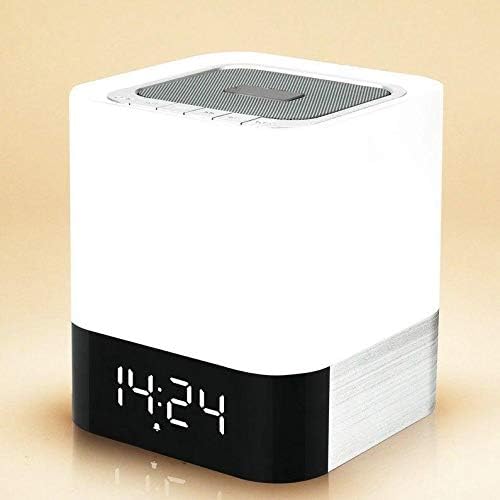
This image displays the front of the MUSKY DY28 PLUS speaker, highlighting its compact, cube-shaped design and the clear digital time display at the base.
2. ઉત્પાદન સુવિધાઓ
- Wireless Bluetooth function for audio streaming.
- Touch-sensitive display to check the time instantly.
- Hands-free calling with a built-in microphone, providing clear voice communication.
- Supports MP3 music playback directly from U-disk (USB drive) or TF (Micro SD) card.
- Integrated high-quality lithium battery, rechargeable via Micro USB port.
- Customizable alarm clock function.
- Delivers stereo and Hi-Fi audio quality.
- આધુનિક અને આકર્ષક ડિઝાઇન.
- Special music-responsive LED light with dynamic lamplight beat.
- Seven optional lamplight modes and various color options for personalized ambiance.
3. પેકેજ સામગ્રી
કૃપા કરીને નીચેની વસ્તુઓ માટે પેકેજ તપાસો:
- 1 x MUSKY DY28 PLUS Bluetooth Speaker
- 1 x માઇક્રો યુએસબી ચાર્જિંગ કેબલ
- ૧ x વપરાશકર્તા માર્ગદર્શિકા (આ દસ્તાવેજ)
4. સલામતી માહિતી
To ensure safe and optimal operation of your MUSKY DY28 PLUS speaker, please observe the following precautions:
- ઉપકરણને અતિશય તાપમાન, સીધો સૂર્યપ્રકાશ અથવા ઉચ્ચ ભેજના સંપર્કમાં ન લાવો.
- ઉપકરણને મજબૂત અસરમાં મૂકવા અથવા આધીન કરવાનું ટાળો.
- ઉપકરણને જાતે ડિસએસેમ્બલ, રિપેર અથવા સુધારશો નહીં. સહાય માટે લાયક સેવા કર્મચારીઓનો સંપર્ક કરો.
- ઇલેક્ટ્રિક શોક અથવા નુકસાનથી બચવા માટે ઉપકરણને પાણી અથવા અન્ય પ્રવાહીથી દૂર રાખો.
- Use only the provided or recommended charging cable and power adapter.
5. સેટઅપ
5.1 પ્રારંભિક ચાર્જિંગ
Before first use, fully charge the speaker's built-in lithium battery. Charging can be done using a mobile phone adapter or a computer's USB port. A full charge typically takes approximately 8-10 hours.
5.2 પાવર ચાલુ/બંધ
Locate the power switch on the rear panel of the speaker. Slide the switch to the 'ON' position to power on the device. Slide it to the 'OFF' position to power off.

The rear panel of the speaker features various connectivity options, including a USB host port, Micro SD card slot, AUX input, Micro USB charging port, and the power ON/OFF switch.
6. ઓપરેટિંગ સૂચનાઓ
6.1 બ્લૂટૂથ પેરિંગ
- ખાતરી કરો કે સ્પીકર ચાલુ છે.
- તમારા મોબાઇલ ઉપકરણ (સ્માર્ટફોન, ટેબ્લેટ, વગેરે) પર બ્લૂટૂથ સક્રિય કરો.
- માટે શોધો available Bluetooth devices. The speaker will appear as "MUSKY DY28 PLUS" or similar.
- જોડી બનાવવા માટે યાદીમાંથી સ્પીકર પસંદ કરો. એક પુષ્ટિકરણ અવાજ સફળ જોડી સૂચવશે.
6.2 Music Playback (U-disk / TF Card)
Insert a USB drive into the USB HOST port or a TF (Micro SD) card into the Micro SD slot on the rear of the speaker. The speaker will automatically detect the storage device and begin playing MP3 music files.
6.3 Hands-free Function
When connected via Bluetooth to a smartphone, the speaker supports hands-free calling. When a call comes in, the speaker will ring. Press the call answer button (usually indicated by a phone icon) on the speaker to answer the call. The built-in microphone ensures clear voice transmission without echo.
6.4 Clock and Alarm Setting
To display the time, gently touch the top surface of the speaker. The digital clock display will illuminate. Refer to the specific button layout on the top panel for setting the time and customizing the alarm bell as desired.
6.5 LED લાઇટ મોડ્સ
The speaker features a touch-sensitive LED light with multiple modes and colors. Gently press the top surface of the speaker to cycle through brightness levels: first press for low brightness, second for medium, and third for high. Continue pressing to cycle through the seven lamplight modes and different color options. The light can also beat in sync with the music.

This series of images illustrates the touch-sensitive LED light function. A single touch activates low brightness, a second touch increases to medium brightness, and a third touch sets it to high brightness.

The MUSKY DY28 PLUS offers seven distinct lamplight modes with various color options, allowing users to customize the visual ambiance.
7. જાળવણી
7.1 સફાઈ
To clean the speaker, use a soft, dry cloth. Do not use abrasive cleaners, waxes, or solvents as they may damage the finish. Ensure no liquids enter the ports or openings.
7.2 બેટરી જાળવણી
If the device will not be used for an extended period, it is recommended to fully charge the lithium rechargeable battery every two to three months. This helps prevent the battery from losing its capacity or becoming non-functional. Alternatively, you may remove the lithium battery if the device allows for it and will be stored for a very long duration.
8. મુશ્કેલીનિવારણ
- કોઈ શક્તિ નથી: Ensure the speaker is fully charged. Connect the Micro USB charging cable and allow sufficient time for charging. Check the power switch is in the 'ON' position.
- કોઈ અવાજ નથી: Verify that the speaker's volume is turned up. Check if the device is properly paired via Bluetooth or if the U-disk/TF card is inserted correctly and contains playable MP3 files.
- બ્લૂટૂથ ડિસ્કનેક્શન: Ensure your Bluetooth device is within the effective range (typically 10 meters) and there are no significant obstacles. Try unpairing and re-pairing the device.
- Clock Not Displaying: Gently touch the top surface of the speaker to activate the time display.
9. સ્પષ્ટીકરણો
| લક્ષણ | વિગત |
|---|---|
| બ્રાન્ડ નામ | મસ્કી |
| મોડેલનું નામ | DY28 PLUS |
| આઇટમ મોડલ નંબર | DY28 PLUS |
| સ્પીકરનો પ્રકાર | બ્લૂટૂથ સ્પીકર્સ |
| કનેક્ટિવિટી ટેકનોલોજી | વાયર્ડ/વાયરલેસ |
| સ્પીકર મહત્તમ આઉટપુટ પાવર | 10 વોટ્સ |
| ઓડિયો આઉટપુટ મોડ | સ્ટીરિયો |
| માઉન્ટિંગ પ્રકાર | ટેબલટોપ |
| ખાસ લક્ષણો | વાયરલેસ, બ્લૂટૂથ |
| સુસંગત ઉપકરણો | Laptop, MP3 Player, Desktop, Smartphone |
| ઉત્પાદન માટે ભલામણ કરેલ ઉપયોગો | For Gaming Consoles, For Computers, For Televisions, For Smartphones or Tablets, For Music Players |
| પેકેજ પરિમાણો | 23.3 x 13.6 x 12.6 સેમી |
| ઉત્પાદન વજન | 1 કિગ્રા |
| ઉત્પાદક | Musky |
10. વોરંટી માહિતી
This product comes with a standard manufacturer's warranty. Please refer to the warranty card included in your product packaging for detailed terms and conditions, including warranty period and coverage. Keep your purchase receipt as proof of purchase for any warranty claims.
11. ગ્રાહક આધાર
For any questions, technical assistance, or support regarding your MUSKY DY28 PLUS Bluetooth Speaker, please contact your retailer or the manufacturer's customer service. Contact information can typically be found on the product packaging or the manufacturer's official webસાઇટ


