પરિચય
The SHARP Digital Alarm Clock with AccuSet is designed for effortless timekeeping. Featuring automatic time setting, a clear LED display, and user-friendly controls, this clock is ideal for any bedroom. Its AccuSet technology ensures the time is always accurate, eliminating the need for manual adjustments, making it perfect for seniors, children, or anyone seeking a hassle-free alarm clock solution.

આકૃતિ 1: ફ્રન્ટ view of the SHARP Digital Alarm Clock with green LED display.
મુખ્ય લક્ષણો
- AccuSet ઓટોમેટિક સમય સેટ: The clock is pre-programmed to automatically set the correct time, removing the need for manual adjustments. Simply select your time zone.
- ક્વિક ડેલાઇટ સેવિંગ્સ ટાઇમ (DST) એડજસ્ટમેન્ટ: A convenient switch allows for easy adjustment for Daylight Savings Time (+1 hour) or Standard Time (-1 hour).
- ઉચ્ચ/નીચું ડિમર નિયંત્રણ: Adjust the brightness of the LED display to your preference, ensuring comfortable viewદિવસ હોય કે રાત.
- બેટરી બેકઅપ: A pre-installed CR2032 button cell battery provides backup for time settings during power outages, ensuring continuous accuracy.
- સમય ઝોન પસંદગી: Easily select your local time zone from the options provided at the bottom of the clock.

Figure 2: Diagram illustrating the key features and functionalities of the alarm clock.
સેટઅપ માર્ગદર્શિકા
- અનપેકીંગ: Carefully remove the alarm clock from its packaging.
- Battery Installation (Pre-installed): The CR2032 button cell battery for backup is pre-installed in a screw-secured cabinet at the bottom of the clock. This battery is designed to last for several years. No immediate action is required for initial setup.
- સમય ઝોન પસંદગી: Before plugging in the clock, locate the time zone selection switch at the bottom of the unit. Select your correct time zone (e.g., EST, CST, MST, PST). The default time zone is Eastern Standard Time.
- પાવર કનેક્શન: Plug the clock into an approved electrical source. The AccuSet feature will automatically program the correct time based on your selected time zone.
- Daylight Savings Time (DST) Adjustment: If applicable, slide the DST switch at the bottom of the clock to "ON" to add one hour (+1 hr) for Daylight Savings Time. For Standard Time, slide the switch to "OFF" to subtract one hour (-1 hr).

Figure 3: Top panel controls for setting time, alarm, and adjusting display.
ઓપરેટિંગ સૂચનાઓ
એલાર્મ સેટ કરી રહ્યું છે
- દબાવો એલાર્મ button once. The alarm time will appear on the display.
- જ્યારે એલાર્મનો સમય પ્રદર્શિત થાય, ત્યારે દબાવો કલાક અલાર્મ કલાકને સમાયોજિત કરવા માટે બટન.
- દબાવો મિનિટ એલાર્મ મિનિટને સમાયોજિત કરવા માટે બટન.
- એલાર્મને સક્રિય અથવા નિષ્ક્રિય કરવા માટે, દબાવો એલાર્મ ચાલુ / બંધ button. An alarm indicator light (usually a small LED) will illuminate when the alarm is active.
- To return to the current time display, press the TIME button or wait a few seconds for it to revert automatically.
સ્નૂઝ ફંક્શનનો ઉપયોગ કરીને
જ્યારે એલાર્મ વાગે, ત્યારે મોટું દબાવો સ્નૂઝ button located on the top of the clock. This will temporarily silence the alarm for a set period (typically 9 minutes), allowing for extra rest. The alarm will sound again after the snooze period ends.
Adjusting Display Brightness (Dimmer Control)
The clock features a High/Low dimmer control to adjust the display brightness. Locate the ડિમર હાઇ/લો button on the top panel. Press this button to toggle between high and low brightness settings to suit your environment and preference.

Figure 4: Illustration of the High & Low Display Dimmer Control.
જાળવણી
- સફાઈ: To clean the clock, use a soft, dry cloth. Do not use abrasive cleaners or solvents, as they may damage the finish.
- બેટરી રિપ્લેસમેન્ટ: The CR2032 backup battery is designed for long-term use. If the clock loses time during a power outage after several years, it may be time to replace the battery. This is located in a screw-secured compartment at the bottom of the clock.
- પ્લેસમેન્ટ: Place the clock on a stable, flat surface. Avoid placing it in direct sunlight, near heat sources, or in areas with high humidity.
મુશ્કેલીનિવારણ
| સમસ્યા | સંભવિત કારણ | ઉકેલ |
|---|---|---|
| Clock does not display time after plugging in. | Not connected to power, or power outlet is not active. | ખાતરી કરો કે પાવર કોર્ડ કાર્યરત ઇલેક્ટ્રિકલ આઉટલેટમાં સુરક્ષિત રીતે પ્લગ થયેલ છે. |
| સમય ખોટો છે. | Incorrect time zone selected, or DST switch is set incorrectly. | Verify the time zone switch at the bottom of the clock is set to your local zone. Check the DST switch position. |
| એલાર્મ વાગતો નથી. | Alarm is not activated, or alarm volume is too low (if adjustable). | Ensure the alarm is turned ON using the ALARM ON/OFF button. Check for an alarm indicator light. |
| Display is too bright or too dim. | ડિમર સેટિંગને ગોઠવણની જરૂર છે. | બ્રાઇટનેસ સેટિંગ્સમાં સાયકલ કરવા માટે DIMMER HI/LO બટન દબાવો. |
| Clock loses time during power outage. | Backup battery is depleted. | Replace the CR2032 backup battery located in the compartment at the bottom of the clock. |
વિશિષ્ટતાઓ
| લક્ષણ | વિગત |
|---|---|
| બ્રાન્ડ | તીક્ષ્ણ |
| મોડલ નંબર | OZJONG |
| રંગ | Black - Green Led |
| ડિસ્પ્લે પ્રકાર | ડિજિટલ |
| ખાસ લક્ષણો | Alarm, Daylight Saving, Auto Dimmable |
| ઉત્પાદન પરિમાણો | ૨.૩૬"પગ x ૪.૦૬"પગ |
| પાવર સ્ત્રોત | કોર્ડેડ ઇલેક્ટ્રિક, બેટરી સંચાલિત |
| બેકઅપ બેટરી | CR2032 (pre-installed) |
| સામગ્રી | પ્લાસ્ટિક |
| વસ્તુનું વજન | 9.9 ઔંસ |
| માઉન્ટિંગ પ્રકાર | ટેબલટોપ |
| યુપીસી | 049353006079 |
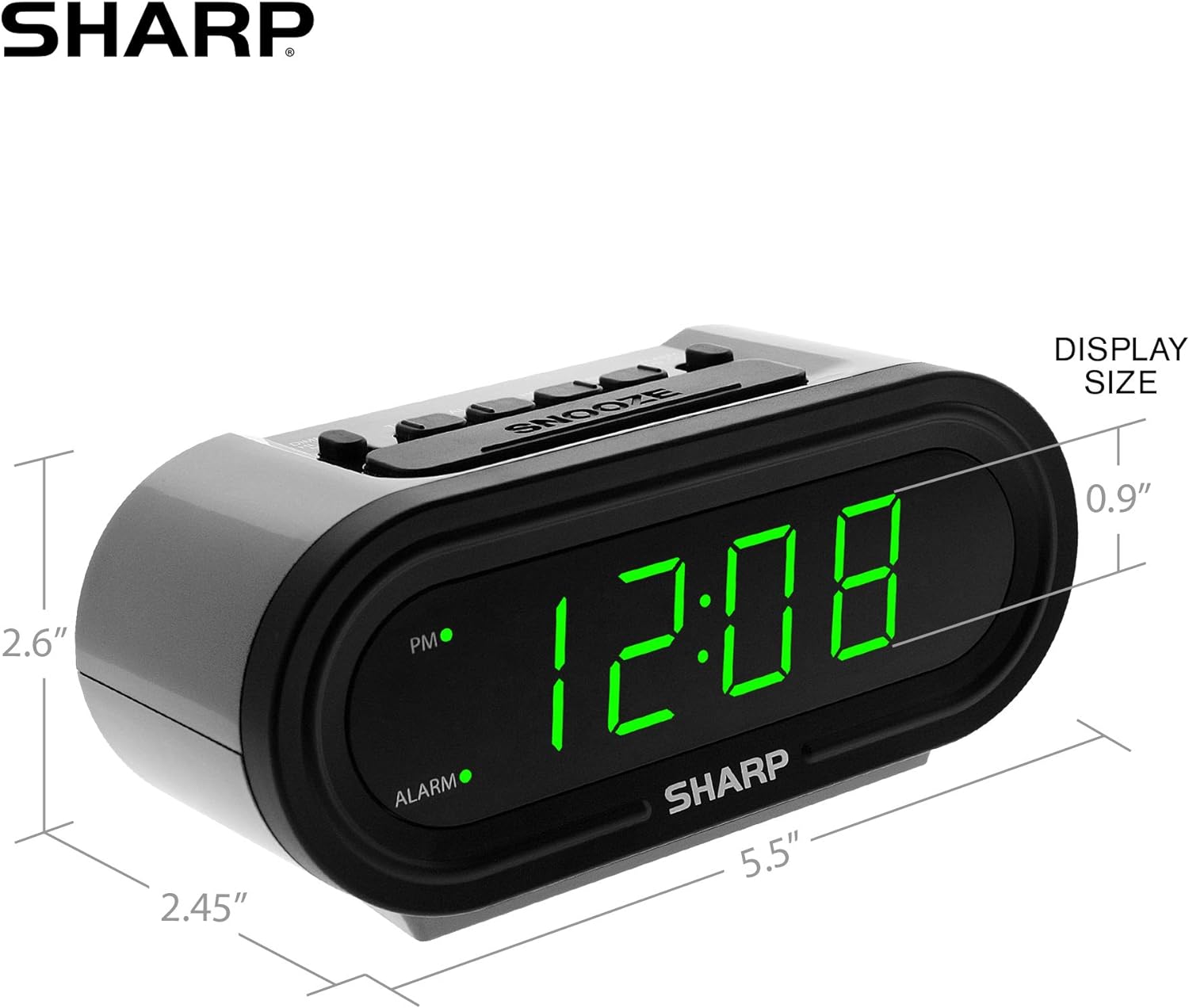
Figure 5: Product dimensions for easy reference.
વોરંટી અને આધાર
For warranty information or technical support, please refer to the contact details provided in your product packaging or visit the official Sharp webસાઇટ વોરંટી દાવા માટે તમારી ખરીદીની રસીદ રાખો.


