1. પરિચય
Thank you for choosing the Sofirn Universal 4-Bay Smart Battery Charger. This device is designed to provide efficient and safe charging, discharging, capacity testing, and repair functions for a wide range of rechargeable batteries. Please read this manual thoroughly before use to ensure proper operation and to maximize the lifespan of your batteries and charger.

This image displays the Sofirn Universal 4-Bay Smart Battery Charger, showcasing its four independent charging slots and the integrated LCD screen. Different battery types, including Li-ion and Ni-MH, are shown inserted into the bays, illustrating the charger's versatility.
2. સલામતી સૂચનાઓ
- Use this charger only for specified rechargeable batteries. Attempting to charge non-rechargeable batteries may lead to explosion, rupture, or leakage, causing personal injury or property damage.
- Do not disassemble, modify, or short-circuit the charger.
- Keep the charger away from water, moisture, and high temperatures.
- Ensure proper ventilation during operation. Do not cover the charger.
- ઉપયોગમાં ન હોય ત્યારે અથવા સફાઈ કરતા પહેલા ચાર્જરને પાવર આઉટલેટમાંથી અનપ્લગ કરો.
- બાળકોની પહોંચથી દૂર રાખો.
- If any abnormal conditions occur (e.g., smoke, unusual smell, excessive heat), immediately unplug the charger and discontinue use.
3. પેકેજ સામગ્રી
ખાતરી કરો કે બધી વસ્તુઓ તમારા પેકેજમાં હાજર છે:
- Sofirn S4 Plus Fast Charger Unit
- પાવર એડેપ્ટર
- વપરાશકર્તા માર્ગદર્શિકા (આ દસ્તાવેજ)

This image displays the items included in the product package: the S4 Plus Fast Charger unit, a power adapter, and the user manual.
4. ઉત્પાદન ઓવરview
મુખ્ય લક્ષણો:
- 4 Independent Charging Bays: Each bay operates independently, allowing for simultaneous charging, discharging, or testing of different battery types and sizes.
- વ્યાપક સુસંગતતા: Supports various battery types including Li-ion (10440, 14500, 16340, 18350, 18650, 21700, 26650, etc.) and Ni-MH/Ni-Cd (AA, AAA, C). Compatible with battery diameters 10-26mm and heights 34-75mm.
- ઝડપી ચાર્જિંગ: Capable of charging at up to 3A per slot, with a total output of 12A. A 2500mAh battery can be fully charged in approximately 1 hour.
- મલ્ટિ-ફંક્શનલ મોડ્સ: Offers Charge, Discharge, Capacity Test, and Repair modes.
- એલસીડી ડિસ્પ્લે: Provides real-time information on charge/discharge capacity, voltage, current, time, internal resistance, and temperature for each slot.
- બુદ્ધિશાળી તાપમાન નિયંત્રણ: Equipped with a temperature sensor to prevent overheating. Charging current automatically decreases if the battery temperature rises excessively.
- લવચીક નિયંત્રણ: Features a switch to toggle between Automatic and Manual operating modes for current selection.

This diagram highlights the charger's fast charging feature, capable of delivering up to 3A per slot simultaneously, totaling 12A. It indicates that a 2500mAh battery can be fully charged in approximately one hour.

This image illustrates the wide compatibility of the charger, supporting batteries with diameters from 10-26mm and heights from 34-75mm. It lists compatible Li-ion types (e.g., 18650, 21700, 14500) and Ni-MH/Ni-Cd types (AA, AAA, C), noting sufficient space for 20700/21700 batteries.

This diagram shows the charger's specialized design for efficient heat dissipation. It highlights the cooling fins and airflow paths that help manage internal temperatures during operation.

This image describes the charger's automatic intelligent temperature control system. It explains that a built-in temperature sensor automatically reduces charging current if the battery becomes too hot, ensuring safety and stability.
5. સેટઅપ
- Connect the power adapter to the charger's DC input port.
- Plug the power adapter into a suitable wall outlet. The LCD screen will illuminate, indicating the charger is ready.
- Observe the 'Manual & Auto' switch on the side of the charger. For most users, the 'Auto' mode is recommended for automatic current selection. For advanced users, switch to 'Manual' mode to set charging parameters.

This image highlights the 'Manual & Auto' switch located on the side of the charger. This switch allows users to toggle between automatic current selection and manual control over charging parameters.
6. ઓપરેટિંગ સૂચનાઓ
બેટરી દાખલ કરવી:
Carefully insert one or more rechargeable batteries into the charging bays, ensuring correct polarity (+/-). The charger will automatically detect the battery type and display information on the LCD.
સ્વચાલિત મોડ:
In 'Auto' mode, the charger intelligently selects the optimal charge current based on the battery's internal resistance and type. This is the default and recommended mode for general use.

This image demonstrates the charger's intelligent function to automatically select the optimal charge current. The LCD screen shows the charger assessing the battery's internal resistance to determine the most suitable charging rate.
Manual Mode (Setting Charge Current):
If the 'Manual & Auto' switch is set to 'Manual', you can adjust the charge current:
- After inserting a battery, press the મોડ button to select the desired function (Charge, Discharge, Cap Test, Repair).
- દબાવો વર્તમાન button to cycle through available charge current options: 250mA, 500mA (default), 1000mA, 1500mA, 2000mA, 2500mA, 3000mA.
- The selected current will be applied to the battery in that slot. Each slot can have different settings.
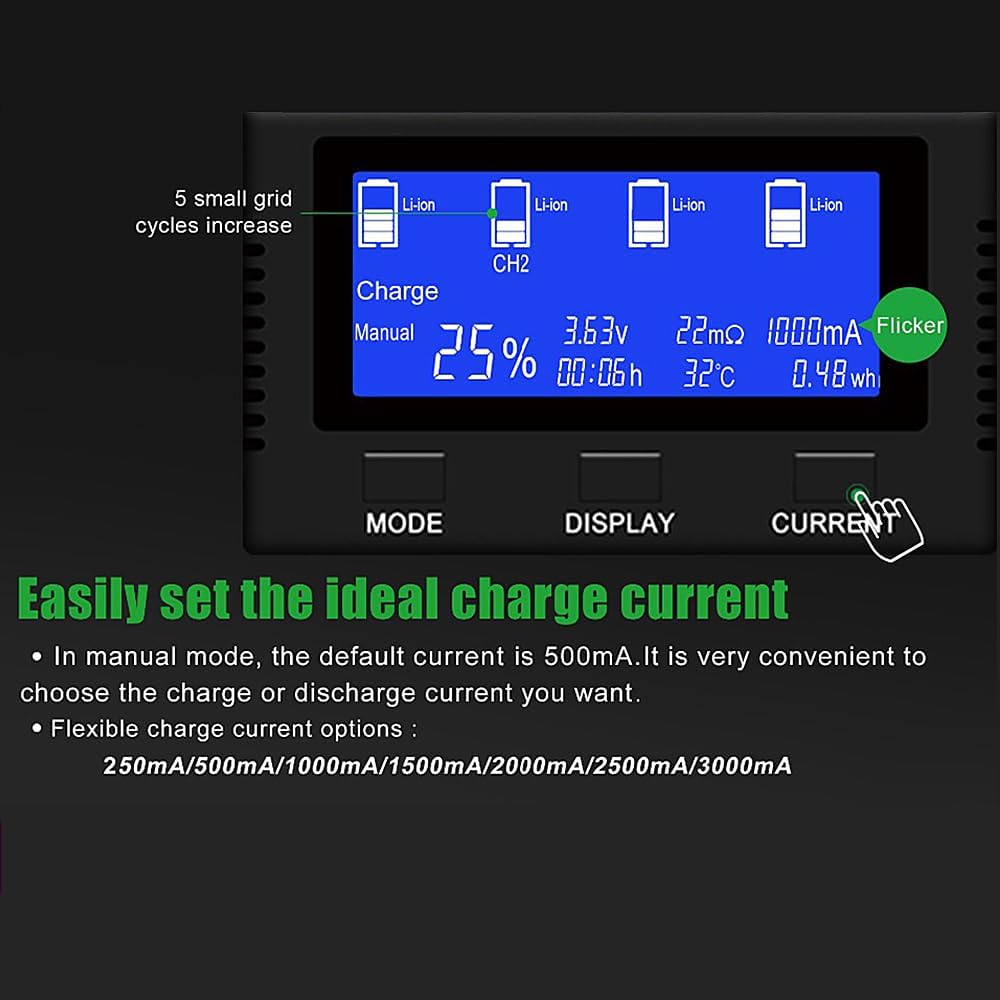
This image displays the manual mode interface on the LCD screen, allowing users to select specific charge currents. Available options include 250mA, 500mA (default), 1000mA, 1500mA, 2000mA, 2500mA, and 3000mA.
ડિસ્ચાર્જ મોડ:
The Discharge mode is used to analyze the actual capacity of a battery. It discharges the battery at a specified current.
- બેટરી દાખલ કરો.
- દબાવો મોડ button until 'Discharge' is selected.
- The charger will begin discharging the battery. The LCD will show discharge progress and capacity.
- માજી માટેample, a 21700 5000mAh battery discharged at 1A will take approximately 5 hours.

This image illustrates the discharge mode on the charger's LCD. This function is used to analyze battery capacity by discharging at a set current, such as 1A for the first and fourth slots.
Capacity Test Mode:
This mode measures the true capacity of a battery by performing a full charge-discharge-charge cycle.
- બેટરી દાખલ કરો.
- દબાવો મોડ button until 'Cap Test' is selected.
- The charger will first fully charge the battery, then fully discharge it to measure capacity, and finally recharge it to full.
- The measured capacity will be displayed on the LCD.

This image depicts the capacity test mode on the LCD. In this mode, the charger fully charges a battery, then fully discharges it to measure its actual capacity, and finally recharges it.
સમારકામ મોડ:
The Repair function is designed to help restore the capacity of low-voltage or older Ni-MH batteries through a series of charge/discharge cycles. This process can take an extended period.
- બેટરી દાખલ કરો.
- દબાવો મોડ button until 'Repair' is selected.
- The charger will initiate a repair cycle. Monitor the battery during this process.
7. માહિતી દર્શાવો
The LCD screen provides detailed real-time data for each battery. Use the પ્રદર્શન button to cycle through the information for each slot.

This image provides a comprehensive guide to the information displayed on the charger's LCD screen. It labels indicators for battery capacity status, battery type, charge mode (Auto/Manual), battery percentage, charge time, voltage, internal resistance, battery temperature, and energy in Wh.
- Battery Capacity Status: Visual representation of charge level.
- બેટરીનો પ્રકાર: Indicates detected battery chemistry (e.g., Li-ion, NiMH/NiCd).
- ચાર્જ મોડ: Shows current operating mode (Charge, Discharge, Cap Test, Repair).
- ઓટો/મેન્યુઅલ: Indicates whether automatic or manual current selection is active.
- બેટરી પર્સેનtage: અંદાજિત ચાર્જ સ્તર.
- ચાર્જ સમય: Duration of the current operation.
- ભાગtage: રીઅલ-ટાઇમ બેટરી વોલ્યુમtage.
- આંતરિક પ્રતિકાર: Displays the battery's internal resistance (mΩ).
- વર્તમાન: Displays the charging or discharging current (mA).
- તાપમાન: Real-time battery temperature (°C).
- Energy (Wh): Accumulated energy transferred.
8. જાળવણી
- સફાઈ: સફાઈ કરતા પહેલા ચાર્જરને પાવરથી ડિસ્કનેક્ટ કરો. સપાટી સાફ કરવા માટે નરમ, સૂકા કપડાનો ઉપયોગ કરો. ઘર્ષક ક્લીનર્સ અથવા સોલવન્ટનો ઉપયોગ કરશો નહીં.
- સંપર્ક બિંદુઓ: Periodically inspect and gently clean the battery contact points on both the charger and your batteries. Dirt or corrosion can affect charging performance.
- સંગ્રહ: ઉપયોગમાં ન હોય ત્યારે ચાર્જરને સીધા સૂર્યપ્રકાશ અને અતિશય તાપમાનથી દૂર ઠંડી, સૂકી જગ્યાએ સંગ્રહિત કરો.
9. મુશ્કેલીનિવારણ
- ચાર્જર ચાલુ ન થવું: Ensure the power adapter is securely connected to both the charger and a working wall outlet. Check if the outlet has power.
- Battery Not Detected/Charging:
- Ensure the battery is inserted with correct polarity.
- Clean the battery terminals and the charger's contact points with a dry cloth.
- Verify the battery is a rechargeable type and within the charger's supported specifications.
- Inconsistent Capacity Readings: Ensure battery terminals and charger contacts are clean. Repeat the capacity test if necessary.
- Charger Beep Volume Too Low: This version (V3) allows you to turn the beep and display off. Refer to the manual's specific instructions for adjusting these settings if available, or note that the volume is fixed.
- બેટરી ઓવરહિટીંગ: The charger has an automatic temperature control system that reduces current if overheating is detected. Ensure adequate ventilation around the charger. If overheating persists, discontinue use and contact support.
- ધીમું ચાર્જિંગ: In Manual mode, ensure a higher charge current is selected if desired. In Auto mode, the charger selects an optimal current which may be lower for battery health.
10. સ્પષ્ટીકરણો
| પરિમાણ | મૂલ્ય |
|---|---|
| મોડલ નંબર | LSY-AAZV-IT-20230804-27150 |
| ઇનપુટ વોલ્યુમtage | 5 વોલ્ટ |
| આઉટપુટ વોલ્યુમtage | 5 વોલ્ટ (DC) |
| મહત્તમ ચાર્જ વર્તમાન | 3A per slot |
| Compatible Battery Diameter | 10-26 મીમી |
| Compatible Battery Height | 34-75 મીમી |
| સપોર્ટેડ બેટરી પ્રકારો | Li-ion (10440, 14500, 16340, 18350, 18650, 21700, 26650, etc.), Ni-MH/Ni-Cd (AA, AAA, C) |
| વસ્તુનું વજન | 1.57 પાઉન્ડ (0.71 કિલોગ્રામ) |
| પેકેજ પરિમાણો | 8.03 x 7.36 x 2.52 ઇંચ |
| રંગ | કાળો |
11. વોરંટી અને સપોર્ટ
Sofirn products are manufactured to high-quality standards. For warranty information or technical support, please refer to the contact details provided with your purchase or visit the official Sofirn webસાઇટ. વોરંટી દાવાઓ માટે ખરીદીના પુરાવા તરીકે તમારી ખરીદી રસીદ રાખો.


