1. પરિચય
This manual provides comprehensive instructions for the assembly, operation, and maintenance of your SilverStone GD09 Home Theater PC (HTPC) computer case. The GD09 is engineered for space efficiency and broad compatibility, supporting full-size components within a compact form factor suitable for living room environments.
યોગ્ય સેટઅપ સુનિશ્ચિત કરવા અને તમારી સિસ્ટમની કામગીરી અને આયુષ્યને મહત્તમ બનાવવા માટે કૃપા કરીને ઇન્સ્ટોલેશન શરૂ કરતા પહેલા આ માર્ગદર્શિકાને સારી રીતે વાંચો.
2. મુખ્ય લક્ષણો
- Positive air pressure design for excellent cooling, quiet operation, and dust prevention.
- Supports SSI-CEB, ATX, and Micro-ATX motherboards.
- Compatible with SilverStone RA02 rackmount ears (sold separately).
- Includes quick-access dust filters for easy maintenance.
- Incredible 358mm depth to fit comfortably inside most home theater cabinets.
3. સ્પષ્ટીકરણો
| લક્ષણ | સ્પષ્ટીકરણ |
|---|---|
| મોડલ નંબર | SST-GD09B |
| પરિમાણો (LxWxH) | 14.09 x 17.32 x 6.69 ઇંચ (358 x 440 x 170 mm) |
| વસ્તુનું વજન | 9.26 પાઉન્ડ (4.2 કિગ્રા) |
| સામગ્રી | Aluminum (Faux Aluminum Design) |
| મધરબોર્ડ સુસંગતતા | SSI-CEB, ATX, Micro-ATX |
| પાવર સપ્લાય માઉન્ટિંગ પ્રકાર | Front Mount (ATX) |
| ઠંડક પદ્ધતિ | હવા |
| પંખાના કદનો આધાર | 120mm (front, side), 80mm (rear) |
| ફ્રન્ટ I / O બંદરો | 2x USB 3.0, Audio In/Out |
4. સેટઅપ અને ઇન્સ્ટોલેશન
4.1. સામાન્ય ઓવરview
The SilverStone GD09 is designed for horizontal placement, blending seamlessly with home theater components. Its internal layout is optimized for standard PC hardware.

આકૃતિ 1: ફ્રન્ટ view of the SilverStone GD09 HTPC case, showcasing its faux aluminum design and accessible front I/O ports.

આકૃતિ 2: પાછળ view of the SilverStone GD09, highlighting the motherboard I/O shield area, expansion slots, and power supply bay.
4.2. Opening the Case
- Locate the two thumbscrews at the rear of the case. Unscrew them to loosen the top panel.
- Slide the top panel backward and then lift it off to access the internal components.

Figure 3: Illustration of removing the top panel by sliding it back after unscrewing the rear thumbscrews.
4.3. મધરબોર્ડ ઇન્સ્ટોલેશન
- કેસના પાછળના ભાગમાં I/O શિલ્ડ ઇન્સ્ટોલ કરો.
- Align your ATX, Micro-ATX, or SSI-CEB motherboard with the standoffs inside the case.
- આપેલા સ્ક્રૂનો ઉપયોગ કરીને મધરબોર્ડને સુરક્ષિત કરો.

Figure 4: Internal layout showing the motherboard mounting area and various internal bays.
4.4. પાવર સપ્લાય ઇન્સ્ટોલેશન
- The GD09 supports standard ATX power supplies.
- Mount the power supply in the designated front-right compartment of the case.
- કેસના પાછળના ભાગમાંથી સ્ક્રૂ વડે પાવર સપ્લાય સુરક્ષિત કરો.
4.5. ડ્રાઇવ ઇન્સ્ટોલેશન
The case features versatile drive mounting options, including removable drive cages.
- Identify the 3.5-inch and 2.5-inch drive bays. The main drive cage can accommodate up to two 3.5-inch drives.
- An additional cage is provided for one 3.5-inch or two 2.5-inch drives, mounting behind the power supply.
- Secure drives to the cages using the appropriate screws.
- Reinstall the drive cages into their respective positions within the chassis.

Figure 5: Close-up of a removable drive cage, illustrating mounting points for storage devices.
4.6. ગ્રાફિક્સ કાર્ડ ઇન્સ્ટોલેશન
- The GD09 supports graphics cards up to 340mm in length.
- Ensure your graphics card's height (depth) is compatible, especially when considering power connectors. For thicker cards, a 90-degree power adapter may be beneficial to prevent cable bending.
- Install the graphics card into the appropriate PCIe slot on your motherboard and secure it with the expansion slot screw.
૩.૭. કુલિંગ સિસ્ટમ સેટઅપ
The GD09 features a positive air pressure design to enhance cooling performance and minimize dust accumulation. It supports multiple fan configurations.
- The case includes quick-access dust filters for easy cleaning. These are located on the side panels where intake fans are typically mounted.
- The case supports up to two 120mm fans in the front, two 120mm fans on the side, and two 80mm fans at the rear for exhaust.
- For optimal cooling, ensure proper airflow direction: intake fans at the front/side and exhaust fans at the rear.
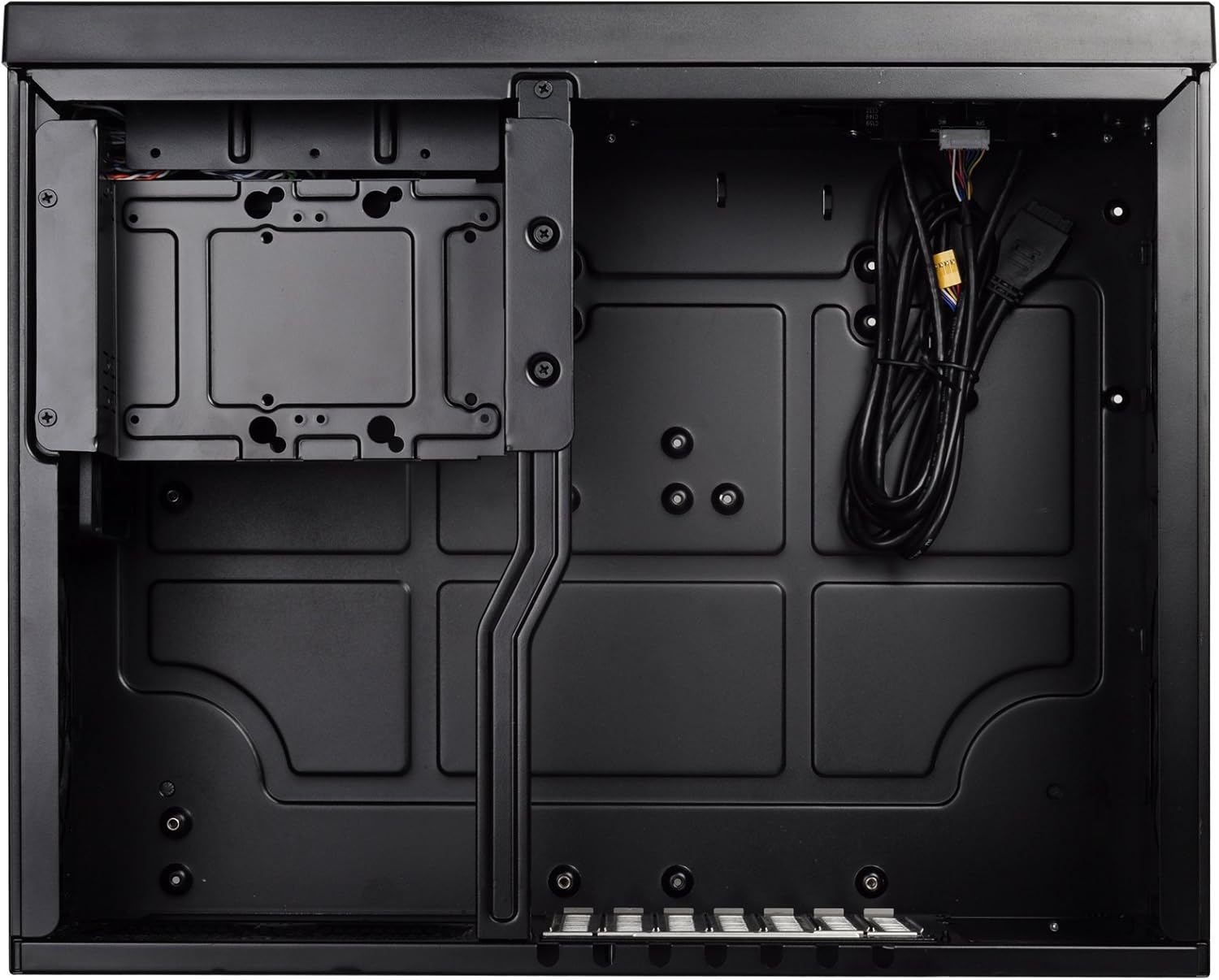
Figure 6: Detail of a removable dust filter, designed for easy cleaning and maintenance.
5. ઓપરેટિંગ સૂચનાઓ
૪.૧. ફ્રન્ટ I/O પેનલ
The front panel provides convenient access to essential ports and controls:
- પાવર બટન: Press to power on/off the system.
- રીસેટ બટન: સિસ્ટમ રીસ્ટાર્ટ કરવા માટે દબાવો.
- USB 3.0 પોર્ટ્સ (x2): સુસંગત ઉપકરણો સાથે હાઇ-સ્પીડ ડેટા ટ્રાન્સફર માટે.
- ઑડિયો ઇન/આઉટ: For connecting headphones, microphones, or other audio devices.
6. જાળવણી
૬.૧. ડસ્ટ ફિલ્ટર સફાઈ
Regular cleaning of the dust filters is crucial for maintaining optimal airflow and preventing dust buildup inside the case.
- Gently pull the quick-access dust filters from their slots on the side panels.
- Clean the filters using compressed air, a soft brush, or by rinsing them with water (ensure they are completely dry before reinstallation).
- Reinsert the clean filters back into their respective slots.
6.2. સામાન્ય સફાઈ
Use a soft, dry cloth to wipe down the exterior of the case. Avoid abrasive cleaners or solvents that may damage the finish.
7. મુશ્કેલીનિવારણ
If you encounter issues with your system, consider the following basic troubleshooting steps:
- કોઈ શક્તિ નથી: Ensure all power cables (PSU to wall, PSU to motherboard, CPU, GPU) are securely connected. Check the power switch on the PSU.
- કોઈ ડિસ્પ્લે નથી: Verify that your monitor cable is connected to the graphics card (not the motherboard integrated graphics, unless intended) and that the graphics card is properly seated and powered.
- ઓવરહિટીંગ: Check fan connections and ensure they are spinning. Clean dust filters. Verify CPU cooler installation. Ensure adequate airflow within the case.
- ઘટક શોધાયો નથી: Reseat the component (e.g., RAM, GPU, storage drive). Check power and data cables.
For more complex issues, consult the manuals for your individual components or contact SilverStone support.
8. વોરંટી અને સપોર્ટ
For detailed warranty information, technical support, and product registration, please visit the official SilverStone Technology webસાઇટ પર જાઓ અથવા તેમના ગ્રાહક સેવા વિભાગનો સંપર્ક કરો. વોરંટી દાવાઓ માટે ખરીદીનો પુરાવો રાખો.


