પરિચય
This manual provides comprehensive instructions for the safe and efficient operation of your Cecotec Toast & Taste 9000 Double Slot Toaster. Please read this manual thoroughly before first use and retain it for future reference.

Image: The Cecotec Toast & Taste 9000 Double Slot Toaster, featuring its sleek black design and integrated bun warmer rack.
મહત્વપૂર્ણ સલામતી સૂચનાઓ
- સફાઈ કરતા પહેલા અથવા ઉપયોગમાં ન હોય ત્યારે હંમેશા ખાતરી કરો કે ઉપકરણ અનપ્લગ થયેલ છે.
- ઉપકરણ, દોરી અથવા પ્લગને પાણીમાં અથવા અન્ય કોઈપણ પ્રવાહીમાં બોળશો નહીં.
- બાળકોની પહોંચથી દૂર રાખો.
- Do not operate the toaster with a damaged cord or plug. If the cord is damaged, it must be replaced by the manufacturer, its service agent, or similarly qualified persons to avoid a hazard.
- ગરમ સપાટીઓને સ્પર્શ કરવાનું ટાળો. હેન્ડલ્સ અથવા નોબ્સનો ઉપયોગ કરો.
- Do not place the toaster near flammable materials such as curtains or drapes.
- Never attempt to remove jammed bread with a metal utensil while the toaster is plugged in. Always unplug first.
- Ensure the crumb tray is regularly emptied to prevent fire hazards.
ઉત્પાદન ઘટકો
Familiarize yourself with the parts of your toaster:
- ટોસ્ટિંગ સ્લોટ્સ: Two extra-wide slots designed to accommodate various types of bread.
- બ્રાઉનિંગ કંટ્રોલ ડાયલ: બ્રાઉનિંગ લેવલને 1 (સૌથી હળવા) થી 6 (સૌથી ઘાટા) માં સમાયોજિત કરે છે.
- કાર્ય બટનો:
- રદ કરો બટન: ટોસ્ટિંગ ચક્ર તરત જ બંધ કરે છે.
- ફરીથી ગરમ કરો બટન: અગાઉ શેકેલી બ્રેડને વધુ બ્રાઉન કર્યા વિના ગરમ કરે છે.
- ડિફ્રોસ્ટ બટન: ફ્રોઝન બ્રેડને ડિફ્રોસ્ટ અને ટોસ્ટ કરે છે.
- હાઇ-લિફ્ટ લિવર: Lifts toast higher for easy removal of smaller items.
- Bun Warmer Rack: Detachable rack for warming pastries and larger items.
- ક્રમ્બ ટ્રે: ભૂકો એકત્રિત કરવા માટે તળિયે સ્થિત દૂર કરી શકાય તેવી ટ્રે.
- Power Cord with Storage: For convenient storage on the base.

છબી: ક્લોઝ-અપ view of the toaster's control panel, showing the browning dial (1-6) and the illuminated Cancel, Reheat, and Defrost buttons.
સેટઅપ અને પ્રથમ ઉપયોગ
- અનપેકીંગ: Carefully remove the toaster and all accessories from the packaging. Dispose of packaging materials responsibly.
- પ્લેસમેન્ટ: Place the toaster on a stable, heat-resistant, and non-slip surface, away from walls, curtains, and other flammable materials. Ensure adequate ventilation around the appliance.
- પ્રારંભિક સફાઈ: જાહેરાત સાથે બાહ્ય સાફ કરોamp cloth. Ensure the crumb tray is empty and properly inserted.
- પ્રથમ ઉપયોગ (બર્ન-ઓફ):
- Plug the toaster into a grounded electrical outlet.
- Set the browning control to a medium setting (e.g., 3 or 4).
- Operate the toaster without bread for 2-3 cycles to burn off any manufacturing residues. A slight odor or smoke is normal during this process. Ensure good ventilation in the area.
- Unplug and allow to cool completely before first use with food.
ઓપરેટિંગ સૂચનાઓ
ટોસ્ટિંગ બ્રેડ
- Ensure the toaster is plugged into a suitable power outlet.
- Place slices of bread into the toasting slots. The automatic centering system will hold the bread in place for even browning.
- બ્રાઉનિંગ કંટ્રોલ ડાયલ (પ્રકાશ માટે 1, શ્યામ માટે 6) નો ઉપયોગ કરીને તમારા ઇચ્છિત બ્રાઉનિંગ લેવલને પસંદ કરો.
- Press the high-lift lever down until it locks into place. The indicator light will illuminate, and toasting will begin.
- Once the selected browning level is reached, the toast will automatically pop up, and the indicator light will turn off.
- If the toast is not sufficiently browned, you can lower the lever again for a short period.
- કોઈપણ સમયે ટોસ્ટિંગ બંધ કરવા માટે, દબાવો રદ કરો બટન
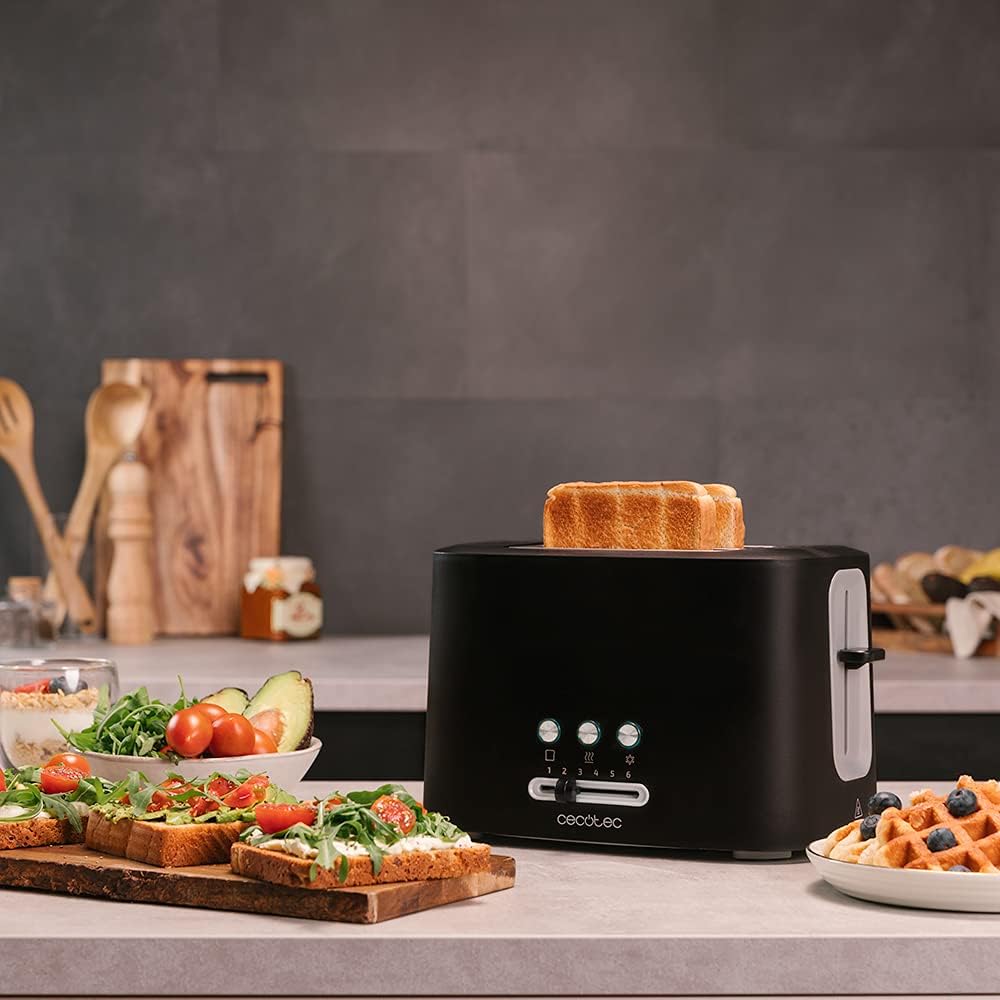
Image: The toaster in operation on a kitchen counter, with a slice of bread emerging from one of the slots, surrounded by breakfast items.
ડિફ્રોસ્ટ ફંક્શનનો ઉપયોગ કરીને
This function is ideal for toasting frozen bread directly.
- Place frozen bread into the toasting slots.
- તમારા ઇચ્છિત બ્રાઉનિંગ લેવલ પસંદ કરો.
- Press the high-lift lever down, then press the ડિફ્રોસ્ટ button. The defrost indicator light will illuminate.
- The toaster will automatically adjust the toasting time to first defrost and then toast the bread.
Using the Reheat Function
Use this function to warm up already toasted bread without further browning.
- Place the cold, toasted bread into the slots.
- Press the high-lift lever down, then press the ફરી ગરમ કરો button. The reheat indicator light will illuminate.
- The toaster will briefly warm the bread.
Using the Bun Warmer Rack
The bun warmer rack is designed for warming larger items like croissants, pastries, or buns.
- ટોસ્ટર સ્લોટની ટોચ પર બન વોર્મર રેક મૂકો.
- Place the items to be warmed on the rack.
- Set the browning control to a low setting (e.g., 1 or 2).
- Press the high-lift lever down. The toaster will begin to heat.
- Monitor the warming process closely to prevent burning. Press the રદ કરો button when desired warmth is achieved.
- Remove warmed items carefully, as they will be hot.

Image: The toaster with two croissants placed on its upper warming rack, ready for gentle heating.
સંભાળ અને જાળવણી
નિયમિત સફાઈ શ્રેષ્ઠ કામગીરી સુનિશ્ચિત કરે છે અને તમારા ટોસ્ટરનું આયુષ્ય વધારે છે.
- હંમેશા અનપ્લગ કરો: Before cleaning, always unplug the toaster from the power outlet and allow it to cool completely.
- બાહ્ય સફાઈ: સોફ્ટ સાથે બાહ્ય સપાટીઓ સાફ કરો, ડીamp cloth. Do not use abrasive cleaners, harsh chemicals, or metal scouring pads, as these can scratch or damage the finish.
- ક્રમ્બ ટ્રે:
- Pull out the crumb tray from the bottom of the toaster.
- Empty crumbs into a waste bin.
- જાહેરાત સાથે ટ્રે સાફ કરોamp ફરીથી નાખતા પહેલા કાપડને સારી રીતે સૂકવી લો.
- Ensure the crumb tray is fully and correctly inserted before using the toaster.

Image: A hand removing the easy-slide crumb tray from the bottom of the toaster, showing accumulated crumbs.
સંગ્રહ: When not in use, store the toaster in a clean, dry place. The power cord can be wrapped around the cord storage area on the base for neat storage.
મુશ્કેલીનિવારણ
| સમસ્યા | સંભવિત કારણ | ઉકેલ |
|---|---|---|
| ટોસ્ટર ચાલુ થતું નથી. | Not plugged in; power outlet faulty; circuit breaker tripped. | Ensure plug is securely in outlet. Test outlet with another appliance. Check household circuit breaker. |
| બ્રેડ શેકાતી નથી અથવા અસમાન રીતે શેકાતી નથી. | Browning level set too low; bread too thick or irregularly shaped; crumb tray full. | Increase browning level. Ensure bread fits freely in slots. Empty crumb tray. |
| ધુમાડો કે બળવાની ગંધ. | Crumbs accumulated; food jammed in slots; first use burn-off. | Immediately unplug. Empty crumb tray. Carefully remove any jammed food (only when unplugged and cool). Ensure good ventilation during first use. If smoke persists, discontinue use. |
| લીવર નીચે રહેતું નથી. | ટોસ્ટર પ્લગ ઇન નથી; આંતરિક મિકેનિઝમ સમસ્યા. | Ensure toaster is plugged in. If problem persists after checking power, contact customer support. |
ઉત્પાદન સ્પષ્ટીકરણો
| લક્ષણ | વિગત |
|---|---|
| બ્રાન્ડ | સીકોટેક |
| મોડલ નંબર | 03179 |
| શક્તિ | 980 વોટ્સ |
| ભાગtage | 230 વોલ્ટ |
| સ્લોટ્સની સંખ્યા | 2 (Extra-wide) |
| બ્રાઉનિંગ સ્તરો | 6 |
| કાર્યો | ફરીથી ગરમ કરો, ડિફ્રોસ્ટ કરો, રદ કરો |
| ખાસ લક્ષણો | Bun warmer rack, Removable crumb tray, High-lift function, Automatic centering, Non-slip base, Cord storage |
| સામગ્રી | Plastic with Stainless Steel finishes |
| રંગ | કાળો |
| પરિમાણો (L x W x H) | 31.5 x 21 x 23.2 સેમી |
| વજન | 1.3 કિગ્રા |
વોરંટી અને આધાર
Cecotec products are manufactured to high-quality standards. This product comes with a standard manufacturer's warranty. Please refer to the warranty card included in your product packaging for specific terms and conditions regarding coverage and duration.
For technical support, spare parts, or warranty claims, please contact Cecotec customer service through their official website or the contact information provided in your product documentation. Spare parts are generally available for up to 10 years from the date of purchase, ensuring long-term usability.
ઉત્પાદક: સીકોટેક
Webસાઇટ: www.cecotec.com


