1. પરિચય
This manual provides comprehensive instructions for the installation, operation, and maintenance of your Dioche 2-Wire Video Intercom System. This system is designed to enhance home security by allowing visual and audio communication with visitors at your door.
The system includes an outdoor camera unit and three indoor 7-inch TFT LCD monitors, offering two-way audio communication, night vision capabilities, and a waterproof design for reliable performance.
2. સલામતી માહિતી
- ઇન્સ્ટોલેશન અથવા જાળવણી પહેલાં ખાતરી કરો કે બધી પાવર ડિસ્કનેક્ટ થઈ ગઈ છે.
- જો તમને ઇલેક્ટ્રિકલ વાયરિંગ વિશે ખાતરી ન હોય તો ઇન્સ્ટોલેશન લાયક કર્મચારીઓ દ્વારા કરાવવું જોઈએ.
- Do not expose the indoor monitors to water or excessive humidity.
- ફક્ત પ્રદાન કરેલ પાવર એડેપ્ટરનો ઉપયોગ કરો.
- Keep the outdoor unit's camera lens clean for optimal performance.
3. પેકેજ સામગ્રી
ખાતરી કરો કે નીચે સૂચિબદ્ધ બધી વસ્તુઓ તમારા પેકેજમાં શામેલ છે:
- 1 x Outdoor Camera Unit
- 3 x Indoor Monitor Units (7-inch TFT LCD)
- 1 x ડીસી 24 વી 2.5 એ પાવર એડેપ્ટર
- 1 x 2-Core Connection Terminal Cable
- 3 x Screw Packs (for mounting)
- 3 x Indoor Monitor Brackets
- 3 x 2-Hole Terminals
- 1 x 3-Hole Terminal
- 1 x 4-Hole Terminal
- 1 x વપરાશકર્તા માર્ગદર્શિકા

Image 3.1: Complete package contents.
4. સિસ્ટમના ઘટકો
4.1 Outdoor Camera Unit
The outdoor unit features a durable aluminum alloy casing, providing resistance against rain and oxidation. It includes a 1/3" CMOS 1000 TV line camera with a 130° viewing angle and white LEDs for clear night vision.
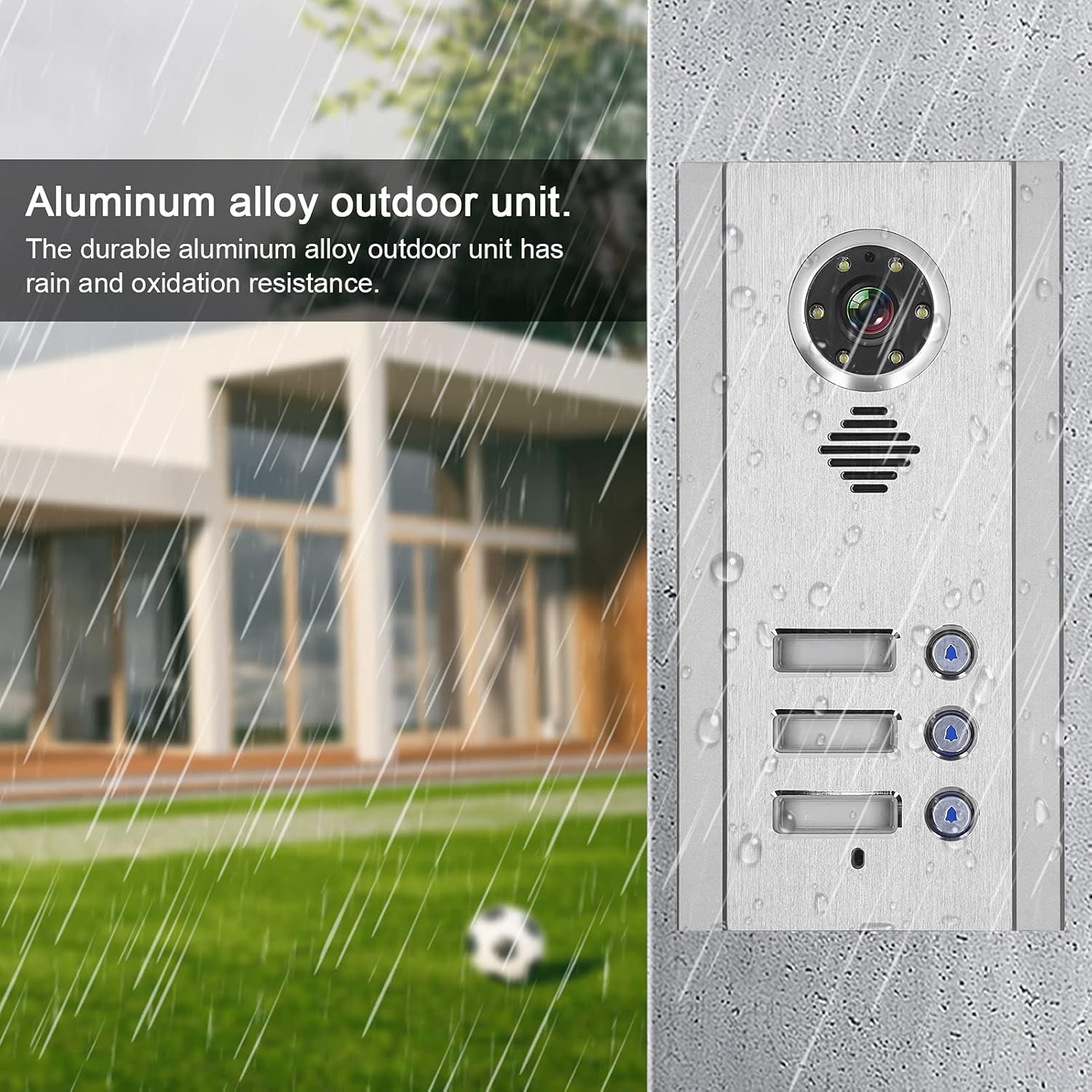
Image 4.1: Outdoor camera unit with waterproof design.
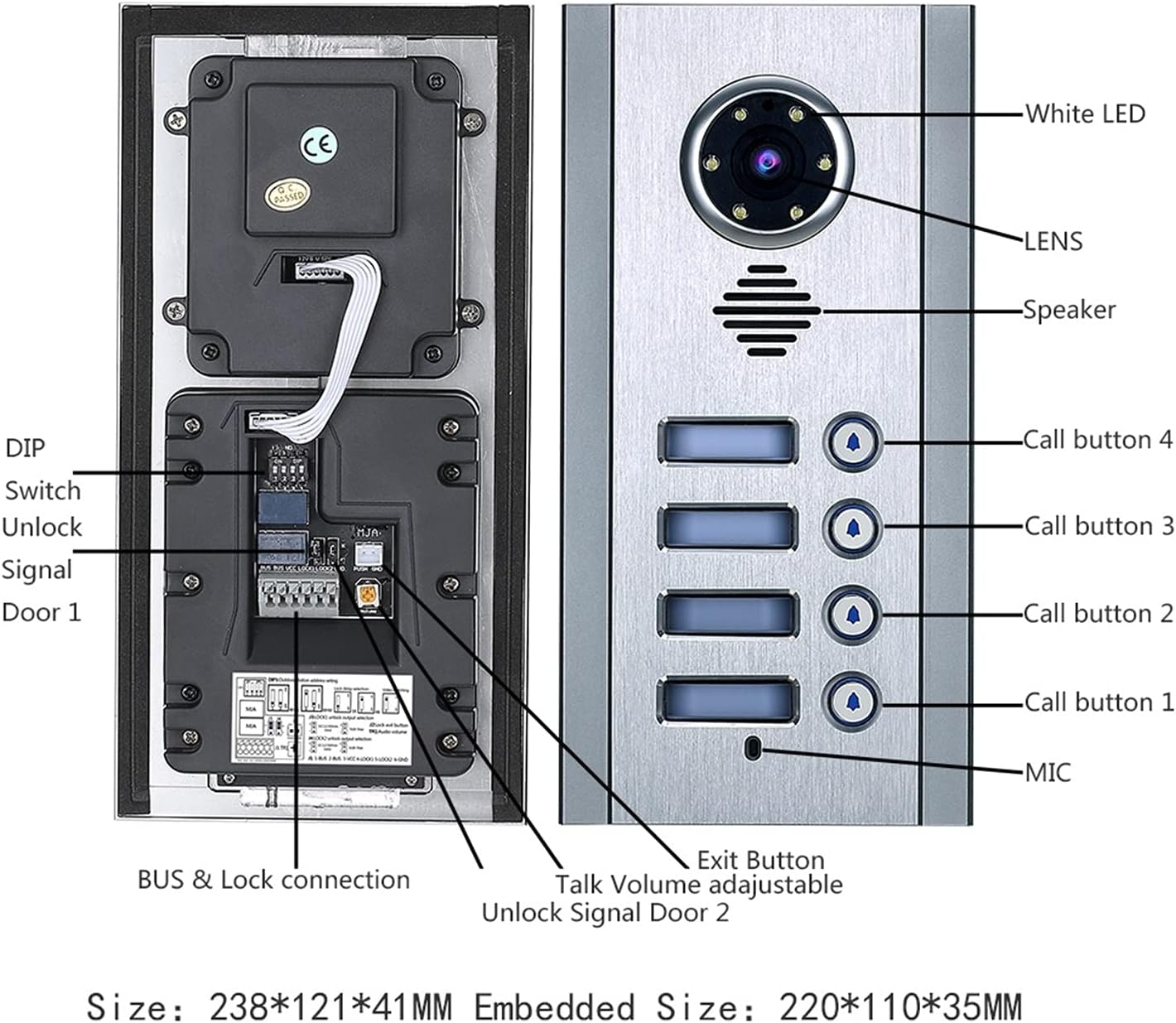
Image 4.2: Outdoor unit component overview.
4.2 Indoor Monitor Unit
Each indoor monitor features a 7-inch color TFT LCD screen with 800x480 resolution. It offers low power consumption and high-definition display. Controls for volume, brightness, and contrast are adjustable.
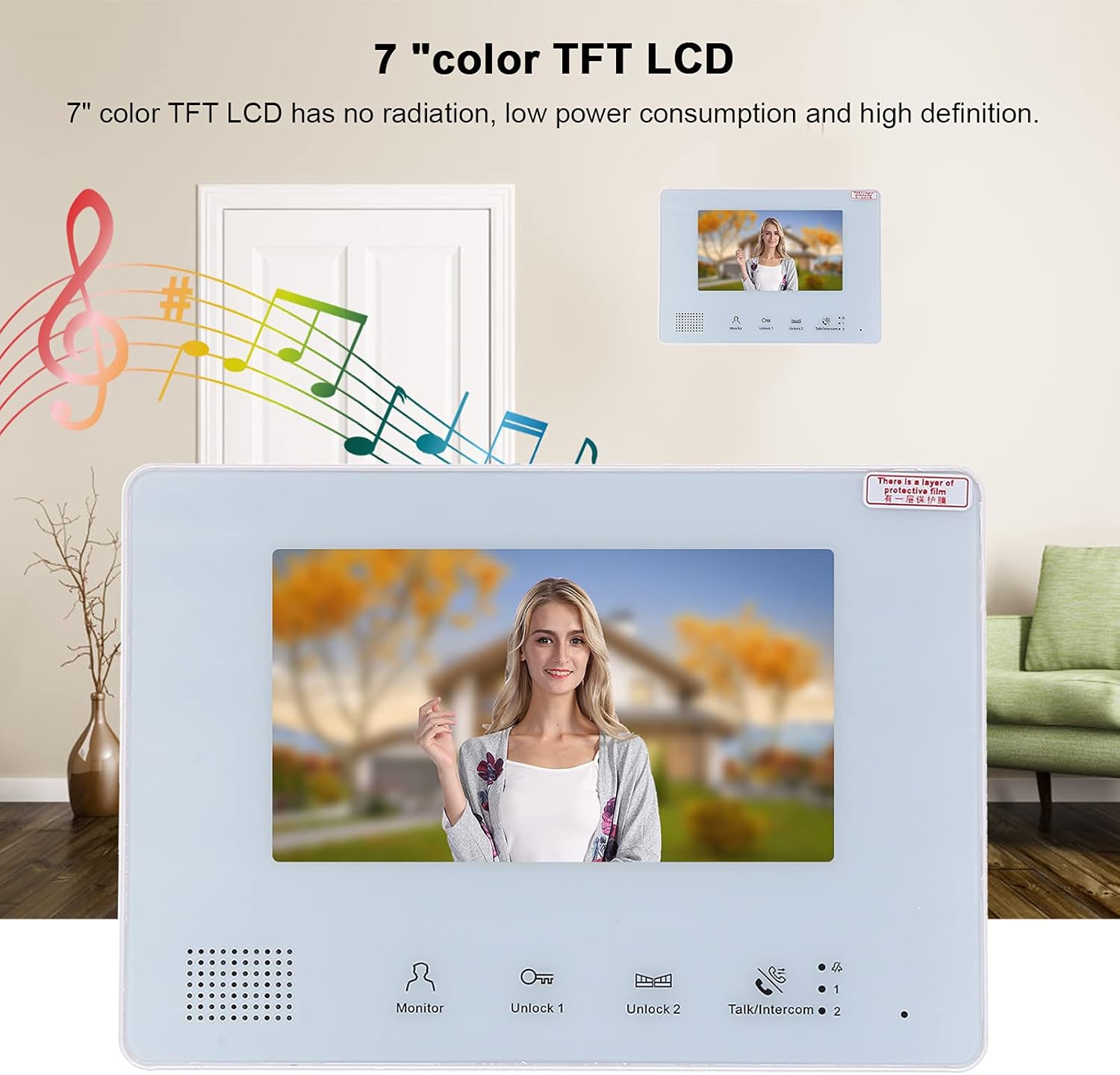
Image 4.3: 7-inch TFT LCD indoor monitor.

Image 4.4: Indoor monitor component overview.
5. સેટઅપ અને ઇન્સ્ટોલેશન
૩ વાયરિંગ કનેક્શન
The system utilizes a 2-wire bus connection, simplifying installation. Power, audio, video, and control signals are all transmitted through a single 2-wire cable. Ensure proper polarity when connecting the wires.

Image 5.1: 2-Wire system connection principle.
5.2 સિસ્ટમ વાયરિંગ ડાયાગ્રામ
Connect the outdoor camera unit(s) and indoor monitor units to the central power supply using the provided 2-core connection cables and terminals. The system supports up to 2 outdoor units and 4 indoor monitors. Refer to the diagram below for typical wiring configurations.

છબી ૪.૧: ઉદાહરણample system wiring diagram.
5.3 માઉન્ટ કરવાનું
- આઉટડોર યુનિટ: The outdoor unit is designed for integrated (embedded) installation. Prepare a suitable opening in the wall according to the unit's dimensions (approx. 220 x 110 x 35 mm embedded size). Secure it using the provided screws.
- Indoor Monitors: The indoor monitors can be mounted on a wall using the provided brackets or placed on a desk.
૫.૧ પ્રારંભિક પાવર-અપ
Once all connections are secure, connect the DC 24V 2.5A power adapter to a 100-240V AC power source. The indoor monitors will power on, and you can begin configuration.
6. ઓપરેશન
૨.૩ કોલનો જવાબ આપવો
When a visitor presses the call button on the outdoor unit, the indoor monitors will ring. Press the 'Talk/Intercom' button on any indoor monitor to establish two-way audio communication.
6.2 મોનીટરીંગ
થી view the outdoor area without a visitor call, press the 'Monitor' button on the indoor unit. This will display the live feed from the outdoor camera.
6.3 Unlocking Doors
If connected to electronic locks, press 'Unlock 1' or 'Unlock 2' on the indoor monitor to remotely open the corresponding door. The system supports unlocking two locks simultaneously.

Image 6.1: Intercom usage scenario.
6.4 ગોઠવણ સેટિંગ્સ
Use the 'Menu' button and navigation controls on the side of the indoor monitor to adjust settings such as:
- Talk Volume: Adjust the audio volume during intercom calls.
- રિંગ વોલ્યુમ: Adjust the volume of the doorbell ring.
- બ્રાઇટનેસ/કોન્ટ્રાસ્ટ: Adjust the display quality of the monitor.
- ખલેલ પાડશો નહીં: Activate this mode to silence the indoor monitor's ringtone.
6.5 Inter-Monitor Communication
The system supports call transfer between indoor monitors, allowing communication between different rooms within the household.
7. જાળવણી
- સફાઈ: Use a soft, dry cloth to clean the indoor monitors. For the outdoor unit, a damp cloth can be used to wipe away dirt and debris from the camera lens and casing. ઘર્ષક ક્લીનર્સ ટાળો.
- હવામાન સંરક્ષણ: While the outdoor unit is waterproof (IP66 rated), ensure its mounting location provides some protection from extreme weather conditions for extended longevity.
- કેબલ નિરીક્ષણ: Periodically check all wiring connections for any signs of wear or damage.
8. મુશ્કેલીનિવારણ
| સમસ્યા | સંભવિત કારણ | ઉકેલ |
|---|---|---|
| No power to indoor monitor | Power adapter unplugged or faulty; wiring issue. | Check power adapter connection and outlet. Inspect wiring for damage. |
| No image from outdoor camera | Camera cable disconnected; faulty camera. | Verify the 2-wire connection between outdoor unit and monitors. |
| No audio during intercom | Volume too low; wiring issue. | Adjust talk volume on the indoor monitor. Check wiring connections. |
| દરવાજાનું અનલોક કામ કરતું નથી | Electronic lock not connected; wiring issue. | Ensure electronic locks are properly wired to the outdoor unit. |
9. સ્પષ્ટીકરણો
| લક્ષણ | વિગત |
|---|---|
| બ્રાન્ડ | ડાયોચે |
| મોડલ નંબર | Diochetgizns6b5a493 |
| કનેક્ટિવિટી ટેકનોલોજી | Wired (2-wire bus) |
| પાવર સ્ત્રોત | DC 24V 2.5A (Input: 100-240V AC) |
| પાવર વપરાશ | 2.5 વોટ્સ |
| આઉટડોર યુનિટ મટીરીયલ | એલ્યુમિનિયમ એલોય |
| આઉટડોર યુનિટના પરિમાણો | આશરે. 238 x 121 x 41 મીમી |
| Outdoor Unit Embedded Size | આશરે. 220 x 110 x 35 મીમી |
| Outdoor Unit Camera | 1/3" CMOS 1000 TV Line |
| આઉટડોર યુનિટ Viewએન્ગલ | 130° |
| આઉટડોર યુનિટ નાઇટ વિઝન | સફેદ એલઇડી |
| Outdoor Unit Waterproof Rating | IP66 |
| Indoor Monitor Screen | 7 ઇંચનું ટીએફટી એલસીડી |
| Indoor Monitor Resolution | 800 x 480 |
| Indoor Monitor Dimensions | આશરે. 238 x 169 x 24 મીમી |
| ઇન્સ્ટોલેશનનો પ્રકાર | Outdoor: Integrated; Indoor: Wall Mount/Desk Mount |
| Max System Capacity | 2 Outdoor Units, 4 Indoor Monitors |
10. વોરંટી અને સપોર્ટ
For warranty information, please refer to the documentation provided at the time of purchase or contact your retailer. For technical support or service inquiries, please contact Dioche customer service through their official channels.