1. પરિચય
The Victrola Journey Portable Bluetooth Suitcase Record Player offers a blend of classic vinyl playback with modern connectivity. This 3-speed belt-driven turntable is designed for portability and ease of use, featuring built-in speakers, Bluetooth streaming, and multiple connection options.
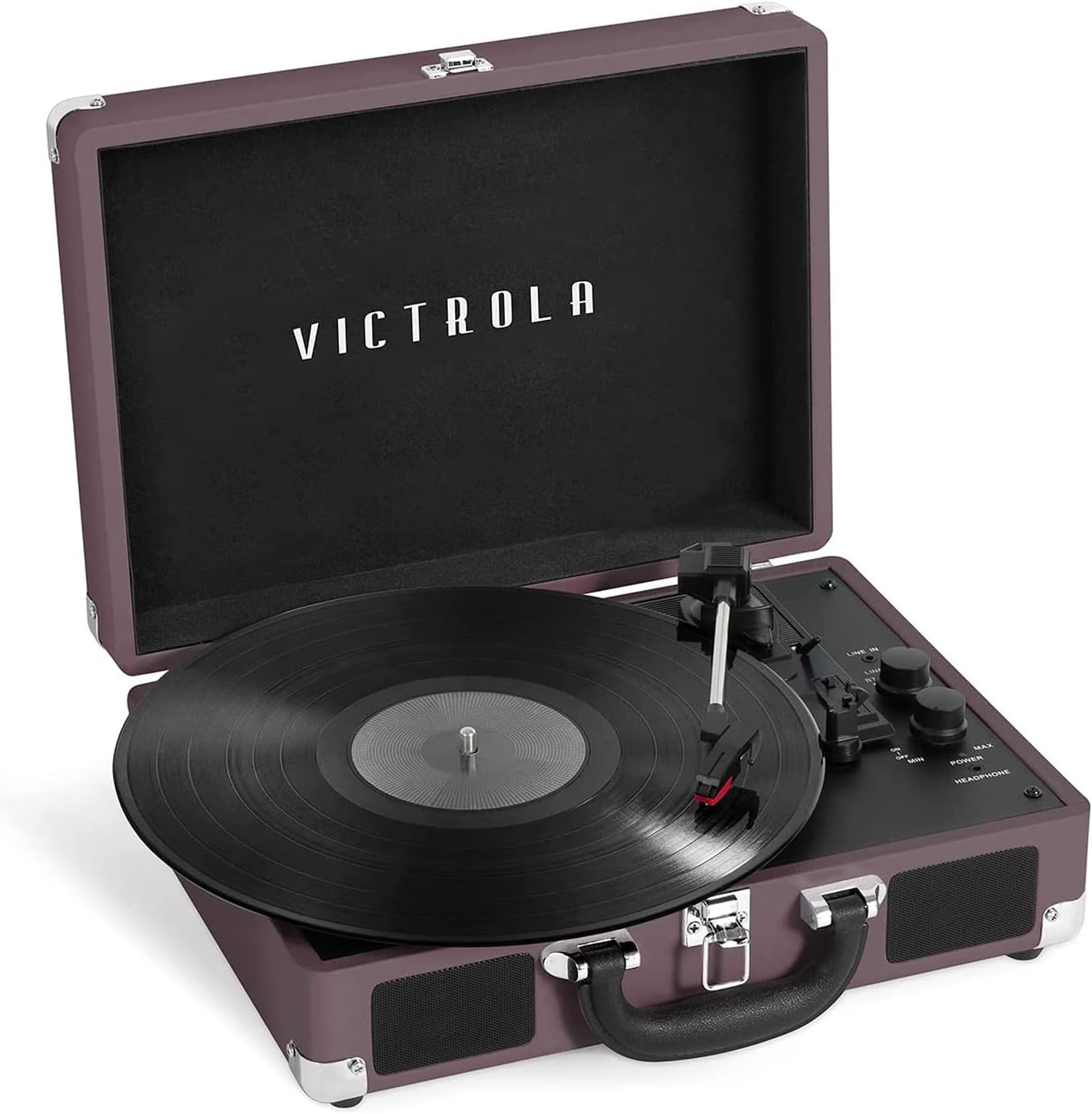
Image 1.1: Victrola Journey Portable Bluetooth Suitcase Record Player (Magenta).
2. ઉત્પાદન સુવિધાઓ
- Three-Speed Belt-Driven Turntable: Supports 33 1/3, 45, and 78 RPM records.
- બિલ્ટ-ઇન સ્પીકર્સ: Integrated stereo speakers for immediate playback.
- બ્લૂટૂથ કનેક્ટિવિટી: Stream audio wirelessly from your mobile device.
- સહાયક ઇનપુટ (3.5mm): Connect non-Bluetooth devices.
- RCA આઉટપુટ: Connect to external speakers for enhanced audio.
- હેડફોન જેક: ખાનગી સાંભળવા માટે.
- પોર્ટેબલ ડિઝાઇન: Suitcase style with a carry handle for easy transport.
- Auto-Stop Switch: Stops the turntable when a record finishes playing.

Image 2.1: Key features of the Victrola Journey Record Player.
3. સેટઅપ માર્ગદર્શિકા
- અનપેકીંગ: Carefully remove the record player from its packaging. Ensure all components, including the 45 RPM adapter, are present.
- પાવર કનેક્શન: Connect the power adapter to the DC IN jack on the back of the unit and plug it into a wall outlet.
- પ્લેસમેન્ટ: રેકોર્ડ પ્લેયરને સ્થિર, સમતલ સપાટી પર મૂકો. યુનિટની આસપાસ પર્યાપ્ત વેન્ટિલેશનની ખાતરી કરો.
- Remove Stylus Guard: Gently remove the white plastic stylus guard from the needle before first use.
- Tonearm Release: Unlock the tonearm clip to allow the tonearm to move freely.

Image 3.1: Effortless setup and simple controls for the Victrola Journey.
4. ઓપરેટિંગ સૂચનાઓ
૫.૧ વિનાઇલ રેકોર્ડ વગાડવો
- પાવર ચાલુ: Turn the POWER/VOLUME knob clockwise to turn on the unit. The power indicator light will illuminate.
- ફોનો મોડ પસંદ કરો: Set the INPUT SELECT knob to PHONO.
- સ્થળ રેકોર્ડ: Place a vinyl record on the turntable platter. If playing a 45 RPM single, use the included 45 RPM adapter.
- ઝડપ પસંદ કરો: Adjust the SPEED switch to match the record's speed (33, 45, or 78 RPM).
- પ્લેબેક શરૂ કરો: Lift the tonearm using the cueing lever. Manually position the tonearm over the desired track on the record. Gently lower the tonearm onto the record using the cueing lever.
- વોલ્યુમ સમાયોજિત કરો: Rotate the POWER/VOLUME knob to adjust the sound level.
- ઓટો-સ્ટોપ: The AUTO STOP switch can be set to ON to automatically stop the platter when the record finishes playing, or OFF for continuous play.

Image 4.1: Turntable platter and speed selection.
૬.૫ બ્લૂટૂથ સ્ટ્રીમિંગ
- પાવર ચાલુ: Turn the POWER/VOLUME knob clockwise.
- બ્લૂટૂથ મોડ પસંદ કરો: Set the INPUT SELECT knob to BT (Bluetooth). The indicator light will flash blue.
- ઉપકરણ જોડો: On your mobile device, enable Bluetooth and search for 'Victrola Journey'. Select it to pair. Once paired, the indicator light will stop flashing and remain solid blue.
- સંગીત ચલાવો: Begin playing music on your mobile device. Audio will stream through the record player's built-in speakers.
- વોલ્યુમ સમાયોજિત કરો: Control volume using both your mobile device and the POWER/VOLUME knob on the record player.

Image 4.2: Bluetooth connectivity for wireless audio.
4.3 Auxiliary Input (Line In)
- પાવર ચાલુ: Turn the POWER/VOLUME knob clockwise.
- Select Line In Mode: Set the INPUT SELECT knob to LINE IN.
- ઉપકરણને કનેક્ટ કરો: Connect an external audio device (e.g., CD player, MP3 player) to the LINE IN jack using a 3.5mm audio cable (not included).
- સંગીત ચલાવો: Begin playing music on your external device.
- વોલ્યુમ સમાયોજિત કરો: Control volume using both your external device and the POWER/VOLUME knob on the record player.
4.4 આરસીએ આઉટપુટ
To connect the record player to external speakers or an amplifier, use RCA cables (not included) to connect the RCA OUT jacks on the back of the unit to the audio input of your external system.

Image 4.3: RCA Output and Built-in Speakers.
4.5 હેડફોન જેક
For private listening, plug any standard headphones (3.5mm) into the HEADPHONE jack located on the control panel.
5. જાળવણી
5.1 યુનિટની સફાઈ
- નરમ, સૂકા કપડાથી બાહ્ય ભાગ સાફ કરો.
- કઠોર રસાયણો અથવા ઘર્ષક ક્લીનર્સનો ઉપયોગ કરવાનું ટાળો.
- Keep the unit free from dust, especially the turntable platter and tonearm.
૭.૨ સ્ટાઇલસ કેર
- Handle the stylus (needle) with extreme care. Avoid touching it with your fingers.
- સોફ્ટ બ્રશથી સમયાંતરે સ્ટાઇલસને પાછળથી આગળ બ્રશ કરીને સાફ કરો.
- Replace the stylus when you notice a degradation in sound quality or visible wear.
૭.૩ રેકોર્ડ કેર
- Always handle records by their edges.
- Store records vertically in their sleeves to prevent warping.
- Clean records regularly with a dedicated record cleaning brush or solution.
6. મુશ્કેલીનિવારણ
| સમસ્યા | સંભવિત કારણ | ઉકેલ |
|---|---|---|
| કોઈ શક્તિ નથી | Power adapter not connected or outlet not working. | ખાતરી કરો કે પાવર એડેપ્ટર સુરક્ષિત રીતે જોડાયેલ છે અને કાર્યરત આઉટલેટમાં પ્લગ થયેલ છે. |
| સ્પીકર્સમાંથી અવાજ આવતો નથી | Volume too low; incorrect input selected; external speakers connected. | Increase volume; select correct input (PHONO, BT, LINE IN); disconnect external speakers if using built-in. |
| ટર્નટેબલ ફરતું નથી | Power off; auto-stop engaged. | Turn on power; check AUTO STOP switch. |
| રેકોર્ડ સ્કિપિંગ | Dirty or damaged record; worn or dirty stylus; unit not level. | Clean record; clean or replace stylus; ensure unit is on a stable, level surface. |
| બ્લૂટૂથ કનેક્ટ થઈ રહ્યું નથી | Incorrect input selected; device too far; device already paired. | Select BT input; ensure device is within range; unpair from other devices. |
7. સ્પષ્ટીકરણો
- મોડલ: VSC-550BT
- પરિમાણો: 16.65 x 7.28 x 12.8 ઇંચ
- વસ્તુનું વજન: 4.4 પાઉન્ડ (2 કિલોગ્રામ)
- ઝડપ: 33 1/3, 45, 78 RPM
- કનેક્ટિવિટી: Bluetooth, 3.5mm AUX Input, RCA Output, Headphone Jack
- સામગ્રી: પ્લાસ્ટિક
- ઉત્પાદક: નવીન ટેકનોલોજી

છબી 7.1: ઉત્પાદન પરિમાણો.
૧૦. સત્તાવાર ઉત્પાદન વિડિઓઝ
Victrola Journey Vintage 3-Speed Bluetooth Record Player
વિડિઓ 8.1: આ વિડિઓ એક ઓવર પૂરી પાડે છેview of the Victrola Journey Vintage 3-Speed Bluetooth Record Player, showcasing its design and core functionalities.
Journey Bluetooth Turntable
Video 8.2: A concise video demonstrating the key features and portability of the Journey Bluetooth Turntable.
9. વોરંટી અને સપોર્ટ
For warranty information and customer support, please refer to the documentation included with your product or visit the official Victrola webસાઇટ વોરંટી દાવા માટે તમારી ખરીદીની રસીદ રાખો.


