1. પરિચય
Thank you for choosing the EDIS 40W Speakers, Model EA014. This manual provides essential information for the safe and efficient use of your new speaker system. Please read this manual thoroughly before installation and operation, and retain it for future reference.
2. સલામતી માહિતી
સલામત કામગીરી સુનિશ્ચિત કરવા અને નુકસાન અટકાવવા માટે, કૃપા કરીને નીચેની સાવચેતીઓનું પાલન કરો:
- સ્પીકર્સને પાણી કે ભેજના સંપર્કમાં ન લાવો.
- વેન્ટિલેશનના પ્રારંભને અવરોધિત કરશો નહીં.
- Place the speakers on a stable surface to prevent falling.
- એકમ સાથે પૂરા પાડવામાં આવેલ પાવર એડેપ્ટરનો જ ઉપયોગ કરો.
- બાળકોની પહોંચથી દૂર રાખો.
- વીજળીના તોફાન દરમિયાન અથવા લાંબા સમય સુધી ઉપયોગ ન હોય ત્યારે વીજળી બંધ કરો.
3. પેકેજ સામગ્રી
કૃપા કરીને તપાસો કે તમારા પેકેજમાં બધી વસ્તુઓ હાજર છે:
- EDIS 40W Speakers (2 units)
- ઇન્ફ્રારેડ રિમોટ કંટ્રોલ
- પાવર કેબલ
- ઓડિયો કનેક્શન કેબલ્સ
- વપરાશકર્તા માર્ગદર્શિકા (આ દસ્તાવેજ)
4. ઉત્પાદન ઓવરview
The EDIS 40W Speakers are designed to deliver clear audio. They feature a robust design with a steel grille for protection and offer multiple input options.
4.1 Speaker Units

આકૃતિ 1: ફ્રન્ટ view of the EDIS 40W Speakers. Each speaker unit features two drivers and a protective steel grille.
4.2 રીમોટ કંટ્રોલ
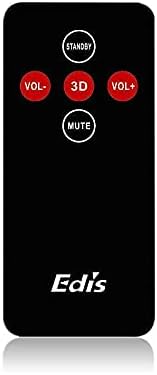
Figure 2: The infrared remote control for the EDIS 40W Speakers. It includes buttons for power, volume adjustment, 3D audio mode, and mute.
4.3 Media Player Panel

Figure 3: The integrated USB and SD Card Media Player panel. This panel allows direct playback from USB drives and SD/MMC memory cards.
5. સેટઅપ
Follow these steps to set up your EDIS 40W Speakers:
- પ્લેસમેન્ટ: Position the speakers on a flat, stable surface or mount them securely to a wall. Ensure adequate space for ventilation.
- ઑડિઓ સ્રોત કનેક્ટ કરો: Connect your audio source (e.g., computer, TV, interactive whiteboard) to the speaker system using the appropriate audio cables.
- પાવર કનેક્શન: Connect the power cable to the main speaker unit and then plug it into a standard electrical outlet.
- પાવર ચાલુ: Press the power button on the main speaker unit or the 'STANDBY' button on the remote control to turn on the speakers.
6. ઓપરેટિંગ સૂચનાઓ
Your EDIS 40W Speakers can be operated using the integrated controls or the infrared remote control.
6.1 રીમોટ કંટ્રોલનો ઉપયોગ કરીને
- સ્ટેન્ડબાય: Press to turn the speakers on or off (standby mode).
- VOL+: વોલ્યુમ વધારો.
- વીઓએલ-: વોલ્યુમ ઘટાડો.
- મૌન: ઑડિયો આઉટપુટને મ્યૂટ અથવા અનમ્યૂટ કરો.
- 3 ડી: Activate or deactivate the 3D audio effect.
6.2 Using the Media Player Panel
Insert a USB drive or SD/MMC card into the respective slot on the media player panel.
- DIRECTIONS: Press to switch between input sources (e.g., AUX, USB, SD Card).
- PREVIOUS (◀◀): પાછલા ટ્રેક પર જાઓ.
- PLAY/PAUSE (►▌▌): વર્તમાન ટ્રેક ચલાવો અથવા થોભાવો.
- NEXT (►►): આગલા ટ્રેક પર જાઓ.
- એલઇડી: Indicates power status or playback activity.
7. જાળવણી
યોગ્ય જાળવણી તમારા સ્પીકર્સની આયુષ્ય સુનિશ્ચિત કરે છે:
- સફાઈ: સ્પીકરની સપાટી સાફ કરવા માટે નરમ, સૂકા કપડાનો ઉપયોગ કરો. પ્રવાહી ક્લીનર્સ અથવા ઘર્ષક સામગ્રીનો ઉપયોગ કરશો નહીં.
- સંગ્રહ: If storing the speakers for an extended period, disconnect them from power and store them in a cool, dry place.
- વેન્ટિલેશન: Ensure that the speaker's ventilation openings are not obstructed to prevent overheating.
8. મુશ્કેલીનિવારણ
If you encounter issues with your EDIS 40W Speakers, refer to the following common problems and solutions:
| સમસ્યા | સંભવિત કારણ | ઉકેલ |
|---|---|---|
| કોઈ શક્તિ નથી | Power cable not connected; power outlet not working | પાવર કેબલ કનેક્શન તપાસો; કોઈ અલગ આઉટલેટ અજમાવી જુઓ. |
| કોઈ અવાજ નથી | Volume too low; incorrect input source; audio cable loose/faulty | Increase volume; press MODE to select correct input; check audio cable connections. |
| રીમોટ કંટ્રોલ કામ કરતું નથી | Batteries depleted; obstruction between remote and speaker; remote not pointed correctly | Replace remote batteries; remove obstructions; point remote directly at the speaker's IR receiver. |
| USB/SD કાર્ડ ચાલી રહ્યું નથી | અયોગ્ય file format; card/drive not inserted correctly; corrupted media | ખાતરી કરો files are compatible (e.g., MP3); reinsert media; try a different USB drive/SD card. |
9. સ્પષ્ટીકરણો
| લક્ષણ | સ્પષ્ટીકરણ |
|---|---|
| બ્રાન્ડ | EDIS |
| મોડલ નંબર | EA014 |
| મહત્તમ સ્પીકર આઉટપુટ પાવર | 40 વોટ્સ |
| રંગ | ગ્રે |
| વસ્તુનું વજન | 8 કિગ્રા |
| નિયંત્રણ પદ્ધતિ | દૂરસ્થ |
| કનેક્ટિવિટી ટેકનોલોજી | વાયર્ડ |
| પાવર સ્ત્રોત | કોર્ડેડ ઇલેક્ટ્રિક |
| ઓડિયો આઉટપુટ મોડ | આસપાસ |
| માઉન્ટિંગ પ્રકાર | ફ્લોર સ્ટેન્ડિંગ |
| સામગ્રી | લાકડું |
| સ્પીકરનો પ્રકાર | આઉટડોર |
| ખાસ લક્ષણો | Ampજીવંત |
| સુસંગત ઉપકરણો | બધા ઉપકરણો |
| સરાઉન્ડ સાઉન્ડ ચેનલ કન્ફિગરેશન | 2 |
10. વોરંટી અને સપોર્ટ
વોરંટી માહિતી અને ગ્રાહક સપોર્ટ માટે, કૃપા કરીને ખરીદી સમયે આપેલા દસ્તાવેજોનો સંદર્ભ લો અથવા તમારા રિટેલરનો સંપર્ક કરો. કોઈપણ વોરંટી દાવા માટે ખરીદીનો પુરાવો રાખો.


