1. પરિચય
The D-Link DGS-105GL is a 5-Port Gigabit Unmanaged Desktop Switch designed to provide a simple and efficient solution for expanding network connectivity in small office/home office (SOHO) and small to medium-sized business (SMB) environments. This device offers plug-and-play functionality, requiring no complex configuration. Its fanless design ensures silent operation, and the metal housing provides durability. The DGS-105GL incorporates energy-efficient features, including IEEE 802.3az Energy-Efficient Ethernet, to reduce power consumption without compromising performance.
2. પેકેજ સામગ્રી
ચકાસો કે તમારા પેકેજમાં નીચેની વસ્તુઓ છે:
- D-Link DGS-105GL 5-Port Gigabit Unmanaged Desktop Switch
- પાવર એડેપ્ટર
If any items are missing or damaged, please contact your local D-Link reseller.
3. ઉત્પાદન ઓવરview
The DGS-105GL switch features a compact, low-profile design with a durable metal housing. It is equipped with five Gigabit Ethernet ports for high-speed network connections.
3.1 ફ્રન્ટ પેનલ

છબી: આગળ view of the D-Link DGS-105GL switch, showing the D-Link logo, model number DGS-105GL, a power LED, five port status LEDs (1-5), and five RJ45 Gigabit Ethernet ports (1-5).
The front panel includes the following indicators and ports:
- પાવર એલઇડી: સ્વીચની પાવર સ્થિતિ સૂચવે છે.
- પોર્ટ LEDs (1-5): Each port has an LED that indicates link status and activity. A solid light indicates a successful connection, and a blinking light indicates data transmission.
- RJ45 Gigabit Ethernet Ports (1-5): These ports are used to connect network devices such as computers, servers, and other switches.
3.2 રીઅર પેનલ

છબી: પાછળનો ભાગ view of the D-Link DGS-105GL switch, showing the power input port labeled '5V --- 1A'.
The rear panel contains the power input port, where the included power adapter is connected.
4. સેટઅપ
The DGS-105GL is a plug-and-play device, making installation straightforward. Follow these steps to set up your switch:
- પાવર એડેપ્ટરને કનેક્ટ કરો: Plug the included power adapter into the power input port on the rear panel of the DGS-105GL switch. Then, plug the other end of the adapter into a standard electrical outlet. The Power LED on the front panel should illuminate.
- નેટવર્ક ઉપકરણોને કનેક્ટ કરો: Connect your network devices (e.g., computers, network-attached storage, routers) to any of the five RJ45 Gigabit Ethernet ports on the front panel using standard Ethernet cables.
- જોડાણો ચકાસો: Once a device is connected and powered on, the corresponding Port LED on the switch's front panel should light up, indicating a successful link. If there is network activity, the LED will blink.

Image: The D-Link DGS-105GL switch placed on a desk in an office setting, connected to a laptop and other peripherals, demonstrating a typical setup.
5. સ્વીચનું સંચાલન
The DGS-105GL operates automatically once connected. It supports auto-negotiation for speed and duplex mode, and auto-MDI/MDIX, eliminating the need for crossover cables. The switch automatically detects the speed of the connected device (10/100/1000 Mbps) and adjusts accordingly.
5.1 એલઇડી સૂચકાંકો
The LEDs provide visual feedback on the switch's status:
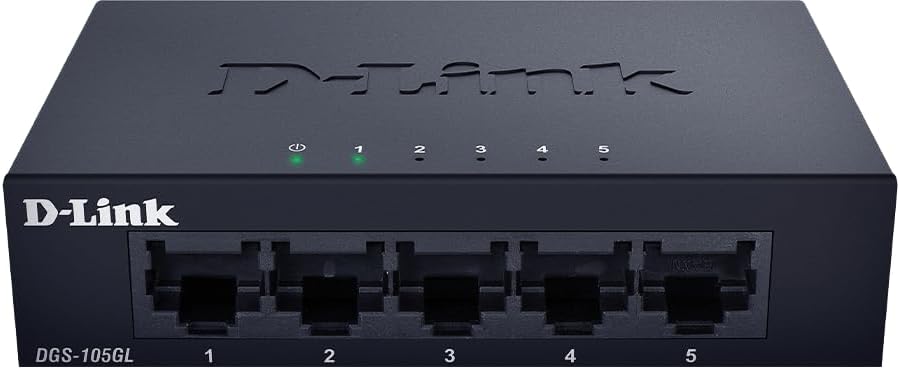
છબી: આગળ view of the D-Link DGS-105GL switch with the green power LED and green port LEDs 1-5 illuminated, indicating active connections.
| એલઇડી | સ્થિતિ | વર્ણન |
|---|---|---|
| શક્તિ | સોલિડ ગ્રીન | સ્વીચ ચાલુ છે. |
| શક્તિ | બંધ | સ્વીચને પાવર પ્રાપ્ત થતો નથી. |
| પોર્ટ (1-5) | સોલિડ ગ્રીન | A device is successfully connected to the port. |
| પોર્ટ (1-5) | લીલો ઝબકતો | પોર્ટ દ્વારા ડેટા ટ્રાન્સમિટ અથવા પ્રાપ્ત થઈ રહ્યો છે. |
| પોર્ટ (1-5) | બંધ | No device is connected to the port, or the connected device is powered off. |
6. જાળવણી
To ensure optimal performance and longevity of your DGS-105GL switch, consider the following maintenance guidelines:
- સફાઈ: Periodically clean the exterior of the switch with a soft, dry cloth. Avoid using liquid or aerosol cleaners directly on the device.
- પર્યાવરણીય પરિસ્થિતિઓ: Ensure the switch is placed in a well-ventilated area, away from direct sunlight, heat sources, and excessive moisture. Maintain operating temperatures within the specified range (refer to specifications).
- કેબલ મેનેજમેન્ટ: Keep network cables neatly organized to prevent strain on ports and improve airflow around the device.
- પાવર સાયકલિંગ: If you experience network issues, a simple power cycle (unplugging the power adapter, waiting 10 seconds, and plugging it back in) can often resolve minor problems.
7. મુશ્કેલીનિવારણ
If you encounter issues with your DGS-105GL switch, refer to the following common troubleshooting steps:
- પાવર એલઇડી નથી:
- ખાતરી કરો કે પાવર એડેપ્ટર સ્વીચ અને કાર્યરત ઇલેક્ટ્રિકલ આઉટલેટ બંને સાથે સુરક્ષિત રીતે જોડાયેલ છે.
- બીજા ઉપકરણને પ્લગ ઇન કરીને ખાતરી કરો કે ઇલેક્ટ્રિકલ આઉટલેટ કાર્યરત છે.
- No Link LED for a Connected Device:
- તપાસો કે ઇથરનેટ કેબલ સ્વીચ પોર્ટ અને નેટવર્ક ડિવાઇસ બંનેમાં સુરક્ષિત રીતે પ્લગ થયેલ છે.
- ખાતરી કરો કે કનેક્ટેડ નેટવર્ક ડિવાઇસ ચાલુ છે અને યોગ્ય રીતે કાર્ય કરી રહ્યું છે.
- ખામીયુક્ત કેબલને નકારી કાઢવા માટે અલગ ઇથરનેટ કેબલનો પ્રયાસ કરો.
- ઉપકરણને સ્વીચ પર એક અલગ પોર્ટ સાથે કનેક્ટ કરવાનો પ્રયાસ કરો.
- ધીમી નેટવર્ક ગતિ:
- ખાતરી કરો કે બધા કનેક્ટેડ ઉપકરણો અને કેબલ્સ ગીગાબીટ ઇથરનેટ (Cat5e અથવા ઉચ્ચ) ને સપોર્ટ કરે છે.
- Check for excessive network traffic or bandwidth-intensive applications running on connected devices.
- Perform a power cycle on the switch and connected devices.
8. સ્પષ્ટીકરણો
Key technical specifications for the D-Link DGS-105GL switch:
| લક્ષણ | સ્પષ્ટીકરણ |
|---|---|
| મોડલ નંબર | DGS-105GL |
| બંદરોની સંખ્યા | ૧ x ગીગાબીટ ઇથરનેટ (RJ45) |
| ડેટા ટ્રાન્સફર રેટ | 1 Gbps per port |
| ઈન્ટરફેસ પ્રકાર | આરજે 45 |
| કેસ સામગ્રી | ધાતુ |
| ફેનલેસ ડિઝાઇન | હા |
| ઊર્જા કાર્યક્ષમતા | IEEE 802.3az એનર્જી-એફિશિયન્ટ ઈથરનેટ (EEE) |
| પાવર ઇનપુટ | 5 Volts (DC), 1 Amps |
| વસ્તુનું વજન | 160 ગ્રામ (5.6 ઔંસ) |
| ઉત્પાદન પરિમાણો | ૭૮"L x ૭૮"W x ૧૦૮"H (અંદાજે) |
| યુપીસી | 790069458606 |
9. વોરંટી અને ટેકનિકલ સપોર્ટ
D-Link products are backed by a limited warranty. For specific warranty terms and conditions, please refer to the warranty information included with your product or visit the official D-Link webસાઇટ
For technical assistance, product documentation, or to download the latest software and firmware updates, please visit the D-Link support portal or contact D-Link technical support directly. Contact information can typically be found on the D-Link webતમારા પ્રદેશ માટે સાઇટ.


