1. પરિચય
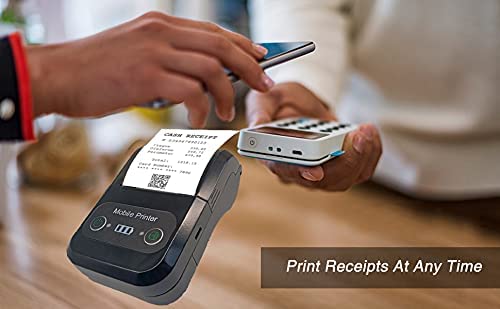
The Milestone MPT-II is a compact and portable 58mm thermal printer designed for various business applications, including retail, restaurants, and mobile logistics. It offers high-speed, clear printing and features Bluetooth connectivity for seamless integration with Android and iOS devices. Its lightweight design and long-lasting battery make it ideal for on-the-go printing needs.

2. મુખ્ય લક્ષણો
- બ્લૂટૂથ પ્રિન્ટિંગ: Supports Android and iOS devices for wireless printing.
- પોર્ટેબિલિટી: Light and compact design allows for printing anywhere, anytime.
- Low Operating Cost: Direct thermal printing eliminates the need for ink ribbons or cartridges, requiring only thermal paper.
- લાંબી બેટરી જીવન: Built-in 7.4V/2500mAh rechargeable lithium battery provides up to 4 hours of continuous printing.
- Versatile Interface: Equipped with both USB and Bluetooth connectivity.
- ESC/POS Compatible: Supports standard ESC/POS print commands for broad software compatibility.

3. પ્રારંભિક સેટઅપ
૨.૧ અનબોક્સિંગ અને સામગ્રી
Carefully unpack the printer and verify all components are present:
- 1 x Milestone MPT-II Thermal Printer
- 1 x USB કેબલ
- 1 x USB Adaptor
- 1 x પેપર રોલ
- ૧ x વપરાશકર્તા માર્ગદર્શિકા (આ દસ્તાવેજ)
૩.૧ પ્રિન્ટર ચાર્જ કરવું
- Connect the USB cable to the printer's charging port.
- Plug the USB adaptor into a standard power outlet.
- The charging indicator light will illuminate. Charge the printer fully before first use (approximately 2.5-3 hours for continuous printing).
૩.૩ થર્મલ પેપર લોડ કરી રહ્યું છે
- Open the paper compartment cover by gently pushing the latch.
- Insert the thermal paper roll with the printing side facing outwards (as shown in Figure 2). Ensure the roll is seated correctly.
- કટીંગ એજની બહાર એક નાની લંબાઈનો કાગળ ખેંચો.
- કાગળના ડબ્બાના કવરને મજબૂતીથી બંધ કરો જ્યાં સુધી તે જગ્યાએ ન આવે.
4. ઓપરેટિંગ સૂચનાઓ
4.1 પાવરિંગ ચાલુ/બંધ
- પાવર ચાલુ કરવા માટે: સૂચક પ્રકાશ પ્રકાશિત થાય ત્યાં સુધી પાવર બટન દબાવો અને પકડી રાખો.
- પાવર બંધ કરવા માટે: સૂચક લાઇટ બંધ ન થાય ત્યાં સુધી પાવર બટન દબાવી રાખો.
4.2 બ્લૂટૂથ કનેક્શન
The MPT-II printer supports Bluetooth connectivity for mobile devices.
- Ensure the printer is powered on and within range of your mobile device.
- On your mobile device (Android/iOS), go to Bluetooth settings and turn Bluetooth on.
- માટે શોધો available devices. The printer will appear as "MPT-II".
- Select "MPT-II" to pair. If prompted for a password, enter 1234 or 0000.
- Once paired, the printer is ready for use with compatible applications.
4.3 Using with Applications
For mobile printing, you will need a compatible application. Milestone recommends downloading RAWBT Printer App or MYXPrint App from the Google Play Store. For iOS, search for compatible thermal printer apps in the App Store.
- Open your chosen printing application.
- Navigate to the printer settings within the app.
- Select the "MPT-II" printer from the list of available Bluetooth devices.
- You can now send print commands from the application.

4.4 USB Connection (for PC)
The printer can also be connected to a PC via USB. You may need to install a printer driver, which is typically available from the manufacturer's website or included on a CD with the product (if applicable).
5. જાળવણી
5.1 પ્રિન્ટરની સફાઈ
To ensure optimal performance and print quality, regularly clean the printer:
- પ્રિન્ટ હેડ: કપાસના સ્વેબનો હળવા હાથે ઉપયોગ કરો dampened with isopropyl alcohol to gently wipe the thermal print head. Allow it to dry completely before use.
- Paper Path: Use a soft, dry cloth or a small brush to remove any paper dust or debris from the paper path.
- બાહ્ય: પ્રિન્ટરના બાહ્ય ભાગને સોફ્ટ, ડી વડે સાફ કરોamp કાપડ કઠોર રસાયણો અથવા ઘર્ષક ક્લીનર્સનો ઉપયોગ કરવાનું ટાળો.
5.2 બેટરી કેર
- પ્રથમ ઉપયોગ કરતા પહેલા બેટરીનો સંપૂર્ણ ચાર્જ કરો.
- વારંવાર બેટરી સંપૂર્ણપણે ખાલી થવાનું ટાળો.
- If storing the printer for an extended period, charge it to about 50% and recharge every few months to prevent battery degradation.
6. મુશ્કેલીનિવારણ
| સમસ્યા | સંભવિત કારણ | ઉકેલ |
|---|---|---|
| પ્રિન્ટર ચાલુ થતું નથી. | બેટરી ઓછી છે અથવા ખતમ થઈ ગઈ છે. | Charge the printer using the provided USB cable and adaptor. |
| બ્લૂટૂથ દ્વારા કનેક્ટ થઈ શકતું નથી. | Bluetooth is off on device; incorrect pairing password; printer not discoverable. | Ensure Bluetooth is enabled on your device. Re-attempt pairing with password 1234 or 0000. Restart both printer and device. |
| No print output or blank paper. | Paper loaded incorrectly; out of paper; print head dirty. | Check paper orientation (printing side out). Replace paper roll if empty. Clean the thermal print head (refer to Maintenance section). |
| નબળી છાપ ગુણવત્તા (ઝાંખા પડી ગયા, રેખાઓ). | Print head dirty; low battery; poor quality thermal paper. | Clean the print head. Charge the printer fully. Use high-quality thermal paper. |
| Printer beeps continuously. | Paper alarm (out of paper or paper jam); low battery reminder. | Check and replace paper roll or clear jam. Charge the printer. |
7. ટેકનિકલ વિશિષ્ટતાઓ
| લક્ષણ | સ્પષ્ટીકરણ |
|---|---|
| પ્રિન્ટીંગ પદ્ધતિ | થર્મલ લાઇન પ્રિન્ટીંગ |
| છાપવાની પહોળાઈ | Paper width 58mm, effective width 58mm |
| પ્રિન્ટ ઘનતા | 576 ડોટ/લાઇન |
| ઠરાવ | 8 dots/mm, 203 DPI |
| પ્રિન્ટ ઝડપ | 70mm/s (Max Print speed Monochrome: 50 ppm) |
| Printer Core Life | 50KM (25% print density or less than 100 million pulses) |
| Printable Content | English, numbers, symbols, characters, pictures, 1D/2D barcode, multi-languages |
| ડેટા કોમ્યુનિકેશન ઈન્ટરફેસ | યુએસબી / બ્લૂટૂથ |
| પાવર સપ્લાય | Machine charging 9V-1.5A |
| બેટરી | Built-in rechargeable 2600mAh lithium-ion battery (7.4V/2500mAh) |
| Continuous Printing Time | 2.5-3 કલાક |
| સૂચના સેટ | ESC / POS સુસંગત |
| પેપર કટીંગ | Manually tear |
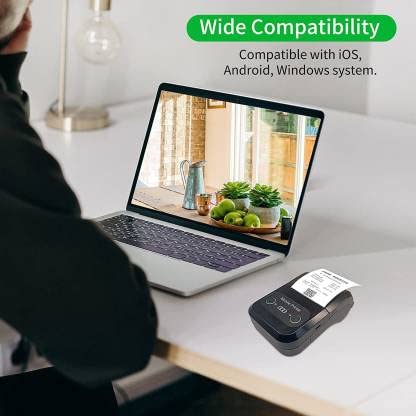
| ઓપરેટિંગ સિસ્ટમ સુસંગતતા | એન્ડ્રોઇડ, આઇઓએસ, વિન્ડોઝ |
| ઉત્પાદન પરિમાણો | ૪૦.૩ડી x ૩૧.૫વોટ x ૩૦.૭એચ સેન્ટીમીટર |
| વસ્તુનું વજન | 310 ગ્રામ |
| સમાવાયેલ ઘટકો | 1 x Thermal Printer, 1 x USB Cable, 1 x USB Adaptor, 1 x Paper Roll, 1 x User Manual |
8. વોરંટી અને સપોર્ટ
This product comes with a 10-day warranty as per the purchase terms. For any technical assistance, troubleshooting beyond this manual, or warranty claims, please contact your retailer or the manufacturer's customer support. Refer to your purchase documentation for specific contact details.
ઉત્પાદક: માઈલસ્ટોન
આયાતકાર: SB RETAILS, SECTOR 28, PRADHIKARAN, PUNE-44, +918888881631


