પરિચય
Welcome to the user manual for your Nothing Ear 1 Wireless Earbuds. This guide provides essential information on setting up, operating, maintaining, and troubleshooting your device to ensure optimal performance and longevity.

Figure 1: Nothing Ear 1 Wireless Earbuds, showcasing their transparent design and in-ear fit.
બૉક્સમાં શું છે
Your Nothing Ear 1 package includes the following components:
- Pair of Nothing Ear 1 Wireless Earbuds
- વાયરલેસ ચાર્જિંગ કેસ
- યુએસબી-સી કેબલ
- S, M, L કદમાં કાનની ટીપ્સ
- Safety Information & User Guide (this document)
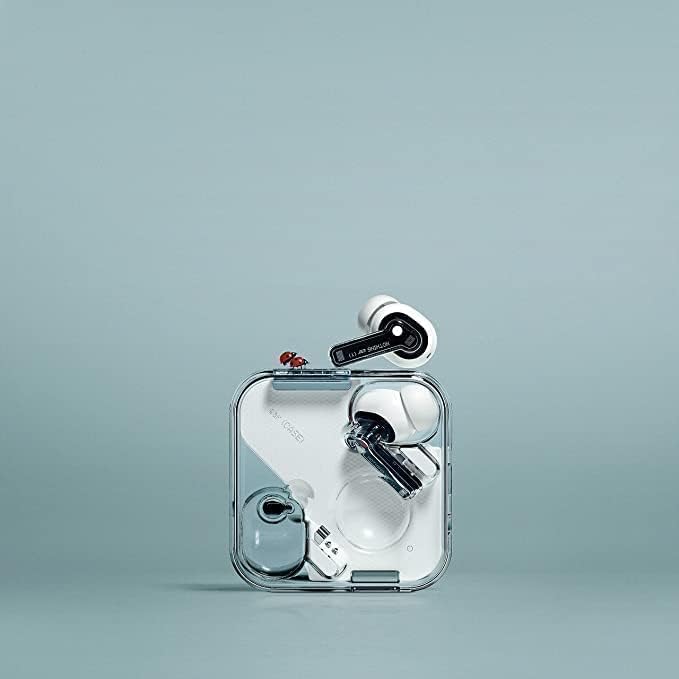
Figure 2: The Nothing Ear 1 earbuds securely placed within their transparent wireless charging case.
સેટઅપ
1. કેસ અને ઇયરબડ્સ ચાર્જ કરવા
પ્રથમ ઉપયોગ કરતા પહેલા, ચાર્જિંગ કેસ અને ઇયરબડ્સને સંપૂર્ણપણે ચાર્જ કરો.
- ચાર્જિંગ કેસમાં બંને ઇયરબડ્સ મૂકો.
- USB-C કેબલને કેસ પરના ચાર્જિંગ પોર્ટ અને પાવર સ્ત્રોત સાથે કનેક્ટ કરો.
- The indicator light on the case will show charging status. A full charge is indicated when the light remains solid.
2. તમારા ઉપકરણ સાથે પેરિંગ
The Nothing Ear 1 earbuds use Bluetooth 5.0 for a stable connection.
- ખાતરી કરો કે ઇયરબડ્સ ચાર્જિંગ કેસમાં છે અને ઢાંકણ ખુલ્લું છે.
- તમારા ઉપકરણ (સ્માર્ટફોન, ટેબ્લેટ, વગેરે) પર, બ્લૂટૂથ સેટિંગ્સ પર જાઓ અને બ્લૂટૂથ સક્ષમ કરો.
- Select "Nothing Ear (1)" from the list of available devices.
- એકવાર કનેક્ટ થઈ ગયા પછી, પુષ્ટિકરણ અવાજ વાગશે, અને ઇયરબડ્સ ઉપયોગ માટે તૈયાર થઈ જશે.

Figure 3: A hand holding the open charging case, ready for pairing or use.
3. Selecting the Right Ear Tips
For optimal sound quality and active noise cancellation, choose the ear tips that provide the best seal and comfort.
- Experiment with the included S, M, and L size ear tips.
- A good fit will feel secure and block out most ambient noise even before active noise cancellation is enabled.
તમારા ઇયરબડ્સનું સંચાલન
ઇયરબડ્સ પહેર્યા
Gently insert the earbuds into your ears, ensuring a snug and comfortable fit. The earbuds are designed for extended wear.

Figure 4: A user demonstrating the proper way to wear the Nothing Ear 1 earbuds.
નિયંત્રણોને ટચ કરો
The Nothing Ear 1 features intuitive touch controls on each earbud:
| ક્રિયા | નિયંત્રણ |
|---|---|
| ચલાવો/થોભો | એક નળ |
| નેક્સ્ટ ટ્રૅક | બે વાર ટૅપ કરો (જમણું ઇયરબડ) |
| પાછલો ટ્રેક | Triple tap (left earbud) |
| કૉલનો જવાબ આપો/સમાપ્ત કરો | એક નળ |
| કૉલ નકારો | લાંબા સમય સુધી દબાવો |
| ANC/પારદર્શકતા મોડ ટૉગલ કરો | Long press (customizable via app) |
| વોલ્યુમ અપ/ડાઉન | Swipe up/down (customizable via app) |
For advanced customization of touch controls, download the Nothing Ear (1) app from your device's app store.
સક્રિય અવાજ રદ (ANC) અને પારદર્શિતા મોડ
The Nothing Ear 1 features Active Noise Cancellation to reduce ambient noise and Transparency Mode to allow you to hear your surroundings.
- સક્રિય અવાજ રદ: Ideal for noisy environments, it actively blocks out external sounds.
- પારદર્શિતા મોડ: Allows you to hear your surroundings without removing the earbuds, useful for conversations or awareness.
Switch between modes using the customizable touch controls or through the Nothing Ear (1) app.
જાળવણી
Cleaning Your Earbuds and Case
નિયમિત સફાઈ અવાજની ગુણવત્તા અને સ્વચ્છતા જાળવવામાં મદદ કરે છે.
- ઇયરબડ્સ અને ચાર્જિંગ કેસ સાફ કરવા માટે નરમ, સૂકા, લિન્ટ-ફ્રી કાપડનો ઉપયોગ કરો.
- For ear tips, remove them from the earbuds and clean with a damp કાપડ, પછી ફરીથી જોડતા પહેલા સારી રીતે સૂકવી લો.
- ઘર્ષક સામગ્રી, આલ્કોહોલ અથવા રાસાયણિક ક્લીનર્સનો ઉપયોગ કરવાનું ટાળો.
- ખાતરી કરો કે ઇયરબડ અને કેસ બંને પર ચાર્જિંગ કોન્ટેક્ટ સ્વચ્છ અને સૂકા છે.

આકૃતિ ૪.૧: વિગતવાર view of a single Nothing Ear 1 earbud, highlighting areas for cleaning.
સંગ્રહ
જ્યારે ઇયરબડ્સ ઉપયોગમાં ન હોય ત્યારે તેમને સુરક્ષિત રાખવા અને ચાર્જ રાખવા માટે હંમેશા તેમના ચાર્જિંગ કેસમાં રાખો.
મુશ્કેલીનિવારણ
| સમસ્યા | સંભવિત કારણ | ઉકેલ |
|---|---|---|
| ઇયરબડ્સ જોડી રહ્યાં નથી | Bluetooth off, out of range, or pairing mode not active. | Ensure Bluetooth is on, earbuds are in case with lid open, and within range. Try forgetting the device on your phone and re-pairing. |
| એક ઈયરબડમાંથી કોઈ અવાજ નથી | Low battery, earbud not properly seated, or connection issue. | Place both earbuds in the case, close the lid for 10 seconds, then open to reset. Ensure both are charged. Clean charging contacts. |
| Poor sound quality / ANC not effective | Improper ear tip fit, dirty earbuds, or environmental interference. | Try different ear tip sizes for a better seal. Clean earbuds, especially the mesh. Move away from strong electromagnetic interference. |
| ઇયરબડ્સ ચાર્જ થતા નથી | Dirty charging contacts, faulty cable/charger, or case battery low. | Clean charging contacts on both earbuds and case. Try a different USB-C cable and power adapter. Ensure the charging case itself is charged. |
| ટચ નિયંત્રણો પ્રતિભાવવિહીન છે | Temporary software glitch or dirty touch surface. | Restart the earbuds by placing them in the case and closing the lid. Clean the touch sensitive area on the earbuds. Check the Nothing Ear (1) app for firmware updates. |
If problems persist, refer to the official Nothing support webસાઇટ અથવા ગ્રાહક સેવાનો સંપર્ક કરો.
વિશિષ્ટતાઓ
- મોડલ નામ: Nothing Ear 1
- મોડલ નંબર: 2140110007A
- બ્રાન્ડ: કંઈ નહીં
- કનેક્ટિવિટી ટેકનોલોજી: વાયરલેસ (બ્લુટુથ)
- બ્લૂટૂથ સંસ્કરણ: 5.0
- અવાજ નિયંત્રણ: સક્રિય અવાજ રદ
- ફોર્મ ફેક્ટર: કાન માં
- નિયંત્રણ પ્રકાર: નિયંત્રણને ટચ કરો
- બેટરી જીવન: Up to 5 hours (earbuds), extended with charging case
- ઓડિયો ડ્રાઈવર પ્રકાર: ડાયનેમિક ડ્રાઈવર
- Item Weight (Earbud): આશરે 0.176 ઔંસ (5 ગ્રામ)
- Product Dimensions (Case): 0.93 x 2.31 x 2.31 ઇંચ
- કેસ સામગ્રી વહન: પ્લાસ્ટિક અથવા એલ્યુમિનિયમ
- સમાવાયેલ ઘટકો: Wireless Charging Case, USB-C Cable, Ear tips (S, M, L)
- સુસંગત ઉપકરણો: Smartphones, Laptops, Desktops, Tablets, Smart Speakers, Televisions, Car Audio Systems, Cellphones
વોરંટી અને આધાર
For detailed warranty information and customer support, please visit the official Nothing webસાઇટ પર જાઓ અથવા તેમની ગ્રાહક સેવાનો સીધો સંપર્ક કરો. વોરંટી દાવાઓ માટે ખરીદીનો પુરાવો રાખો.
Supportનલાઇન સપોર્ટ: nothing.tech/pages/support


