1. પરિચય
The ASUS Notebook E210 is a compact and lightweight 11.6-inch laptop designed for productivity and portability. It features an Intel Celeron N4020 Processor, 4GB RAM, and 64GB eMMC storage, running Windows 10 in S mode. This manual provides essential information for setting up, operating, and maintaining your device.

Figure 1: ASUS Notebook E210, showcasing its compact design with the screen displaying a colorful desktop background.
2. સેટઅપ
૧.૧ અનબોક્સિંગ અને પ્રારંભિક નિરીક્ષણ
પેકેજિંગમાંથી બધા ઘટકો કાળજીપૂર્વક દૂર કરો. ખાતરી કરો કે નીચેની વસ્તુઓ શામેલ છે:
- ASUS Notebook E210 (Model: E210MA-DB02)
- પાવર એડેપ્ટર અને કોર્ડ
- વપરાશકર્તા માર્ગદર્શિકા
- વોરંટી કાર્ડ
Inspect the laptop for any physical damage. If any components are missing or damaged, contact your retailer or ASUS support.
૪.૩ પાવર ચાલુ અને પ્રારંભિક ગોઠવણી
- પાવર એડેપ્ટરને લેપટોપના ચાર્જિંગ પોર્ટ સાથે અને પછી પાવર આઉટલેટ સાથે કનેક્ટ કરો.
- લેપટોપનું ઢાંકણ ખોલો. લેપટોપ આપમેળે ચાલુ થઈ શકે છે, અથવા તમારે પાવર બટન દબાવવાની જરૂર પડી શકે છે.
- Follow the on-screen instructions to complete the Windows 10 Home in S Mode setup, including language selection, network connection, and user account creation.
- Ensure the laptop is fully charged before its first use.
3. ઓપરેટિંગ સૂચનાઓ
3.1 મૂળભૂત ઉપયોગ
- પાવર ચાલુ/બંધ: ચાલુ કરવા માટે પાવર બટન દબાવો. બંધ કરવા માટે, સ્ટાર્ટ બટન પર ક્લિક કરો, પછી પાવર > બંધ કરો.
- નિદ્રા સ્થિતિ: ઢાંકણ બંધ કરો અથવા સ્ટાર્ટ બટન પર ક્લિક કરો, પછી પાવર > સ્લીપ બટન પર ક્લિક કરો.
- કીબોર્ડ: The full-size keyboard offers comfortable typing with 1.4mm key travel.
- ટચપેડ: The touchpad supports multi-gesture input for navigation and control.
3.2 Windows 10 in S Mode
Windows 10 in S mode is a version of Windows 10 that is streamlined for security and performance, exclusively using apps from the Microsoft Store. If you require apps outside the Microsoft Store, you can switch out of S mode. This is a one-way switch and cannot be undone.
- ખોલો સ્ટાર્ટ મેનૂ અને પસંદ કરો સેટિંગ્સ.
- પર જાઓ અપડેટ અને સુરક્ષા > સક્રિયકરણ.
- "Switch to Windows 10 Home" અથવા "Switch to Windows 10 Pro" વિભાગમાં, પસંદ કરો સ્ટોર પર જાઓ.
- માઈક્રોસોફ્ટ સ્ટોરમાં દેખાતા "સ્વિચ આઉટ ઓફ એસ મોડ" (અથવા સમાન) પેજ પર, ક્લિક કરો મેળવો બટન
- After confirming, you will be switched out of S mode.
4. ફીચર્સ ઓવરview
- કાર્યક્ષમ પ્રદર્શન: Powered by the Intel Celeron N4020 Processor for daily computing tasks.
- કોમ્પેક્ટ અને હલકો: Designed for portability, measuring 0.7 inches thin and weighing 2.31 lbs.
- 11.6” HD Display: A clear 1366 x 768 resolution display suitable for productivity and media consumption.
- Integrated NumberPad: The touchpad features an illuminated NumberPad for efficient data entry.
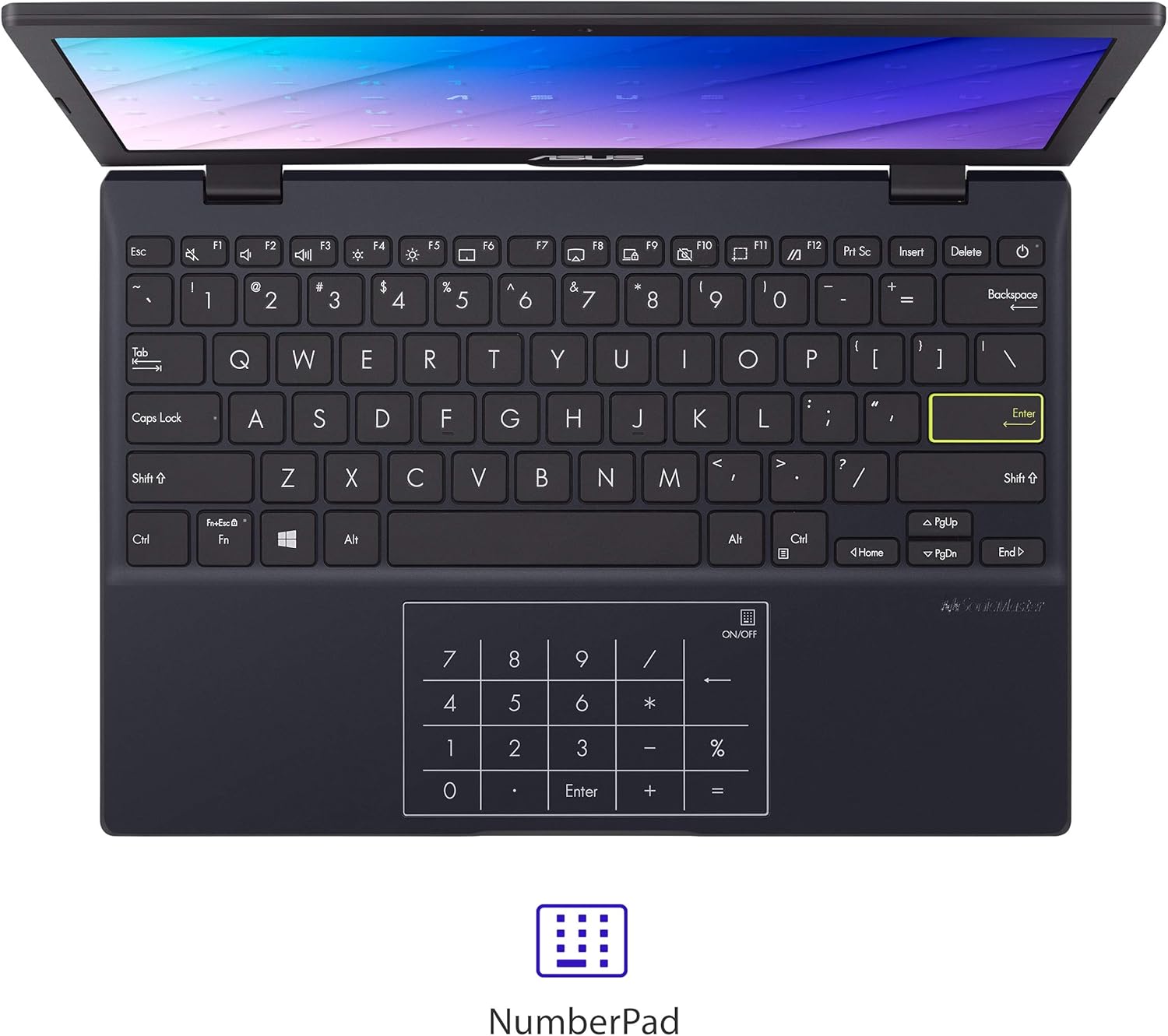
Figure 2: The touchpad with integrated NumberPad for quick numerical input.
- 180° Lay-Flat Hinge: Allows the laptop to open completely flat for easy sharing and collaboration.

Figure 3: The laptop's 180-degree lay-flat hinge allows for versatile viewing અને શેરિંગ.
- લાંબી બેટરી જીવન: Provides up to 12 hours of battery life for extended use on the go.
5. બંદરો અને કનેક્ટિવિટી
The ASUS Notebook E210 offers a variety of ports for connecting peripherals and external displays:
- 1x USB 2.0 Type-A
- 1x USB 3.2 Gen 1 Type-A
- 1x USB 3.2 Gen 1 Type-C
- 1x HDMI 1.4
- ૧x ૩.૫ મીમી કોમ્બો ઓડિયો જેક
- Wi-Fi 802.11ac
- બ્લૂટૂથ
6. જાળવણી
- સફાઈ: Use a soft, lint-free cloth to clean the screen and chassis. Avoid harsh chemicals.
- બેટરી સંભાળ: બેટરી લાઇફ વધારવા માટે, વારંવાર બેટરીને સંપૂર્ણપણે ડિસ્ચાર્જ કરવાનું ટાળો. લેપટોપને ઠંડી, સૂકી જગ્યાએ સ્ટોર કરો.
- સૉફ્ટવેર અપડેટ્સ: શ્રેષ્ઠ કામગીરી અને સુરક્ષા સુનિશ્ચિત કરવા માટે વિન્ડોઝ અને ડ્રાઇવરોને નિયમિતપણે અપડેટ કરો.
- સંગ્રહ વ્યવસ્થાપન: સમયાંતરે બિનજરૂરી સાફ કરો files and applications to maintain adequate storage space.
7. મુશ્કેલીનિવારણ
- લેપટોપ ચાલુ નથી થઈ રહ્યું: ખાતરી કરો કે પાવર એડેપ્ટર સુરક્ષિત રીતે જોડાયેલ છે અને બેટરી પર્યાપ્ત ચાર્જ થયેલ છે. અલગ પાવર આઉટલેટ અજમાવી જુઓ.
- ધીમી કામગીરી: Close unnecessary applications, check for background updates, and ensure sufficient free storage space.
- વાઇ-ફાઇ કનેક્ટિવિટી સમસ્યાઓ: Restart the laptop and your Wi-Fi router. Check network settings and ensure Wi-Fi is enabled.
- Screen issues: If the screen is blank or flickering, try restarting the laptop. Connect to an external monitor to check if the issue is with the laptop's display or graphics.
8. સ્પષ્ટીકરણો
| લક્ષણ | વિગત |
|---|---|
| બ્રાન્ડ | ASUS |
| મોડેલનું નામ | એલ210 |
| આઇટમ મોડલ નંબર | E210MA-DB02 |
| સ્ક્રીન માપ | 11.6 ઇંચ |
| સ્ક્રીન રીઝોલ્યુશન | 1366 x 768 પિક્સેલ્સ |
| પ્રોસેસર | Intel Celeron N4020 (1.1 GHz, up to 2.8 GHz) |
| રેમ | 4 GB LPDDR4 |
| હાર્ડ ડ્રાઈવ | 64 GB eMMC Flash Storage |
| ગ્રાફિક્સ કોપ્રોસેસર | ઇન્ટેલ UHD ગ્રાફિક્સ 600 |
| ઓપરેટિંગ સિસ્ટમ | વિન્ડોઝ 10 હોમ એસ મોડમાં |
| વાયરલેસ પ્રકાર | 802.11ac, Bluetooth |
| યુએસબી 2.0 પોર્ટ્સ | 1 |
| યુએસબી 3.0 પોર્ટ્સ | 2 |
| વસ્તુનું વજન | 2.31 lbs |
| ઉત્પાદન પરિમાણો | 10.98 x 7.52 x 0.67 ઇંચ |
| રંગ | સ્ટાર બ્લેક |
| બેટરીઓ | 1 લિથિયમ આયન બેટરી (સમાવેલ) |
9. વોરંટી અને સપોર્ટ
9.1 વોરંટી માહિતી
This ASUS Notebook E210 is covered by a manufacturer's warranty. Please refer to the included Warranty Card for specific terms, conditions, and duration of coverage. Keep your proof of purchase for warranty claims.
9.2 ગ્રાહક સપોર્ટ
For technical assistance, troubleshooting, or service inquiries, please visit the official ASUS support website or contact their customer service. Details can be found on the ASUS webસાઇટ અથવા તમારા ઉત્પાદન દસ્તાવેજોમાં.


