1. પરિચય અને સલામતી માહિતી
ખરીદી બદલ આભારasing the SMART TECH 32HN10T2 32" HD LED Television. This manual provides important instructions for the safe and efficient operation of your new television. Please read it thoroughly before use and retain it for future reference.
મહત્વપૂર્ણ સલામતી સૂચનાઓ:
- આ સૂચનાઓ વાંચો.
- આ સૂચનાઓ રાખો.
- બધી ચેતવણીઓ પર ધ્યાન આપો.
- બધી સૂચનાઓનું પાલન કરો.
- પાણીની નજીક આ ઉપકરણનો ઉપયોગ કરશો નહીં.
- માત્ર સૂકા કપડાથી સાફ કરો.
- કોઈપણ વેન્ટિલેશન છિદ્રોને અવરોધિત કરશો નહીં. ઉત્પાદકની સૂચનાઓ અનુસાર ઇન્સ્ટોલ કરો.
- રેડિએટર્સ, હીટ રજિસ્ટર, સ્ટોવ અથવા અન્ય ઉપકરણો જેવા કોઈપણ હીટ સ્ત્રોતોની નજીક ઇન્સ્ટોલ કરશો નહીં (સહિત ampલિફાયર) જે ગરમી ઉત્પન્ન કરે છે.
- પાવર કોર્ડને ચાલવાથી અથવા પિંચ થવાથી સુરક્ષિત કરો, ખાસ કરીને પ્લગ, સગવડતા રીસેપ્ટેકલ્સ અને તે બિંદુ જ્યાં તેઓ ઉપકરણમાંથી બહાર નીકળે છે.
- માત્ર ઉત્પાદક દ્વારા ઉલ્લેખિત જોડાણો/એસેસરીઝનો ઉપયોગ કરો.
- વીજળીના વાવાઝોડા દરમિયાન અથવા લાંબા સમય સુધી ઉપયોગ ન થાય ત્યારે આ ઉપકરણને અનપ્લગ કરો.
- તમામ સેવાનો સંદર્ભ લાયક સેવા કર્મચારીઓને આપો. જ્યારે ઉપકરણને કોઈપણ રીતે નુકસાન થયું હોય, જેમ કે પાવર-સપ્લાય કોર્ડ અથવા પ્લગને નુકસાન થયું હોય, પ્રવાહી ઢોળાયેલું હોય અથવા ઉપકરણમાં વસ્તુઓ પડી હોય, ઉપકરણ વરસાદ અથવા ભેજના સંપર્કમાં આવ્યું હોય, સામાન્ય રીતે કામ કરતું નથી ત્યારે સર્વિસિંગ જરૂરી છે. , અથવા પડતું મૂકવામાં આવ્યું છે.

આકૃતિ 1.1: આગળ view of the SMART TECH 32HN10T2 32-inch HD LED Television. This image displays the television's screen, the "SMART TECH" logo at the bottom center, and various feature icons on the top left, including "32"", "HD ready", "DVB T2/S2/C", "CI+", "Dolby Audio", and "HDMI".
2. પેકેજ સામગ્રી
Please check that all items are present and in good condition upon unpacking your television.
- SMART TECH 32HN10T2 32" HD LED Television
- રીમોટ કંટ્રોલ (RC)
- TV Stand (Feet)
- AAA Batteries (2x) for Remote Control
3. સેટઅપ
૩.૧ ટીવી સ્ટેન્ડ ઇન્સ્ટોલ કરવું
To install the TV stand, carefully place the television face down on a soft, flat surface to prevent screen damage. Align the stand feet with the corresponding slots on the bottom of the TV and secure them with the provided screws.

આકૃતિ 3.1: The SMART TECH 32HN10T2 television positioned on its stand on a media console, demonstrating a typical setup.
૩.૩ વોલ માઉન્ટિંગ (વૈકલ્પિક)
The television supports VESA wall mounts. The VESA mounting pattern for this model is 100mm x 100mm. Ensure you use a compatible wall mount bracket and follow the instructions provided with the wall mount. Professional installation is recommended for wall mounting.

આકૃતિ 3.2: પાછળ view of the television, highlighting the VESA mounting points (100mm x 100mm) and various input/output ports. These ports include USB 2, USB 1, DVB-T/T2, DVB-S/S2, HDMI 1, HDMI 2, HDMI 3, AV IN, and COAXIAL.

આકૃતિ 3.3: The television wall-mounted above a media console, illustrating an alternative installation method.
૫.૩ બાહ્ય ઉપકરણોને જોડવા
The SMART TECH 32HN10T2 TV offers multiple connectivity options:
- એચડીએમઆઈ: Connect Blu-ray players, game consoles, or other HDMI-enabled devices to HDMI 1, HDMI 2, or HDMI 3 ports.
- યુએસબી: Insert USB drives into USB 1 or USB 2 ports for media playback.
- DVB-T/T2 (Antenna): Connect a terrestrial antenna for digital broadcast reception.
- DVB-S/S2 (Satellite): Connect a satellite dish for satellite broadcast reception.
- AV ઇન: Use for older devices with composite video and stereo audio outputs.
- કોક્સિયલ: સાઉન્ડ સિસ્ટમમાં ડિજિટલ ઓડિયો આઉટપુટ માટે.
3.4 પાવર કનેક્શન
After connecting all necessary cables, plug the power cord into the TV's power input and then into a suitable wall outlet.
4. ઓપરેટિંગ સૂચનાઓ
4.1 રીમોટ કંટ્રોલ ઓવરview
The remote control allows you to access all functions of your television. Insert the two AAA batteries into the remote control, ensuring correct polarity.

આકૃતિ 4.1: This image displays the overall dimensions of the television (732mm width, 483mm height, 180mm depth) and an illustration of the remote control with its various buttons.
4.2 Initial Setup and Channel Scan
Upon first power-on, the TV will guide you through the initial setup process, including language selection, country, and channel scanning for DVB-T2/S2 signals. Follow the on-screen prompts.
4.3 મૂળભૂત કાર્યો
- પાવર ચાલુ/બંધ: દબાવો પાવર રીમોટ કંટ્રોલ પરનું બટન.
- ચેનલ પસંદગી: નો ઉપયોગ કરો સીએચ +/- buttons or numeric buttons to change channels.
- વોલ્યુમ નિયંત્રણ: નો ઉપયોગ કરો VOL +/- વોલ્યુમ સમાયોજિત કરવા માટે બટનો.
- ઇનપુટ સ્ત્રોત: દબાવો સ્ત્રોત button to select between HDMI, USB, DVB-T/T2, DVB-S/S2, or AV inputs.
- મેનુ નેવિગેશન: નો ઉપયોગ કરો મેનુ button to access settings, and the arrow keys (ઉપર/નીચે/ડાબે/જમણે) અને OK નેવિગેટ કરવા માટે બટન.
5. જાળવણી
૪.૧ ટીવી સાફ કરવું
- સફાઈ કરતા પહેલા હંમેશા ટીવીને પાવર આઉટલેટમાંથી અનપ્લગ કરો.
- સ્ક્રીન અને કેબિનેટ સાફ કરવા માટે નરમ, સૂકા કપડાનો ઉપયોગ કરો.
- હઠીલા ગુણ માટે, થોડું ડીampકપડાને પાણી અથવા હળવા, ઘર્ષણ ન કરતા સ્ક્રીન ક્લીનરથી ઢાંકી દો. ક્યારેય પણ સ્ક્રીન પર સીધું ક્લીનર સ્પ્રે ન કરો.
- ઘર્ષક ક્લીનર્સ, મીણ અથવા સોલવન્ટ્સનો ઉપયોગ કરવાનું ટાળો કારણ કે તે ટીવીના ફિનિશને નુકસાન પહોંચાડી શકે છે.
૪.૨ રિમોટ કંટ્રોલ બેટરી રિપ્લેસમેન્ટ
If the remote control's response becomes sluggish, replace the two AAA batteries with new ones. Ensure correct polarity when inserting the new batteries.
6. મુશ્કેલીનિવારણ
ગ્રાહક સપોર્ટનો સંપર્ક કરતા પહેલા, કૃપા કરીને નીચેની સામાન્ય સમસ્યાઓ અને ઉકેલોનો સંદર્ભ લો:
| સમસ્યા | સંભવિત કારણ / ઉકેલ |
|---|---|
| કોઈ શક્તિ નથી |
|
| કોઈ ચિત્ર નથી, પણ અવાજ છે. |
|
| અવાજ નથી, પણ ચિત્ર હાજર છે. |
|
| રીમોટ કંટ્રોલ કામ કરતું નથી |
|
| "નો સિગ્નલ" સંદેશ |
|
7. સ્પષ્ટીકરણો
| લક્ષણ | વિગત |
|---|---|
| બ્રાન્ડ | સ્માર્ટ ટેક |
| મોડલ નંબર | 32HN10T2 |
| સ્ક્રીન માપ | ૬૫ ઇંચ (૧૬૬ સે.મી. કર્ણ) |
| ડિસ્પ્લે ટેકનોલોજી | એલઇડી |
| ઠરાવ | 720p (1366 x 768 પિક્સેલ્સ) |
| તાજું દર | 60 હર્ટ્ઝ |
| કનેક્ટિવિટી ટેકનોલોજી | HDMI, USB |
| યુએસબી પોર્ટની સંખ્યા | 2 |
| HDMI પોર્ટ્સ | 3 |
| ટ્યુનર પ્રકાર | DVB-T2/S2 (Triple Tuner) |
| ઓડિયો લક્ષણો | ડોલ્બી ઓડિયો |
| ખાસ લક્ષણો | ફ્લેટ સ્ક્રીન |
| રંગ | કાળો |
| પાવર વપરાશ (SDR) | 26.0 ડબ્લ્યુ |
| ઉર્જા કાર્યક્ષમતા વર્ગ (SDR) | E |
| સ્ટેન્ડબાય પાવર વપરાશ | 0.5 ડબ્લ્યુ |
| નેટવર્ક સ્ટેન્ડબાય પાવર વપરાશ | 2.0 ડબ્લ્યુ |
| VESA માઉન્ટિંગ પેટર્ન | 100mm x 100mm |
| સમાવાયેલ ઘટકો | TV, Remote Control, Stand Feet |
| બેટરીનો પ્રકાર (રિમોટ) | 2 AAA (સમાવેલ) |
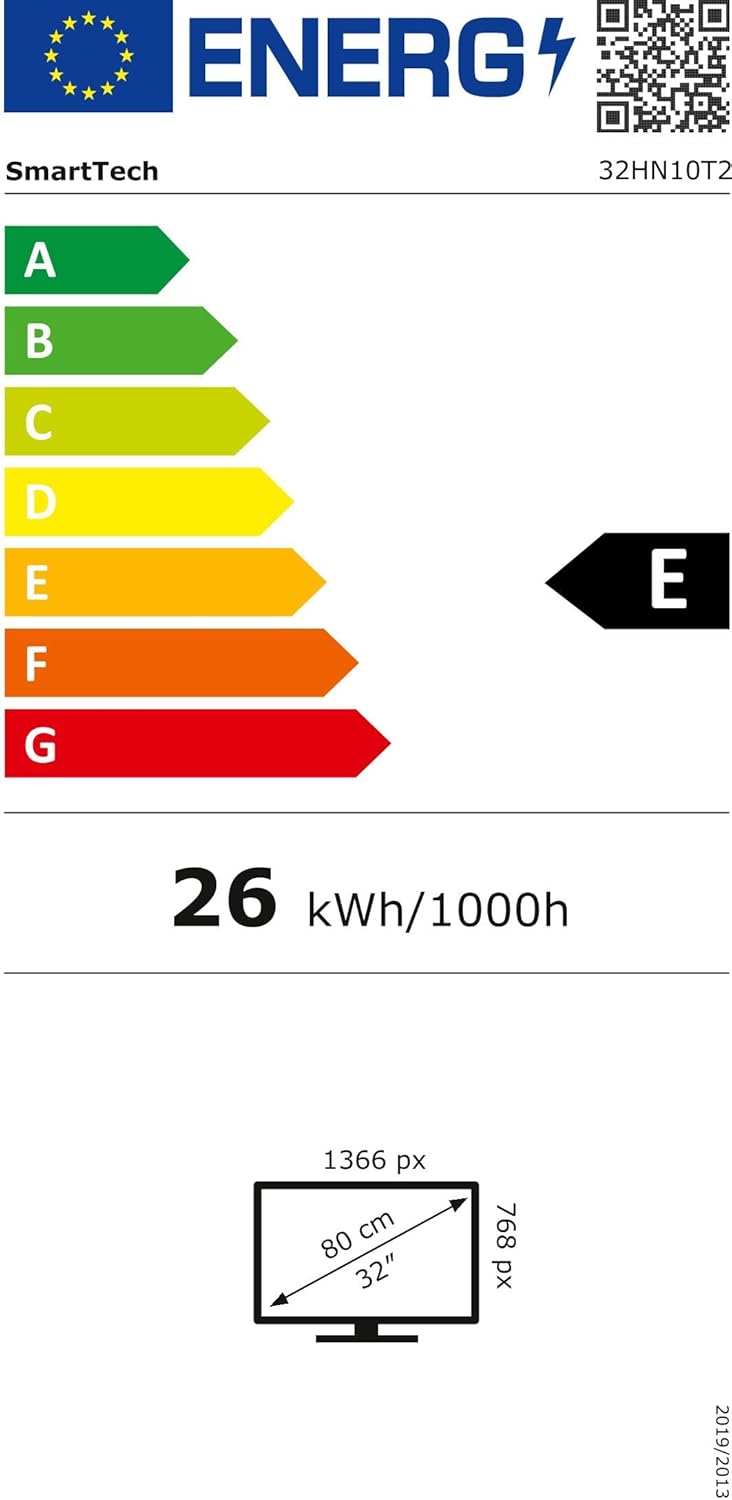
આકૃતિ 7.1: Energy efficiency label for the SMART TECH 32HN10T2, indicating an 'E' class rating and 26 kWh per 1000 hours of operation.
For detailed product information and energy efficiency data, please refer to the EPREL database: https://eprel.ec.europa.eu/qr/964700
8. વોરંટી અને સપોર્ટ
SMART TECH products are designed and manufactured to the highest quality standards. For warranty information, please refer to the warranty card included with your product or contact your retailer.
ગ્રાહક આધાર:
- ઉત્પાદક: Express LUCK Europe Electric Kft.
- Webસાઇટ: www.smarttech-tv.com
- ઈમેલ: csilla.simita-tompa@expressluck.hu
- ફોન: +3624889353
- સરનામું: Sales, Leshegy út 2., 2310 Szigetszentmiklós, Pest, HU
Please note that spare parts availability and software updates are not explicitly guaranteed beyond initial purchase, as per available product information.


