પરિચય
ખરીદી બદલ આભારasing the Roxel RDR-80 Digital Radio. This manual provides essential information for setting up, operating, and maintaining your device. Please read it thoroughly before use to ensure optimal performance and safety.
મહત્વપૂર્ણ સલામતી માહિતી
- એકમને વરસાદ અથવા ભેજ માટે ખુલ્લા કરશો નહીં.
- Do not disassemble the unit. Refer servicing to qualified personnel.
- એકમની આસપાસ યોગ્ય વેન્ટિલેશનની ખાતરી કરો.
- ફક્ત પ્રદાન કરેલ પાવર એડેપ્ટરનો ઉપયોગ કરો.
- ગરમીના સ્રોત અને સીધા સૂર્યપ્રકાશથી દૂર રહો.
પેકેજ સામગ્રી
- Roxel RDR-80 Digital Radio
- Power Adapter (UK plug)
- વપરાશકર્તા માર્ગદર્શિકા
ઉત્પાદન ઓવરview

આગળનો કોણીય View: Shows the overall design of the Roxel RDR-80 radio, featuring its white and cappuccino color scheme, dual speakers, central display, and top-mounted controls with a carry handle.

આગળ View: સીધો મોરચો view highlighting the 2.4-inch TFT color display, the Roxel branding, and the two speaker grilles. The display shows DAB radio information.
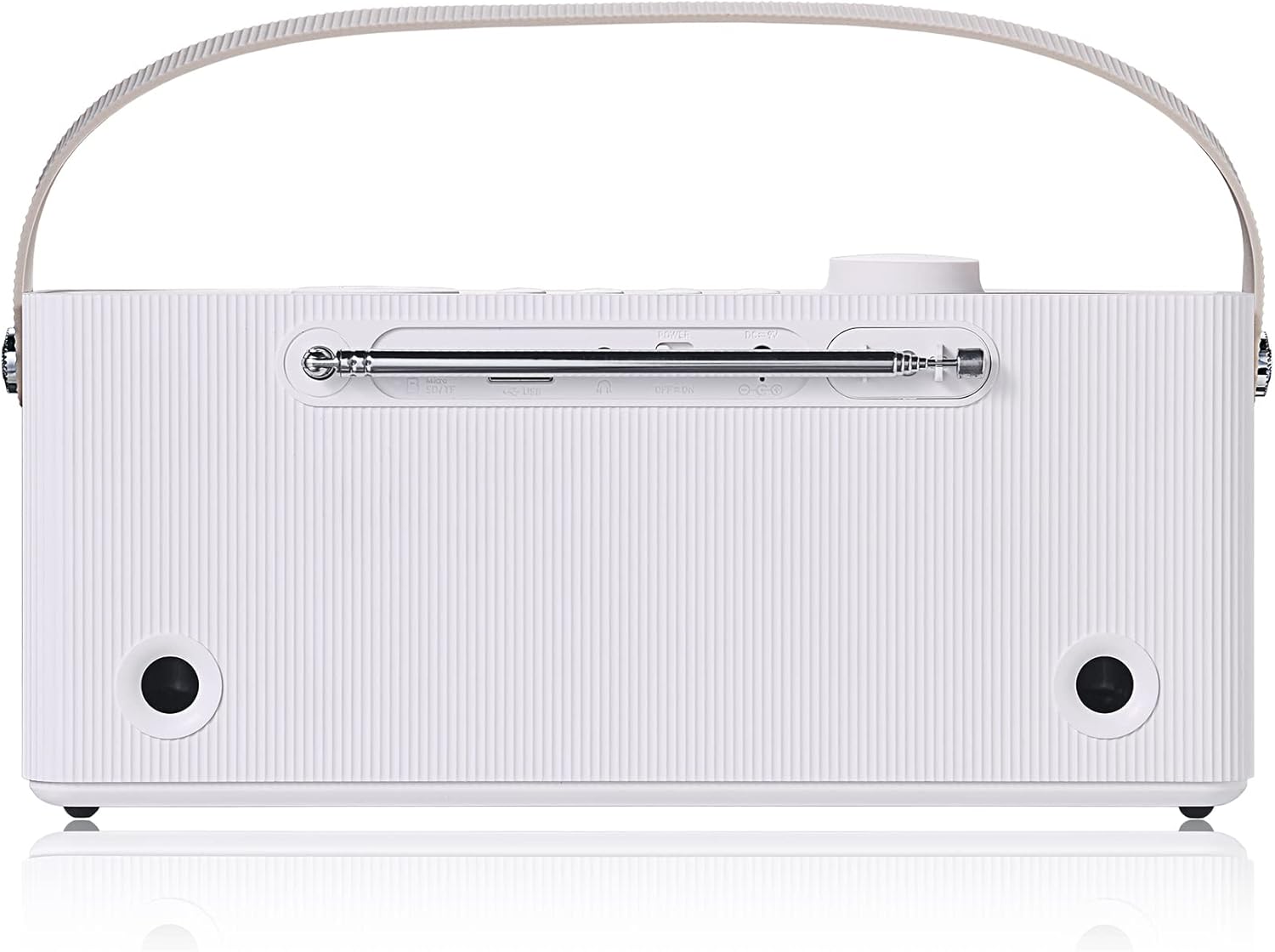
પાછળ View: Displays the back panel of the radio, showing the extendable antenna, USB port, Micro SD card slot, 3.5mm AUX input, and the power input port. This view also shows the rear bass ports.

રંગ વિકલ્પો: The Roxel RDR-80 is available in White/Cappuccino and Black/Walnut finishes, offering aesthetic versatility.
નિયંત્રણો અને બંદરો
- પાવર/વોલ્યુમ નોબ: Located on the top, used to turn the unit on/off and adjust volume.
- મોડ બટન: Switches between DAB, FM, Bluetooth, USB, and TF card modes.
- Preset Buttons (P1-P4): Quick access to stored radio stations.
- નેવિગેશન બટનો: Used for menu navigation and station tuning.
- પ્રદર્શન: 2.4-inch TFT color screen for information display.
- યુએસબી પોર્ટ: MP3 વગાડવા માટે fileયુએસબી ડ્રાઇવમાંથી s.
- ટીએફ કાર્ડ સ્લોટ: MP3 વગાડવા માટે fileમાઇક્રો એસડી કાર્ડમાંથી.
- AUX ઇનપુટ (3.5mm): બાહ્ય ઑડિઓ ઉપકરણોને કનેક્ટ કરો.
- હેડફોન જેક (3.5 મીમી): ખાનગી સાંભળવા માટે.
- ડી.સી. માં: Power input for the included adapter.
- ટેલિસ્કોપિક એન્ટેના: શ્રેષ્ઠ રેડિયો રિસેપ્શન માટે.
પ્રારંભિક સેટઅપ
- પાવર કનેક્શન: Connect the provided power adapter to the DC IN port on the back of the radio and plug it into a wall outlet. Alternatively, ensure the internal battery is charged for portable use.
- એન્ટેના: Fully extend the telescopic antenna for best radio reception.
- પ્રથમ પાવર ચાલુ: Press the Power/Volume knob to turn on the radio. The unit will automatically scan for available DAB/DAB+ stations and set the time and date. This process may take a few minutes.
- Language Selection (if prompted): If prompted, use the navigation buttons to select your preferred language and confirm.
Note: For optimal battery life, fully charge the unit before first use. The radio can operate for up to 12 hours on a single charge.
ઓપરેટિંગ સૂચનાઓ

The Roxel RDR-80 is packed with multiple functions including USB, Micro SD, Bluetooth, DAB/DAB+ radio, and a 2.4" TFT screen.
1. Radio Mode (DAB/DAB+ and FM)
- સ્વિચિંગ મોડ્સ: દબાવો મોડ button repeatedly to cycle between DAB, FM, Bluetooth, USB, and TF Card modes.
- DAB/DAB+ રેડિયો:
- After initial setup, the radio will automatically scan for DAB/DAB+ stations.
- Use the navigation buttons to browse through the available stations.
- દબાવો દાખલ કરો સ્ટેશન પસંદ કરવા માટે બટન.
- સ્ટોર પ્રીસેટ્સનો: To save a station, press and hold one of the P1-P4 preset buttons until "Preset Saved" appears. You can store up to 20 DAB stations.
- રિસીલ્ડિંગ પ્રીસેટ્સનો: ઇચ્છિતને સંક્ષિપ્તમાં દબાવો P1-P4 button to recall a saved station.
- એફએમ રેડિયો:
- In FM mode, use the navigation buttons to manually tune to a frequency.
- Press and hold the navigation buttons to auto-scan for the next available station.
- સ્ટોર પ્રીસેટ્સનો: Similar to DAB, press and hold a P1-P4 button to save the current FM station. You can store up to 20 FM stations.
- રિસીલ્ડિંગ પ્રીસેટ્સનો: ઇચ્છિતને સંક્ષિપ્તમાં દબાવો P1-P4 બટન
2. બ્લૂટૂથ મોડ
- દબાવો મોડ બ્લૂટૂથ મોડ પસંદ કરવા માટે બટન. ડિસ્પ્લે "બ્લુટુથ પેરિંગ" અથવા તેના જેવું બતાવશે.
- On your Bluetooth-enabled device (smartphone, tablet, etc.), search for "Roxel RDR-80" in the Bluetooth settings.
- Select "Roxel RDR-80" to pair. Once connected, you will hear a confirmation sound, and the display will indicate a successful connection.
- You can now stream audio from your device to the Roxel RDR-80.
3. USB / TF Card Playback
- Insert a USB flash drive into the USB port or a Micro SD (TF) card into the TF card slot on the back of the radio.
- દબાવો મોડ button to select USB or TF Card mode. The radio will automatically detect and begin playing MP3 files.
- Use the navigation buttons to skip tracks or pause/play.
- Note: The RDR-80 supports MP3 files and plays them in a flat list. It does not support browsing by album, artist, or folder structure.
4. એલાર્મ ઘડિયાળ કાર્ય
- એલાર્મ સેટ કરી રહ્યું છે:
- દબાવો એલાર્મ button (if available, or navigate through menu).
- Use navigation buttons to set the alarm time (hour and minute).
- Select the alarm source: DAB radio, FM radio, or Buzzer.
- Choose the alarm frequency: Once, Daily, Weekdays, or Weekends.
- એલાર્મ સક્રિય કરવા માટે સેટિંગ્સની પુષ્ટિ કરો.
- Snooze/Stop Alarm: When the alarm sounds, press any button (except power) to snooze, or press the Power button to turn off the alarm.

The Roxel RDR-80 can function as a bedside alarm clock, waking you up with your preferred radio station or a buzzer.
5. Sleep Timer Function
- દબાવો ઊંઘ button (or navigate through menu).
- Use navigation buttons to select the desired sleep timer duration (e.g., 15, 30, 60, 90 minutes).
- પસંદ કરેલા સમય પછી રેડિયો આપમેળે બંધ થઈ જશે.
6. પોર્ટેબલ ઉપયોગ
The Roxel RDR-80 features a built-in rechargeable battery, providing up to 12 hours of playback on a single charge, making it ideal for use around the home, garden, or during outdoor activities.

Enjoy your favorite audio during indoor or outdoor activities like yoga, thanks to the radio's portability.

The compact design and convenient carry handle make the RDR-80 an ideal companion for picnics or outdoor relaxation.
7. Private Listening (Headphones)
- Plug any standard 3.5mm headphones into the headphone jack on the back of the unit.
- The internal speakers will automatically mute, allowing for private listening.
જાળવણી
- સફાઈ: રેડિયોના બાહ્ય ભાગને સાફ કરવા માટે નરમ, સૂકા કપડાનો ઉપયોગ કરો. ઘર્ષક ક્લીનર્સ અથવા સોલવન્ટનો ઉપયોગ કરશો નહીં.
- સંગ્રહ: If storing the radio for an extended period, ensure the battery is partially charged and store it in a cool, dry place.
- બેટરી સંભાળ: To prolong battery life, avoid fully discharging the battery frequently. Recharge it regularly.
મુશ્કેલીનિવારણ
| સમસ્યા | સંભવિત કારણ / ઉકેલ |
|---|---|
| પાવર નથી / યુનિટ ચાલુ થતું નથી. |
|
| ખરાબ રેડિયો રિસેપ્શન (DAB/FM). |
|
| બ્લૂટૂથ પેરિંગ સમસ્યાઓ. |
|
| USB/TF card playback not working. |
|
| એલાર્મ વાગતું નથી. |
|
વિશિષ્ટતાઓ
| બ્રાન્ડ | રોક્સેલ |
| મોડલ નંબર | RDR-80 |
| રંગ | White and Cappuccino |
| કનેક્ટિવિટી ટેકનોલોજી | Bluetooth (BT V5.0) |
| ખાસ લક્ષણો | FM Radio, 12-hour Playtime, DAB/DAB+ Radio, 2.4" TFT Color Screen, Portable Speaker/Radio, USB/TF Card Playback, Alarm Clock, Sleep Timer, Headphone Jack |
| સામગ્રી | પ્લાસ્ટિક |
| સુસંગત ઉપકરણો | iOS devices, Android devices, Computers |
| રિચાર્જેબલ બેટરી | હા |
| ઉત્પાદન પરિમાણો | 26 cm (L) x 10 cm (W) x 6 cm (H) |
| ટ્યુનિંગ ટેકનોલોજી | DAB+/FM |
| પાવર સ્ત્રોત | Battery Powered / Mains Powered (via adapter) |
| સપોર્ટેડ રેડિયો બેન્ડ્સ | એફએમ/ડીએબી/ડીએબી+ |
| સમાવાયેલ ઘટકો | પાવર એડેપ્ટર, વપરાશકર્તા માર્ગદર્શિકા |
વોરંટી અને આધાર
Roxel products are designed for reliability and performance. For warranty information or technical support, please refer to the contact details provided with your purchase documentation or visit the official Roxel webસાઇટ. વોરંટી દાવાઓ માટે તમારી ખરીદીનો પુરાવો રાખો.
For further assistance, please contact Roxel customer service.


