1. પરિચય
The Roxel RSB380 is an all-in-one 2.0 channel soundbar designed to significantly enhance your television's audio experience. Featuring built-in high-range speakers and multiple connectivity options, it delivers clear and powerful sound for movies, music, and games.
2. સલામતી માહિતી
- ઉપયોગ કરતા પહેલા બધી સૂચનાઓ કાળજીપૂર્વક વાંચો.
- વરસાદ અથવા ભેજ માટે સાઉન્ડબારને ખુલ્લા ન કરો.
- કોઈપણ વેન્ટિલેશન ઓપનિંગ્સને અવરોધિત કરશો નહીં.
- Ensure the power cable is not pinched or walked on.
- માત્ર ઉત્પાદક દ્વારા ઉલ્લેખિત જોડાણો/એસેસરીઝનો ઉપયોગ કરો.
- તમામ સેવાનો સંદર્ભ લાયક સેવા કર્મચારીઓને આપો.
3. પેકેજ સામગ્રી
કૃપા કરીને તપાસો કે બધી વસ્તુઓ બોક્સમાં હાજર છે:
- Roxel RSB380 Soundbar
- વપરાશકર્તા માર્ગદર્શિકા
- વોલ માઉન્ટ માર્ગદર્શિકા
- Wall mounting screws and brackets
- પાવર કેબલ
- રીમોટ કંટ્રોલ
- Optical cable (if included in your specific package)
4. ઉત્પાદન ઓવરview
4.1 મુખ્ય લક્ષણો
- Compact All-in-One 2.0 System
- Multi-Connection Options (AUX, USB, Optical, Wireless Bluetooth)
- સરળ સેટઅપ
- Roxel Remote Control Included
- Elegant and Stylish Design with Wall Mounting Capability
4.2 Soundbar Dimensions

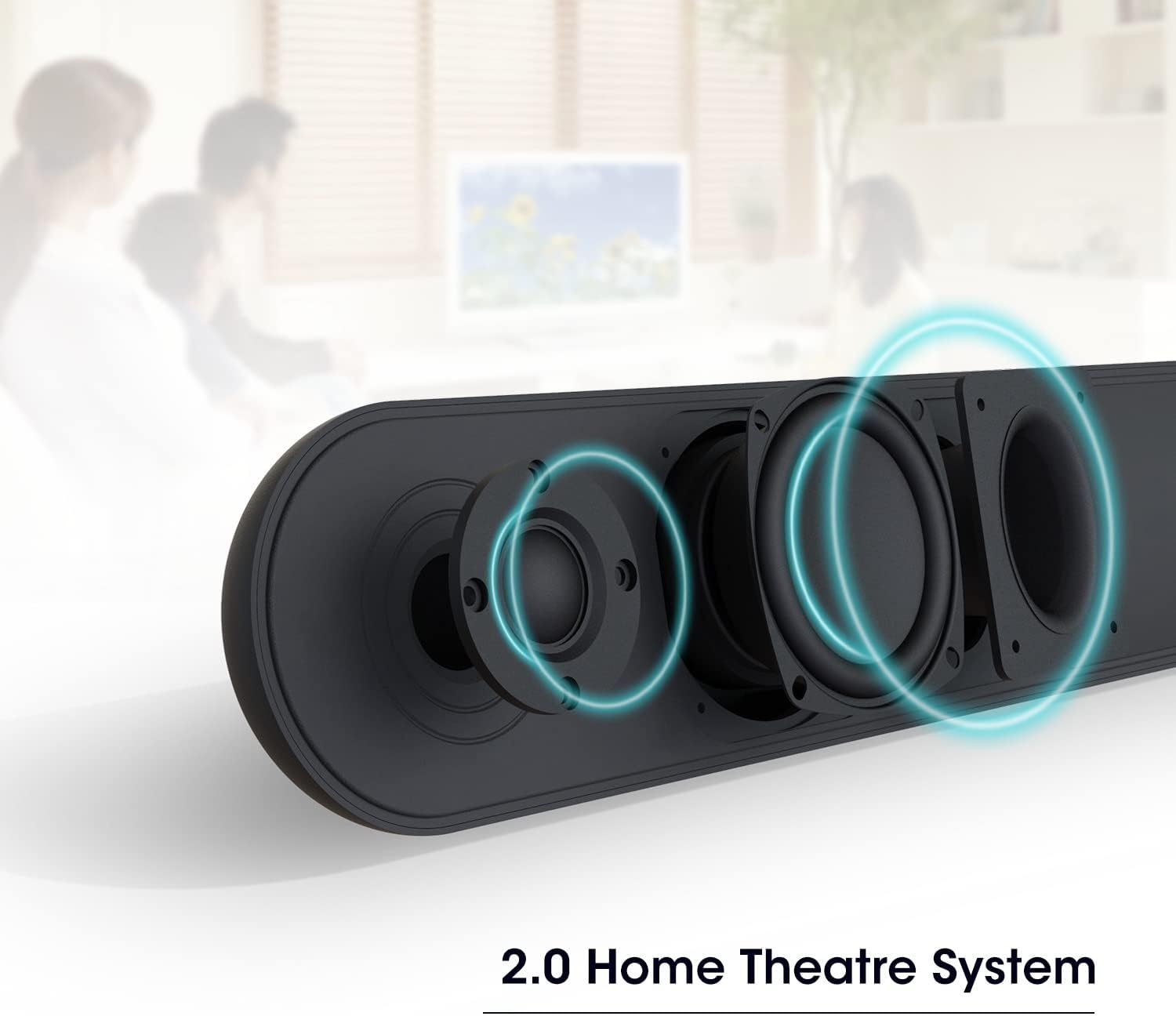
4.3 Internal Speaker Configuration
5. સેટઅપ
૩.૧ પ્લેસમેન્ટ વિકલ્પો
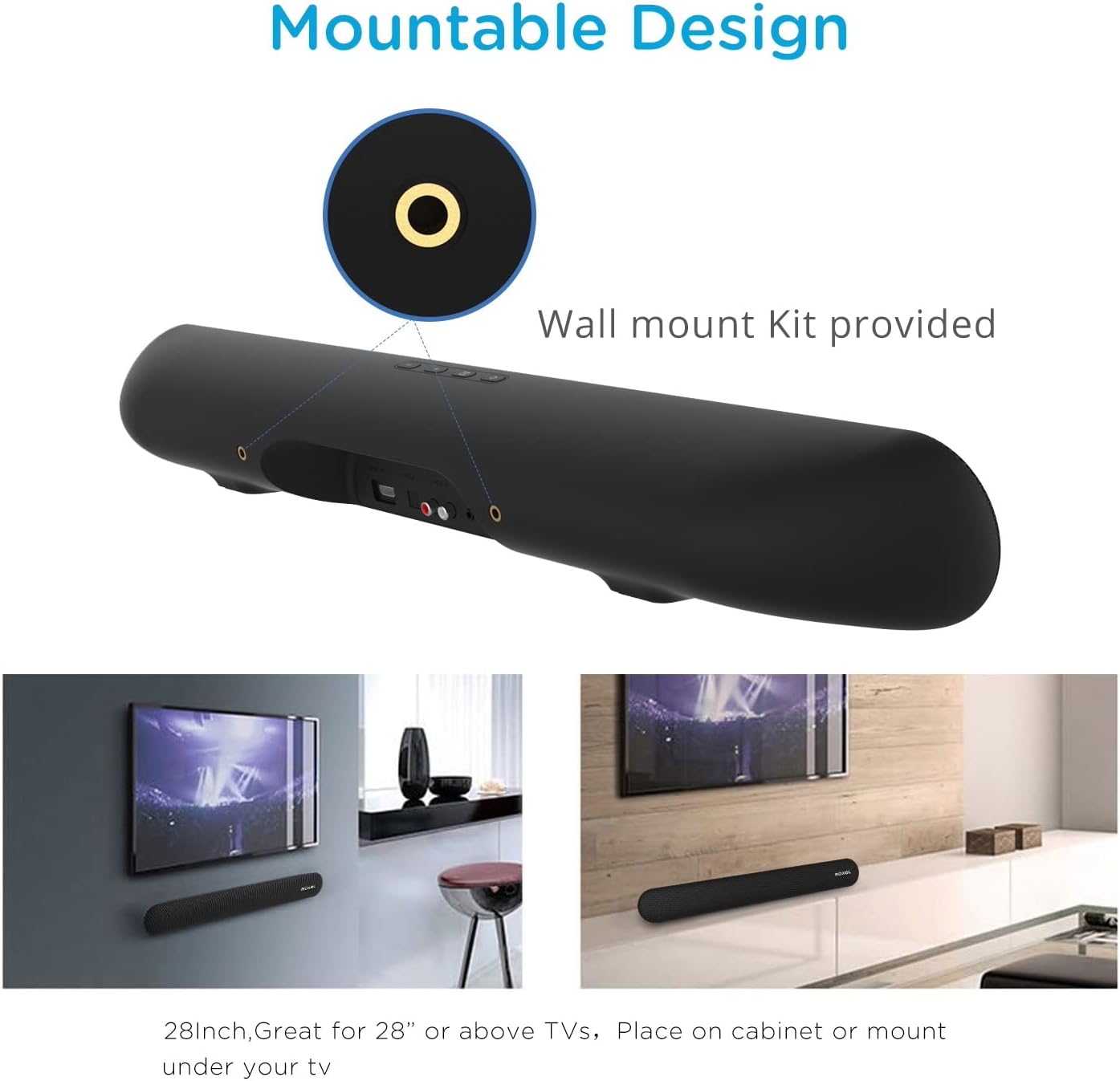
The Roxel RSB380 Soundbar offers versatile placement options:
- ટેબલટોપ પ્લેસમેન્ટ: Place the soundbar on a flat, stable surface directly in front of your TV.
- વોલ માઉન્ટિંગ: The soundbar can be mounted on a wall using the provided brackets and screws. Refer to the included Wall Mount Guide for detailed instructions.
5.2 Connecting to Your TV or Device
The RSB380 offers multiple connection methods:
- Optical Connection (Recommended for best audio quality):
Connect one end of the optical cable to the OPTICAL OUT port on your TV and the other end to the OPTICAL IN port on the soundbar. Select 'Optical' input on the soundbar. - AUX કનેક્શન:
Connect a 3.5mm audio cable from the AUX OUT port on your TV or device to the AUX IN port on the soundbar. Select 'AUX' input on the soundbar. - યુએસબી કનેક્શન:
ઑડિઓ ધરાવતી USB ડ્રાઇવ દાખલ કરો files into the USB port on the soundbar. The soundbar will automatically switch to USB mode and begin playback. - બ્લૂટૂથ કનેક્શન:
Refer to Section 6.3 for detailed Bluetooth pairing instructions.
5.3 પાવર કનેક્શન
Connect the provided power cable to the DC IN port on the soundbar and then plug it into a wall outlet. The soundbar will enter standby mode.
6. સાઉન્ડબારનું સંચાલન
6.1 પાવર ચાલુ/બંધ
દબાવો પાવર યુનિટ ચાલુ અથવા બંધ કરવા માટે સાઉન્ડબાર અથવા રિમોટ કંટ્રોલ પરનું બટન.
6.2 ઇનપુટ પસંદગી
દબાવો મોડ button on the soundbar or the remote control repeatedly to cycle through the available input sources: Optical, AUX, USB, and Bluetooth.
6.3 બ્લૂટૂથ પેરિંગ
- સાઉન્ડબાર ચાલુ કરો.
- દબાવો મોડ button until 'BT' (Bluetooth) is displayed or indicated by an LED. The soundbar will enter pairing mode.
- તમારા બ્લૂટૂથ-સક્ષમ ઉપકરણ (દા.ત., સ્માર્ટફોન, ટેબ્લેટ) પર, ઉપલબ્ધ બ્લૂટૂથ ઉપકરણો શોધો.
- Select 'Roxel RSB380' from the list.
- Once paired, the soundbar will emit a confirmation tone, and the 'BT' indicator will stop flashing.
- You can now play audio from your device through the soundbar.
6.4 વોલ્યુમ નિયંત્રણ
નો ઉપયોગ કરો VOL+ અને વીઓએલ- buttons on the soundbar or the remote control to adjust the volume. Press the મૌન button on the remote to temporarily silence the audio.

7. જાળવણી
To ensure the longevity and optimal performance of your Roxel RSB380 Soundbar:
- સફાઈ: Use a soft, dry cloth to wipe the exterior of the soundbar. Do not use liquid cleaners or abrasive materials.
- વેન્ટિલેશન: ઓવરહિટીંગ અટકાવવા માટે ખાતરી કરો કે વેન્ટિલેશન ઓપનિંગ્સ અવરોધિત નથી.
- સંગ્રહ: જો સાઉન્ડબારને લાંબા સમય સુધી સ્ટોર કરી રહ્યા હોવ, તો તેને પાવરથી ડિસ્કનેક્ટ કરો અને તેને ઠંડી, સૂકી જગ્યાએ સ્ટોર કરો.
8. મુશ્કેલીનિવારણ
જો તમને તમારા સાઉન્ડબારમાં સમસ્યાઓ આવે, તો નીચેની સામાન્ય સમસ્યાઓ અને ઉકેલોનો સંદર્ભ લો:
- કોઈ શક્તિ નથી:
ઉકેલ: Check if the power cable is securely connected to both the soundbar and the wall outlet. Try a different power outlet. - કોઈ અવાજ નથી:
ઉકેલ: Ensure the soundbar is powered on and not muted. Verify that the correct input source is selected (Optical, AUX, Bluetooth). Check the volume level on both the soundbar and your connected device/TV. Ensure cables are securely connected. - બ્લૂટૂથ પેરિંગ સમસ્યાઓ:
ઉકેલ: Ensure the soundbar is in Bluetooth pairing mode. Turn off Bluetooth on other nearby devices to avoid interference. Try unpairing and re-pairing the soundbar from your device's Bluetooth settings. - રીમોટ કંટ્રોલ કામ કરતું નથી:
ઉકેલ: Check the battery in the remote control and replace if necessary. Ensure there are no obstructions between the remote and the soundbar's sensor.
9. સ્પષ્ટીકરણો
| લક્ષણ | સ્પષ્ટીકરણ |
|---|---|
| મોડલ નંબર | આરએસબી -380 |
| બ્રાન્ડ | રોક્સેલ |
| સ્પીકરનો પ્રકાર | સાઉન્ડબાર |
| કનેક્ટિવિટી ટેકનોલોજી | AUX, USB, Optical, Wireless (Bluetooth 5.0) |
| ઓડિયો આઉટપુટ મોડ | સ્ટીરિયો |
| મહત્તમ સ્પીકર આઉટપુટ પાવર | 120 વોટ |
| સરાઉન્ડ સાઉન્ડ કન્ફિગરેશન | 2.0 ચેનલ |
| સ્પીકર પરિમાણો | 60 મિલીમીટર |
| ઉત્પાદન પરિમાણો | ૫૪.૭ x ૪૧.૯ x ૨૯.૬ સેમી; ૯.૮ કિગ્રા |
| પાવર સ્ત્રોત | કોર્ડ સાથે ઇલેક્ટ્રિક |
| નિયંત્રણ પદ્ધતિ | રીમોટ કંટ્રોલ |
| માઉન્ટિંગ પ્રકાર | વોલ માઉન્ટ |
| સુસંગત ઉપકરણો | Android devices, iOS devices, Television, Universal TV |
| ખાસ લક્ષણો | પોર્ટેબલ |
| રંગ | કાળો |
10. વોરંટી અને સપોર્ટ
For warranty information and customer support, please refer to the warranty card included in your product packaging or visit the official Roxel webસાઇટ. કોઈપણ વોરંટી દાવા માટે તમારી ખરીદીનો પુરાવો રાખો.


