1. પરિચય
This manual provides essential information for the safe and efficient operation of your Vispera Ai43T1 43-inch Smart Full HD Google Android TV. Please read this manual thoroughly before using the television and retain it for future reference. Your Vispera TV offers a 43-inch Full HD display (1920 x 1080 resolution), integrated Google Android TV features including Google Assistant and Chromecast, and access to popular streaming services like Netflix, Amazon Prime Video, Disney+, and YouTube. It also supports Freeview Play for catch-up TV services.
2. મહત્વપૂર્ણ સલામતી માહિતી
- પાવર સ્ત્રોત: ખાતરી કરો કે ટીવી નિર્દિષ્ટ વોલ્યુમમાં પાવર સપ્લાય સાથે જોડાયેલ છેtage range. Do not overload power outlets.
- વેન્ટિલેશન: વેન્ટિલેશનના છિદ્રોને અવરોધશો નહીં. ટીવીની આસપાસ યોગ્ય હવા પ્રવાહ માટે પૂરતી જગ્યા આપો જેથી વધુ ગરમ થવાથી બચી શકાય.
- પાણી અને ભેજ: ટીવીને વરસાદ, ભેજના સંપર્કમાં ન લાવો, અથવા ટીવી પર અથવા તેની નજીક પ્રવાહીથી ભરેલી વસ્તુઓ ન મૂકો.
- સફાઈ: સફાઈ કરતા પહેલા ટીવીને અનપ્લગ કરો. નરમ, સૂકા કપડાનો ઉપયોગ કરો. લિક્વિડ ક્લીનર્સ અથવા એરોસોલ ક્લીનર્સનો ઉપયોગ કરશો નહીં.
- પ્લેસમેન્ટ: ટીવીને સ્થિર, સમતલ સપાટી પર મૂકો અથવા તેને દિવાલ પર સુરક્ષિત રીતે લગાવો. તેને સીધા સૂર્યપ્રકાશમાં અથવા ગરમીના સ્ત્રોતોની નજીક રાખવાનું ટાળો.
- બાળકો: બાળકોને ટીવી કે સ્ટેન્ડ પર ચઢતા અટકાવવા માટે તેમની દેખરેખ રાખો.
- સર્વિસિંગ: આ ઉત્પાદનની જાતે સેવા કરવાનો પ્રયાસ કરશો નહીં. લાયક સેવા કર્મચારીઓને તમામ સેવાઓનો સંદર્ભ આપો.
3. પેકેજ સામગ્રી
Please check that the following items are included in your TV package:
- Vispera Ai43T1 43-inch Smart Full HD Google Android TV
- રીમોટ કંટ્રોલ
- પાવર કેબલ
- ટીવી સ્ટેન્ડ (2 ટુકડા) અને સ્ક્રૂ
- વપરાશકર્તા માર્ગદર્શિકા (આ દસ્તાવેજ)
- ઝડપી પ્રારંભ માર્ગદર્શિકા
4. સેટઅપ
4.1 સ્ટેન્ડ ઇન્સ્ટોલેશન
If you are not wall-mounting the TV, attach the included stand pieces to the bottom of the TV using the provided screws. Ensure the stand is securely fastened before placing the TV on a flat, stable surface.
4.2 વોલ માઉન્ટિંગ
The Vispera Ai43T1 TV supports VESA standard wall mounts with a pattern of 200 x 200 mm. Use appropriate wall mounting hardware (not included) and consult a professional installer if you are unsure about the process. Ensure the wall can support the weight of the TV.
4.3 કનેક્ટિંગ પેરિફેરલ્સ
ઓવર માટે નીચેના આકૃતિનો સંદર્ભ લોview of the TV's rear ports and typical connections.

આકૃતિ 1: પાછળ view of the Vispera Ai43T1 TV showing various input and output ports.
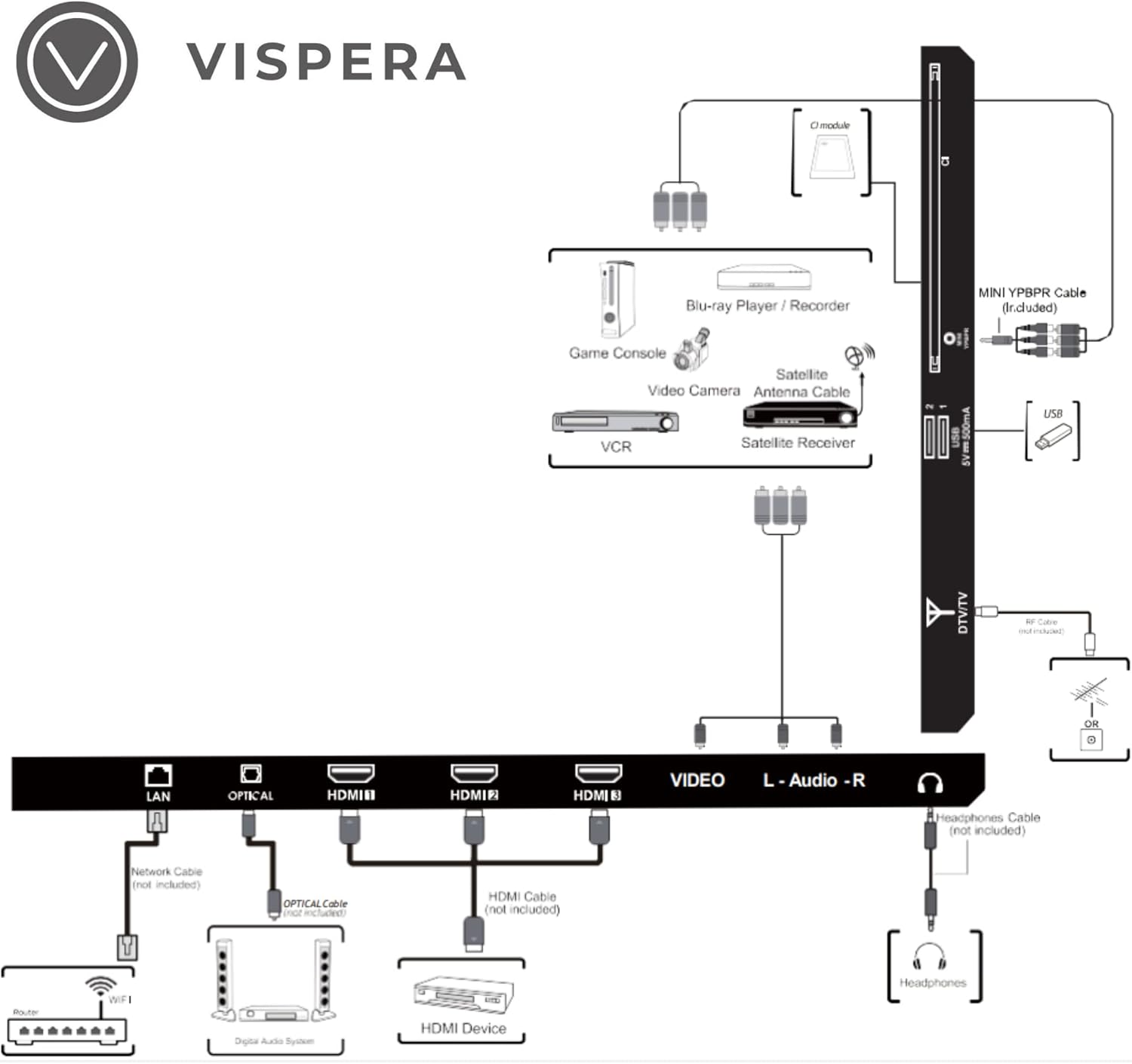
Figure 2: Diagram illustrating various connection types for external devices to the Vispera Ai43T1 TV.
- LAN (ઇથરનેટ) પોર્ટ: Connect an Ethernet cable from your router for a stable wired internet connection.
- OPTICAL (Digital Audio Out): Connect to a digital audio system for high-quality sound.
- HDMI Inputs (HDMI1, HDMI2, HDMI3): Connect High-Definition (HD) signal output devices such as Blu-ray players, game consoles, or set-top boxes.
- VIDEO Input: Connect to composite video output devices.
- L-AUDIO-R Input: Connect to composite audio (L/R) output sockets on external video devices.
- હેડફોન સોકેટ: ખાનગી સાંભળવા માટે હેડફોન કનેક્ટ કરો.
- DTV/TV Input: Connect to an antenna (75Ω VHF/UHF) socket with an RF coaxial cable for terrestrial TV broadcasts.
- યુએસબી ઇનપુટ: Connect a USB storage device to play photo files or other compatible media.
- મીની વાયપીબીઆર: Connect to AV devices with component (Y/Pb/Pr) video and audio output sockets.
- સીઆઈ સ્લોટ: Used to insert a CI card for encrypted digital TV channels.
૪.૪ પ્રારંભિક પાવર-ઓન અને પહેલી વાર સેટઅપ
- પાવર કેબલને ટીવી સાથે અને પછી દિવાલના આઉટલેટ સાથે જોડો.
- રિમોટ કંટ્રોલ અથવા ટીવી પર પાવર બટન દબાવો.
- પ્રારંભિક સેટઅપ પૂર્ણ કરવા માટે ઓન-સ્ક્રીન સૂચનાઓનું પાલન કરો, જેમાં સામાન્ય રીતે શામેલ છે:
- ભાષા પસંદગી.
- Connecting to a Wi-Fi network or wired LAN.
- Signing in with your Google Account to access Google services and apps.
- Scanning for TV channels (if an antenna is connected).
- નિયમો અને શરતો સ્વીકારી રહ્યા છીએ.
5. તમારા ટીવીનું સંચાલન
5.1 રીમોટ કંટ્રોલ કાર્યો
The included remote control allows you to navigate your TV's features. Ensure batteries are correctly inserted.
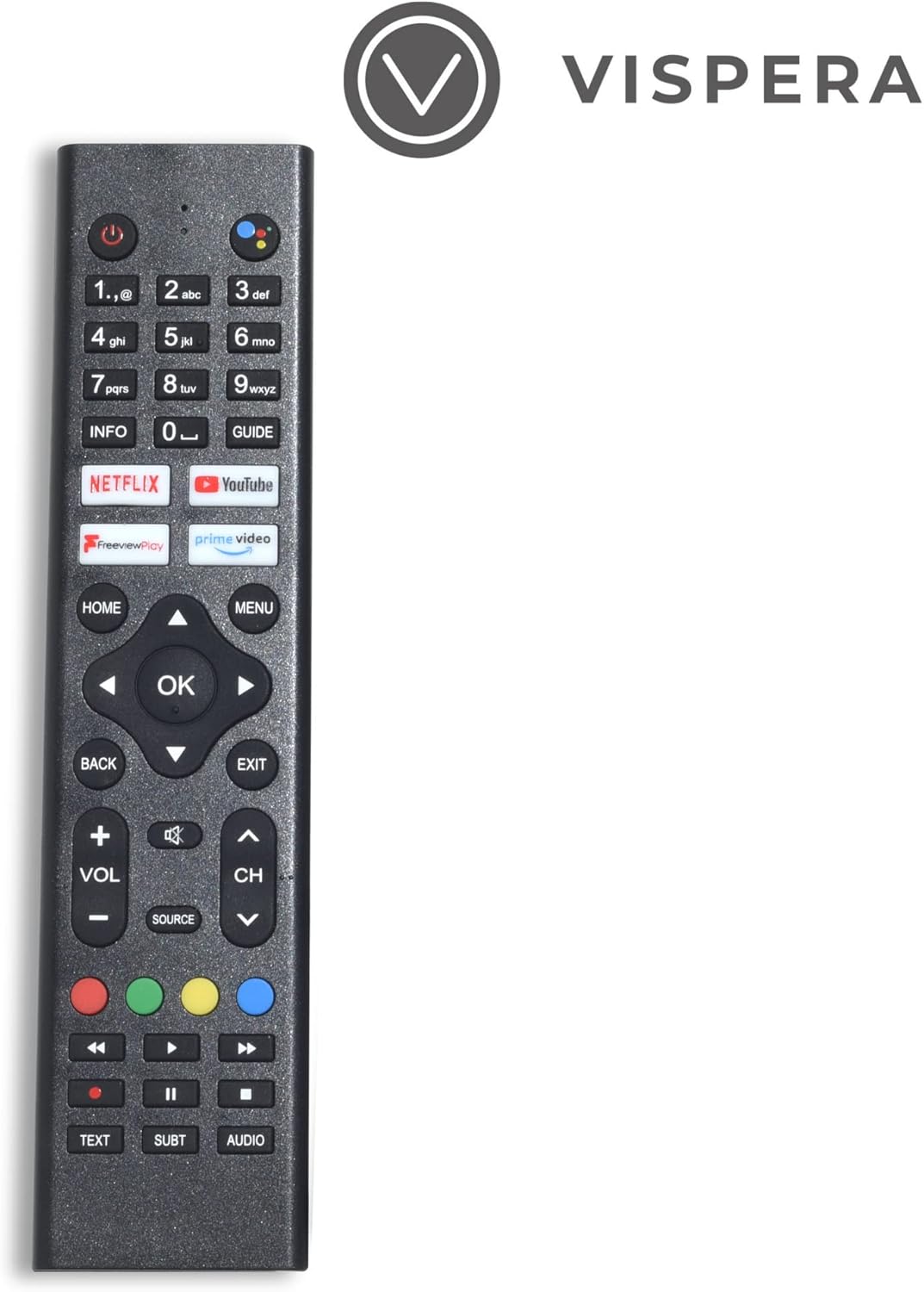
Figure 3: Vispera Ai43T1 Remote Control.
- પાવર બટન: ટીવી ચાલુ કે બંધ કરે છે.
- નંબર બટનો (0-9): Select TV channels directly.
- ગૂગલ આસિસ્ટન્ટ બટન: Activates voice control for searching, controlling smart home devices, and more.
- નેવિગેશન પેડ (ઉપર/નીચે/ડાબે/જમણે/ઓકે): મેનુઓ નેવિગેટ કરે છે અને વિકલ્પો પસંદ કરે છે.
- હોમ બટન: Android TV હોમ સ્ક્રીન પર પાછા ફરે છે.
- પાછળનું બટન: પાછલી સ્ક્રીન અથવા મેનૂ પર પાછા ફરે છે.
- વોલ્યુમ અપ/ડાઉન: વોલ્યુમ સ્તરને સમાયોજિત કરે છે.
- ચેનલ ઉપર/નીચે: ટીવી ચેનલો બદલે છે.
- સોર્સ બટન: Selects input sources (HDMI, AV, TV, etc.).
- App Buttons (Netflix, Prime Video, YouTube, Freeview Play): આ સ્ટ્રીમિંગ એપ્લિકેશનોની સીધી ઍક્સેસ.
5.2 Smart TV Features (Google Android TV)
Your Vispera Ai43T1 TV runs on Google Android TV, providing access to a wide range of entertainment and smart features.

Figure 4: The Google Android TV interface on the Vispera Ai43T1, showing various streaming applications.
- Google સહાયક: Use your voice to search for movies and shows, get answers, control your TV, and manage compatible smart home devices. Press the Google Assistant button on your remote to activate.
- Chromecast બિલ્ટ-ઇન: Cast photos, videos, and music from your smartphone, tablet, or computer directly to your TV. Ensure your device and TV are on the same Wi-Fi network.
- સ્ટ્રીમિંગ એપ્લિકેશન્સ: Access pre-installed apps like Netflix, Amazon Prime Video, Disney+, and YouTube. Download more apps from the Google Play Store.
- Google Play Store: Browse and download thousands of apps, games, and content directly to your TV.
5.3 મફતview રમો
મફતview Play allows you to watch live TV, catch up on shows you've missed, and access on-demand content from various UK broadcasters. You can scroll back through the TV guide to watch programs directly from the guide, without needing to open individual catch-up apps.
6. જાળવણી
- સ્ક્રીન સફાઈ: નરમ, લિન્ટ-ફ્રી કાપડથી સ્ક્રીનને ધીમેથી સાફ કરો. હઠીલા નિશાનો માટે, સહેજ ડીampપાણી અથવા વિશિષ્ટ સ્ક્રીન ક્લીનરથી કાપડને ઢાંકી દો (કાપડા પર લગાવો, સીધા સ્ક્રીન પર નહીં).
- કેબિનેટ સફાઈ: ટીવી કેબિનેટને નરમ, સૂકા કપડાથી સાફ કરો.
- ડસ્ટિંગ: Regularly dust the ventilation openings to prevent dust buildup.
- સૉફ્ટવેર અપડેટ્સ: ટીવીમાં ઓટોમેટિક સોફ્ટવેર અપડેટ્સ મળી શકે છે. આ અપડેટ્સ મેળવવા માટે ખાતરી કરો કે તમારું ટીવી ઇન્ટરનેટ સાથે જોડાયેલ છે, જે પ્રદર્શનમાં સુધારો કરી શકે છે અને નવી સુવિધાઓ ઉમેરી શકે છે.
7. મુશ્કેલીનિવારણ
જો તમને તમારા ટીવીમાં સમસ્યાઓ આવે, તો નીચેની સામાન્ય સમસ્યાઓ અને ઉકેલોનો સંદર્ભ લો:
- કોઈ શક્તિ નથી:
- Check if the power cable is securely connected to the TV and the power outlet.
- બીજા ઉપકરણને પ્લગ ઇન કરીને ખાતરી કરો કે પાવર આઉટલેટ કામ કરી રહ્યું છે.
- ફક્ત રિમોટ જ નહીં, ટીવી પર જ પાવર બટન દબાવવાનો પ્રયાસ કરો.
- કોઈ ચિત્ર/ધ્વનિ નથી:
- Verify the correct input source is selected (e.g., HDMI1, TV).
- બધા કેબલ કનેક્શન (HDMI, એન્ટેના, વગેરે) સુરક્ષિત છે કે નહીં તે તપાસો.
- વોલ્યુમ સમાયોજિત કરો.
- Perform a channel scan if using an antenna.
- રીમોટ કંટ્રોલ કામ કરતું નથી:
- બેટરીને નવી સાથે બદલો.
- ખાતરી કરો કે રિમોટ અને ટીવીના IR સેન્સર વચ્ચે કોઈ અવરોધો નથી.
- Pair the remote again if it's a Bluetooth remote (refer to TV settings).
- નેટવર્ક કનેક્શન સમસ્યાઓ:
- તમારા રાઉટર અને મોડેમને ફરીથી શરૂ કરો.
- Check Wi-Fi password and network settings on the TV.
- જો Wi-Fi અસ્થિર હોય તો વાયર્ડ ઇથરનેટ કનેક્શન અજમાવી જુઓ.
- એપ્લિકેશનો લોડ થઈ રહી નથી/ક્રેશ થઈ રહી નથી:
- Ensure the TV has a stable internet connection.
- Clear the cache and data for the problematic app in the TV's settings.
- Update the app or the TV's system software.
8. સ્પષ્ટીકરણો
Below are the technical specifications for the Vispera Ai43T1 43-inch Smart Full HD Google Android TV.

Figure 5: Technical specifications of the Vispera Ai43T1 TV.
| લક્ષણ | સ્પષ્ટીકરણ |
|---|---|
| પેનલનું કદ | 43 inches (diagonally) |
| ડિસ્પ્લે પ્રકાર | એલઇડી |
| પેનલ ટેકનોલોજી | TFT |
| તાજું દર | 60 હર્ટ્ઝ |
| ડિસ્પ્લે રિઝોલ્યુશન | 1080p (1920 x 1080) Full HD |
| HDMI સપોર્ટ | 1080p સુધી |
| પાસા રેશિયો | 16:9 |
| ડાયનેમિક કોન્ટ્રાસ્ટ રેશિયો-પેનલ | 2400~3000:1 |
| પ્રતિભાવ સમય (G થી G) | 11.5 એમ.એસ |
| Lamp જીવન (પ્રકાર. કલાકો) | >30,000 કલાક |
| આડું Viewએન્ગલ (CR> 10 પર) | 178° |
| વર્ટિકલ Viewએન્ગલ (CR> 10 પર) | 178° |
| Wall-mount (LxW-mm) | 200*200 (mm) VESA |
| ઓપરેટિંગ સિસ્ટમ | એન્ડ્રોઇડ |
| કનેક્ટિવિટી ટેકનોલોજી | Wi-Fi |
| સપોર્ટેડ ઈન્ટરનેટ સેવાઓ | Amazon Prime Video, Google Assistant, Netflix, YouTube |
| ઉત્પાદન વજન | 9.53 કિગ્રા |
| પરિમાણો (પેકેજ) | 104 x 63 x 14 સેમી |
9. વોરંટી અને સપોર્ટ
Your Vispera Ai43T1 TV comes with a standard manufacturer's warranty. Please refer to the warranty card included in your package for specific terms and conditions, including the warranty period and coverage details. For technical support, troubleshooting assistance, or service inquiries, please contact Vispera customer support through the contact information provided on the official Vispera webસાઇટ અથવા તમારા ખરીદી દસ્તાવેજો.


