1. પરિચય
This manual provides detailed instructions for the installation, operation, and maintenance of your PANTUM P3018DW Wireless Duplex Laser Printer. Please read this manual thoroughly before using the printer to ensure proper and safe operation. Keep this manual for future reference.
2. સલામતી માહિતી
આગ, ઇલેક્ટ્રિક આંચકો અને વ્યક્તિઓને ઇજા થવાનું જોખમ ઘટાડવા માટે આ ઉત્પાદનનો ઉપયોગ કરતી વખતે હંમેશા મૂળભૂત સલામતી સાવચેતીઓનું પાલન કરો.
- Do not place the printer on an unstable cart, stand, or table.
- Do not block or cover the slots and openings in the printer.
- Use only the type of power source indicated on the printer's label.
- Unplug the printer from the wall outlet before cleaning.
- પ્રિન્ટરની જાતે સર્વિસ કરવાનો પ્રયાસ કરશો નહીં. બધી સર્વિસિંગ લાયકાત ધરાવતા સેવા કર્મચારીઓને સોંપો.
3. પેકેજ સામગ્રી
ખાતરી કરો કે બધી વસ્તુઓ પેકેજમાં શામેલ છે:
- PANTUM P3018DW Laser Printer
- Starter Toner Cartridge (1000 pages yield)
- Starter Drum Unit (9000 pages yield)
- યુએસબી કેબલ
- પાવર કોર્ડ
- વપરાશકર્તા માર્ગદર્શિકા (આ દસ્તાવેજ)
4. ઉત્પાદન ઓવરview
The PANTUM P3018DW is a monochrome laser printer designed for efficient printing with automatic duplex capability and wireless connectivity.


5. સેટઅપ
5.1 અનપેકિંગ
- પ્રિન્ટરને તેના પેકેજિંગમાંથી દૂર કરો.
- પ્રિન્ટરના બાહ્ય અને આંતરિક ભાગમાંથી બધી રક્ષણાત્મક ટેપ અને પેકિંગ સામગ્રી દૂર કરો.
5.2 Toner Cartridge and Drum Unit Installation
The PANTUM P3018DW uses a separate toner cartridge and drum unit system.
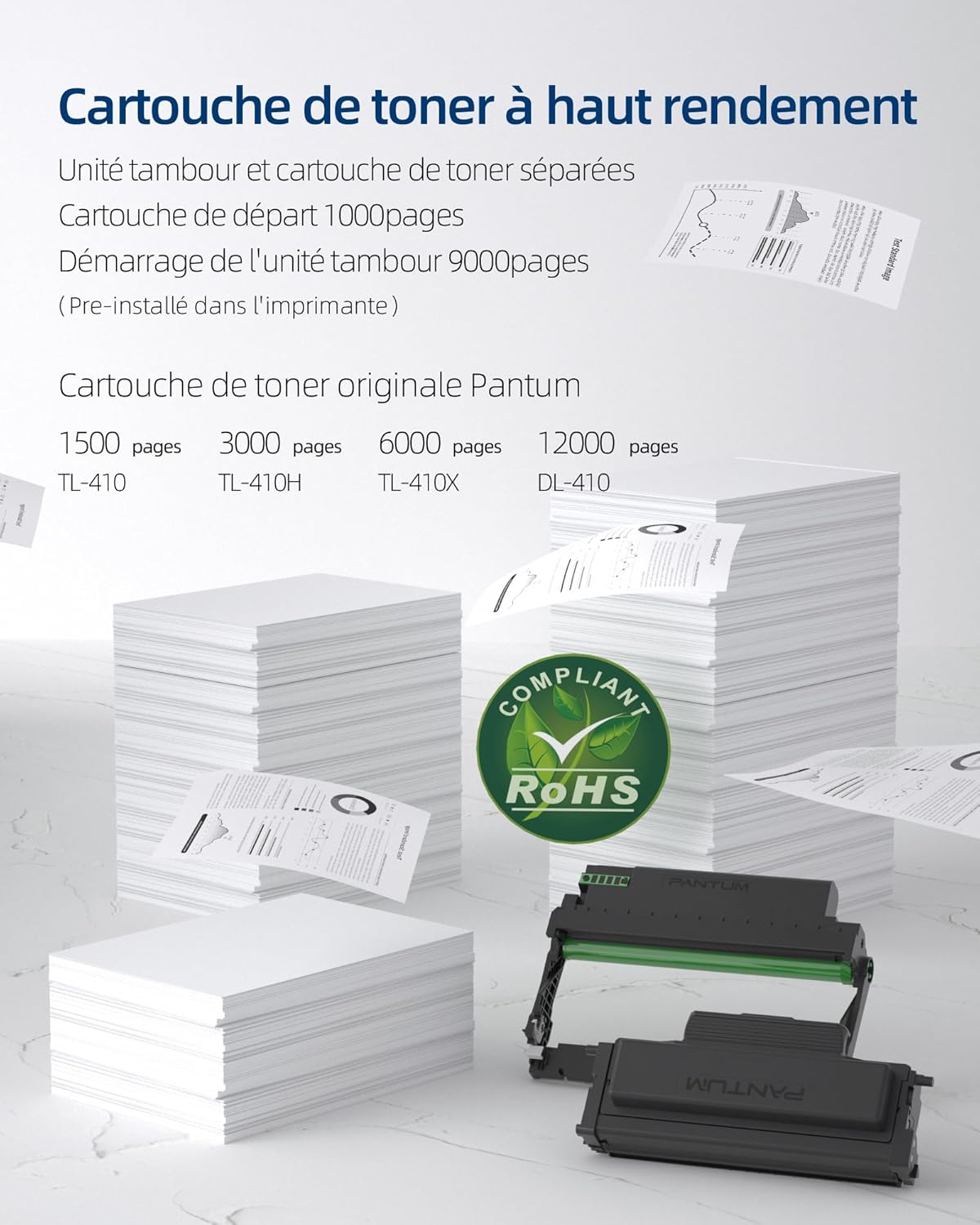
- પ્રિન્ટરનું આગળનું કવર ખોલો.
- Carefully insert the drum unit into the printer until it clicks into place.
- Unpack the toner cartridge and gently shake it horizontally several times.
- Insert the toner cartridge into the drum unit until it locks securely.
- આગળનું કવર બંધ કરો.
5.3 પાવર કનેક્શન
- પાવર કોર્ડને પ્રિન્ટર સાથે અને પછી ગ્રાઉન્ડેડ ઇલેક્ટ્રિકલ આઉટલેટ સાથે જોડો.
- પ્રિન્ટર ચાલુ કરવા માટે પાવર બટન દબાવો.
5.4 ડ્રાઇવર ઇન્સ્ટોલેશન
The PANTUM P3018DW features a one-step driver installation process.
- પ્રદાન કરેલ USB કેબલનો ઉપયોગ કરીને પ્રિન્ટરને તમારા કમ્પ્યુટર સાથે કનેક્ટ કરો.
- The operating system should automatically detect the printer and initiate driver installation. Follow the on-screen prompts.
- Alternatively, download the latest drivers from the official PANTUM webસાઇટ
5.5 Wi-Fi સેટઅપ
The printer supports easy Wi-Fi configuration for convenient wireless printing.

- ખાતરી કરો કે તમારું પ્રિન્ટર ચાલુ છે.
- Access the printer's control panel or use the PANTUM mobile application for Wi-Fi setup.
- Follow the instructions to connect the printer to your wireless network.
- For Wi-Fi Direct printing, connect your device directly to the printer's Wi-Fi hotspot (SSID and password typically found on a label or the printer's display).
6. ઓપરેટિંગ સૂચનાઓ
6.1 પેપર લોડ કરી રહ્યું છે
- કાગળની ટ્રે ખોલો.
- તમે જે કાગળ લોડ કરી રહ્યા છો તેના કદ પ્રમાણે કાગળ માર્ગદર્શિકાઓને ગોઠવો.
- Load paper into the tray, ensuring it is flat and not exceeding the maximum fill line. The maximum sheet capacity is 250 sheets.
- કાગળની ટ્રે બંધ કરો.
6.2 પ્રિન્ટીંગ
The PANTUM P3018DW offers fast monochrome printing at up to 30 pages per minute (A4) or 32 pages per minute (Letter), with a first print out time of less than 7.8 seconds.

Standard Printing
- તમારા કમ્પ્યુટર અથવા મોબાઇલ ઉપકરણ પરથી, તમે જે દસ્તાવેજ છાપવા માંગો છો તે ખોલો.
- એપ્લિકેશનના મેનુમાંથી 'પ્રિન્ટ' પસંદ કરો.
- Choose the PANTUM P3018DW from the list of available printers.
- જરૂર મુજબ પ્રિન્ટ સેટિંગ્સ ગોઠવો (દા.ત., નકલોની સંખ્યા, કાગળનું કદ).
- 'પ્રિન્ટ' પર ક્લિક કરો.
ઓટોમેટિક ડુપ્લેક્સ પ્રિન્ટિંગ
The printer supports automatic two-sided printing.

- When printing, select the 'Print on both sides' or 'Duplex Printing' option in your printer settings.
- પ્રિન્ટર બંને બાજુ છાપવા માટે કાગળને આપમેળે ફેરવશે.
Mobile Printing (PANTUM APP)
Print directly from your smartphone or tablet using the PANTUM APP.


- Download and install the PANTUM APP from your device's app store.
- Ensure your mobile device is connected to the same Wi-Fi network as the printer, or directly to the printer's Wi-Fi hotspot.
- Open the PANTUM APP and select the document or image you wish to print.
- Follow the app's instructions to send the print job to the printer.
7. જાળવણી
7.1 Replacing Toner Cartridge and Drum Unit
When the toner is low or the drum unit reaches its end of life, the printer will indicate a replacement is needed. Refer to section 5.2 for installation steps.
Compatible Toner Cartridges:
- TL-410 (1,500 pages)
- TL-410H (3,000 pages)
- TL-410X (6,000 pages)
Compatible Drum Unit:
- DL-410 (12,000 pages)
7.2 પ્રિન્ટરની સફાઈ
નિયમિત સફાઈ પ્રિન્ટ ગુણવત્તા જાળવવામાં મદદ કરે છે અને પ્રિન્ટરનું આયુષ્ય લંબાવે છે.
- Turn off the printer and unplug it from the power outlet.
- નરમ, લિન્ટ-ફ્રી કાપડનો ઉપયોગ કરો ડીampપ્રિન્ટરના બાહ્ય ભાગને સાફ કરવા માટે પાણીથી ભેળવવામાં આવે છે.
- ઘર્ષક ક્લીનર્સ અથવા સોલવન્ટનો ઉપયોગ કરશો નહીં.
- For internal cleaning, consult the detailed cleaning instructions on the PANTUM webસાઇટ અથવા સંપર્ક સપોર્ટ.
8. મુશ્કેલીનિવારણ
This section provides solutions to common printer issues.
૬.૧ પ્રિન્ટર જવાબ આપી રહ્યું નથી
- Ensure the printer is powered on and properly connected to the power outlet.
- Check the USB cable connection to the computer or verify Wi-Fi connectivity.
- પ્રિન્ટર અને તમારા કમ્પ્યુટર/મોબાઇલ ઉપકરણને ફરીથી શરૂ કરો.
- Check the printer's control panel for any error messages.
૫.૩ નબળી પ્રિન્ટ ગુણવત્તા
- ટોનર કારતૂસનું સ્તર તપાસો અને જો ઓછું હોય તો બદલો.
- Ensure the drum unit is properly installed and not damaged.
- જાળવણી માર્ગદર્શિકા અનુસાર પ્રિન્ટરના આંતરિક ઘટકો સાફ કરો.
- Use recommended paper types and ensure they are not damp અથવા સીurlસંપાદન
૪.૮ પેપર જામ
- પ્રિન્ટર બંધ કરો અને તેને અનપ્લગ કરો.
- Carefully open all covers and remove any jammed paper, pulling in the direction of the paper path.
- Ensure paper is loaded correctly in the tray and not overfilled.
- પ્રિન્ટરની વિશિષ્ટતાઓને પૂર્ણ કરતા કાગળનો ઉપયોગ કરો.
9. સ્પષ્ટીકરણો
| લક્ષણ | સ્પષ્ટીકરણ |
|---|---|
| મોડેલનું નામ | P3018DW |
| પ્રિન્ટ ટેકનોલોજી | લેસર |
| આઉટપુટ છાપો | મોનોક્રોમ |
| મહત્તમ પ્રિન્ટ ઝડપ (મોનોક્રોમ) | 30 PPM (A4) / 32 PPM (Letter) |
| First Print Out Time | < 7.8 સેકન્ડ |
| મહત્તમ પ્રિન્ટ રિઝોલ્યુશન | 1200 ડીપીઆઈ |
| ડુપ્લેક્સ પ્રિન્ટીંગ | સ્વયંસંચાલિત |
| કનેક્ટિવિટી | USB, Wi-Fi |
| સુસંગત ઉપકરણો | લેપટોપ, પીસી, સ્માર્ટફોન, ટેબ્લેટ |
| સુસંગત ઓપરેટિંગ સિસ્ટમ્સ | Android, Chrome OS (and others via driver) |
| મહત્તમ મીડિયા કદ | 8.5 x 11 inches (A4) |
| શીટનું કદ | A4 |
| મહત્તમ શીટ ક્ષમતા | 250 શીટ્સ |
| પરિમાણો (D x W x H) | 40.8 સેમી x 43.3 સેમી x 29.5 સેમી |
| વસ્તુનું વજન | 6.8 કિલોગ્રામ |
| ખાસ લક્ષણો | Automatic Duplexing, Automatic Sleep Mode, Two-line LCD Control Panel, NFC Touch Print, Silent Printing, Ethernet Network, Optional High-Capacity Cartridges, Low Paper Jam Design |
10. વોરંટી અને સપોર્ટ
10.1 વોરંટી માહિતી
The PANTUM P3018DW printer comes with a standard one-year warranty against manufacturing defects from the date of purchase. Please retain your proof of purchase for warranty claims.
10.2 ગ્રાહક સપોર્ટ
For technical assistance, troubleshooting, or warranty inquiries, please visit the official PANTUM website or contact PANTUM Online Customer Service. Support resources, including driver downloads and FAQs, are available online.


