1. પરિચય
The Raspberry Pi 4 Model B (2GB) is a powerful, compact single-board computer designed for a wide range of applications, from desktop computing to embedded projects. It offers enhanced processing power, improved multimedia capabilities, and expanded connectivity compared to previous models. This manual provides essential information for setting up, operating, and maintaining your Raspberry Pi 4 Model B.

Image 1.1: The Raspberry Pi 4 Model B (2GB) single-board computer, showcasinતેની કોમ્પેક્ટ ડિઝાઇન અને વિવિધ પોર્ટ્સ.
2. પેકેજ સામગ્રી
Upon opening your Raspberry Pi 4 Model B package, you should find the following:
- Raspberry Pi 4 Model B (2GB) board
Note: Additional accessories such as a power supply, microSD card, HDMI cables, and a case are typically sold separately.
3. ઉત્પાદન સુવિધાઓ
The Raspberry Pi 4 Model B (2GB) includes several key features:
- પ્રોસેસર: બ્રોડકોમ BCM2711, ક્વાડ કોર કોર્ટેક્સ-A72 (ARM v8) 64-bit SoC @ 1.5GHz
- રેમ: 2GB LPDDR4-3200 SDRAM
- વાયરલેસ કનેક્ટિવિટી: 2.4 GHz and 5.0 GHz IEEE 802.11ac wireless, Bluetooth 5.0, BLE
- ઈથરનેટ: ગીગાબીટ ઈથરનેટ
- યુએસબી પોર્ટ્સ: 2 USB 3.0 ports; 2 USB 2.0 ports
- GPIO: Standard 40-pin GPIO header (fully backwards compatible with previous boards)
- વિડિયો અને ઑડિયો: 2 micro-HDMI ports (up to 4Kp60 supported), 2-lane MIPI DSI display port, 2-lane MIPI CSI camera port, 4-pole stereo audio and composite video port
- સંગ્રહ: ઓપરેટિંગ સિસ્ટમ અને ડેટા સ્ટોરેજ માટે માઇક્રોએસડી કાર્ડ સ્લોટ
4. સેટઅપ માર્ગદર્શિકા
4.1. Required Components (Not Included)
- USB-C Power Supply (5V/3A recommended)
- MicroSD Card (minimum 8GB, Class 10 recommended)
- HDMI Cable(s) (micro-HDMI to standard HDMI)
- યુએસબી કીબોર્ડ અને માઉસ
- HDMI ઇનપુટ સાથે મોનિટર અથવા ટીવી
૩.૧. ઓપરેટિંગ સિસ્ટમ ઇન્સ્ટોલ કરવી
- Download the Raspberry Pi Imager software from the official Raspberry Pi webસાઇટ (www.raspberrypi.com/software/).
- Insert your microSD card into your computer's card reader.
- Open Raspberry Pi Imager, select your desired operating system (e.g., Raspberry Pi OS), and choose your microSD card as the destination.
- Click "Write" and wait for the process to complete.
- Safely eject the microSD card from your computer.
4.3. હાર્ડવેર કનેક્શન
- Insert the prepared microSD card into the card slot on the underside of the Raspberry Pi.
- Connect your USB keyboard and mouse to the USB ports on the Raspberry Pi.
- Connect your monitor(s) to the micro-HDMI ports using appropriate cables. The Raspberry Pi 4 supports up to two displays.
- (Optional) Connect an Ethernet cable for wired network access.
- Finally, connect the USB-C power supply to the Raspberry Pi. The device will power on automatically.
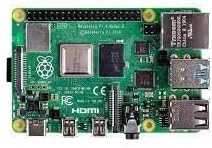
છબી ૫.૧: નજીકથી નજર view of the Raspberry Pi 4 Model B's various ports, including USB, Ethernet, and micro-HDMI.
5. ઓપરેટિંગ સૂચનાઓ
5.1. First Boot and Initial Configuration
On the first boot, the Raspberry Pi OS will guide you through an initial setup wizard. This includes setting your country, language, timezone, creating a user password, connecting to Wi-Fi, and updating the software. Follow the on-screen prompts to complete these steps.
5.2. Desktop Environment
Once configured, you will be presented with the Raspberry Pi OS desktop environment. This is similar to other desktop operating systems, allowing you to launch applications, browse the web, મેનેજ કરો files, અને વધુ.
૩.૩. બંધ કરી રહ્યા છીએ
To safely shut down your Raspberry Pi, click the Raspberry Pi icon in the top-left corner of the screen, then select શટડાઉન. Always shut down the system properly before disconnecting power to prevent data corruption on the microSD card.
6. જાળવણી
- સૉફ્ટવેર અપડેટ્સ: Regularly update your operating system and installed software to ensure optimal performance and security. This can typically be done via the terminal using commands like
sudo apt updateઅનેsudo apt full-upgrade. - ઠંડક: The Raspberry Pi 4 can generate heat under heavy load. Consider using a heatsink or a fan case to ensure proper cooling and prevent thermal throttling, especially for demanding applications.
- પાવર સપ્લાય: Use a high-quality 5V/3A USB-C power supply to ensure stable operation. Insufficient power can lead to instability.
- માઇક્રોએસડી કાર્ડ કેર: Avoid frequently writing large amounts of data to the microSD card to prolong its lifespan. Consider using a USB SSD for heavy data operations.
7. મુશ્કેલીનિવારણ
- કોઈ ડિસ્પ્લે આઉટપુટ નથી: Ensure micro-HDMI cables are securely connected and your monitor is set to the correct input. Try a different micro-HDMI port or cable.
- પાવર એલઇડી ફ્લેશિંગ: This often indicates an insufficient power supply. Ensure you are using a 5V/3A USB-C power supply.
- વાઇ-ફાઇ/બ્લુટુથ સમસ્યાઓ: Check your network settings in the Raspberry Pi OS. Ensure the device is within range of your Wi-Fi router.
- સિસ્ટમ અસ્થિરતા/ક્રેશ: This could be due to overheating (ensure proper cooling), a corrupted microSD card (try re-flashing the OS), or an inadequate power supply.
- સામાન્ય મુદ્દાઓ: The Raspberry Pi community forums and documentation are excellent resources for troubleshooting specific problems.
8. સ્પષ્ટીકરણો
| લક્ષણ | વિગત |
|---|---|
| પ્રોસેસર | બ્રોડકોમ BCM2711, ક્વાડ કોર કોર્ટેક્સ-A72 (ARM v8) 64-bit SoC @ 1.5GHz |
| રેમ | 2GB LPDDR4-3200 SDRAM |
| વાયરલેસ પ્રકાર | 802.11ac, Bluetooth 5.0, BLE |
| ઈથરનેટ | ગીગાબીટ ઈથરનેટ |
| યુએસબી પોર્ટ્સ | 2 USB 3.0 ports, 2 USB 2.0 ports |
| વિડિઓ આઉટપુટ | 2 micro-HDMI ports (up to 4Kp60) |
| ઓડિયો આઉટપુટ | 4-પોલ સ્ટીરિયો audioડિઓ અને સંયુક્ત વિડિઓ બંદર |
| GPIO હેડર | Standard 40-pin GPIO header |
| સંગ્રહ | માઇક્રોએસડી કાર્ડ સ્લોટ |
| ઓપરેટિંગ સિસ્ટમ | Linux (e.g., Raspberry Pi OS) |
| વસ્તુનું વજન | 2.11 ઔંસ |
9. વોરંટી અને સપોર્ટ
For warranty information and technical support, please refer to the official Raspberry Pi website or contact your retailer. The Raspberry Pi community also provides extensive resources, forums, and documentation for assistance with projects and troubleshooting.
સત્તાવાર Webસાઇટ: www.raspberrypi.com


