1. પરિચય
This manual provides comprehensive instructions for the setup, operation, and maintenance of your REACHER Small Digital Rainbow LED Alarm Clock, Model N188C-Black. Please read this manual thoroughly to ensure proper use and to maximize the functionality of your device.
2. ઉત્પાદન ઓવરview
મુખ્ય લક્ષણો:
- Large, colorful LED numbers for clear visibility day or night.
- Compact design (5.6" x 2.9" x 1.9") suitable for various spaces.
- Full range 0-100% brightness dimmer slider for personalized display intensity.
- Adjustable alarm volume from 30dB to 85dB.
- Easy-to-use snooze function by pressing any part of the top surface.
- Outlet powered with included DC adapter.
- Battery backup (2x AAA batteries, not included) to retain time and alarm settings during power outages
બૉક્સમાં શું છે:
- Small Colorful LED Alarm Clock
- યુએસબી કેબલ
- પાવર એડેપ્ટર
- વપરાશકર્તા માર્ગદર્શિકા

આકૃતિ 2.1: ફ્રન્ટ view of the REACHER Small Digital Rainbow LED Alarm Clock.

Figure 2.2: The alarm clock's compact size, shown held in a hand.
3. સેટઅપ
3.1 પાવર કનેક્શન
- Connect the provided USB cable to the DC 5V port on the back of the alarm clock.
- Plug the other end of the USB cable into the included power adapter.
- Insert the power adapter into a standard electrical outlet. The clock display will illuminate.
૪.૨ બેટરી બેકઅપ ઇન્સ્ટોલેશન (વૈકલ્પિક)
For battery backup functionality, which retains time and alarm settings during a power outage (display will be off to conserve power):
- ઘડિયાળના તળિયે બેટરીનો ડબ્બો શોધો.
- બેટરી કમ્પાર્ટમેન્ટ કવર ખોલો.
- Insert two (2) AAA batteries (not included), ensuring correct polarity (+/-).
- બેટરી કમ્પાર્ટમેન્ટ કવર સુરક્ષિત રીતે બંધ કરો.
4. ઓપરેટિંગ સૂચનાઓ

Figure 4.1: Rear controls of the alarm clock.
4.1 સમય નક્કી કરવો
- દબાવો અને પકડી રાખો ટાઇમ સેટ button located on the back of the clock. The hour digits will begin to flash.
- નો ઉપયોગ કરો + or - buttons to adjust the hour. Pay attention to the PM indicator if using 12-hour format.
- દબાવો ટાઇમ સેટ button again to confirm the hour and move to minute adjustment. The minute digits will flash.
- નો ઉપયોગ કરો + or - મિનિટ સમાયોજિત કરવા માટે બટનો.
- દબાવો ટાઇમ સેટ button one more time to save the time setting.
4.2 એલાર્મ સેટ કરવું
- દબાવો અને પકડી રાખો એલાર્મ સેટ button on the back of the clock. The alarm hour digits will begin to flash, and an alarm icon will appear on the display.
- નો ઉપયોગ કરો + or - અલાર્મ કલાકને સમાયોજિત કરવા માટે બટનો.
- દબાવો એલાર્મ સેટ button again to confirm the alarm hour and move to alarm minute adjustment. The alarm minute digits will flash.
- નો ઉપયોગ કરો + or - એલાર્મ મિનિટ ગોઠવવા માટે બટનો.
- દબાવો એલાર્મ સેટ button one more time to save the alarm setting.
૫.૪ એલાર્મ ચાલુ/બંધ કરવું
સંક્ષિપ્તમાં દબાવો એલાર્મ ચાલુ / બંધ button on the back of the clock to toggle the alarm function. The alarm icon on the display indicates if the alarm is active.
૫.૨ ડિસ્પ્લે બ્રાઇટનેસ એડજસ્ટ કરવી
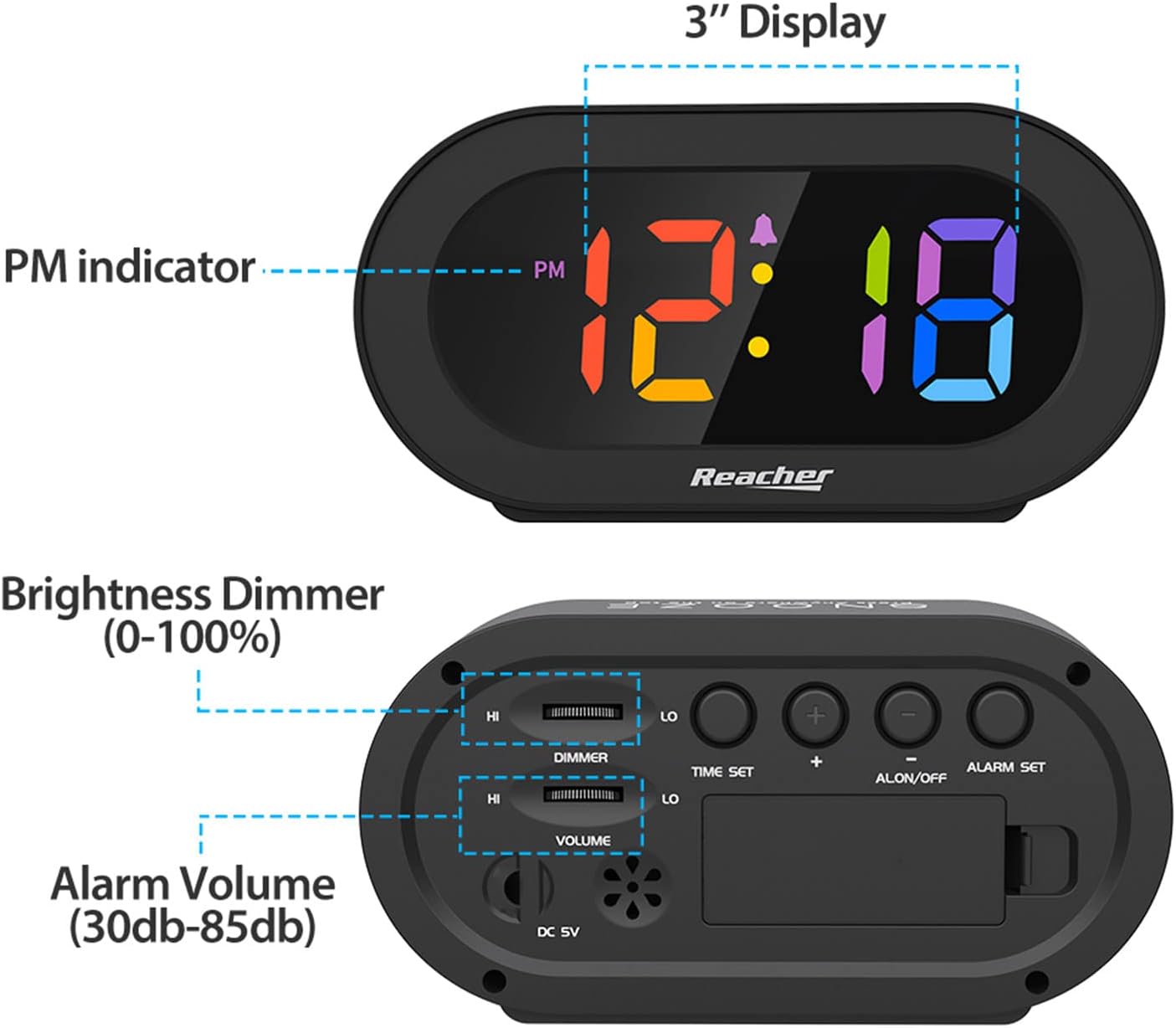
Figure 4.2: Dimmer slider control.
નો ઉપયોગ કરો ડિમર slider located on the back of the clock to adjust the display brightness from 0% (off) to 100% (maximum brightness). Slide towards 'HI' for brighter, and 'LO' for dimmer.
૫.૬ એલાર્મ વોલ્યુમ ગોઠવવું

Figure 4.3: Volume slider control.
નો ઉપયોગ કરો વોલ્યુમ slider located on the back of the clock to adjust the alarm sound level from 30dB (low) to 85dB (high). Slide towards 'HI' for louder, and 'LO' for quieter.
4.6 સ્નૂઝ ફંક્શન
When the alarm sounds, press any part of the top surface of the clock to activate the snooze function. The alarm will temporarily pause and sound again after a set interval (typically 9 minutes).
૭.૩ એલાર્મ બંધ કરવું
To stop the alarm completely after it sounds (not just snooze), press the એલાર્મ ચાલુ / બંધ button on the back of the clock. The alarm icon will disappear from the display.
5. જાળવણી
To maintain your alarm clock in optimal condition:
- ઘડિયાળની સપાટીને નરમ, સૂકા કપડાથી સાફ કરો.
- ઘર્ષક ક્લીનર્સ અથવા સોલવન્ટ્સનો ઉપયોગ કરવાનું ટાળો, કારણ કે આ ફિનિશને નુકસાન પહોંચાડી શકે છે.
- Keep the device away from excessive moisture, direct sunlight, and extreme temperatures.
- If using battery backup, replace AAA batteries annually or if the clock frequently experiences power outages
6. મુશ્કેલીનિવારણ
| સમસ્યા | સંભવિત કારણ | ઉકેલ |
|---|---|---|
| Clock display is off or dim. | No power, dimmer set to 0%, or battery backup active during power outage. | Ensure power adapter is securely plugged in. Adjust the DIMMER slider. If on battery backup, the display is intentionally off; it will return when main power is restored. |
| એલાર્મ વાગતો નથી. | Alarm is not set, alarm is turned off, or volume is too low. | Verify alarm time is set correctly. Ensure the alarm icon is visible on the display (alarm is ON). Adjust the VOLUME slider to an audible level. |
| Time/Alarm settings are lost after power outage. | No battery backup installed or batteries are depleted. | Install two fresh AAA batteries for battery backup. |
| બટનો પ્રતિભાવવિહીન છે. | કામચલાઉ સોફ્ટવેર ખામી. | Unplug the power adapter, remove backup batteries (if installed), wait 30 seconds, then reconnect power. |
7. સ્પષ્ટીકરણો
- મોડલ: N188C-Black
- ડિસ્પ્લે પ્રકાર: Digital LED (Rainbow Digits)
- ઉત્પાદન પરિમાણો: 5.6" (Width) x 2.9" (Height) x 1.9" (Depth)
- પાવર સ્ત્રોત: Corded Electric (DC 5V adapter included)
- બેટરી બેકઅપ: 2 x AAA બેટરી (શામેલ નથી)
- સામગ્રી: Acrylonitrile Butadiene Styrene (ABS), એક્રેલિક
- વસ્તુનું વજન: 5.5 ઔંસ
- રૂમનો પ્રકાર: Bedroom, Bedside, Desk, Shelf
8. વોરંટી અને સપોર્ટ
REACHER is committed to providing high-quality products and excellent customer service. While specific warranty periods may vary by region, we strive to address any product-related concerns promptly.
For technical support, warranty inquiries, or any questions regarding your REACHER Small Digital Rainbow LED Alarm Clock, please contact our customer service team:
- ઈમેલ: customer@reachershop.com
Please provide your model number (N188C-Black) and a detailed description of the issue when contacting support.


