1. પરિચય
This manual provides comprehensive instructions for the Naxa NDS-6501 Portable Dual 6.5-inch Bluetooth Speaker. Please read this manual thoroughly before operating the device to ensure proper use and to maximize your experience. Keep this manual for future reference.
2. પેકેજ સામગ્રી
ખાતરી કરો કે નીચે સૂચિબદ્ધ બધી વસ્તુઓ તમારા પેકેજમાં શામેલ છે:
- Naxa NDS-6501 Portable Bluetooth Speaker
- વાયર્ડ માઇક્રોફોન
- યુએસબી ચાર્જિંગ કેબલ
- વપરાશકર્તા માર્ગદર્શિકા (આ દસ્તાવેજ)
3. ઉત્પાદન સુવિધાઓ
The Naxa NDS-6501 speaker offers a range of functionalities designed for portable audio entertainment:
- Dual 6.5-inch full-frequency speakers for clear audio output.
- Bluetooth connectivity for wireless audio streaming from compatible devices.
- Integrated multi-color flame lights with various lighting effects.
- True Wireless Stereo (TWS) function for connecting two NDS-6501 speakers wirelessly.
- Wired microphone input for vocal use.
- Built-in FM radio tuner for local station access.
- USB port and MicroSD/TF card slot for playing audio files from external storage.
- Auxiliary (3.5mm) input for wired audio connections.
- Rechargeable battery providing up to 2 hours of playback time.
૪.૨. નિયંત્રણો અને પોર્ટ્સ
The speaker features various controls and input/output ports. A typical layout includes a power button, volume controls, mode selection, playback controls (play/pause, skip tracks), microphone input, USB port, MicroSD card slot, auxiliary input, and a charging port. Refer to the diagram below for specific locations.
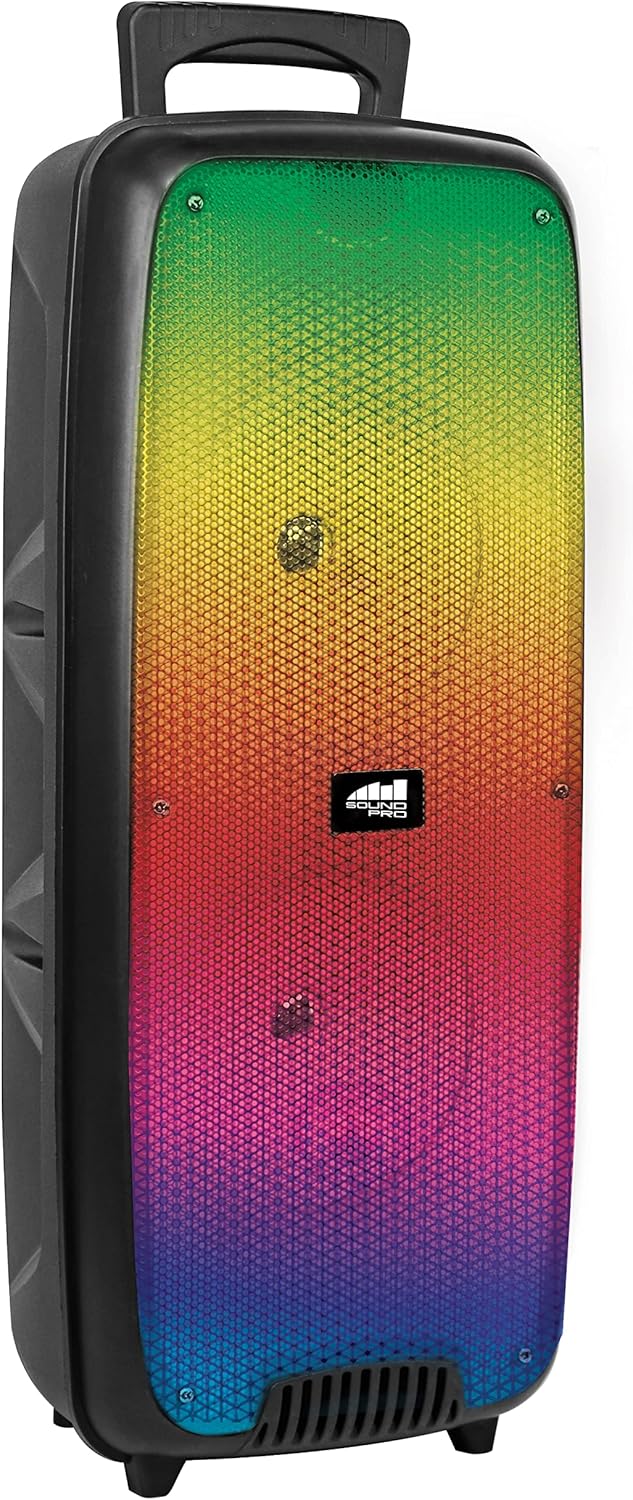
આકૃતિ 4.1: આગળ view of the Naxa NDS-6501 speaker, showcasing the dual 6.5-inch drivers and multi-color flame lights.

આકૃતિ 4.2: બાજુ view of the Naxa NDS-6501 speaker, illustrating its portable design with an integrated handle.
5. સેટઅપ
૩.૧ સ્પીકરને ચાર્જ કરવું
- આપેલા USB ચાર્જિંગ કેબલને સ્પીકરના ચાર્જિંગ પોર્ટ સાથે જોડો.
- USB કેબલના બીજા છેડાને સુસંગત USB પાવર એડેપ્ટર (શામેલ નથી) અથવા કમ્પ્યુટરના USB પોર્ટ સાથે કનેક્ટ કરો.
- ચાર્જિંગ દરમિયાન ચાર્જિંગ સૂચક લાઇટ પ્રકાશિત થશે, સામાન્ય રીતે લાલ.
- Once fully charged, the indicator light will change color or turn off (refer to specific LED behavior in your product). A full charge provides approximately 2 hours of playback.
5.2 પાવરિંગ ચાલુ/બંધ
- To power on: Press and hold the Power button for a few seconds until the speaker activates.
- To power off: Press and hold the Power button again until the speaker shuts down.
6. ઓપરેટિંગ સૂચનાઓ
6.1 બ્લૂટૂથ પેરિંગ
- Ensure the speaker is powered on and in Bluetooth mode. If not, press the Mode button to switch to Bluetooth. The speaker will indicate it is ready for pairing (e.g., a flashing LED or an audible prompt).
- તમારા બ્લૂટૂથ-સક્ષમ ઉપકરણ (સ્માર્ટફોન, ટેબ્લેટ, વગેરે) પર, બ્લૂટૂથ સેટિંગ્સ પર જાઓ.
- માટે શોધો available devices. You should see "NDS-6501" or a similar name in the list.
- Select "NDS-6501" to initiate pairing.
- Once successfully paired, the speaker will provide an audible confirmation, and the Bluetooth indicator light will become solid.
૬.૪ ટ્રુ વાયરલેસ સ્ટીરિયો (TWS) પેરિંગ
The TWS function allows you to connect two NDS-6501 speakers for a stereo sound experience.

આકૃતિ 6.1: Illustration of the True Wireless Stereo (TWS) function, enabling two speakers to connect wirelessly from a single Bluetooth source.
- Ensure both NDS-6501 speakers are powered on and in Bluetooth mode, but not yet paired to any device.
- On one of the speakers (this will be the primary speaker), press and hold the TWS button (or a designated pairing button) for a few seconds.
- The primary speaker will search for the secondary speaker. Once connected, both speakers will provide an audible confirmation.
- Now, pair your Bluetooth device to the primary speaker as described in Section 6.1. Audio will play through both speakers in stereo.
૬.૫ એફએમ રેડિયો ઓપરેશન
- FM રેડિયો મોડ પર સ્વિચ કરવા માટે મોડ બટન દબાવો.
- Press the Play/Pause button to automatically scan and save available FM stations.
- સાચવેલા સ્ટેશનો વચ્ચે નેવિગેટ કરવા માટે પાછલા/આગલા ટ્રેક બટનોનો ઉપયોગ કરો.
૪.૫ યુએસબી/માઈક્રોએસડી પ્લેબેક
- Insert a USB flash drive or a MicroSD/TF card (with audio files) સંબંધિત પોર્ટમાં.
- The speaker should automatically switch to USB or MicroSD mode and begin playing audio. If not, press the Mode button to select the correct input.
- Use the playback controls (Play/Pause, Previous/Next) to manage your music.
૬.૬ માઇક્રોફોનનો ઉપયોગ
- Connect the wired microphone to the microphone input jack on the speaker.
- Adjust the microphone volume control (if available) on the speaker to your desired level.
- The microphone audio will be mixed with any music playing through the speaker.
6.6 લાઇટિંગ ઇફેક્ટ્સ
- The speaker features integrated multi-color flame lights.
- Press the Light button (if available) to cycle through different lighting modes or to turn the lights on/off.
- The lights may synchronize with the music playback.
7. જાળવણી
- સફાઈ: સ્પીકરના બાહ્ય ભાગને સાફ કરવા માટે નરમ, સૂકા કપડાનો ઉપયોગ કરો. ઘર્ષક ક્લીનર્સ, મીણ અથવા દ્રાવકનો ઉપયોગ કરશો નહીં.
- સંગ્રહ: જ્યારે લાંબા સમય સુધી ઉપયોગમાં ન હોય, ત્યારે સ્પીકરને સીધા સૂર્યપ્રકાશ અને અતિશય તાપમાનથી દૂર ઠંડી, સૂકી જગ્યાએ સંગ્રહિત કરો.
- બેટરી સંભાળ: બેટરી લાઇફ વધારવા માટે, વારંવાર બેટરી સંપૂર્ણપણે ડિસ્ચાર્જ કરવાનું ટાળો. સ્પીકરને નિયમિતપણે ચાર્જ કરો, ભલે તે ઉપયોગમાં ન હોય.
- પાણીનો સંપર્ક: This speaker is not waterproof. Avoid exposing it to water or excessive moisture.
8. મુશ્કેલીનિવારણ
| સમસ્યા | સંભવિત કારણ | ઉકેલ |
|---|---|---|
| સ્પીકર ચાલુ થતો નથી. | બેટરી ખતમ થઈ ગઈ છે. | પ્રદાન કરેલ USB કેબલનો ઉપયોગ કરીને સ્પીકર ચાર્જ કરો. |
| સ્પીકરમાંથી કોઈ અવાજ નથી. | Volume is too low; incorrect input mode; device not paired. | Increase volume; press Mode button to select correct input; re-pair Bluetooth device. |
| Bluetooth device cannot find speaker. | સ્પીકર પેરિંગ મોડમાં નથી; ડિવાઇસ ખૂબ દૂર છે; દખલગીરી. | Ensure speaker is in Bluetooth pairing mode; move device closer; avoid obstacles. |
| TWS જોડી નિષ્ફળ જાય છે. | સ્પીકર્સ પહેલાથી જ ઉપકરણ સાથે જોડાયેલા છે; ખૂબ દૂર છે. | Ensure both speakers are unpaired from other devices; place speakers within 33 feet of each other. |
| માઇક્રોફોન કામ કરી રહ્યો નથી. | Microphone not fully plugged in; microphone volume low. | Ensure microphone is securely connected; adjust microphone volume. |
9. સ્પષ્ટીકરણો
| લક્ષણ | સ્પષ્ટીકરણ |
|---|---|
| મોડલ નંબર | એનડીએસ -6501 |
| સ્પીકરનું કદ | ડ્યુઅલ ૩.૭ ઇંચ |
| કનેક્ટિવિટી ટેકનોલોજી | Bluetooth, USB, MicroSD, Aux (3.5mm) |
| ઓડિયો ઇનપુટ | વાયર્ડ માઇક્રોફોન |
| ઓડિયો આઉટપુટ મોડ | સ્ટીરિયો |
| મહત્તમ આઉટપુટ પાવર | 3 વોટ્સ |
| વક્તા Ampલિફિકેશનનો પ્રકાર | સક્રિય |
| બેટરીનો પ્રકાર | Lithium Ion (rechargeable, included) |
| બેટરી સરેરાશ જીવન | 2 કલાક સુધી |
| ઉત્પાદનના પરિમાણો (L x W x H) | 24.13 x 19.05 x 57.91 સેમી (9.5 x 7.5 x 22.8 ઇંચ) |
| વસ્તુનું વજન | 2.81 કિગ્રા (6.2 lbs) |
| રંગ | કાળો |
| યુપીસી | 840005017555 |
10. વોરંટી અને સપોર્ટ
For warranty information or technical support, please refer to the warranty card included with your product or visit the official Naxa Electronics webસાઇટ. કોઈપણ વોરંટી દાવા માટે ખરીદીના પુરાવા તરીકે તમારી ખરીદી રસીદ રાખો.


