ઉત્પાદન ઓવરview
The SWISSTEN Elegant Bluetooth Headphones are designed for versatile audio playback, offering high-quality sound and multiple connectivity options. These headphones feature Bluetooth wireless connectivity, an integrated FM radio tuner, a microSD card slot for direct music playback, a 3.5mm AUX audio input, and a built-in hands-free microphone. The earcups are pivotable for enhanced comfort during use.

આકૃતિ 1: આગળ view of the SWISSTEN Elegant Bluetooth Headphones, showcasing the sleek black design and earcups.
પેકેજ સામગ્રી
પેકેજ ખોલતી વખતે, ખાતરી કરો કે બધા ઘટકો હાજર છે:
- SWISSTEN Elegant Bluetooth Headphones
- યુએસબી ચાર્જિંગ કેબલ
- ૩.૫ મીમી ઓડિયો કેબલ (AUX)
- વપરાશકર્તા માર્ગદર્શિકા
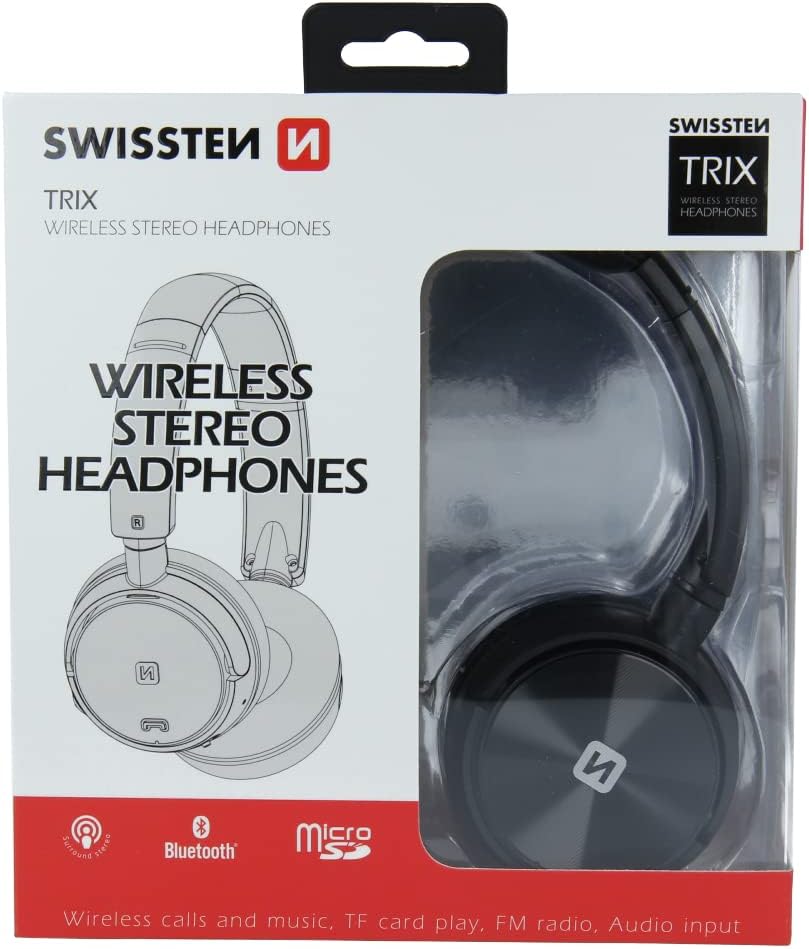
આકૃતિ 2: Retail packaging of the SWISSTEN Elegant Bluetooth Headphones, showing the product and key features.
સેટઅપ
હેડફોન ચાર્જ કરી રહ્યા છીએ
Before first use, fully charge the headphones. Connect the supplied USB charging cable to the micro USB port on the headphones and the other end to a USB power source (e.g., computer USB port, USB wall adapter). The charging indicator light will illuminate during charging and turn off when fully charged. A full charge takes approximately 2 hours.
પાવરિંગ ચાલુ/બંધ
- પાવર ચાલુ કરવા માટે: Press and hold the Power button until the indicator light flashes.
- પાવર ઓફ કરવા માટે: સૂચક લાઇટ બંધ ન થાય ત્યાં સુધી પાવર બટન દબાવી રાખો.

આકૃતિ 3: ક્લોઝ-અપ view of the headphone earcup, highlighting the control buttons, charging port, and 3.5mm audio jack.
ઓપરેટિંગ સૂચનાઓ
બ્લૂટૂથ જોડી
- ખાતરી કરો કે હેડફોન્સ બંધ છે.
- Press and hold the Power button for approximately 5-7 seconds until the indicator light flashes blue and red alternately, indicating pairing mode.
- તમારા ઉપકરણ (સ્માર્ટફોન, ટેબ્લેટ, કમ્પ્યુટર) પર, બ્લૂટૂથ સક્ષમ કરો અને ઉપલબ્ધ ઉપકરણો શોધો.
- Select "SWISSTEN SW1010" (or similar name) from the list of found devices.
- એકવાર જોડી બનાવ્યા પછી, સૂચક પ્રકાશ ધીમે ધીમે વાદળી રંગનો ચમકશે.
બ્લૂટૂથ રેન્જ આશરે 10 મીટર (33 ફૂટ) છે.
Music Playback (Bluetooth/MicroSD/AUX)
- બ્લૂટૂથ મોડ: After successful pairing, play music from your connected device. Use the headphone controls for Play/Pause, Next/Previous Track, and Volume adjustment.
- માઇક્રોએસડી કાર્ડ મોડ: Insert a microSD card (up to 32GB) with MP3, WMA, or WAV audio files into the designated slot. The headphones will automatically switch to microSD mode and begin playback.
- AUક્સ મોડ: Connect one end of the 3.5mm audio cable to the headphone's AUX port and the other end to your audio source. The headphones will automatically switch to AUX mode. Note: In AUX mode, controls on the headphones may be limited; control playback from your audio source.
એફએમ રેડિયો ઓપરેશન
- હેડફોન પર પાવર.
- Press the Mode button (often labeled 'M' or similar) to switch to FM Radio mode.
- ઉપલબ્ધ FM સ્ટેશનોને ઓટો-સ્કેન કરવા અને સાચવવા માટે એકવાર પ્લે/પોઝ બટન દબાવો.
- Use the Next/Previous Track buttons to navigate between saved stations.
The FM frequency range is 87.5-108 MHz.
હેન્ડ્સ-ફ્રી કૉલિંગ
- કૉલનો જવાબ આપો: એકવાર પ્લે/પોઝ બટન દબાવો.
- કૉલ સમાપ્ત કરો: કોલ દરમિયાન એકવાર પ્લે/પોઝ બટન દબાવો.
- કૉલ નકારો: પ્લે/પોઝ બટનને 2 સેકન્ડ માટે દબાવી રાખો.
- છેલ્લો નંબર ફરીથી ડાયલ કરો: પ્લે/પોઝ બટનને બે વાર દબાવો.

આકૃતિ 4: A person wearing the SWISSTEN Elegant Bluetooth Headphones, demonstrating their comfortable fit.
જાળવણી
- સફાઈ: હેડફોન સાફ કરવા માટે નરમ, સૂકા કપડાનો ઉપયોગ કરો. ઘર્ષક ક્લીનર્સ અથવા સોલવન્ટનો ઉપયોગ કરશો નહીં.
- સંગ્રહ: હેડફોનને સીધા સૂર્યપ્રકાશ અને અતિશય તાપમાનથી દૂર ઠંડી, સૂકી જગ્યાએ સંગ્રહિત કરો.
- બેટરી સંભાળ: બેટરી લાઇફ વધારવા માટે, વારંવાર બેટરી સંપૂર્ણપણે ડિસ્ચાર્જ કરવાનું ટાળો. હેડફોન નિયમિતપણે ચાર્જ કરો, ભલે લાંબા સમય સુધી ઉપયોગમાં ન હોય.
- પાણીનો સંપર્ક: આ હેડફોન વોટરપ્રૂફ નથી. પાણી અથવા વધુ પડતા ભેજના સંપર્કમાં આવવાનું ટાળો.
મુશ્કેલીનિવારણ
| સમસ્યા | સંભવિત કારણ | ઉકેલ |
|---|---|---|
| હેડફોન ચાલુ થતા નથી. | ઓછી બેટરી. | હેડફોનને સંપૂર્ણ રીતે ચાર્જ કરો. |
| બ્લૂટૂથ દ્વારા જોડી બનાવી શકાતી નથી. | હેડફોન પેરિંગ મોડમાં નથી; ડિવાઇસ બ્લૂટૂથ બંધ છે; ડિવાઇસથી ખૂબ દૂર છે. | Ensure headphones are in pairing mode (flashing blue/red). Turn on Bluetooth on your device. Move headphones closer to the device (within 10m). |
| કોઈ અવાજ નથી. | વોલ્યુમ ખૂબ ઓછું છે; ખોટો મોડ પસંદ કરેલ છે; AUX કેબલ સંપૂર્ણપણે દાખલ થયેલ નથી. | Increase volume on headphones and connected device. Ensure correct mode (Bluetooth, MicroSD, AUX, FM) is selected. Re-insert AUX cable firmly. |
| ખરાબ FM રેડિયો રિસેપ્શન. | નબળો સંકેત; દખલગીરી. | Move to an area with better signal. Re-scan stations. |
વિશિષ્ટતાઓ
| લક્ષણ | વિગત |
|---|---|
| મોડલ નંબર | SW1010 |
| બ્લૂટૂથ સંસ્કરણ | V4.2 |
| સપોર્ટેડ બ્લૂટૂથ પ્રોfiles | A2DP, AVRCP |
| Supported Audio Formats (MicroSD) | MP3 (8-320 Kbps), WMA (5-320 Kbps), WAV (16-1536 Kbps) |
| એફએમ રેડિયો ફ્રીક્વન્સી રેન્જ | 87.5-108 MHz |
| સ્પીકર વ્યાસ | 40 મીમી |
| અવબાધ | 32 ઓહ્મ |
| સંવેદનશીલતા | 108 +/- 3 ડીબી |
| આવર્તન પ્રતિભાવ | 20 - 20,000 Hz |
| ઓપરેટિંગ રેન્જ | 10 મી |
| ચાર્જિંગ સમય | 2 કલાક |
| ઓપરેટિંગ સમય | 6-8 કલાક |
| કનેક્ટિવિટી | Wireless Bluetooth, 3.5mm Jack |
| ખાસ લક્ષણો | Microphone included, FM Radio, MicroSD slot |
| ફોર્મ ફેક્ટર | Over-Ear (Supra-Auriculaire) |
| સામગ્રી | Faux Leather (Simili cuir) |
વોરંટી અને આધાર
For warranty information and technical support, please refer to the official SWISSTEN webસાઇટ પર જાઓ અથવા તમારા રિટેલરનો સંપર્ક કરો. વોરંટી દાવાઓ માટે ખરીદીનો પુરાવો રાખો.
ઉત્પાદક: સ્વિસટન
ASIN: B0BC9F9LWM


