1. પરિચય
This manual provides essential information for the proper setup, operation, and maintenance of your Sharp 32FG6EA 32-inch HD Android TV. The Sharp 32FG6EA offers a wide range of connection options and features the Android TV operating system, providing a modern and intuitive television experience. It functions as an all-in-one entertainment hub, integrating Google Assistant for a smarter viewing experience. Users can quickly access entertainment, control smart devices, and obtain on-screen information using voice commands.
2. સલામતી માહિતી
Please read all safety instructions carefully before using the television. Keep this manual for future reference.
- પાવર સપ્લાય: ખાતરી કરો કે ટીવી યોગ્ય વોલ્યુમ સાથે પાવર સ્ત્રોત સાથે જોડાયેલ છેtage. પાવર આઉટલેટ્સ ઓવરલોડ ન કરો.
- વેન્ટિલેશન: વેન્ટિલેશનના છિદ્રોને અવરોધશો નહીં. ટીવીની આસપાસ યોગ્ય હવા પ્રવાહ માટે પૂરતી જગ્યા આપો જેથી વધુ ગરમ થવાથી બચી શકાય.
- પાણી અને ભેજ: Do not expose the TV to rain, moisture, or excessive humidity. Avoid placing objects filled with liquids on or near the TV.
- સફાઈ: સફાઈ કરતા પહેલા ટીવીને અનપ્લગ કરો. નરમ, સૂકા કપડાનો ઉપયોગ કરો. પ્રવાહી ક્લીનર્સ અથવા એરોસોલ સ્પ્રેનો ઉપયોગ કરશો નહીં.
- પ્લેસમેન્ટ: Place the TV on a stable, level surface. If wall-mounting, ensure the mount is securely installed and can support the TV's weight.
- સર્વિસિંગ: ટીવીની જાતે સર્વિસ કરવાનો પ્રયાસ કરશો નહીં. બધી સર્વિસિંગ લાયકાત ધરાવતા સેવા કર્મચારીઓને સોંપો.
3. પેકેજ સામગ્રી
ખાતરી કરો કે બધી વસ્તુઓ પેકેજિંગમાં હાજર છે:
- Sharp 32FG6EA 32-inch HD Android TV
- રિમોટ કંટ્રોલ (2 AAA બેટરી સાથે)
- Stand Type Base
- સૂચના માર્ગદર્શિકા
- પાવર કેબલ
4. સેટઅપ
4.1 અનપેકિંગ
પેકેજિંગમાંથી ટીવી અને બધી એસેસરીઝ કાળજીપૂર્વક દૂર કરો. ભવિષ્યના પરિવહન અથવા સર્વિસિંગ માટે પેકેજિંગ સામગ્રી રાખો.
૨.૧ સ્ટેન્ડ જોડવું
If you are not wall-mounting the TV, attach the included stand base:
- નુકસાન અટકાવવા માટે ટીવી સ્ક્રીનને નરમ, સપાટ સપાટી પર નીચે મૂકો.
- ટીવીના તળિયે માઉન્ટિંગ છિદ્રો સાથે સ્ટેન્ડ બેઝને સંરેખિત કરો.
- આપેલા સ્ક્રૂનો ઉપયોગ કરીને સ્ટેન્ડને સુરક્ષિત કરો. ખાતરી કરો કે સ્ટેન્ડ મજબૂત રીતે જોડાયેલ છે.
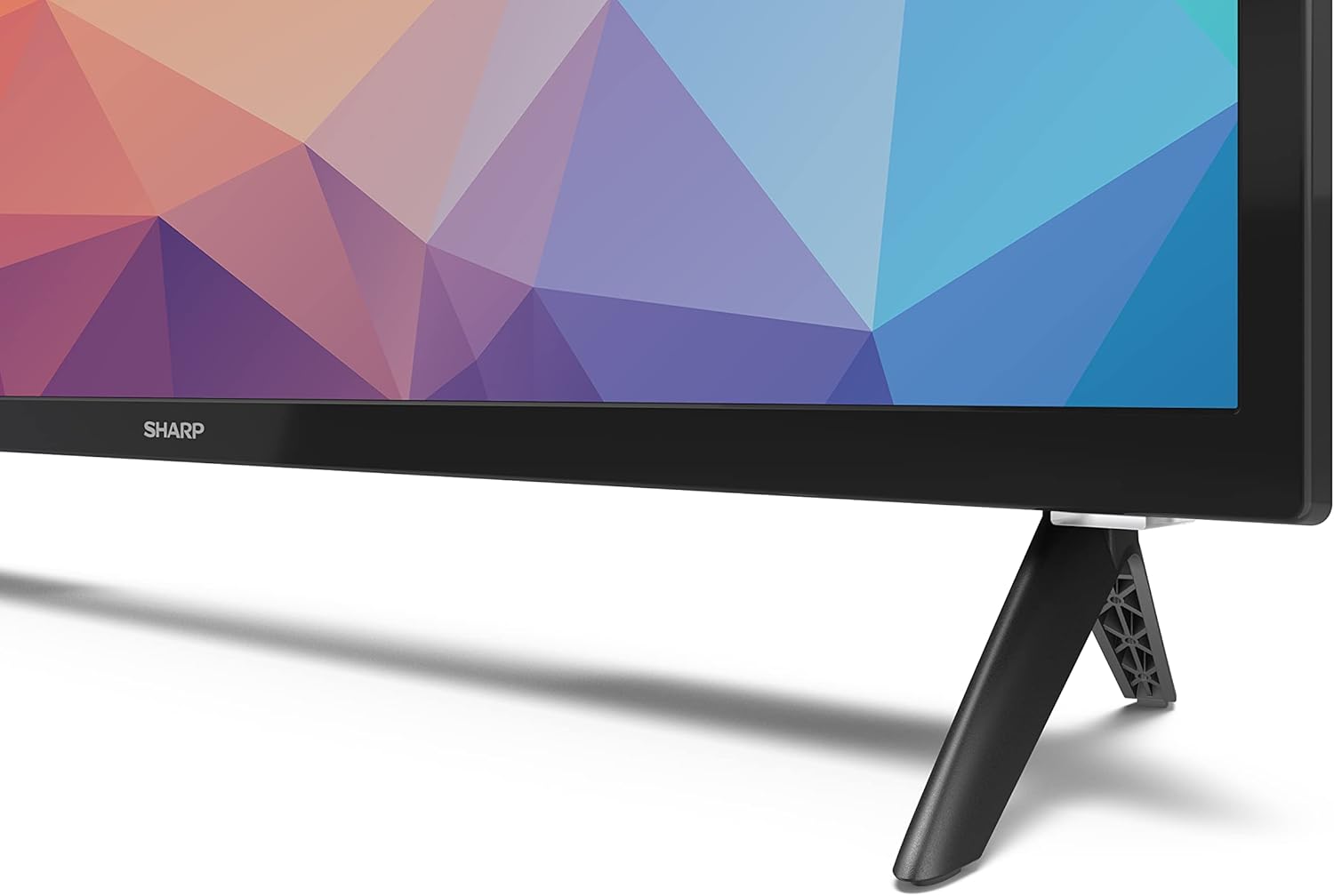
Image: Close-up of the TV stand attachment.
4.3 વોલ માઉન્ટિંગ
The Sharp 32FG6EA supports VESA wall mounts with dimensions of 75 x 75 mm. Wall mount hardware is not included. Follow the instructions provided with your wall mount kit.
૫.૩ બાહ્ય ઉપકરણોને જોડવા
તમારા ટીવીમાં વિવિધ ઉપકરણોને કનેક્ટ કરવા માટે બહુવિધ પોર્ટ છે:
- એચડીએમઆઈ: Connect Blu-ray players, game consoles, or set-top boxes to the 2 HDMI ports.
- યુએસબી: Connect USB storage devices for media playback to the 2 USB ports.
- એન્ટેના/કેબલ: Connect an antenna or cable TV source for broadcast channels.
- ઈથરનેટ: વાયર્ડ ઇન્ટરનેટ કનેક્શન માટે.
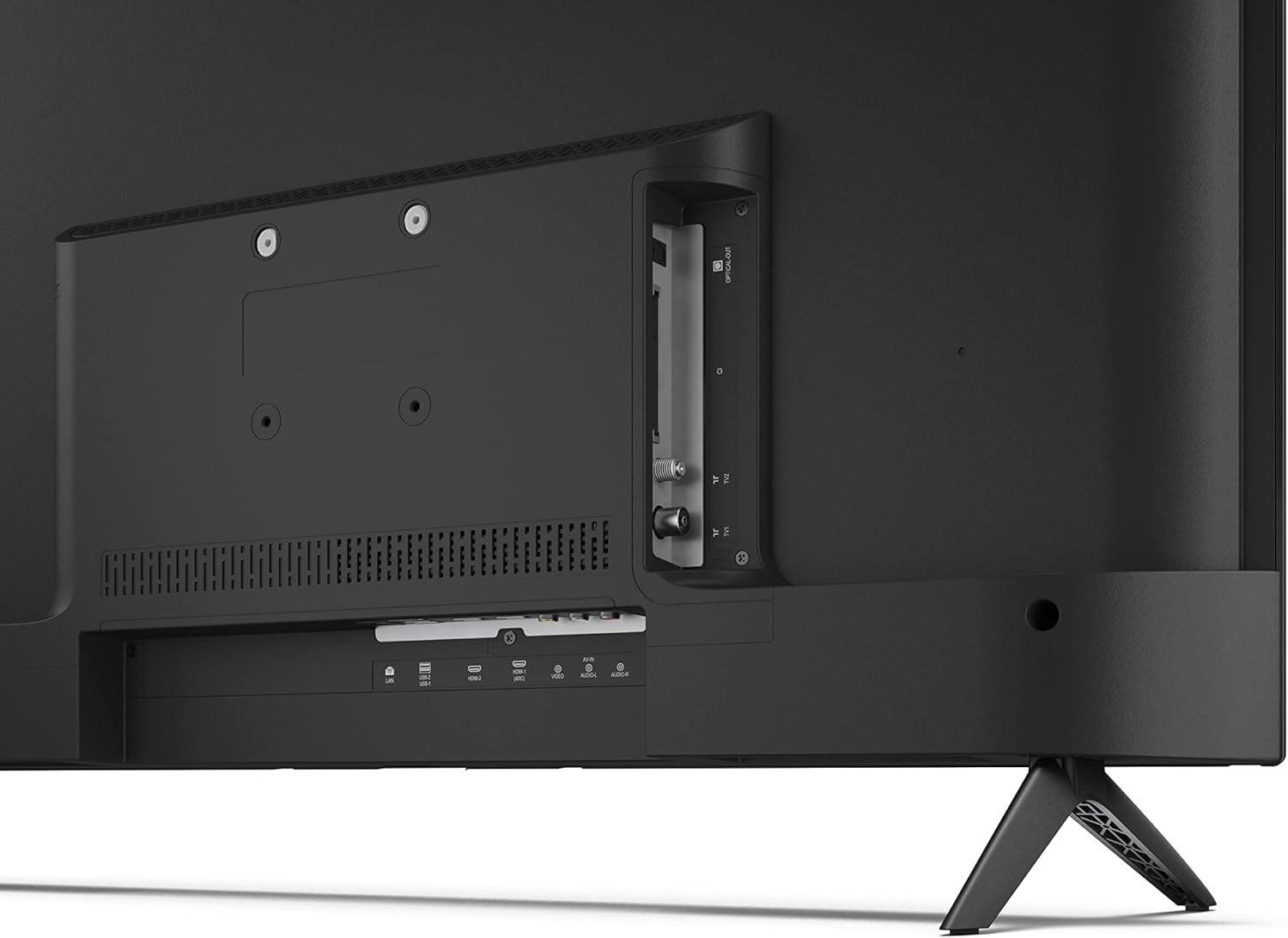
છબી: પાછળનો ભાગ view of the TV with connection ports.
4.5 પાવર કનેક્શન
After connecting all necessary devices, plug the power cable into the TV and then into a wall outlet.
૨.૫ પ્રારંભિક સેટઅપ વિઝાર્ડ
પહેલી વાર પાવર-ઓન કરવા પર, ટીવી તમને પ્રારંભિક સેટઅપ પ્રક્રિયામાં માર્ગદર્શન આપશે. આમાં શામેલ છે:
- ભાષા પસંદગી.
- નેટવર્ક કનેક્શન (Wi-Fi અથવા ઇથરનેટ).
- Google account sign-in (required for full Android TV features).
- ચેનલ સ્કેનિંગ.
Ope. Opeપરેટિંગ
5.1 રીમોટ કંટ્રોલ ઓવરview
The included remote control allows you to navigate the TV's features. Insert the 2 AAA batteries into the remote control before use.
- પાવર બટન: ટીવી ચાલુ કે બંધ કરે છે.
- ડાયરેક્શનલ પેડ (ડી-પેડ) અને ઓકે બટન: મેનુઓ નેવિગેટ કરો અને પસંદગીઓની પુષ્ટિ કરો.
- પાછળનું બટન: પાછલી સ્ક્રીન પર પાછા ફરે છે.
- હોમ બટન: Android TV હોમ સ્ક્રીનને ઍક્સેસ કરે છે.
- વોલ્યુમ અપ/ડાઉન: ઓડિયો વોલ્યુમ સમાયોજિત કરે છે.
- ચેનલ ઉપર/નીચે: ટીવી ચેનલો બદલે છે.
- ગૂગલ આસિસ્ટન્ટ બટન: વૉઇસ નિયંત્રણ સક્રિય કરે છે.
- એપ શોર્ટકટ બટનો: Dedicated buttons for popular streaming services like Netflix, Prime Video, and YouTube.
5.2 Android TV Interface Navigation
The Android TV home screen provides access to your installed apps, recommended content, and settings. Use the directional pad on your remote to navigate through the interface.
5.3 ગૂગલ સહાયક
Press the Google Assistant button on your remote and speak into the microphone to:
- માટે શોધો movies, shows, or information.
- Control smart home devices.
- Open applications.
- ટીવી સેટિંગ્સ ગોઠવો.
5.4 Chromecast બિલ્ટ-ઇન
The TV includes Chromecast built-in, allowing you to cast content from compatible apps on your smartphone, tablet, or computer directly to the TV screen.
૪.૩ બ્લૂટૂથ કનેક્ટિવિટી
Connect Bluetooth devices such as headphones or speakers to your TV for a personalized audio experience. Navigate to the TV's settings menu to pair new Bluetooth devices.
5.6 ઓડિયો સેટિંગ્સ
The TV supports Dolby Audio with 2 x 6 W RMS speakers. You can adjust audio settings, including sound modes and equalizer, through the TV's settings menu.
6. જાળવણી
૪.૧ ટીવી સાફ કરવું
ટીવી સ્ક્રીન અને કેબિનેટ સાફ કરવા માટે:
- વોલ આઉટલેટમાંથી પાવર કોર્ડને અનપ્લગ કરો.
- Use a soft, lint-free cloth to gently wipe the screen and surfaces.
- હઠીલા ગુણ માટે, સહેજ ડીampપાણી અથવા વિશિષ્ટ સ્ક્રીન ક્લીનરથી કાપડને ઢાંકી દો (કાપડા પર લગાવો, સીધા સ્ક્રીન પર નહીં).
- ઘર્ષક ક્લીનર્સ, મીણ અથવા દ્રાવકનો ઉપયોગ કરશો નહીં.
6.2 સોફ્ટવેર અપડેટ્સ
Your Android TV may receive periodic software updates to improve performance and add new features. Ensure your TV is connected to the internet to receive these updates. You can check for updates manually in the TV's settings menu.
7. મુશ્કેલીનિવારણ
જો તમને તમારા ટીવીમાં સમસ્યાઓ આવે, તો નીચેની સામાન્ય સમસ્યાઓ અને ઉકેલોનો સંદર્ભ લો:
- કોઈ શક્તિ નથી: Ensure the power cable is securely plugged into both the TV and a working wall outlet. Try a different outlet.
- કોઈ ચિત્ર/ધ્વનિ નથી: Check that the correct input source is selected. Verify all cables (HDMI, antenna) are properly connected.
- રીમોટ કંટ્રોલ કામ કરતું નથી: બેટરીઓ તપાસો અને ખાતરી કરો કે તે યોગ્ય રીતે દાખલ કરવામાં આવી છે. રિમોટને સીધો ટીવીના IR સેન્સર પર રાખો.
- નબળી ચિત્ર ગુણવત્તા: Check antenna/cable connections. Adjust picture settings in the TV menu. For streaming content, ensure a stable internet connection.
- ઇન્ટરનેટ કનેક્શન નથી: Verify Wi-Fi password or Ethernet cable connection. Restart your router and the TV.
- Apps Not Working: Ensure the TV's software is up to date. Try clearing the app's cache or reinstalling the app.
If problems persist, consult the Sharp support webસાઇટ અથવા ગ્રાહક સેવાનો સંપર્ક કરો.
8. સ્પષ્ટીકરણો
| લક્ષણ | સ્પષ્ટીકરણ |
|---|---|
| મોડલ નંબર | 32FG6EA |
| બ્રાન્ડ | તીક્ષ્ણ |
| સ્ક્રીન માપ | ૬૫ ઇંચ (૧૬૬ સે.મી. કર્ણ) |
| ડિસ્પ્લે ટેકનોલોજી | એલઇડી |
| ઠરાવ | 720p (1366 x 768 પિક્સેલ્સ) |
| પાસા રેશિયો | 16:9 |
| તાજું દર | 50 હર્ટ્ઝ |
| ઓપરેટિંગ સિસ્ટમ | એન્ડ્રોઇડ ટીવી 11 |
| ખાસ લક્ષણો | Android TV, Google Assistant, Chromecast built-in |
| ઓડિયો આઉટપુટ | 2 x 6 W RMS, Dolby Audio |
| HDMI પોર્ટ્સ | 2 |
| યુએસબી પોર્ટ્સ | 2 |
| કનેક્ટિવિટી | Wi-Fi, બ્લૂટૂથ, ઇથરનેટ |
| VESA વોલ માઉન્ટ | 75 x 75 મીમી |
| સ્ટેન્ડ સાથેના પરિમાણો (W x H x D) | 731 x 486 x 177 મીમી |
| સ્ટેન્ડ વગરના પરિમાણો (W x H x D) | 731 x 433 x 68 મીમી |
| ઉત્પાદનના પરિમાણો (D x W x H) | 16 x 73 x 46.4 cm (approximate, with stand) |
| વજન | 3.9 કિગ્રા |
| ઉર્જા કાર્યક્ષમતા વર્ગ | E |

Image: TV dimensions diagram.

Image: Energy Label. For more details, visit EPREL ડેટાબેઝ.
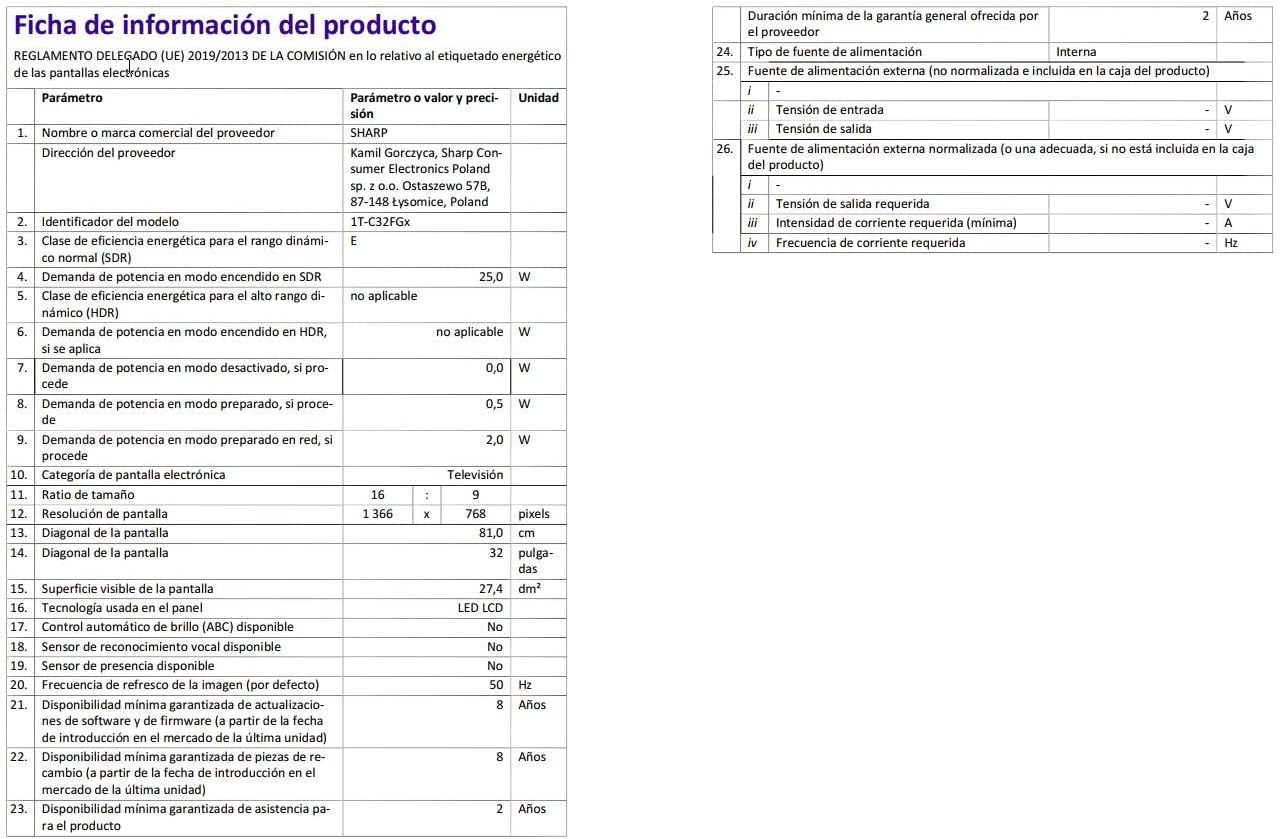
Image: Detailed product information sheet.
9. વોરંટી અને સપોર્ટ
The Sharp 32FG6EA television comes with a minimum general warranty duration of 2 years from the provider.
For technical support, warranty claims, or further assistance, please refer to the contact information provided with your purchase documentation or visit the official Sharp support webતમારા પ્રદેશ માટે સાઇટ.


