1. પરિચય
This manual provides essential information for the safe and effective operation of your SCULPFUN S30 Pro Max Laser Engraving Machine. Please read this manual thoroughly before operating the machine and retain it for future reference.

Figure 1: SCULPFUN S30 Pro Max Laser Engraving Machine.
The SCULPFUN S30 Pro Max is an industrial-grade laser engraving and cutting machine featuring a powerful 20000mW (20W) quad-laser module, automatic air assist system, and an expandable working area. It is designed for high-precision engraving and efficient cutting on a wide range of materials.
2. સુરક્ષા માર્ગદર્શિકા
ચેતવણી: This product is a Class IV laser device. Laser radiation can cause eye and skin damage. Always wear appropriate laser safety goggles (OD4+) when operating the machine. Never look directly into the laser beam or at reflections.
- Ensure proper ventilation in the work area to dissipate fumes and smoke generated during engraving/cutting.
- ઓપરેશન દરમિયાન મશીનને અડ્યા વિના છોડશો નહીં.
- નજીકમાં અગ્નિશામક યંત્ર રાખો.
- Do not engrave or cut unknown materials, as they may produce toxic fumes or catch fire.
- ઓપરેશન દરમિયાન બાળકો અને પાલતુ પ્રાણીઓને મશીનથી દૂર રાખો.
- Ensure the machine is placed on a stable, level, and non-flammable surface.
3. ઉત્પાદન સુવિધાઓ
- Automatic Air Assist System: Equipped with a 32-bit automatic air assist motherboard and an air pump, intelligently controlled by LightBurn software (M8 button). This system significantly improves cutting efficiency and cleanliness.
- High-Pressure Air-Assisted Nozzle: Generates a high-pressure airflow of 30L/min, increasing cutting speed by over 5 times compared to operations without air assist. It also helps in blowing away debris for cleaner cuts.
- 20W Quad-Laser Module: Features a powerful 20000mW laser for strong cutting and precise engraving capabilities.
- Industrial X-Axis Guide Rail: Provides high precision and stability, preventing ripple patterns in engraving details.
- Sturdy and Precise Body: Constructed from high-strength aluminum alloy, supporting up to 50kg. Integrated X-axis and Y-axis scale lines allow for quick measurement of engraved objects.
- Replaceable Lens Design: The laser module features a replaceable lens, extending the service life of the laser by more than 10 times.
- વિસ્તૃત કોતરણી ક્ષેત્ર: Standard engraving area is 410x400mm, expandable to 935x400mm or 935x905mm with optional expansion kits.

Figure 2: Key innovative technologies of the S30 Pro Max series.
4. પેકેજ સામગ્રી
ખાતરી કરો કે બધા ઘટકો તમારા પેકેજમાં હાજર છે:

Figure 3: All components included in the SCULPFUN S30 Pro Max package.
- Laser Engraving Machine Frame (disassembled)
- 20W લેસર મોડ્યુલ
- Automatic Air Assist Pump and Hose
- પાવર એડેપ્ટર અને કેબલ
- યુએસબી કેબલ
- લેસર સેફ્ટી ગોગલ્સ
- Tool Kit (wrenches, screws, tweezers, etc.)
- વપરાશકર્તા માર્ગદર્શિકા અને સૂચનાઓ
- Test Materials (e.g., wood sampલેસ)
- Replacement Lens and Sealing Ring
5. સેટઅપ
5.1 એસેમ્બલી
Follow the detailed assembly instructions provided in the included physical manual. Ensure all screws are tightened securely and cables are connected correctly. The modular design allows for straightforward assembly.
5.2 સૉફ્ટવેર ઇન્સ્ટોલેશન
The SCULPFUN S30 Pro Max is compatible with LightBurn software. Install LightBurn on your computer and ensure the correct drivers for the machine are installed. LightBurn is required to utilize the automatic air assist feature.
૧૩.૩ મશીનને જોડવું
Connect the machine to your computer via the provided USB cable and plug in the power adapter. Turn on the machine using the main power switch.
૫.૩ લેસર પર ધ્યાન કેન્દ્રિત કરવું
Proper laser focus is crucial for optimal engraving and cutting results. Refer to the specific focusing instructions in your physical manual. Typically, this involves adjusting the laser module height until the laser dot is at its smallest and most intense point on the material surface.
6. ઓપરેટિંગ સૂચનાઓ
6.1 Basic Engraving and Cutting
Load your desired design into LightBurn. Position your material on the honeycomb workbed. Adjust laser power, speed, and passes according to the material type and desired outcome. Always perform test cuts/engravings on scrap material first.

Figure 4: Various items created using the laser engraver, demonstrating its versatility.
6.2 Automatic Air Assist Control
The automatic air assist is controlled via the M8 command in LightBurn. For cutting operations, enable air assist to achieve cleaner edges and faster results. For engraving, air assist can be turned off to prevent material charring or to achieve specific engraving effects.

Figure 5: LightBurn interface showing the M8 control for automatic air assist.

Figure 6: Visual comparison demonstrating the benefits of automatic air assist for clean cuts and engravings.
૩.૩ સામગ્રી સુસંગતતા
The S30 Pro Max can engrave and cut various materials:
- કોતરણી: Wood, MDF, zigzag, cardboard, plastic, leather, circuit board, aluminum oxide, 304 stainless steel, ceramics, dark stone.
- કટિંગ: Black acrylic sheets, cardboard, non-woven fabric, bamboo sheets, leather, certain plastic sheets, circuit boards.
6.4 Expanding the Working Area
The standard working area of 410x400mm can be expanded using optional Y-axis or X-axis & Y-axis expansion kits. This allows for larger projects, up to 935x905mm.

Figure 7: Illustration of the standard and expanded working areas.
6.5 Using the Rotary Roller (Optional)
For engraving cylindrical objects like tumblers or bottles, an optional rotary roller attachment can be used. Connect the rotary roller according to its specific instructions and configure it within LightBurn for rotary engraving.
Video 1: Demonstration of the SCULPFUN S30 series laser engraver and cutter, showcasing its features including automatic air assist, cutting capabilities, and rotary engraving on cylindrical objects.
વિડિઓ ૧: એક ઓવરview of the Sculpfun S30 Pro Max Laser Engraving Machine, demonstrating its setup, connection, and engraving capabilities on various materials, including metal pendants.
7. જાળવણી
7.1 Laser Lens Cleaning and Replacement
Regularly inspect the laser lens for dust or debris. Clean it gently with a lint-free cloth and lens cleaning solution. If the lens is damaged or its performance degrades, replace it with a new one. A free laser repair kit including a lens is provided with the S30 Pro Max.
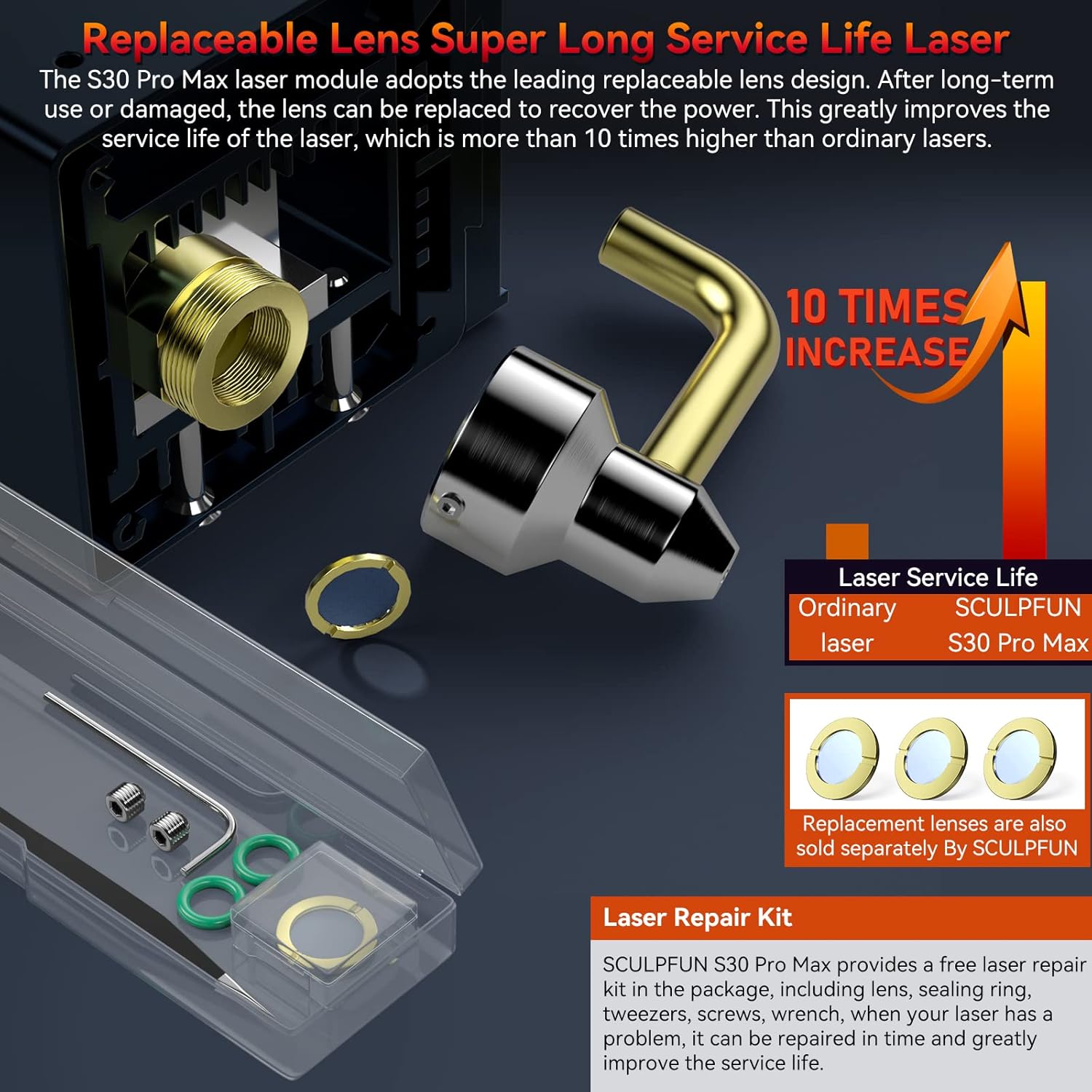
Figure 8: The replaceable laser lens design and included repair kit for extended laser lifespan.
7.2 સામાન્ય સફાઈ
Keep the machine clean from dust, debris, and material residue. Use a soft brush or compressed air to clean the rails, belts, and other moving parts. Ensure the honeycomb workbed is clear of obstructions.
7.3 Belt and Rail Inspection
Periodically check the tension of the timing belts and inspect the linear guide rails for any signs of wear or damage. Proper tension and clean rails ensure smooth and accurate movement of the laser module.
8. મુશ્કેલીનિવારણ
- Laser not firing: Check power connection, USB connection, and ensure the laser module is properly seated. Verify laser is enabled in software.
- Poor engraving/cutting quality: Check laser focus, material settings (speed/power), and ensure the material is flat and securely placed. Clean the laser lens.
- Machine not moving: Check all cable connections, ensure power is on, and verify software connection. Restart the machine and software.
- Air assist not working: Ensure the air pump is connected and powered, and the M8 command is correctly enabled in LightBurn. Check for kinks in the air hose.
- For further assistance, refer to the manufacturer's official support resources or contact customer service.
9. સ્પષ્ટીકરણો
| સ્પષ્ટીકરણ | મૂલ્ય |
|---|---|
| મોડલ નંબર | S30 Pro Max 20W-BR |
| લેસર આઉટપુટ પાવર | ૧૦,૦૦૦ મેગાવોટ (૧૦ વોટ) |
| ઉત્પાદન પરિમાણો | 22.44 x 23.23 x 10.63 ઇંચ |
| વસ્તુનું વજન | 17.21 પાઉન્ડ |
| Engraving Area (Standard) | 410 x 400 મીમી |
| Engraving Area (Expandable) | 935 x 905 મીમી સુધી |
| ઉત્પાદક | સ્કુલફન |
| મૂળ દેશ | ચીન |
| લેસર વર્ગ | વર્ગ IV |
10. વોરંટી અને સપોર્ટ
વોરંટી માહિતી અને ટેકનિકલ સપોર્ટ માટે, કૃપા કરીને સત્તાવાર SCULPFUN નો સંદર્ભ લો. website or contact the seller directly. Keep your purchase receipt as proof of purchase for warranty claims.
Manufacturer Contact: SCULPFUN


