પરિચય
ખરીદી બદલ આભારasing the Nedis Alarm Clock with Wireless Charger. This device combines a digital alarm clock with a Qi-certified wireless charging pad, a USB-A charging port, a dimmable display, dual alarm settings, and a color-changing night light. This manual provides essential information for safe and efficient use of your new device.
સલામતી માહિતી
- ઉપયોગ કરતા પહેલા બધી સૂચનાઓ કાળજીપૂર્વક વાંચો.
- ઉપકરણને પાણી, ભેજ અને અતિશય તાપમાનથી દૂર રાખો.
- ઉપકરણને જાતે ડિસએસેમ્બલ કરવાનો કે રિપેર કરવાનો પ્રયાસ કરશો નહીં. બધી સર્વિસિંગ લાયક કર્મચારીઓને સોંપો.
- Ensure the power adapter used is compatible with the device's power requirements. For fast charging, a QC3.0 power adapter (not included) is recommended.
- Avoid placing metal objects on the wireless charging pad, as this may interfere with charging or cause overheating.
પેકેજ સામગ્રી
- Nedis Alarm Clock with Wireless Charger (Model WCACQ30WT)
- Power Adapter (if included, otherwise sold separately)
- વપરાશકર્તા માર્ગદર્શિકા
ઉત્પાદન ઓવરview
Familiarize yourself with the various components of your alarm clock:

છબી 1: આગળ View. This image displays the front of the alarm clock, featuring the large digital time display and the touch-sensitive control buttons located above it. The buttons include controls for display brightness, time setting, and alarm adjustments.
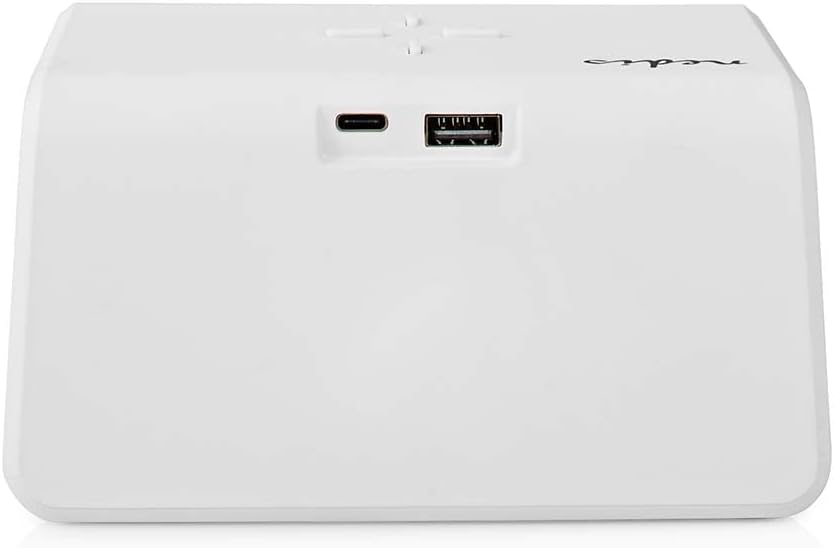
છબી 2: પાછળ View. The back of the alarm clock is shown, highlighting the USB-C port for power input and a standard USB-A port for charging external devices.
- ડિજિટલ ડિસ્પ્લે: સમય, એલાર્મ સ્થિતિ અને અન્ય સૂચકાંકો બતાવે છે.
- નિયંત્રણ બટનો: (Located on top)
- Light Button: Controls night light.
- Time/Alarm Set Button: For setting time and alarms.
- +/- Buttons: Adjust values.
- વાયરલેસ ચાર્જિંગ પેડ: (Top surface) For Qi-compatible devices.
- USB-C ઇનપુટ: (Rear) For connecting the power adapter.
- યુએસબી-એ આઉટપુટ: (Rear) For charging other devices via cable.
- Night Light Panel: (Side/Rear) Emits ambient light.
સેટઅપ
- પાવર કનેક્ટ કરો: Plug the provided power adapter into the USB-C input port on the back of the alarm clock. Connect the other end to a wall outlet. The display will light up.
- પ્રારંભિક સમય સેટિંગ: The clock may display a default time. Proceed to the 'Operating Instructions' section to set the correct time.
ઓપરેટિંગ સૂચનાઓ
1. સમય સુયોજિત
- દબાવો અને પકડી રાખો Time/Alarm Set button (usually marked with a clock icon) until the hour digits start flashing.
- નો ઉપયોગ કરો + or - કલાક સમાયોજિત કરવા માટે બટનો.
- દબાવો Time/Alarm Set button again to switch to minute adjustment. The minute digits will flash.
- નો ઉપયોગ કરો + or - મિનિટ સમાયોજિત કરવા માટે બટનો.
- દબાવો Time/Alarm Set button once more to confirm and exit time setting mode.
૫.૨. એલાર્મ સેટ કરવા (એલાર્મ ૧ અને એલાર્મ ૨)
This device supports two independent alarm times.
- દબાવો Time/Alarm Set button once to enter Alarm 1 setting mode. The alarm icon and hour digits for Alarm 1 will flash.
- નો ઉપયોગ કરો + or - buttons to adjust the hour for Alarm 1.
- દબાવો Time/Alarm Set button again to switch to minute adjustment for Alarm 1.
- નો ઉપયોગ કરો + or - buttons to adjust the minutes for Alarm 1.
- દબાવો Time/Alarm Set button again to confirm Alarm 1 and move to Alarm 2 setting mode (if applicable). Repeat steps 2-4 for Alarm 2.
- After setting Alarm 2, press the Time/Alarm Set એલાર્મ સેટિંગ મોડની પુષ્ટિ કરવા અને બહાર નીકળવા માટે બટન.
- To activate/deactivate an alarm, short press the Time/Alarm Set button until the desired alarm icon (e.g., 'AL1' or 'AL2') appears or disappears on the display.
૫.૩. સ્નૂઝ ફંક્શન
When an alarm sounds, press any button (except the alarm off button, if present) to activate the snooze function. The alarm will temporarily stop and sound again after a few minutes (typically 5-10 minutes, refer to specific model details if available). To turn off the alarm completely, press the designated alarm off button or follow the instructions for deactivating the alarm.
4. Wireless Charging (Qi)
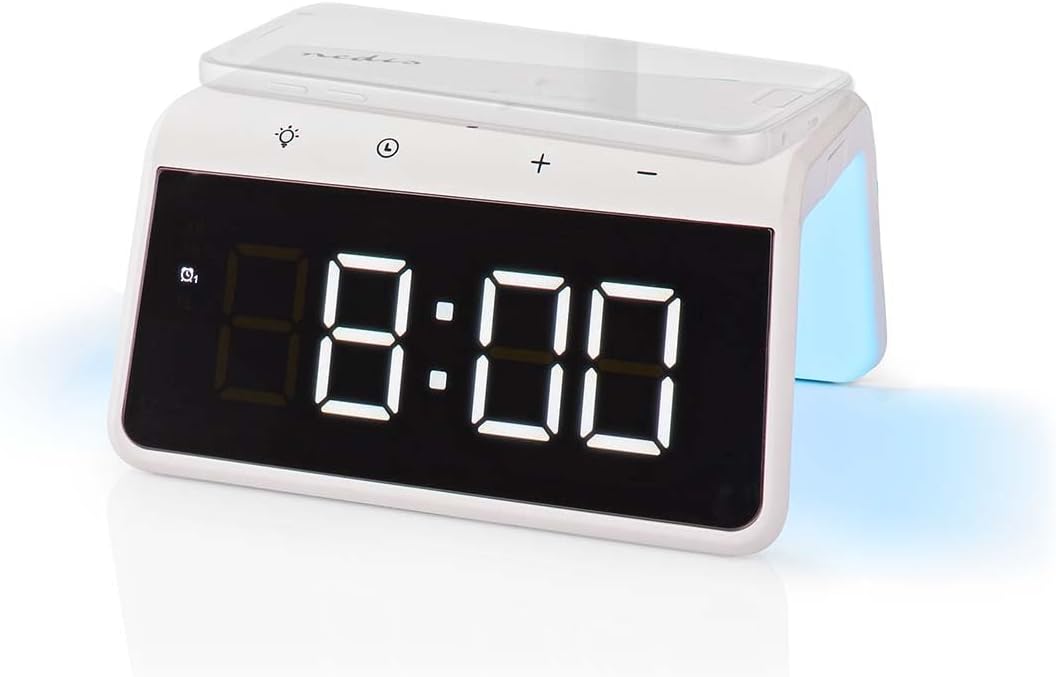
Image 3: Wireless Charging. A smartphone is shown resting on the top surface of the alarm clock, which functions as a Qi wireless charging pad.
- Place your Qi-compatible smartphone or device directly onto the wireless charging pad located on the top surface of the alarm clock.
- Ensure the device is centered on the charging pad for optimal performance.
- A charging indicator (e.g., an icon on the display or an LED light) will typically illuminate to confirm that charging has begun.
- The charger supports 5W, 7.5W, 10W, and 15W output, automatically adjusting to your device's requirements. For 15W fast charging, a QC3.0 power adapter (not included) is required.
5. USB-A Charging Output
The alarm clock features an additional USB-A port for charging devices that are not Qi-compatible or for simultaneous charging.
- Connect your device's USB charging cable to the USB-A output port on the back of the alarm clock.
- કેબલનો બીજો છેડો તમારા ડિવાઇસથી કનેક્ટ કરો.
- ચાર્જિંગ આપમેળે શરૂ થશે.
6. નાઇટ લાઇટ ફંક્શન

Image 4: Night Light. This image shows the side of the alarm clock with its integrated night light emitting a soft glow.
- દબાવો પ્રકાશ button (usually marked with a light bulb icon) to turn the night light on or off.
- વારંવાર દબાવો પ્રકાશ button to cycle through different color modes or to set a specific color. The night light can display a diverse changing color palette.
- The night light can be set to remain on or to be manually activated as needed.
7. ડિસ્પ્લે બ્રાઇટનેસ એડજસ્ટમેન્ટ
The digital display features dimmable backlighting for comfortable viewવિવિધ લાઇટિંગ પરિસ્થિતિઓમાં.
- Look for a dedicated brightness button or a combination of buttons (e.g., a short press of the Light button or +/- buttons when not in setting mode) to adjust the display brightness.
- Cycle through available brightness levels (e.g., high, medium, low, off).
જાળવણી
- સફાઈ: ઉપકરણને નરમ, સૂકા અથવા સહેજ ડીથી સાફ કરો.amp કાપડ ઘર્ષક ક્લીનર્સ અથવા સોલવન્ટનો ઉપયોગ કરશો નહીં.
- સંગ્રહ: જ્યારે લાંબા સમય સુધી ઉપયોગમાં ન હોય, ત્યારે ઉપકરણને અનપ્લગ કરો અને તેને ઠંડી, સૂકી જગ્યાએ સ્ટોર કરો.
મુશ્કેલીનિવારણ
- ઉપકરણ ચાલુ નથી: Ensure the power adapter is securely connected to both the alarm clock and a working power outlet.
- Wireless charging not working:
- ખાતરી કરો કે તમારું ઉપકરણ Qi-સુસંગત છે.
- Ensure your device is centered on the charging pad.
- Remove any thick phone cases or metal objects between the phone and the charging pad.
- USB-A charging not working: Check the USB cable for damage and ensure it is properly connected to both the alarm clock and your device.
- એલાર્મ વાગતો નથી: Ensure the alarm is activated (check for the alarm icon on the display) and the volume is not set to zero (if adjustable).
- Display too dim/bright: Adjust the display brightness using the dedicated controls.
વિશિષ્ટતાઓ
| લક્ષણ | સ્પષ્ટીકરણ |
|---|---|
| મોડલ નંબર | WCACQ30WT નો પરિચય |
| બ્રાન્ડ | નેડિસ |
| ઉત્પાદન પરિમાણો | 14 x 3.81 x 7 સેમી |
| વસ્તુનું વજન | 242 ગ્રામ |
| વાયરલેસ ચાર્જિંગ આઉટપુટ | 5W / 7.5W / 10W / 15W (Qi Certified) |
| યુએસબી-એ આઉટપુટ | હા |
| ડિસ્પ્લે પ્રકાર | ડિજિટલ |
| ખાસ લક્ષણો | Alarm, Charging Port, Dimmable Display, Night Light (Color Changing) |
| પાવર સ્ત્રોત | કોર્ડેડ ઇલેક્ટ્રિક |
| રંગ | સફેદ |
વોરંટી અને આધાર
Nedis products are manufactured to high quality standards. In the unlikely event of a defect during the warranty period, please contact your retailer for support. The warranty period is subject to the terms and conditions of the retailer and local consumer laws.
For further assistance or technical support, please refer to the official Nedis webસાઇટ પર જાઓ અથવા તેમની ગ્રાહક સેવાનો સીધો સંપર્ક કરો. ખરીદીના પુરાવા તરીકે તમારી ખરીદી રસીદ રાખો.


