1. પરિચય
This manual provides essential information for the safe and correct operation of your Vonyx VMM100 4-Channel DJ Mixer. Please read this manual thoroughly before using the device to ensure optimal performance and to prevent damage. Keep this manual for future reference.
2. સલામતી સૂચનાઓ
- પાવર સપ્લાય વોલ્યુમની ખાતરી કરોtage ઉપકરણ માટે ઉલ્લેખિત આવશ્યકતાઓ સાથે મેળ ખાય છે.
- Do not expose the device to rain or moisture to avoid electric shock.
- ઉપકરણને ગરમીના સ્ત્રોતોની નજીક અથવા સીધા સૂર્યપ્રકાશમાં રાખવાનું ટાળો.
- સી ખોલશો નહીંasing; અંદર કોઈ વપરાશકર્તા-સેવાયોગ્ય ભાગો નથી. બધી સેવા લાયક કર્મચારીઓને સોંપો.
- Disconnect the power adapter during thunderstorms or when not in use for extended periods.
- ઉપકરણને બાળકોથી દૂર રાખો.
3. ઉત્પાદન સુવિધાઓ
- Compact 4-channel analog mixer.
- વાયરલેસ ઓડિયો સ્ટ્રીમિંગ માટે બ્લૂટૂથ કનેક્ટિવિટી.
- Integrated USB MP3 player with digital display.
- Adjustable delay effect with dedicated volume control.
- Effect send/return on channels 1 and 2.
- High and low tone controls for each channel.
- USB power supply (5V) for mobile use, compatible with power banks.
- Channels 1 and 2 feature +48V phantom power for condenser microphones.
- LED VU meter and peak indicators for signal monitoring.
- Includes USB power adapter and USB cable.
4. પેકેજ સામગ્રી
અનપેક કરતી વખતે કૃપા કરીને તપાસો કે બધી વસ્તુઓ હાજર છે:
- Vonyx VMM100 4-Channel DJ Mixer
- યુએસબી પાવર એડેપ્ટર
- યુએસબી કેબલ
- વપરાશકર્તા માર્ગદર્શિકા (આ દસ્તાવેજ)
5. નિયંત્રણો અને કાર્યો
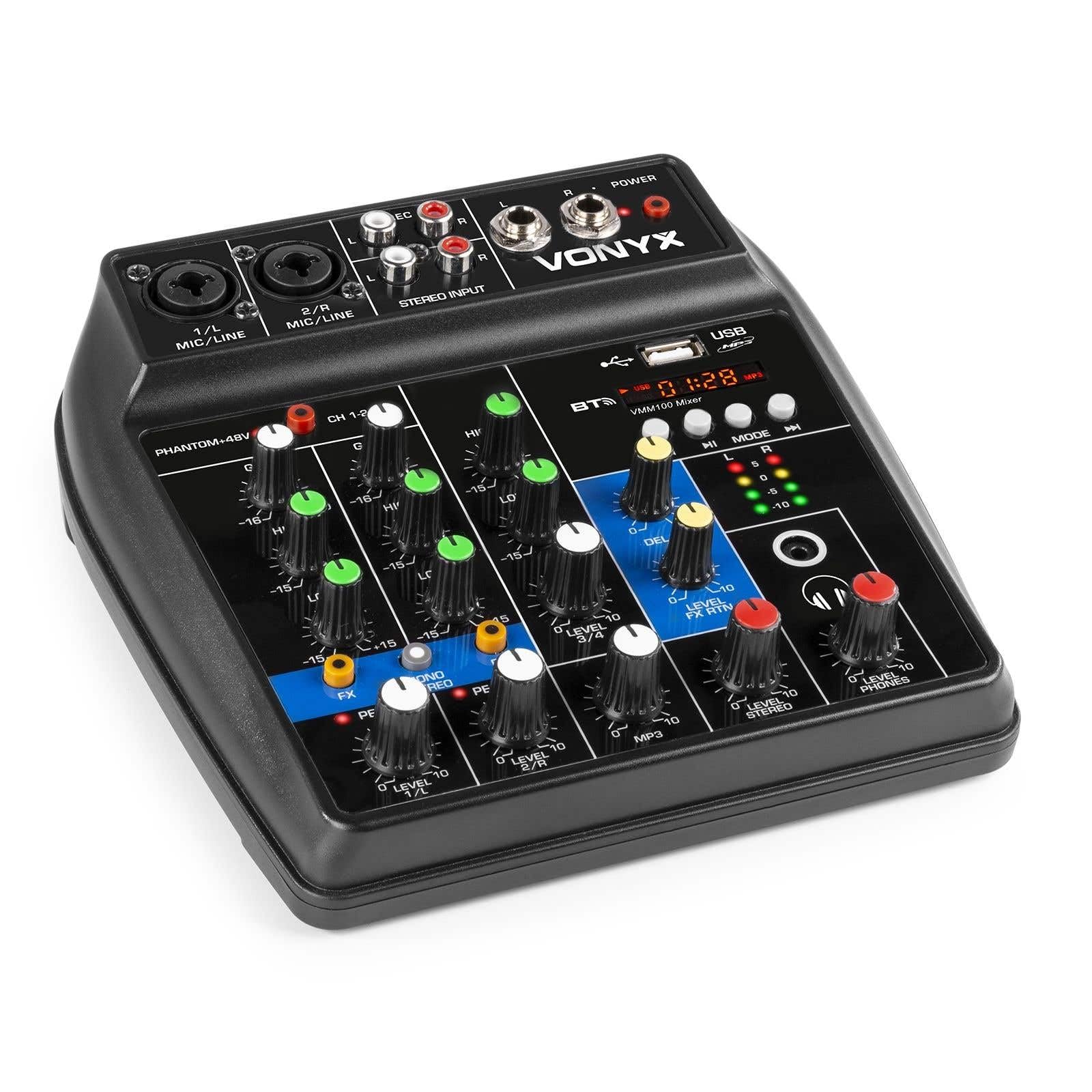
આકૃતિ 1: એકંદરે view of the Vonyx VMM100 mixer, highlighting the layout of all controls, inputs, and outputs.

આકૃતિ 2: Close-up of the mixer's control panel, showing individual channel controls, EQ, gain, and effect knobs.
5.1 Input Channels (1 & 2)
- Combi XLR / 6.3mm Jack: Connect microphones (XLR) or line-level instruments (6.3mm jack).
- Phantom +48V Switch: Activates phantom power for condenser microphones on channels 1 and 2.
- ગેઇન નોબ: Adjusts the input sensitivity for the connected device.
- HIGH Knob: Adjusts the high-frequency (treble) level for the channel.
- LOW Knob: Adjusts the low-frequency (bass) level for the channel.
- FX Knob: Controls the amount of delay effect applied to the channel.
- પીક એલઇડી: Illuminates when the input signal is too high, indicating potential clipping. Adjust GAIN to prevent this.
- લેવલ નોબ: Adjusts the overall output level of the channel.
5.2 Stereo Input (Channel 3)
- RCA Inputs (L/R): Connect external stereo audio sources such as CD players or other line-level devices.
- લેવલ નોબ: સ્ટીરિયો ઇનપુટના આઉટપુટ સ્તરને સમાયોજિત કરે છે.
5.3 MP3/Bluetooth Channel (Channel 4)

આકૃતિ 3: USB port with a USB drive, demonstrating media playback capability.

આકૃતિ 4: Bluetooth and USB player section, showing the display and control buttons.
- યુએસબી પોર્ટ: Insert a USB flash drive for MP3 playback.
- પ્રદર્શન: Shows track information, playback time, and mode.
- Control Buttons (Play/Pause, Skip, Mode): Navigate tracks and switch between USB and Bluetooth modes.
- Bluetooth (BT) Indicator: Lights up when Bluetooth is active and paired.
- લેવલ નોબ: Adjusts the output level of the MP3/Bluetooth channel.
5.4 Master Section
- DELAY Knob: Adjusts the overall intensity of the delay effect.
- LEVEL FX RTN Knob: Controls the return level of the delay effect.
- LEVEL STEREO Knob: Master volume control for the main stereo output.
- LEVEL PHONES Knob: Adjusts the volume for the headphone output.
- VU Meter (LED): Displays the main output level.
- Main Output (6.3mm Jack L/R): સાથે જોડાય છે ampલિફાયર અથવા પાવર્ડ સ્પીકર.
- Record Output (RCA L/R): Connects to recording devices.
- Headphone Output (6.3mm Jack): Connects stereo headphones.
- પાવર એલઇડી: Indicates when the mixer is powered on.
5.5 પાવર ઇનપુટ

આકૃતિ 5: બાજુ view of the mixer, illustrating the 5V DC USB power input port.
- 5V DC USB Input: Connect the provided USB power adapter or a compatible USB power source (e.g., power bank) to power the mixer.
6. સેટઅપ
6.1 પાવર કનેક્શન
- Connect the supplied USB cable to the 5V DC USB input on the mixer.
- Connect the other end of the USB cable to the provided USB power adapter.
- Plug the USB power adapter into a suitable wall outlet. The POWER LED on the mixer will illuminate.
૫.૩ ઓડિયો સ્ત્રોતોને જોડવા
- Microphones/Line Instruments: Connect microphones via XLR or line-level instruments via 6.3mm jack to channels 1 and 2. If using condenser microphones, activate the +48V phantom power switch.
- Stereo Line Devices: Connect devices like CD players to the RCA inputs of channel 3.
- યુએસબી ડ્રાઇવ: MP3 ધરાવતી USB ફ્લેશ ડ્રાઇવ દાખલ કરો files into the USB port on channel 4.
6.3 Connecting Outputs
- મુખ્ય આઉટપુટ: Connect the 6.3mm jack main outputs (L/R) to your ampલાઇફાયર, પાવર્ડ સ્પીકર્સ, અથવા PA સિસ્ટમ.
- હેડફોન: Connect your headphones to the 6.3mm headphone jack.
- Recording Device: Connect the RCA record outputs (L/R) to an external recording device if desired.
7. ઓપરેટિંગ સૂચનાઓ
૫.૧ મૂળભૂત મિશ્રણ
- Ensure all LEVEL and GAIN knobs are set to their minimum positions before powering on.
- Power on the mixer and any connected audio equipment.
- Gradually increase the GAIN knob for each active input channel until the PEAK LED flashes only occasionally during the loudest parts of the signal.
- Adjust the HIGH and LOW EQ knobs for each channel to shape the tone as desired.
- Use the individual LEVEL knobs to balance the volume of each channel.
- Adjust the main STEREO LEVEL knob to control the overall output volume. Monitor the VU meter to avoid clipping.
- Adjust the PHONES LEVEL knob for comfortable headphone monitoring.
7.2 બ્લૂટૂથ ઓપરેશન
- Press the MODE button on the MP3/Bluetooth channel until the display shows "BT" or the Bluetooth indicator flashes.
- On your smartphone, tablet, or PC, search for Bluetooth devices and select "Vonyx VMM100".
- Once paired, the Bluetooth indicator will glow steadily. You can now stream audio wirelessly to the mixer.
- Use the playback controls on the mixer or your device to manage audio.
૪.૬ યુએસબી એમપી૩ પ્લેબેક
- MP3 ધરાવતી USB ફ્લેશ ડ્રાઇવ દાખલ કરો fileયુએસબી પોર્ટમાં એસ.
- Press the MODE button on the MP3/Bluetooth channel until the display shows track information.
- Use the playback controls (Play/Pause, Skip) to navigate and play tracks.
૬.૪ અસરોનો ઉપયોગ
- Turn the FX knob on channels 1 and 2 to send a portion of that channel's signal to the internal delay effect.
- Adjust the main DELAY knob to control the overall intensity and characteristics of the delay.
- Use the LEVEL FX RTN knob to control how much of the processed effect signal is mixed back into the main output.
8. રેકોર્ડિંગ
The VMM100 mixer allows for easy recording of your mix. Connect the RCA record outputs (L/R) to the input of a suitable recording device (e.g., computer audio interface, dedicated recorder). Ensure your recording software or device is configured to receive audio from the connected inputs. The signal sent to the record output is a stereo mix of all active channels, post-fader.
9. જાળવણી
- સફાઈ: મિક્સરના બાહ્ય ભાગને સાફ કરવા માટે નરમ, સૂકા કપડાનો ઉપયોગ કરો. ઘર્ષક ક્લીનર્સ અથવા સોલવન્ટનો ઉપયોગ કરશો નહીં.
- સંગ્રહ: મિક્સરને સીધા સૂર્યપ્રકાશ અને અતિશય તાપમાનથી દૂર ઠંડી, સૂકી જગ્યાએ સંગ્રહિત કરો.
- હેન્ડલિંગ: Avoid dropping or subjecting the mixer to strong impacts.
10. મુશ્કેલીનિવારણ
| સમસ્યા | સંભવિત કારણ | ઉકેલ |
|---|---|---|
| કોઈ શક્તિ નથી | પાવર એડેપ્ટર કનેક્ટેડ નથી અથવા ખામીયુક્ત છે. | Check power connections. Try a different USB port or adapter. |
| કોઈ ધ્વનિ આઉટપુટ નથી | Incorrect cable connections; volume knobs too low; incorrect input selection. | Verify all audio cables are securely connected. Increase channel LEVEL and STEREO LEVEL knobs. Ensure correct input mode (e.g., USB/BT). |
| વિકૃત અવાજ | Input GAIN too high; output level too high. | Reduce GAIN for the affected channel until the PEAK LED stops flashing excessively. Lower STEREO LEVEL. |
| બ્લૂટૂથ જોડી રહ્યું નથી | Mixer not in Bluetooth mode; device too far; previously paired device connected. | Ensure mixer is in BT mode. Move device closer. Disconnect from other Bluetooth devices. |
| USB પ્લેબેક કામ કરતું નથી | USB ડ્રાઇવ યોગ્ય રીતે ફોર્મેટ થયેલ નથી; અસમર્થિત file type; mixer not in USB mode. | Ensure USB drive is FAT32 formatted and contains MP3 files. Press MODE to select USB. |
11. સ્પષ્ટીકરણો
- ઇનપુટ્સ:
- Channels 1 & 2: Combi XLR / 6.3mm Jack (Line or Microphone)
- Channel 3: RCA (Stereo)
- Channel 4: Bluetooth or USB MP3 Player
- આઉટપુટ:
- Main: 6.3mm Jack (Stereo)
- Record: RCA (Stereo)
- Headphone: 6.3mm Jack
- આવર્તન શ્રેણી: ૨૦ હર્ટ્ઝ - ૨૦,૦૦૦ હર્ટ્ઝ
- બરાબરી: 2-band (High, Low) per channel
- ફેન્ટમ પાવર: +48V (Channels 1 & 2)
- કનેક્શન વોલ્યુમtage: 5V DC (USB દ્વારા)
- પરિમાણો (L x W x H): 18 x 19.5 x 5.8 સેમી (7.09 x 7.68 x 2.28 ઇંચ)
- વજન: 0.5 કિગ્રા (1.1 lbs)
- સામગ્રી: નાયલોન
12. વોરંટી અને સપોર્ટ
Vonyx products are designed and manufactured to the highest quality standards. In the unlikely event of a problem with your product, please contact your retailer for warranty service. Please retain your proof of purchase. For technical support or further inquiries, refer to the official Vonyx webસાઇટ અથવા તેમના ગ્રાહક સેવા વિભાગનો સંપર્ક કરો.


