1. પરિચય
The SCULPFUN S30 Laser Engraver is a high-precision laser engraving and cutting machine designed for DIY enthusiasts and professionals. It features an automatically controlled air assist system, a high-pressure air assist nozzle, and an ultra-thin linear rail for superior accuracy. This manual provides essential information for setting up, operating, and maintaining your S30 engraver.

Figure 1: SCULPFUN S30 Laser Engraver with various engraved and cut sampલેસ
2. સલામતી માહિતી
ચેતવણી: This product is a Laser Class 4 device. Always wear appropriate laser safety goggles to protect your eyes from direct or scattered laser radiation. Never look directly into the laser beam. Ensure the laser protection cover is properly positioned during operation. Operate the machine in a well-ventilated area to dissipate fumes from engraving/cutting materials. Keep children and pets away from the operating area.
3. સેટઅપ માર્ગદર્શિકા
3.1 એસેમ્બલી
Follow the detailed assembly instructions provided in the separate assembly guide included with your package. Ensure all components are securely fastened before proceeding.
૩.૪ એર આસિસ્ટ સિસ્ટમ કનેક્શન
The S30 features an automatically controlled air assist system. Connect the air hose from the air pump to the high-pressure air-assisted metal nozzle on the laser module. The air pump is controlled by the 32-bit motherboard.

Figure 2: The automatic air pump included in the package, designed for steady airflow.

Figure 3: Illustration of the automatic air assist system, showing how it intelligently controls airflow during engraving and cutting.
૩.૫ સોફ્ટવેર ઇન્સ્ટોલેશન અને કનેક્ટિવિટી
Install the recommended operating software such as LightBurn or LaserGRBL on your computer. The S30 supports both Windows and MAC systems. Data transmission can be done via USB connection or Bluetooth wireless connection (upgrade kit sold separately for Bluetooth functionality).
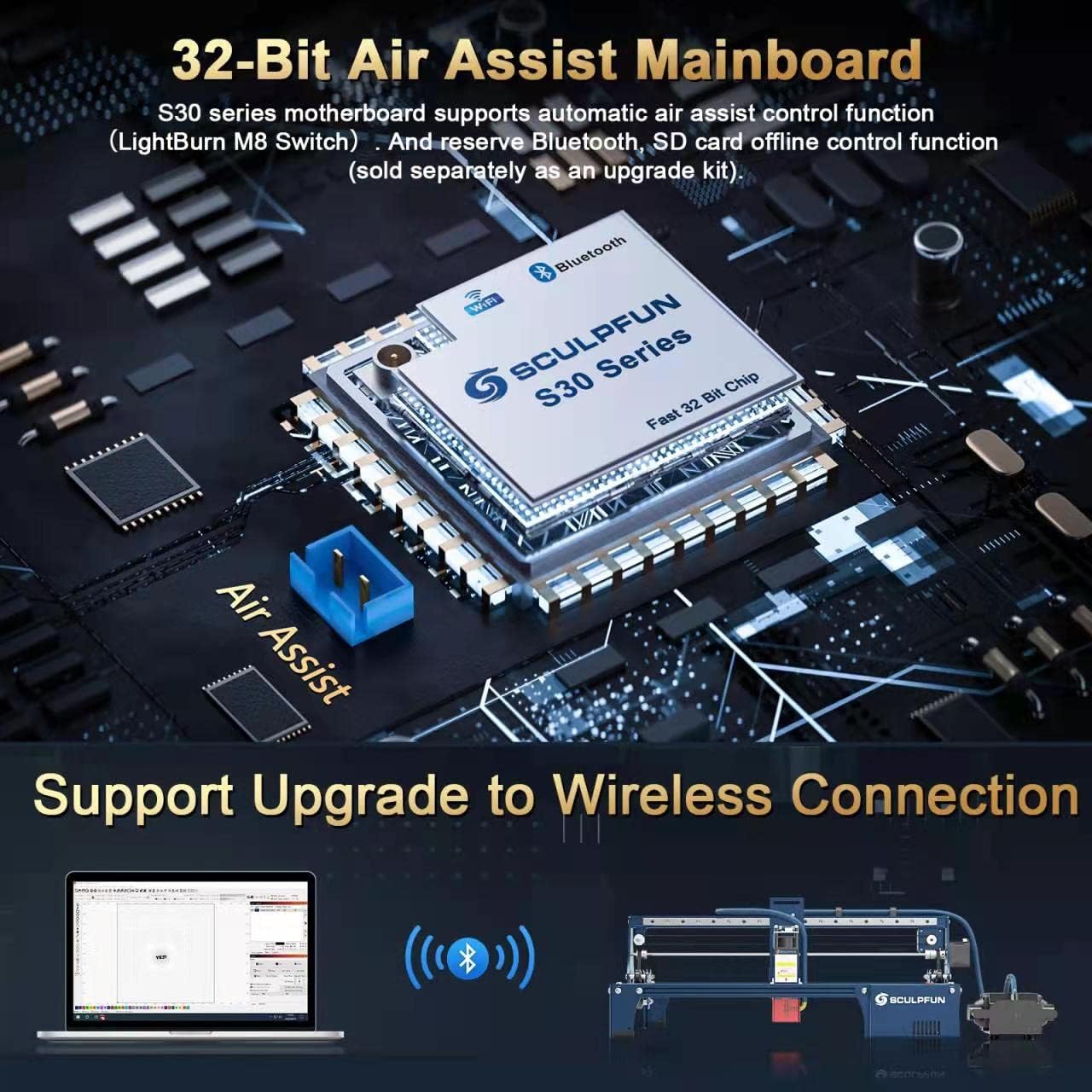
Figure 4: The 32-bit air-assisted motherboard, supporting automatic air assist control and reserving Bluetooth/SD card offline printing functions.
4. ઓપરેટિંગ સૂચનાઓ
4.1 Laser Focusing
The S30 uses a fixed focus column and sliding device for focusing. Refer to the detailed focusing procedure in your assembly guide to ensure optimal laser performance. The laser focus is ultra-thin, at 0.06 x 0.06mm, for high precision.

Figure 5: Diagram illustrating the high density and sharp laser beam, highlighting the ultra-thin laser focus.
4.2 Engraving and Cutting Materials
The S30 is capable of engraving and cutting a wide range of materials:
- કોતરણી સામગ્રી: All kinds of wood (including walnut, cherry and other high-density wood), MDF, zigzag, cardboard, plastic, leather, PCB board, aluminum oxide, 304 stainless steel, ceramic, dark stone.
- કાપવાની સામગ્રી: All kinds of wood (including walnut, cherry and other high-density wood), MDF, acrylic board, cardboard, non-woven, bamboo, leather, some plastic boards, PCB boards.

Figure 6: Comparison of one-pass cutting depths for S30 (5W), S30 Pro (10W), and S30 Pro Max (20W) models on balsa wood and plywood.
4.3 Using Automatic Air Assist
Utilize the LightBurn software's M8 button to intelligently control the air-assist switch. This allows for clean engraving and cutting by turning the air assist ON or OFF as needed, preventing smoke from obscuring engraved patterns and ensuring smooth cut surfaces.

Figure 7: Illustrates the benefits of automatic air assist, showing cleaner edges compared to manual air assist during engraving and cutting.
4.4 Precision and Speed
The S30 features a 0.005mm industrial linear guide, significantly improving engraving accuracy and eliminating wavy patterns often seen in ordinary engraving machines. This industrial-grade precision ensures high-quality results.

Figure 8: Demonstrates the high precision of the S30's linear rail, showing a test pattern with no wavy lines, unlike other machines.
4.5 Expandable Engraving Area
The standard engraving area is 410x400mm. For larger projects, you can purchase a Y-axis or XY-axis expansion kit to extend the engraving area to 935x400mm or 935x905mm, respectively.

આકૃતિ 9: ઓવરview of S30 series innovative technologies, highlighting the X&Y axis expansion kit for increased working area.
૧.૧ સત્તાવાર ઉત્પાદન વિડિઓ
વિડિઓ ૪.૧: એક સત્તાવાર ઉત્પાદન વિડિઓ શોasing the SCULPFUN S30 Series, highlighting its features and capabilities in various engraving and cutting tasks.
5. જાળવણી
5.1 સામાન્ય સફાઈ
Regularly clean the machine, especially the linear rails and laser module, to ensure smooth operation and prevent dust or debris buildup. Use a soft, dry cloth. Avoid using abrasive cleaners.
5.2 Replaceable Lens
The S30 laser module features an innovative replaceable lens design. This significantly extends the laser's lifespan. If the lens becomes worn or damaged, it can be easily replaced. Refer to the specific instructions for lens replacement in your detailed product guide.
આકૃતિ 10: ઓવરview of S30 series innovative technologies, highlighting the replaceable lens feature.
6. મુશ્કેલીનિવારણ
If you encounter any issues with your SCULPFUN S30 Laser Engraver, please refer to the troubleshooting section of the comprehensive user manual provided with your product. Common issues may include connectivity problems, laser focusing difficulties, or material compatibility. For persistent issues, contact SCULPFUN customer support.
7. સ્પષ્ટીકરણો
| શ્રેણી | સ્પષ્ટીકરણ |
|---|---|
| ઉત્પાદન મોડલ | સ્કલફન S30 |
| Output Laser Power | 5000mW |
| લેસર વર્ગ | 4 |
| લેસર ફોકસ | 0.06 x 0.06 મીમી |
| લેસર તરંગલંબાઇ | 455 ± 5nm |
| ધ્યાન કેન્દ્રિત કરવાની પદ્ધતિ | સ્થિર ફોકસ કોલમ + સ્લાઇડિંગ ડિવાઇસ |
| Laser Protection Cover | ડિટેચેબલ, એડજસ્ટેબલ |
| કોતરણી ચોકસાઈ | 0.005 મીમી |
| Engraving Area Size (Standard) | 410*400 મીમી |
| Expandable Engraving Area | Up to 935x400mm or 935x905mm (with expansion kit) |
| મશીન પાવર | લગભગ 60W |
| એર પંપનો પ્રકાર | Mainboard-controlled, 12V, 30L/min flow |
| Air Hose Inner Diameter | 7.5 મીમી |
| મધરબોર્ડ | 32-bit air-assisted, reserves Bluetooth, SD card offline printing (upgrade kit sold separately) |
| ઓપરેટિંગ સોફ્ટવેર | LightBurn (with air assist function M8), LaserGRBL, Benbox, GrblController, LiteFire |
| આધારભૂત File ફોર્મેટ્સ | NC, BMP, JPG, PNG, DXF and other image formats |
| ડેટા ટ્રાન્સમિશન પદ્ધતિ | USB કનેક્શન અથવા બ્લૂટૂથ વાયરલેસ કનેક્શન |
| પાવર ઇનપુટ | 100-240V AC, 50/60HZ |
| પાવર આઉટપુટ | 12V 5A |
| પેકિંગ વજન | 6.7 કિગ્રા (14.77 પાઉન્ડ) |
| પેકિંગ કદ | 62.3*24*22.5cm (24.52 x 9.45 x 8.86 inches) |
8. વોરંટી અને સપોર્ટ
For warranty information, technical support, or to purchase accessories and expansion kits, please visit the official SCULPFUN webસાઇટ પર જાઓ અથવા તેમની ગ્રાહક સેવાનો સીધો સંપર્ક કરો. વોરંટી દાવાઓ માટે ખરીદીનો પુરાવો રાખો.
Manufacturer: SCULPFUN, Co, Ltd
મૂળ દેશ: ચીન


