ઉત્પાદન ઓવરview
The WulaWindy RGB Digital Clock is a versatile LED alarm clock featuring a large mirror surface display and dual USB charging ports. It offers multiple color display modes and adjustable brightness, making it suitable for various home and office environments.

છબી: આગળ view of the WulaWindy RGB Digital Clock displaying time with a vibrant RGB color scheme, highlighting its mirror surface.
મુખ્ય લક્ષણો
- RGB Colorful Display: Features 11 color display modes, including 4 dynamic and 7 fixed modes, for enhanced visual experience.
- ૧૦-સ્તરની તેજ ગોઠવણ: Equipped with a light sensor for automatic brightness adjustment or manual control (0% to 100% brightness).
- મોટી અરીસાની સપાટી: A 6.5-inch HD display with a mirror surface, functional for time viewing and as a personal mirror.
- ડ્યુઅલ યુએસબી પોર્ટ્સ: બે ઉપકરણોને એકસાથે ચાર્જ કરવાની મંજૂરી આપે છે.
- Big Snooze Button: Provides an easy-to-access snooze function with adjustable duration (5 to 60 minutes).
પેકેજ સામગ્રી
- 1 x WulaWindy RGB Digital Alarm Clock
- 1 x યુએસબી ચાર્જિંગ કેબલ
- ૧ x પ્રોડક્ટ મેન્યુઅલ (આ દસ્તાવેજ)
સેટઅપ
- અનપેકીંગ: પેકેજિંગમાંથી તમામ ઘટકોને કાળજીપૂર્વક દૂર કરો.
- રક્ષણાત્મક ફિલ્મો દૂર કરો: Before first use, gently peel off the protective film from the mirror surface of the clock.

Image: Illustration showing the removal of the protective film from the clock's display and the plastic insulator tab from the battery compartment.
- Insert Battery (for memory backup): The clock uses a button cell battery (CR2016) for memory backup during power outages. Ensure the plastic insulator tab is removed from the battery compartment.
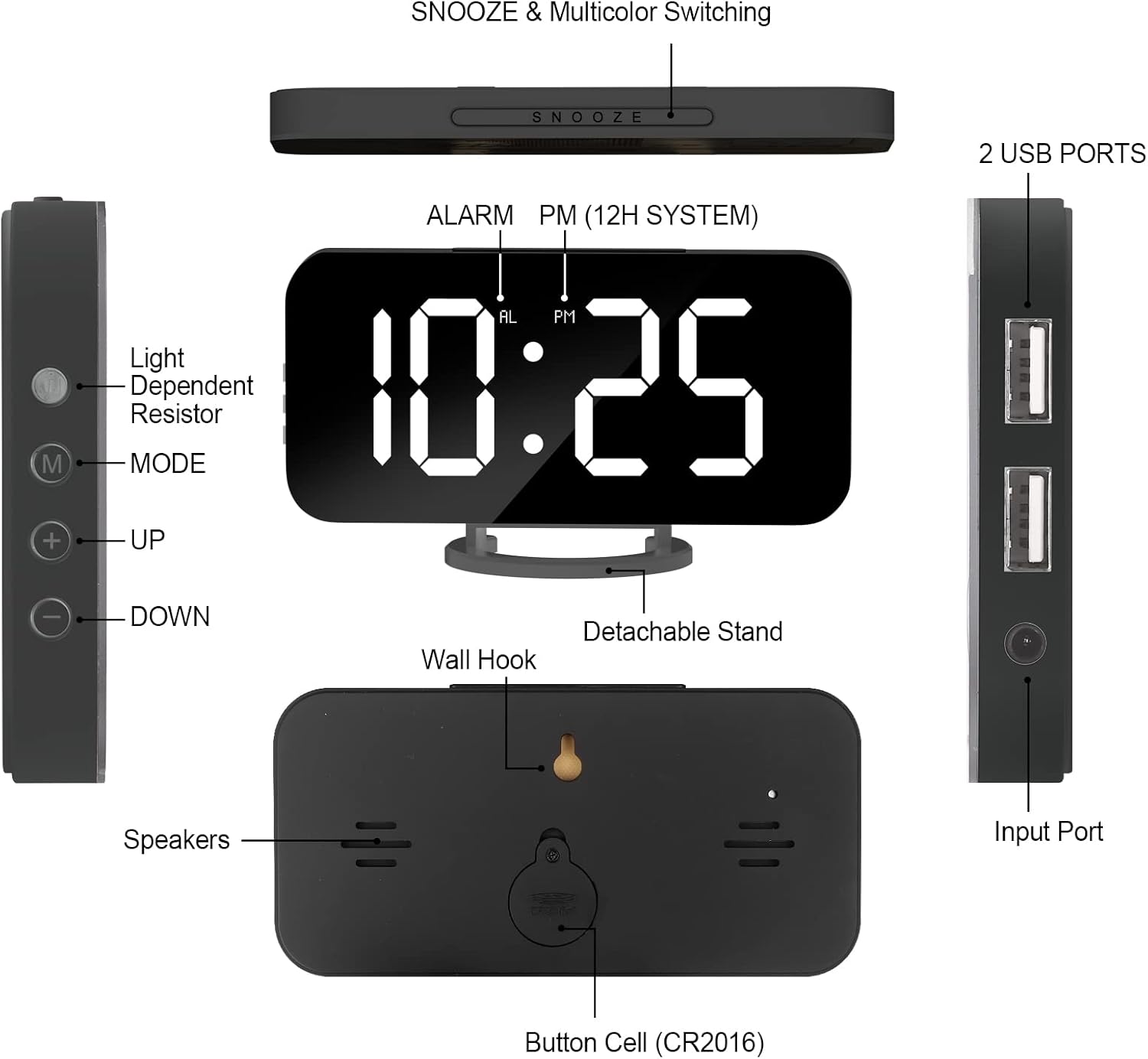
Image: Detailed diagram of the clock's back, indicating the button cell (CR2016) battery compartment and wall hook.
- પાવર કનેક્શન: Connect the provided USB charging cable to the clock's input port and plug the other end into a compatible USB power adapter (not included) or a powered USB port.
- પ્લેસમેન્ટ: Place the clock on a flat surface using its detachable stand or mount it on a wall using the integrated wall hook.
ઓપરેટિંગ સૂચનાઓ
સમય અને એલાર્મ સેટ કરી રહ્યા છીએ
Refer to the side panel for control buttons: 'M' (Mode), '+' (Up), '-' (Down).
છબી: બાજુ view of the clock showing the 'M' (Mode), '+' (Up), and '-' (Down) buttons for settings.
- સમય સેટિંગ: Press the 'M' button once to enter time setting mode. Use '+' and '-' buttons to adjust hours and minutes. Press 'M' again to confirm.
- 12/24 કલાકનું ફોર્મેટ: While in time setting mode, press the 'M' button repeatedly to cycle between 12-hour and 24-hour formats. The 'PM' indicator will light up for PM hours in 12-hour format.
- એલાર્મ સેટિંગ: Press the 'M' button twice to enter alarm setting mode. Use '+' and '-' buttons to set the desired alarm time. Press 'M' again to confirm.
- Alarm Activation/Deactivation: Press the 'AL' button (usually located on the side or back, refer to diagram) to toggle the alarm on or off. An alarm icon will appear on the display when active.
બ્રાઇટનેસ એડજસ્ટમેન્ટ
The clock features 6 levels of brightness. You can adjust it manually or enable automatic adjustment.

Image: Visual representation of the clock's 6-level brightness adjustment, from dimmest to brightest, and automatic darkening feature.
- મેન્યુઅલ એડજસ્ટમેન્ટ: Press the 'Light Dependent Resistor' button (refer to diagram on side) or the '+' button when not in setting mode to cycle through the 6 brightness levels.
- સ્વચાલિત ગોઠવણ: The clock can automatically dim its brightness based on ambient light conditions. This feature is typically enabled by default or can be toggled via a specific button (refer to product manual for exact button, often the light sensor button).
RGB Color Display Modes
The clock offers 11 distinct color display modes, including static colors and dynamic RGB effects.

Image: A grid showing 11 different display modes, including various solid colors (White, Red, Yellow, Green, Light Blue, Blue, Purple) and dynamic RGB effects (RGB Changing, Random Color, RGB Left to Right Flowing, RGB Top Downward Flowing).
- બદલાતી સ્થિતિઓ: Press the large 'SNOOZE' button on the top of the clock to cycle through the 11 available color display modes.
સ્નૂઝ ફંક્શન
When the alarm sounds, press the large 'SNOOZE' button on top to temporarily silence the alarm and activate the snooze function.

Image: Close-up of the clock's top, emphasizing the large snooze button for easy access.
- સ્નૂઝ સમયગાળો: The snooze duration can be set from 5 to 60 minutes. Refer to the full product manual for specific steps to adjust snooze time.
યુએસબી ચાર્જિંગ પોર્ટ્સ
The clock is equipped with two USB ports on its side for charging external devices.
Image: The side of the clock with two USB charging ports, demonstrating their use for charging mobile devices.
- એક સાથે ચાર્જિંગ: You can charge up to two devices concurrently using these ports.
જાળવણી
- સફાઈ: Use a soft, dry cloth to clean the clock's surface. Avoid abrasive cleaners or solvents that may damage the mirror finish or electronic components.
- પાવર ડિસ્કનેક્શન: Disconnect the power cable before cleaning or if the clock will not be used for an extended period.
- બેટરી રિપ્લેસમેન્ટ: If the time and alarm settings are lost after a power outage, the internal CR2016 button cell battery may need replacement. Open the battery compartment on the back of the clock to replace it.
મુશ્કેલીનિવારણ
| સમસ્યા | સંભવિત કારણ | ઉકેલ |
|---|---|---|
| ઘડિયાળનું પ્રદર્શન બંધ અથવા ઝાંખું છે. | No power, low brightness setting, or automatic dimming active. | Ensure USB cable is securely connected to a power source. Adjust brightness manually using the '+' button or check automatic brightness settings. |
| એલાર્મ વાગતો નથી. | એલાર્મ સક્રિય થયેલ નથી અથવા અવાજ ખૂબ ઓછો છે. | Verify the alarm icon is displayed. Check alarm volume settings (if applicable, refer to full manual). |
| Time/settings reset after power disconnection. | Backup battery (CR2016) is dead or missing. | Replace the CR2016 button cell battery. |
| USB charging ports not working. | Clock not powered, or device cable is faulty. | Ensure the clock is powered on. Try a different USB cable or device to confirm functionality. |
વિશિષ્ટતાઓ
- બ્રાન્ડ: વુલા વિન્ડી
- મોડલ: RGB-Black (Model Number: black)
- ડિસ્પ્લે પ્રકાર: ડિજિટલ એલઇડી
- રંગ: RGB-Black
- સામગ્રી: એક્રેલોનિટ્રાઇલ બ્યુટાડીન સ્ટાયરીન (ABS પ્લાસ્ટિક)
- ઉત્પાદન પરિમાણો: 6.7"W x 6.7"H (approximate, based on product info)
- વસ્તુનું વજન: 6.4 ઔંસ (0.18 કિલોગ્રામ)
- પાવર સ્ત્રોત: Corded Electric (with Battery Powered backup for memory)
- ખાસ લક્ષણો: Adjustable Brightness, Silent Clock, Mirror Surface, Dual USB Charging Ports
- માઉન્ટ કરવાનો પ્રકાર: Desk Clock, Wall Mount
વોરંટી અને આધાર
WulaWindy offers a 1 વર્ષની વોરંટી for this product. Additionally, you are eligible for a 30 Days Unconditional Money Back/Exchange policy from the date of purchase.
For any inquiries, issues, or support needs, please contact WulaWindy customer service via email. We aim to provide a solution within 24 hours.
ઉત્પાદક: વુલા વિન્ડી
For more information or to explore other products, visit the official WulaWindy store.
Note: This manual provides general instructions. For detailed information or specific troubleshooting, please refer to the complete PDF user manual available online or contact customer support.


