પરિચય
This manual provides detailed instructions for the setup, operation, and maintenance of your BEITONG Asura 2NS Wireless Controller. Please read this manual carefully before using the product to ensure optimal performance and longevity.

છબી: આગળ view of the BEITONG Asura 2NS Wireless Controller, showcasinતેની એર્ગોનોમિક ડિઝાઇન અને બટન લેઆઉટ.
સેટઅપ અને સુસંગતતા
The BEITONG Asura 2NS Wireless Controller offers multi-platform compatibility and various connection methods.
સુસંગતતા:
- પીસી: Windows 7/8/10/11, Steam
- નિન્ટેન્ડો સ્વિચ: Switch, Switch Lite, Switch OLED
- એન્ડ્રોઇડ: Mobile & TV (supports native games only)
- સ્ટીમ ડેક
કનેક્શન પદ્ધતિઓ:
- વાયર્ડ કનેક્શન: Connect the controller directly to your PC or Steam Deck using a USB cable.
- બ્લૂટૂથ કનેક્શન:
- For PC/Steam Deck: માટે શોધો Bluetooth device name "Xbox Wireless Controller".
- Android માટે: માટે શોધો Bluetooth device name "BEITONG 2585NS".
- નિન્ટેન્ડો સ્વિચ માટે: Connection will be automatic once pairing mode is initiated on the controller and console.
નોંધ: The BEITONG Gamepad Assistant software is available for key testing and firmware upgrades if required. It is not mandatory for basic operation.

છબી: ઓવરview of key features for Nintendo Switch, including screenshot, Bluetooth, 6-axis gyro, 5 levels vibration, key layout adjust-free, key value switchable, and Turbo function.
ઓપરેટિંગ સૂચનાઓ
Motion Control (Nintendo Switch Only):
The controller features a 6-axis gyro sensor and BEITONG somatosensory mapping technology. This supports native Switch sensing games. You can adjust the somatosensory sensitivity to 3 different levels to suit various game requirements. This function is exclusively for Nintendo Switch games.

Image: Visual representation of the 6-axis gyro sensor and somatosensory mapping technology in action, with the controller shown above a Nintendo Switch console.
જોયસ્ટિક ચોકસાઇ:
Equipped with ALPS joysticks from Japan, the controller provides pixel-high accurate positioning, ensuring high accuracy, fine tuning, and easy positioning in games.

Image: Close-up of the ALPS joystick, highlighting its precision and responsiveness for gaming.
Key Layout and HOME Key Function:
- Switch Original Key Layout: The controller maintains the original key layout for seamless integration with Nintendo Switch games.
- હોમ કી: Press the [HOME] key to return to the Switch home page. When connected to PC or Android, the [HOME] key can also be used to switch the function of the left stick and D-pad.
- Auto-Keyed Value: A&B keys automatically adapt to key values depending on the connected platform.

Image: Illustration of the Turbo function setup and the auto-keyed value feature for A&B buttons, adapting to different platforms.
Dual Vibration:
Built-in double vibrating motors provide immersive feedback. The vibration intensity is adjustable with 5 gears, allowing you to customize the experience according to different game scenes.
ટર્બો ફંક્શન:
To set the Turbo function, simultaneously press the ટર્બો button and any of the ABXY, LB, RB, LT, RT keys. This allows for rapid input of commands.
સ્ક્રીનશોટ કાર્ય:
To take a screenshot on your Nintendo Switch, simultaneously press the ટર્બો બટન અને R3 (right stick click) button. Note that this function is only available on the Nintendo Switch.

Image: Diagram showing the location of the dual vibrate motors within the controller and the function of the HOME key to exchange left stick and D-pad functions in PC mode.
LB/RB Mechanical Switches:
The LB/RB buttons utilize ALPS mechanical point-touch switches, providing a crisp and responsive feel similar to a gaming mouse click.
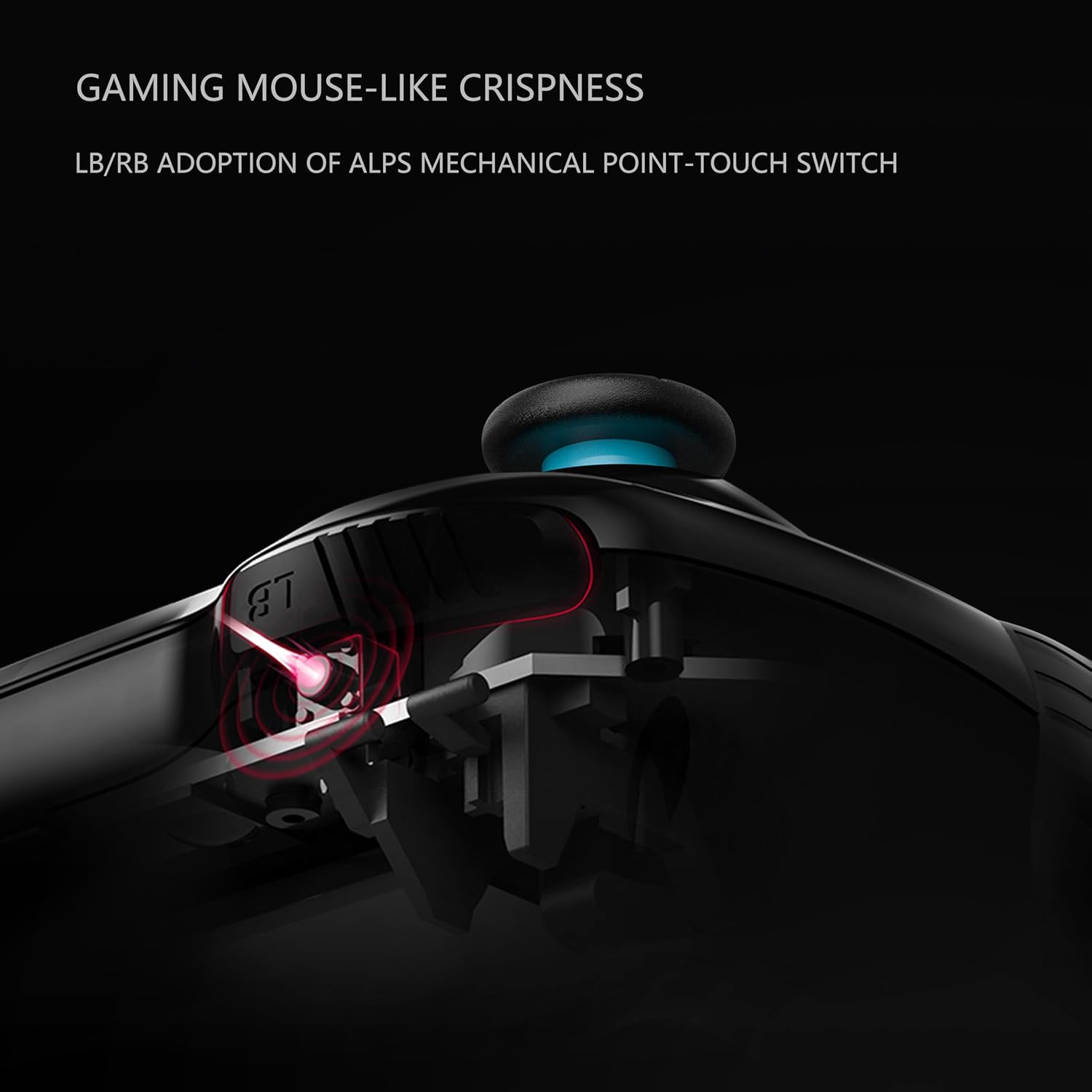
છબી: ક્રોસ-સેક્શન view illustrating the ALPS mechanical point-touch switch used in the LB/RB buttons, emphasizing their tactile feedback.
જાળવણી
Proper maintenance ensures the longevity and performance of your controller.
- સફાઈ: Use a soft, dry cloth to clean the controller. For stubborn dirt, a slightly damp કાપડનો ઉપયોગ કરી શકાય છે, પરંતુ ખાતરી કરો કે ઉપકરણમાં ભેજ પ્રવેશે નહીં. કઠોર રસાયણો અથવા ઘર્ષક ક્લીનર્સ ટાળો.
- સંગ્રહ: કંટ્રોલરને સીધા સૂર્યપ્રકાશ અને અતિશય તાપમાનથી દૂર ઠંડી, સૂકી જગ્યાએ સંગ્રહિત કરો.
- બેટરી સંભાળ: If the controller will not be used for an extended period, ensure it is fully charged before storage. Avoid completely draining the battery frequently.
- ટીપાં ટાળો: Protect the controller from physical impact and drops, which can damage internal components.
મુશ્કેલીનિવારણ
If you encounter issues with your BEITONG Asura 2NS Wireless Controller, refer to the following common solutions:
- કંટ્રોલર કનેક્ટ થઈ રહ્યું નથી:
- ખાતરી કરો કે નિયંત્રક ચાર્જ થયેલ છે.
- Verify Bluetooth is enabled on your device (PC, Android, Switch).
- Check that you are searching for the correct Bluetooth device name (e.g., "Xbox Wireless Controller" for PC/Steam Deck, "BEITONG 2585NS" for Android).
- Try restarting both the controller and the host device.
- For wired connection, ensure the USB cable is securely connected.
- Buttons/Joysticks Not Responding:
- નિયંત્રક યોગ્ય રીતે જોડાયેલ છે કે કેમ તે તપાસો.
- નિયંત્રક પુનઃપ્રારંભ કરો.
- Ensure no physical obstructions are preventing button presses or joystick movement.
- વાઇબ્રેશન કામ કરતું નથી:
- ખાતરી કરો કે રમત વાઇબ્રેશન ફીડબેકને સપોર્ટ કરે છે.
- Check the vibration intensity settings on the controller.
- ફર્મવેર અપડેટ: If issues persist, consider checking for and installing the latest firmware using the BEITONG Gamepad Assistant software.
વિશિષ્ટતાઓ
| લક્ષણ | વિગત |
|---|---|
| મોડલ નંબર | BTP-2585NS |
| ઉત્પાદન પરિમાણો | 16.51 x 104.14 x 6.35 સેમી |
| વજન | 540 ગ્રામ |
| બેટરીનો પ્રકાર | 1 લિથિયમ પોલિમર બેટરી (શામેલ) |
| કનેક્ટિવિટી | Bluetooth 5.0, Wired USB |
| ગતિ નિયંત્રણ | 6-Axis Gyro Sensor (Switch only) |
| કંપન | Dual Motors, 5 adjustable levels |
વોરંટી અને આધાર
For warranty information and technical support, please refer to the official BEITONG webસાઇટ પર જાઓ અથવા તમારા રિટેલરનો સંપર્ક કરો. વોરંટી દાવાઓ માટે ખરીદીનો પુરાવો રાખો.


