1. પરિચય
This manual provides comprehensive instructions for the installation, operation, and maintenance of your ZKTeco MB10-VL Fingerprint and Facial Recognition Attendance System. Please read this manual thoroughly before using the device to ensure proper functionality and safety.
2. સલામતી માહિતી
- ઉપકરણને પાણી અથવા વધુ પડતા ભેજના સંપર્કમાં ન લાવો.
- ઉપકરણને સીધા સૂર્યપ્રકાશમાં અથવા ગરમીના સ્ત્રોતોની નજીક રાખવાનું ટાળો.
- ઉપકરણ સાથે પૂરા પાડવામાં આવેલ પાવર એડેપ્ટરનો જ ઉપયોગ કરો.
- ઉપકરણને જાતે ડિસએસેમ્બલ કરવાનો કે રિપેર કરવાનો પ્રયાસ કરશો નહીં. સેવા માટે લાયક કર્મચારીઓનો સંપર્ક કરો.
- ઉપકરણની આસપાસ યોગ્ય વેન્ટિલેશનની ખાતરી કરો.
3. પેકેજ સામગ્રી
Please check the package contents upon unboxing. If any items are missing or damaged, contact your supplier immediately.
- ZKTeco MB10-VL Device
- પાવર એડેપ્ટર
- માઉન્ટ કરવાનું કૌંસ અને સ્ક્રૂ
- વપરાશકર્તા માર્ગદર્શિકા (આ દસ્તાવેજ)
4. સેટઅપ
4.1 ભૌતિક સ્થાપન
Choose a suitable location for installation, preferably indoors, away from direct sunlight and strong electromagnetic interference. Ensure the mounting surface is stable and can support the device's weight.
- આપેલા સ્ક્રૂનો ઉપયોગ કરીને માઉન્ટિંગ બ્રેકેટને દિવાલ સાથે જોડો.
- Carefully align the device with the bracket and slide it into place until it clicks securely.
- પાવર એડેપ્ટરને ઉપકરણ સાથે કનેક્ટ કરો અને તેને પાવર આઉટલેટમાં પ્લગ કરો.

આકૃતિ 1: ફ્રન્ટ view of the ZKTeco MB10-VL device, displaying the time on its screen, a numeric keypad, and a glowing green fingerprint scanner.
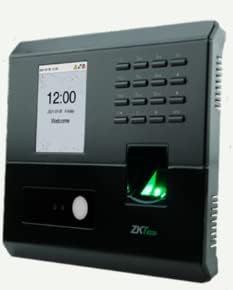
આકૃતિ 2: કોણીય view of the ZKTeco MB10-VL device, highlighting its side ventilation grilles and the illuminated fingerprint scanner.
4.2 પ્રારંભિક રૂપરેખાંકન
Upon first power-on, the device will guide you through basic setup. You may need to set the date, time, and network parameters.
- Navigate the menu using the keypad.
- Set the correct date and time for accurate attendance records.
- Configure network settings (TCP/IP) if connecting to a network for data transfer.
5. ઓપરેટિંગ સૂચનાઓ
5.1 User Enrollment
The MB10-VL supports fingerprint and facial recognition for user identification.
- Access the 'User Management' menu.
- Select 'Add User'.
- Enter the user ID and name.
- For fingerprint enrollment: Place the user's finger on the scanner multiple times as prompted until successful.
- For facial enrollment: Position the user's face within the camera's view as prompted until successful.
- Save the user information.
5.2 Attendance Recording
Users can record their attendance by presenting their registered fingerprint or face to the device.
- When a user presents their biometric data, the device will verify it and record the attendance event.
- A confirmation message will appear on the screen.
5.3 ડેટા મેનેજમેન્ટ
Attendance records can be downloaded via USB or TCP/IP connection.
- યુએસબી હોસ્ટ: Connect a USB flash drive to the device's USB port. Navigate to the 'Data Management' menu and select 'Download Records to USB'.
- TCP/IP: Connect the device to your network. Use the Bio Time 8 software on your computer to connect to the device and download records.
6. જાળવણી
6.1 સફાઈ
Regular cleaning helps maintain the device's performance.
- Wipe the screen and fingerprint scanner with a soft, dry cloth.
- ઘર્ષક ક્લીનર્સ અથવા સોલવન્ટનો ઉપયોગ કરશો નહીં.
6.2 સોફ્ટવેર અપડેટ્સ
સમયાંતરે ઉત્પાદકની તપાસ કરો webશ્રેષ્ઠ કામગીરી અને સુરક્ષા સુનિશ્ચિત કરવા માટે ફર્મવેર અપડેટ્સ માટેની સાઇટ.
7. મુશ્કેલીનિવારણ
- ઉપકરણ ચાલુ નથી: Check the power adapter connection and the power outlet.
- Fingerprint/Face recognition failure: Ensure the scanner/camera is clean. Re-enroll the user's biometric data if issues persist.
- Cannot connect via TCP/IP: Verify network cable connection, IP address settings, and firewall configurations.
- Data download issues: Check USB drive format (FAT32 recommended) or network connectivity to the Bio Time 8 software.
If problems persist, contact technical support.
8. સ્પષ્ટીકરણો
| લક્ષણ | વર્ણન |
|---|---|
| મોડલ | MB10-VL |
| ફિંગરપ્રિન્ટ ક્ષમતા | ૧૦૦૦૦ (૧:N) |
| ચહેરાની ક્ષમતા | ૧૦૦૦૦ (૧:N) |
| રેકોર્ડ ક્ષમતા | 50,000 |
| કોમ્યુનિકેશન | USB Host, TCP/IP |
| સોફ્ટવેર સુસંગતતા | Bio Time 8 (License Required) |
9. વોરંટી અને સપોર્ટ
The ZKTeco MB10-VL comes with a standard manufacturer's warranty. Please refer to the warranty card included in your package or visit the official ZKTeco webવિગતવાર વોરંટી નિયમો અને શરતો માટે સાઇટ.
For technical support, troubleshooting assistance, or service requests, please contact your local distributor or ZKTeco customer service. Ensure you have your product model number and purchase details ready when contacting support.


