1. પરિચય
Thank you for choosing the Joyroom JR-CL18 FM Transmitter. This device allows you to stream audio from your smartphone or other devices to your car's FM radio, make hands-free calls, and charge multiple devices simultaneously. Please read this manual carefully before use to ensure proper operation and safety.
2. સલામતી માહિતી
કૃપા કરીને નીચેના સલામતી માર્ગદર્શિકાઓનું પાલન કરો:
- બેટરી સલામતી: This device does not contain a user-replaceable battery. Do not expose the device to excessive heat or humidity.
- હસ્તક્ષેપ: This device may interfere with other wireless devices. Follow instructions to minimize potential interference.
- સંચાલન પર્યાવરણ: Avoid operating the device in extremely hot, cold, dusty, or humid environments.
- સફાઈ: Disconnect the device from the power source before cleaning. Use a soft, dry cloth. Do not use liquid cleaners.
- નિકાલ: ઇલેક્ટ્રોનિક કચરા માટે સ્થાનિક નિયમો અનુસાર ઉપકરણનો નિકાલ કરો.
3. પેકેજ સામગ્રી
- 1x Joyroom JR-CL18 FM Transmitter
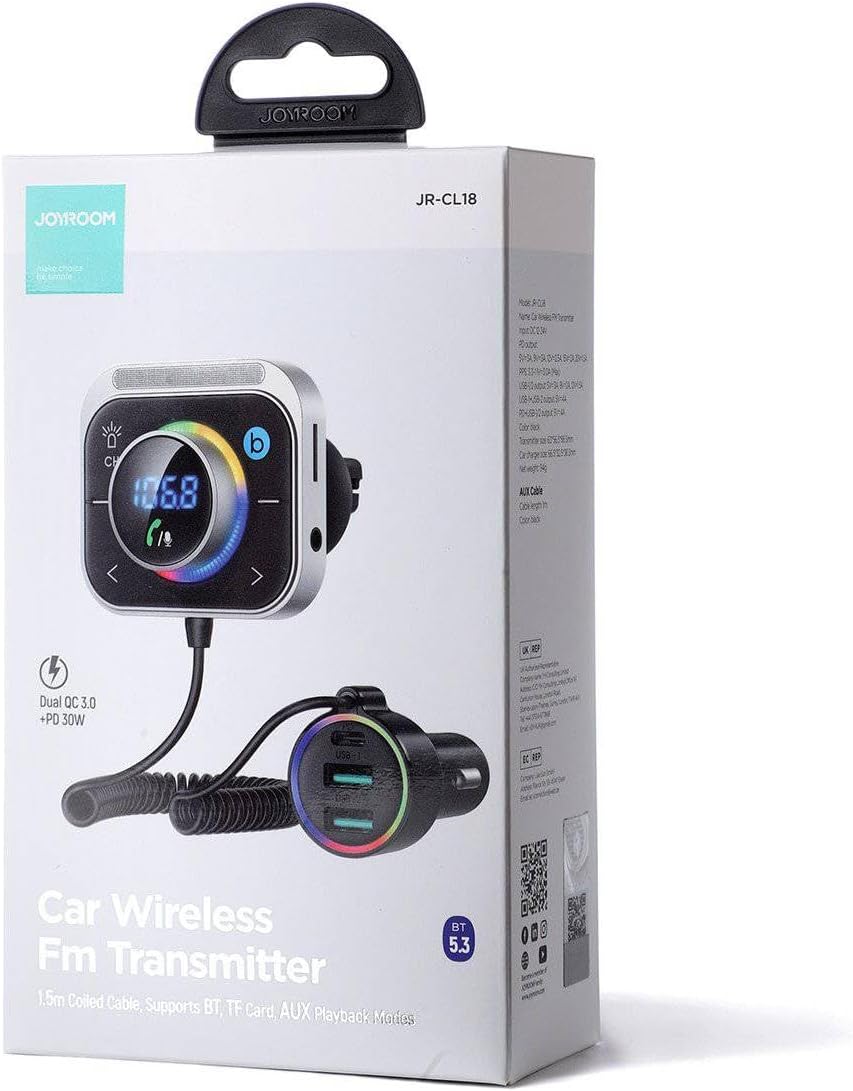
Image: The retail packaging for the Joyroom JR-CL18 FM Transmitter.
4. ઉત્પાદન ઓવરview
The Joyroom JR-CL18 consists of a main transmitter unit with an LED display and control buttons, connected via a coiled cable to a car charger unit with multiple charging ports.

છબી: આગળ view of the Joyroom JR-CL18 FM Transmitter, showing the main unit with LED display and the car charger with USB ports.
મુખ્ય એકમ લક્ષણો:
- LED Display: Shows FM frequency and other status indicators.
- CH Button: For changing FM frequency.
- માઇક્રોફોન: હેન્ડ્સ-ફ્રી કૉલિંગ માટે.
- Navigation Buttons: For frequency adjustment and track control.
- બ્લૂટૂથ સૂચક.
- TF Card Slot: For playing music from a memory card.
- AUX Input: For connecting external audio devices via a 3.5mm audio cable.

Image: Close-up of the transmitter unit, highlighting the TF card slot, AUX input, and Bluetooth connection icon.
Car Charger Unit Features:
- USB-C Port: Power Delivery (PD) 30W for fast charging compatible devices.
- USB-1 Port: Quick Charge (QC) 18W for fast charging compatible devices.
- USB-2 Port: Quick Charge (QC) 18W for fast charging compatible devices.

Image: Close-up of the car charger unit, showing the USB-C (PD 30W) and two USB-A (QC 18W) ports with their respective power output labels.
5. સેટઅપ
- કાર સોકેટમાં દાખલ કરો: Plug the car charger unit into your vehicle's 12V cigarette lighter socket. The device will power on automatically, and the LED display on the main unit will light up.
- Find an Empty FM Frequency: Tune your car's FM radio to an empty frequency (one with no active broadcast, usually static). Note this frequency.
- ટ્રાન્સમીટર ફ્રીક્વન્સી સેટ કરો: On the JR-CL18 main unit, press the 'CH' button. The frequency display will flash. Use the left and right navigation buttons to adjust the transmitter's frequency to match the empty frequency you found on your car radio.
- બ્લૂટૂથ સાથે જોડી બનાવો (વૈકલ્પિક): Once the frequencies match, you can proceed to pair your smartphone via Bluetooth for audio streaming and hands-free calls.
6. ઓપરેટિંગ સૂચનાઓ
6.1. બ્લૂટૂથ જોડી
- Ensure the JR-CL18 is powered on and its FM frequency matches your car radio.
- તમારા સ્માર્ટફોન પર, બ્લૂટૂથ ચાલુ કરો અને ઉપલબ્ધ ઉપકરણો શોધો.
- Select 'JR-CL18' from the list of found devices to pair. A voice prompt or display indicator will confirm successful pairing.
6.2. મ્યુઝિક પ્લેબેક
- બ્લૂટૂથ સ્ટ્રીમિંગ: After successful Bluetooth pairing, open your music player on your smartphone. Audio will be transmitted to your car's speakers via the FM radio. Use the navigation buttons on the JR-CL18 to control playback (play/pause, next/previous track).
- TF કાર્ડ પ્લેબેક: Insert a TF (microSD) card containing MP3/WMA/WAV/FLAC audio files into the TF card slot on the main unit. The device will automatically detect and play music from the card.
- AUX ઇનપુટ: Connect an external audio device (e.g., MP3 player) to the 3.5mm AUX input jack on the main unit using an audio cable. The device will switch to AUX mode.
૫.૩. હેન્ડ્સ-ફ્રી કૉલિંગ
When your smartphone is paired via Bluetooth:
- જવાબ/કૉલ સમાપ્ત કરો: Press the multi-function button (often integrated with the main dial or a dedicated phone button) once to answer an incoming call or end an ongoing call.
- કૉલ નકારો: ઇનકમિંગ કોલને નકારવા માટે મલ્ટી-ફંક્શન બટન દબાવો અને પકડી રાખો.
- ફરીથી ડાયલ કરો: Double-press the multi-function button to redial the last number.
6.4. ચાર્જિંગ કાર્યો
The JR-CL18 provides three charging ports:
- 1x USB-C (PD 30W)
- 2x USB-A (QC 18W each)
Connect your devices using appropriate charging cables to utilize the fast charging capabilities. The total output power is 30W for the USB-C port and 18W for each USB-A port, allowing for efficient charging of smartphones, tablets, and other USB-powered devices.

Image: The car charger unit actively charging a smartphone and a tablet simultaneously, demonstrating its multi-device charging capability.
7. જાળવણી
- Keep the device dry. Moisture can corrode electronic circuits.
- Do not store the device in dusty, dirty areas.
- Do not store the device in hot or cold temperatures. Extreme temperatures can shorten the life of electronic devices.
- Do not attempt to open the device. Unauthorized modifications can damage the unit and void your warranty.
- Clean the device with a soft, dry cloth. Avoid harsh chemicals or abrasive cleaners.
8. મુશ્કેલીનિવારણ
- કોઈ શક્તિ નથી: Ensure the car charger is firmly inserted into the 12V socket. Check if the car's cigarette lighter fuse is intact.
- Poor Sound Quality/Static:
- Ensure the FM frequency on the JR-CL18 and your car radio match exactly.
- Try changing to a different, clearer FM frequency on both the transmitter and car radio.
- Adjust the volume on both the transmitter and your car radio.
- બ્લૂટૂથ પેરિંગ સમસ્યાઓ:
- Make sure Bluetooth is enabled on your smartphone and the JR-CL18 is in pairing mode.
- Delete 'JR-CL18' from your phone's Bluetooth device list and try pairing again.
- Restart both your phone and the JR-CL18 (by unplugging and replugging).
- ચાર્જિંગ કામ કરતું નથી:
- Ensure the device is properly powered.
- Check if the charging cable is securely connected to both the JR-CL18 and your device.
- Try a different charging cable or device to rule out cable/device issues.
9. સ્પષ્ટીકરણો
| બ્રાન્ડ | જોયરૂમ |
| મોડેલનું નામ | JR-CL18 |
| હાર્ડવેર ઇંટરફેસ | યુએસબી, યુએસબી-સી |
| સુસંગત ઉપકરણો | Car stereo, Radio, Smartphone, Tablet |
| વધારાની સુવિધાઓ | બ્લૂટૂથ એફએમ ટ્રાન્સમીટર |
| ડિસ્પ્લે પ્રકાર | એલઇડી |
| ઓડિયો આઉટપુટ મોડ | સ્ટીરિયો |
| ઓડિયો આઉટપુટ પ્રકાર | FM radio, Bluetooth |
| ભાગtage | 12 વોલ્ટ (DC) |
| પાવર સ્ત્રોત | Corded Electric (Car Cigarette Lighter) |
| વાયરલેસ પ્રકાર | બ્લૂટૂથ |
| બંદરોની સંખ્યા | ૨ (૧x યુએસબી-સી, ૧x યુએસબી-એ) |
| માનવ ઇન્ટરફેસ ઇનપુટ | બટનો |
| મીડિયા પ્રકાર | TF કાર્ડ |
| વસ્તુનું વજન | 400 ગ્રામ |
10. વોરંટી અને સપોર્ટ
For warranty information and customer support, please refer to the documentation provided with your purchase or contact Joyroom customer service directly. Keep your proof of purchase for any warranty claims.


