1. પરિચય
Thank you for choosing the FLAMMA FX150 Multi Effects Processor. This device is designed to provide a wide range of guitar effects, amplifier models, and cabinet simulations in a compact and user-friendly format. It features a touchscreen interface, customizable footswitches, and extensive connectivity options for various musical applications. Please read this manual thoroughly to understand the full capabilities of your FX150 and ensure optimal performance.

Figure 1: FLAMMA FX150 Multi Effects Processor with expression pedal.
2. ઉત્પાદન ઓવરview
2.1 ફ્રન્ટ પેનલ નિયંત્રણો
- ટચસ્ક્રીન ડિસ્પ્લે: Main interface for navigating menus, selecting effects, and adjusting parameters.
- માસ્ટર નોબ: એકંદર આઉટપુટ વોલ્યુમને નિયંત્રિત કરે છે.
- મૂલ્ય નોબ: Used for data entry, scrolling through options, and confirming selections.
- EXP પેડલ: Built-in expression pedal for real-time control of various effects parameters (e.g., volume, wah).
- ફૂટસ્વીચો A, B, C: Assignable footswitches for preset changes, effect toggling, looper control, and tuner activation.
2.2 રીઅર પેનલ કનેક્શન્સ
The rear panel of the FX150 provides all necessary input and output ports for connecting to your guitar, amplifier, computer, and other audio devices.

આકૃતિ 2: વિગતવાર view of the FLAMMA FX150 rear panel connections.
- વીજળીનું બટન: Toggles the device on/off.
- ડી.સી. માં: Power port (9V DC, 300mA recommended). Use the original power supply.
- યુએસબી: Type-C port for computer connection (preset management, IR file import, firmware updates, audio interface).
- Xક્સ ઇન: 1/8" stereo audio input jack for connecting external audio devices.
- EXP2: 1/4" stereo audio input jack for connecting an external expression pedal (use a 1/4" TRS cable).
- ઇનપુટ: 1/4" mono audio input jack for guitar or other pedal output.
- મોકલો: 1/4" mono audio output jack of FX LOOP. Connect to external pedal input or amplifier input (four-cable method).
- રીટર્ન: 1/4" mono audio input jack of FX LOOP. Connect to external pedal output or amplifier send (four-cable method).
- આઉટપુટ (L/MONO, R): 1/4" stereo audio output jacks. L/MONO for unbalanced signal or mono audio setup.
- ફોન: 1/8" stereo headphone output.
3. સેટઅપ
3.1 પાવર કનેક્શન
Connect the provided 9V DC power adapter to the DC IN port on the rear panel. Ensure the power switch is in the OFF position before connecting. Once connected, you can toggle the power switch to ON.
3.2 મૂળભૂત જોડાણો
The FX150 offers various connection methods depending on your setup.
- એક સાથે જોડાઈ રહ્યું છે Amplifier's Return (FX Loop):

Figure 3: Connect your guitar to the FX150 INPUT. Connect the FX150 OUTPUT to the RETURN of your amplifier's FX Loop or directly to a power ampજીવંત
- Connecting to Studio Monitors, Sound Cards, or Headphones:

Figure 4: Connect your guitar to the FX150 INPUT. Connect the FX150 OUTPUT to full-frequency devices such as studio monitors, sound cards, stage monitors, or PA systems. Connect headphones to the PHONES output.
- એક સાથે જોડાઈ રહ્યું છે Amplifier's Input:

Figure 5: Connect your guitar to the FX150 INPUT. Connect the FX150 OUTPUT to the INPUT of your ampજીવંત
- Four-Cable Method Connection:

Figure 6: Connect your guitar to the amplifier's INPUT. Connect the amplifier's SEND to the FX150 INPUT. Connect the FX150 SEND to the amplifier's RETURN. Connect the FX150 OUTPUT to the amplifier's RETURN.
4. ઓપરેટિંગ સૂચનાઓ
૩.૨ ટચસ્ક્રીન નેવિગેટ કરવું
The FX150 features a high-quality touchscreen for intuitive navigation and parameter adjustment. Tap icons and menus to select, and use the VALUE knob for fine-tuning.

Figure 7: Interacting with the touchscreen to select and adjust sounds.
4.2 Effects Chain and Presets
The FX150 allows you to customize your effects chain with 10 freely movable effects blocks and 160 built-in effects. There are 180 editable user effects slots to save your personalized tones.
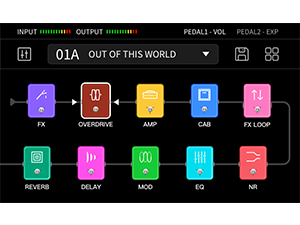
Figure 8: Visual representation of the customizable effects chain on the FX150.
- Amp Simulations: Supports 1024-point impulse response (IR) files for detailed amp અનુકરણ
- કેબિનેટ સિમ્યુલેશન: Includes 30 high-quality preinstalled cab emulations. These can be replaced with edited versions or third-party IR files using the FX150 editing software.
- Effect Editing: Select an effect block on the touchscreen to access its parameters. Use the VALUE knob to adjust settings.
- પ્રીસેટ્સ સાચવી રહ્યાં છે: After customizing your effects chain and settings, save your preset to one of the 180 user slots for quick recall.

Figure 9: Illustration of the non-linear amp modeling technology with 1024-point sampચોકસાઈ.
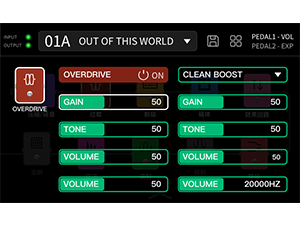
આકૃતિ 10: ઉદાample of adjusting overdrive effect parameters on the touchscreen.
4.3 Drum Machine and Looper
The FX150 includes a built-in drum machine and looper for practice and creative use.
- ડ્રમ મશીન: Features 80 drum machine variations and 10 metronome variations.
- લૂપર: Offers looping functionality up to 52 seconds.
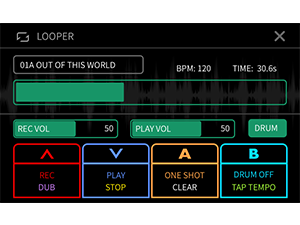
Figure 11: The looper interface showing recording and playback controls, and drum machine integration.
4.4 Customizable Footswitches
The footswitches (A, B, C) can be configured to control various functions, including turning effects on/off, controlling specific parameters, or activating the tuner/looper.

Figure 12: Menu for customizing footswitch assignments and expression pedal functions.
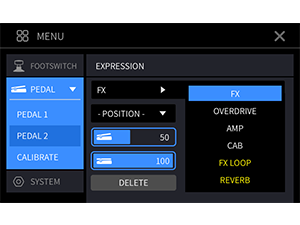
Figure 13: Menu for calibrating the expression pedal and assigning its functions.
4.5 Using the Editor Software
Connect the FX150 to your computer via the USB-C port to use the dedicated editor software. This software provides a visual interface for managing presets, importing IR files, and updating firmware.

Figure 14: The FLAMMA FX150 connected to a computer running the editor software for advanced control.
5. જાળવણી
- સફાઈ: યુનિટ સાફ કરવા માટે નરમ, સૂકા કપડાનો ઉપયોગ કરો. ઘર્ષક ક્લીનર્સ અથવા સોલવન્ટ્સ ટાળો.
- સંગ્રહ: યુનિટને સીધા સૂર્યપ્રકાશ અને અતિશય તાપમાનથી દૂર સૂકી, ઠંડી જગ્યાએ સંગ્રહિત કરો.
- પાવર સપ્લાય: Always use the original power adapter or a compatible 9V DC (center negative) power supply with sufficient current (300mA or higher).
- ફર્મવેર અપડેટ્સ: Regularly check the official FLAMMA webશ્રેષ્ઠ કામગીરી અને નવી સુવિધાઓની ઍક્સેસ સુનિશ્ચિત કરવા માટે ફર્મવેર અપડેટ્સ માટેની સાઇટ.
6. મુશ્કેલીનિવારણ
| સમસ્યા | શક્ય ઉકેલ |
|---|---|
| કોઈ શક્તિ નથી | Ensure the power adapter is correctly connected and the power switch is ON. Verify the power adapter specifications (9V DC, center negative, 300mA minimum). |
| કોઈ ધ્વનિ આઉટપુટ નથી | Check all audio cable connections. Verify the MASTER volume knob is turned up. Ensure the selected preset has active effects and appropriate volume levels. Check your amplifier/monitor volume. |
| Distorted or unwanted sound | Check input gain levels on the FX150 and your amplifier. Adjust individual effect parameters (e.g., gain on overdrive/distortion). Ensure correct connection method for your setup (e.g., amp modeling should be off when connecting to an amp's input). |
| ફૂટસ્વીચો કામ નથી કરી રહ્યા | Check footswitch assignments in the settings menu. Ensure the unit is not in a mode that overrides footswitch functions (e.g., tuner mode). |
| કમ્પ્યુટરથી કનેક્ટ કરી શકાતું નથી | Ensure the USB-C cable is securely connected. Install the necessary drivers for the FX150 on your computer. Try a different USB port or cable. |
7. સ્પષ્ટીકરણો
| લક્ષણ | વિગત |
|---|---|
| મોડલ | FX150 |
| બ્રાન્ડ | ફ્લેમ્મા |
| વસ્તુનું વજન | 6.16 પાઉન્ડ (2.8 કિલોગ્રામ) |
| ઉત્પાદન પરિમાણો | 10.7 x 5.9 x 2.2 ઇંચ |
| પાવર સ્ત્રોત | કોર્ડેડ ઇલેક્ટ્રિક (૧૨ વોલ્ટ ડીસી) |
| સામગ્રીનો પ્રકાર | ધાતુ |
| હાર્ડવેર ઇંટરફેસ | યુએસબી |
| સિગ્નલ ફોર્મેટ | એનાલોગ |
| Amp અનુકરણ | Supports 1024-point Impulse Response (IR) files |
| કેબિનેટ સિમ્યુલેશન્સ | 30 preinstalled, supports 3rd-party IR files |
| બિલ્ટ-ઇન ઇફેક્ટ્સ | 160 unique types |
| User Effects Slots | 180 editable slots |
| ડ્રમ મશીન | 80 variations, 10 metronome variations |
| લૂપર | 52 સેકન્ડ સુધી |
8. વોરંટી અને સપોર્ટ
For warranty information, technical support, or service inquiries, please contact FLAMMA customer support directly. Refer to the official FLAMMA website for the most up-to-date contact details and support resources.
Official FLAMMA Webસાઇટ: www.flamma.shop


