1. પરિચય
This manual provides comprehensive instructions for the installation, operation, and maintenance of your Segotep Memphis M-ATX Mini Tower PC Case. Please read this manual thoroughly before beginning assembly to ensure proper setup and optimal performance.
2. મુખ્ય લક્ષણો
- 40 Series GPU Support: Designed to accommodate high-performance 40 series GPUs, ideal for gaming and creative applications.
- Vertical Air Duct: Optimizes internal airflow for efficient cooling and heat dissipation, preventing component overheating.
- Tool-less Disassembly: Facilitates quick and easy installation or upgrades of components without the need for tools.
- 460cm² Side Panel Cooling Holes: Allows for flexible installation of additional fans or radiators to enhance cooling capabilities.
- Excellent Cable Management: Features dedicated routing and concealment options for cables, ensuring a clean build, maximized airflow, and minimized interference.
- ટેમ્પર્ડ ગ્લાસ પેનલ્સ: સ્પષ્ટતા પૂરી પાડે છે view of internal components and adds to the aesthetic appeal.
3. સેટઅપ અને ઇન્સ્ટોલેશન
Follow these steps for assembling your PC components within the Segotep Memphis case. Refer to the accompanying images and video for visual guidance.
3.1 Case Disassembly
Before installing components, carefully remove the side panels and top cover. The tempered glass side panels are designed for easy removal.

આકૃતિ 3.1: વિસ્ફોટ થયો view of the Segotep Memphis case showing the removal of the 4mm tempered glass side panel, power cover, and removable dust filter.
Video 3.1: A detailed guide on disassembling the Segotep Slath Mini Case, which shares similar design principles for panel removal and internal access.
3.2 Motherboard and Storage Installation
The case supports M-ATX and ITX motherboards. Install your motherboard and then proceed with installing up to three SSDs and one HDD.

Figure 3.2: Layout indicating motherboard compatibility (M-ATX, ITX) and storage drive locations (3x SSD, 1x HDD).
3.3 GPU Installation
The Segotep Memphis case is designed to support 40 Series GPUs with a maximum length of 350mm. Ensure proper seating in the PCIe slot.
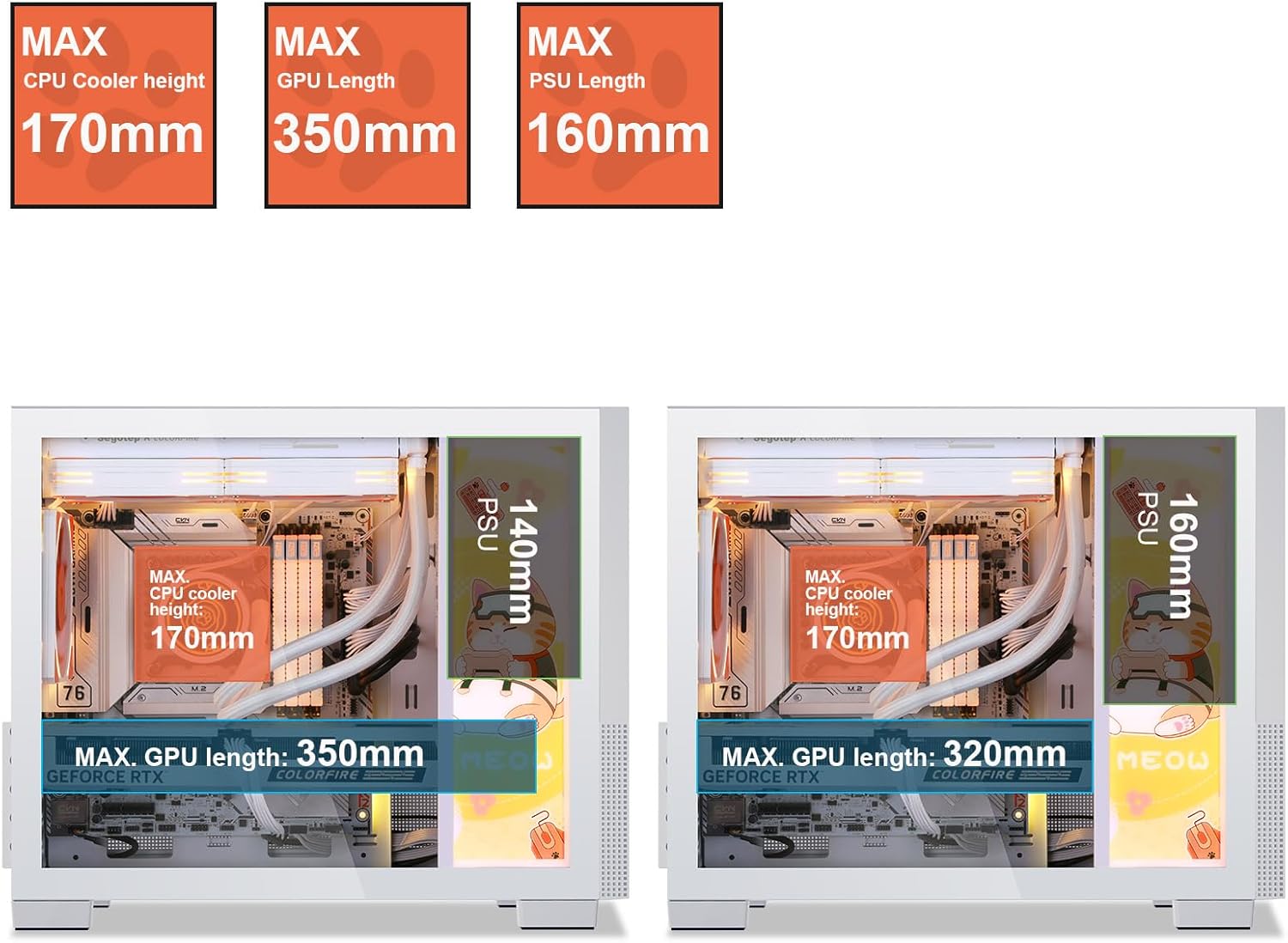
Figure 3.3: Component clearance specifications, including maximum GPU length.
3.4 Cooling System Installation
The case supports up to 6 case fans and a 240mm liquid radiator. Install fans in designated areas for optimal airflow.

Figure 3.4: Fan and radiator support, showing locations for 120mm/140mm fans and a 240mm liquid radiator.

Figure 3.5: Vertical air duct design for efficient cooling.
3.5 પાવર સપ્લાય યુનિટ (PSU) સ્થાપન
Install the PSU in its designated rear-mount location. The case supports PSUs with a maximum length of 160mm.
3.6 કેબલ મેનેજમેન્ટ
નો ઉપયોગ કરો ample space and routing options behind the motherboard tray to manage cables effectively. This ensures a clean build and improved airflow.

Figure 3.6: Top panel and cable management features.
3.7 ફરીથી એસેમ્બલી
Once all components are installed and cables are managed, carefully reattach the side panels and top cover. Ensure all screws are tightened securely.
4. ઓપરેટિંગ સૂચનાઓ
After successful assembly, connect all necessary peripherals and power cables. The front I/O panel provides convenient access to power, audio, and USB 3.0 ports.

Figure 4.1: Front I/O Panel layout.
- તમારા મોનિટર, કીબોર્ડ, માઉસ અને અન્ય પેરિફેરલ્સને તમારા મધરબોર્ડ અને ગ્રાફિક્સ કાર્ડ પરના યોગ્ય પોર્ટ સાથે કનેક્ટ કરો.
- પાવર કેબલને PSU અને વોલ આઉટલેટ સાથે જોડો.
- Press the Power button on the front I/O panel to turn on your system.
5. જાળવણી
Regular maintenance helps ensure the longevity and optimal performance of your PC case and components.
- ડસ્ટ ફિલ્ટર્સ: The Segotep Memphis case includes removable dust filters. Regularly clean these filters to maintain optimal airflow and prevent dust buildup inside the case.
- બાહ્ય સફાઈ: સોફ્ટનો ઉપયોગ કરો, ડીamp cloth to wipe down the exterior surfaces. Avoid abrasive cleaners that may damage the finish or tempered glass.
- આંતરિક સફાઇ: Periodically use compressed air to remove dust from internal components, paying attention to fan blades and heatsinks. Ensure the system is powered off and unplugged before cleaning.
6. મુશ્કેલીનિવારણ
If you encounter issues with your PC build, consider the following common troubleshooting steps:
- કોઈ શક્તિ નથી:
- Ensure the PSU is switched on and properly connected to the wall outlet and motherboard.
- Verify all power cables (24-pin ATX, CPU, GPU) are securely seated.
- મધરબોર્ડ સાથે ફ્રન્ટ પેનલ પાવર સ્વીચ કનેક્શન તપાસો.
- કોઈ ડિસ્પ્લે નથી:
- Confirm the monitor cable is connected to the graphics card (not the motherboard, if a dedicated GPU is installed).
- ગ્રાફિક્સ કાર્ડને તેના PCIe સ્લોટમાં ફરીથી સેટ કરો.
- ખાતરી કરો કે RAM મોડ્યુલો તેમના સ્લોટમાં યોગ્ય રીતે બેઠેલા છે.
- ઓવરહિટીંગ:
- Check if all case fans are spinning and properly oriented for airflow.
- ધૂળ ફિલ્ટર અને આંતરિક ઘટકો સાફ કરો.
- Verify CPU cooler installation and thermal paste application.
For further assistance, please refer to the support section or contact Segotep customer service.
7. સ્પષ્ટીકરણો
| લક્ષણ | સ્પષ્ટીકરણ |
|---|---|
| બ્રાન્ડ | સેગોટેપ |
| મોડેલનું નામ | મેમ્ફિસ |
| કેસનો પ્રકાર | મીની-ટાવર |
| મધરબોર્ડ સુસંગતતા | Micro ATX, ITX |
| મહત્તમ GPU લંબાઈ | 350 મીમી |
| મહત્તમ CPU કુલર ઊંચાઈ | 170 મીમી |
| મહત્તમ PSU લંબાઈ | 160 મીમી |
| Liquid Radiator Support | 240 મીમી સુધી |
| ચાહક આધાર | Up to 6 fans |
| Storage Drive Bays | 3x SSD, 1x HDD |
| ફ્રન્ટ I / O બંદરો | 2x USB 3.0, Audio (Headphone/Microphone) |
| સામગ્રી | ધાતુ, ટેમ્પર્ડ ગ્લાસ |
| રંગ | Memphis-White |
| વસ્તુનું વજન | 9.55 પાઉન્ડ |
| પેકેજ પરિમાણો | 19.25 x 15.5 x 11.5 ઇંચ |
8. વોરંટી અને સપોર્ટ
Segotep products are designed for reliability and performance. For warranty information and technical support, please refer to the official Segotep webસાઇટ પર જાઓ અથવા તેમની ગ્રાહક સેવાનો સીધો સંપર્ક કરો. વોરંટી દાવાઓ માટે ખરીદીનો પુરાવો રાખો.
સંપર્ક માહિતી: Please visit the official Segotep website for the most up-to-date support contact details.


