1. પરિચય
ખરીદી બદલ આભારasing the BlitzWolf BW-V5 LED Projector. This manual provides detailed instructions for the setup, operation, and maintenance of your projector. Please read this manual thoroughly before using the product to ensure proper operation and to extend its lifespan.
The BlitzWolf BW-V5 is a portable LED projector featuring a physical 1080P resolution, 9000 lumens brightness, and Bluetooth 5.0 connectivity, designed for home theater and entertainment use. It is compatible with various devices including TV sticks, smartphones, and supports HDMI, USB, and AV inputs.
2. સલામતી માહિતી
- જ્યારે lamp ચાલુ છે.
- ઓવરહિટીંગ અટકાવવા માટે પ્રોજેક્ટરની આસપાસ યોગ્ય વેન્ટિલેશનની ખાતરી કરો. વેન્ટિલેશનના છિદ્રોને અવરોધશો નહીં.
- પ્રોજેક્ટર સાથે પૂરા પાડવામાં આવેલ પાવર એડેપ્ટરનો જ ઉપયોગ કરો.
- ઇલેક્ટ્રિક આંચકો કે આગથી બચવા માટે પ્રોજેક્ટરને વરસાદ કે ભેજના સંપર્કમાં ન લાવો.
- પ્રોજેક્ટરને અસ્થિર સપાટી પર મૂકવાનું ટાળો.
- પ્રોજેક્ટરને જાતે ડિસએસેમ્બલ કરવાનો કે રિપેર કરવાનો પ્રયાસ કરશો નહીં. સહાય માટે લાયક સેવા કર્મચારીઓનો સંપર્ક કરો.
- Keep the projector away from direct sunlight, heat sources, and extreme temperatures.
3. પેકેજ સામગ્રી
કૃપા કરીને ખાતરી કરો કે નીચેની બધી વસ્તુઓ તમારા પેકેજમાં શામેલ છે:
- BlitzWolf BW-V5 LED Projector
- રીમોટ કંટ્રોલ
- પાવર કેબલ
- HDMI Cable (may vary by region/package)
- AV Cable (may vary by region/package)
- વપરાશકર્તા માર્ગદર્શિકા (આ દસ્તાવેજ)
4. ઉત્પાદન ઓવરview
૨.૨ પ્રોજેક્ટર ઘટકો
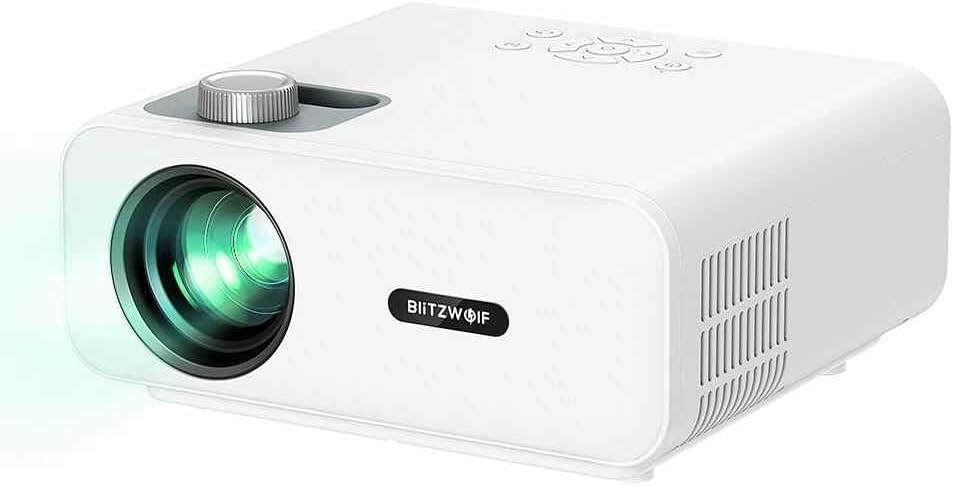
આકૃતિ 4.1: આગળની બાજુ view of the BlitzWolf BW-V5 LED Projector, showing the lens, focus knob, and control panel on top.
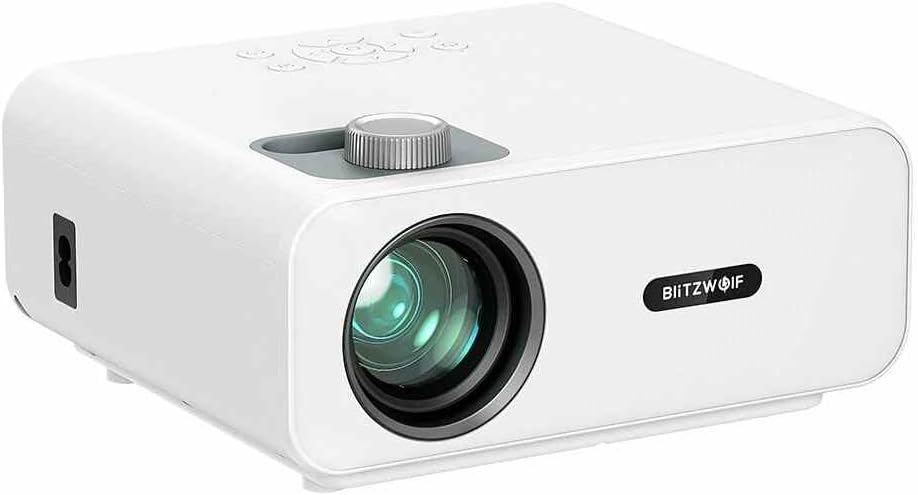
આકૃતિ 4.2: ફ્રન્ટ view of the BlitzWolf BW-V5 LED Projector, highlighting the projection lens and the BlitzWolf logo.
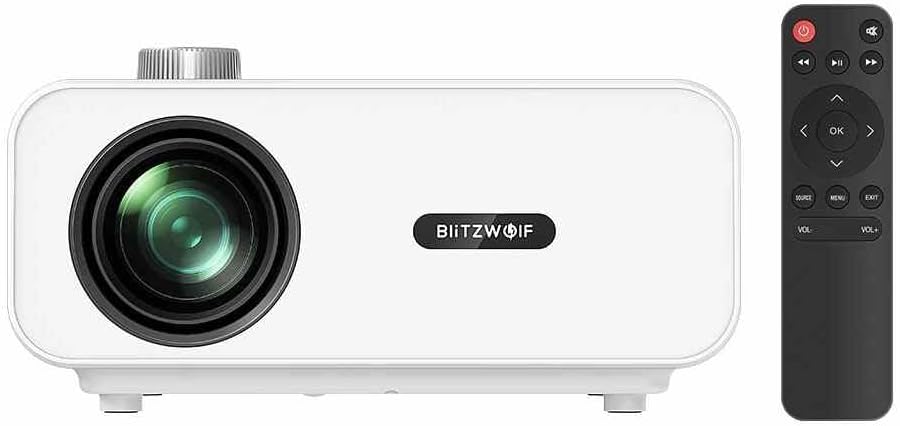
આકૃતિ 4.3: ફ્રન્ટ view of the BlitzWolf BW-V5 LED Projector alongside its remote control, illustrating the compact design of both units.

આકૃતિ 4.4: પાછળ view of the BlitzWolf BW-V5 LED Projector, showcasing the various input/output ports including HDMI, USB, AV, and headphone jack.
The projector features a manual focus knob, an intuitive control panel on the top, and multiple connectivity options on the rear panel. The included remote control allows for convenient operation from a distance.
૫.૧ કંટ્રોલ પેનલ અને રિમોટ કંટ્રોલ
The control panel on top of the projector includes buttons for power, navigation (up, down, left, right, OK), source selection, menu, and volume control. The remote control mirrors these functions and provides additional shortcuts for ease of use.
5. સેટઅપ
5.1 પ્લેસમેન્ટ
પ્રોજેક્ટરને સ્થિર, સપાટ સપાટી પર મૂકો. શ્રેષ્ઠ માટે viewing, position the projector perpendicular to the projection screen or wall. The recommended projection distance ranges from 1.5 to 4.8 meters, yielding a screen size of 50 to 170 inches.
- 50" screen: approx. 1.5 meters (4.9 feet)
- 100" screen: approx. 3.0 meters (9.8 feet)
- 170" screen: approx. 4.8 meters (15.7 feet)
5.2 પાવર સાથે જોડાણ
- પાવર કેબલને પ્રોજેક્ટરના પાવર ઇનપુટ પોર્ટ સાથે જોડો.
- Plug the other end of the power cable into a standard AC 110-240V power outlet.
- પ્રોજેક્ટર પરનો પાવર ઇન્ડિકેટર લાઇટ પ્રકાશિત થશે.
૫.૩ બાહ્ય ઉપકરણોને જોડવા
The BW-V5 projector supports multiple input sources:
- એચડીએમઆઈ: Connect a TV stick, laptop, game console, or Blu-ray player using an HDMI cable. The projector has multiple HDMI ports.
- યુએસબી: મીડિયા ચલાવવા માટે USB ફ્લેશ ડ્રાઇવ દાખલ કરો files (video, audio, images).
- એ.વી .: Use the AV port for older devices like DVD players or set-top boxes.
- Headphone/Audio Out: ઉન્નત ઑડિઓ માટે બાહ્ય સ્પીકર્સ અથવા હેડફોન કનેક્ટ કરો.
6. ઓપરેટિંગ સૂચનાઓ
6.1 પાવર ચાલુ/બંધ
- પાવર ચાલુ: પ્રોજેક્ટર અથવા રિમોટ કંટ્રોલ પર પાવર બટન દબાવો. પ્રોજેક્ટર શરૂ થશે અને મુખ્ય ઇન્ટરફેસ પ્રદર્શિત કરશે.
- પાવર બંધ: Press the power button again. A confirmation message may appear; select "Yes" to shut down.
૪.૨ ઇનપુટ સ્ત્રોત પસંદગી
After powering on, press the "Source" button on the projector or remote control to cycle through available input sources (HDMI1, HDMI2, USB, AV). Select the desired input source corresponding to your connected device.
6.3 ફોકસ એડજસ્ટમેન્ટ
Rotate the focus knob located near the lens until the projected image appears clear and sharp. This adjustment is manual and may need to be fine-tuned based on projection distance.
6.4 કીસ્ટોન કરેક્શન
If the projected image appears trapezoidal (wider at the top or bottom), use the optical keystone correction feature. The projector supports ±15° trapezoidal correction. Adjust the keystone ring or use the menu options to square the image.
૪.૩ બ્લૂટૂથ કનેક્ટિવિટી
The BW-V5 supports Bluetooth 5.0 for connecting external audio devices like Bluetooth speakers or headphones. Navigate to the Bluetooth settings in the projector's menu, enable Bluetooth, and pair with your desired device.
6.6 Media Playback (USB)
When a USB drive is inserted, the projector's interface will typically prompt you to select the media type (Video, Music, Photo). Navigate through your files using the remote control and press "OK" to play.
- Supported Video Formats: MPEG1/MPEG2/MPEG4/H.263/H.264/AVS/VC1/MJPEG/RV30/RV40/HEVC
- Supported Audio Formats: MPEG1/MPEG2/LPCM/MP3/WMA2/AAC/WAV
- Supported Image Formats: JPEG/PNG/BMP
7. જાળવણી
૬.૧ પ્રોજેક્ટરની સફાઈ
- લેન્સ: Use a soft, lint-free cloth specifically designed for optical lenses. Do not use abrasive cleaners or excessive force.
- શરીર: પ્રોજેક્ટરના બાહ્ય ભાગને નરમ, સૂકા કપડાથી સાફ કરો. હઠીલા નિશાનો માટે, થોડો ડીamp કાપડનો ઉપયોગ કરી શકાય છે, ત્યારબાદ સૂકું સાફ કરી શકાય છે.
- વેન્ટિલેશન પોર્ટ્સ: Periodically clean the ventilation ports with a soft brush or compressed air to prevent dust buildup, which can affect cooling performance.
7.2 એલamp જીવન
The LED light source in the BW-V5 projector has a long work life of approximately 50,000 hours. This means the lamp is designed to last for many years under normal usage conditions, reducing the need for frequent replacements.
8. મુશ્કેલીનિવારણ
| સમસ્યા | સંભવિત કારણ | ઉકેલ |
|---|---|---|
| કોઈ છબી પ્રોજેક્ટ કરેલી નથી | Power cable disconnected; Incorrect input source; Lens cap on. | Check power connection; Select correct input source; Remove lens cap. |
| છબી અસ્પષ્ટ છે | ધ્યાન બહાર; ખોટો પ્રક્ષેપણ અંતર. | Adjust the focus knob; Adjust projection distance. |
| છબી ટ્રેપેઝોઇડલ છે | પ્રોજેક્ટર સ્ક્રીન પર લંબ નથી. | Adjust keystone correction; Reposition projector. |
| કોઈ અવાજ નથી | અવાજ ખૂબ ઓછો છે; મ્યૂટ કરેલું છે; બાહ્ય ઑડિઓ ઉપકરણ કનેક્ટેડ કે પસંદ કરેલું નથી. | Increase volume; Unmute; Check audio cable connection or Bluetooth pairing. |
| રીમોટ કંટ્રોલ કામ કરતું નથી | બેટરી ઓછી/ડેડ; રિમોટ અને પ્રોજેક્ટર વચ્ચે અવરોધ. | બેટરી બદલો; ખાતરી કરો કે IR રીસીવર સ્પષ્ટ દૃષ્ટિ રેખા ધરાવે છે. |
9. સ્પષ્ટીકરણો
| લક્ષણ | સ્પષ્ટીકરણ |
|---|---|
| બ્રાન્ડ | બ્લિટ્ઝવોલ્ફ |
| મોડલ | BW-V5 |
| ડિસ્પ્લે ટેકનીક | એલસીડી |
| મૂળ ઠરાવ | 1920x1080P (Physical 1080P) |
| પાસા રેશિયો | 16:9 |
| Bulb Luminance | 9000 LM |
| Light Work Life | 50000 કલાક |
| FOFO Contrast | 1000:1 |
| થ્રો રેશિયો | 1.35 |
| પ્રોજેક્ટર કદ | ૪૨" - ૩૦૦" |
| થ્રો ડિસ્ટન્સ | 1.5 - 4.8 M |
| ધ્યાન કેન્દ્રિત કરવાની રીત | મેન્યુઅલ ફોકસ |
| Optical Keystone Correction | ±15° trapezoidal |
| કનેક્ટિવિટી ટેકનોલોજી | Bluetooth 5.0, HDMI, USB, AV |
| ઇન્ટરફેસ | AV, Headphone, HDMI (x2), USB (x2) |
| Overall Operating Power Consumption | 75W 5W |
| સ્ટેન્ડબાય પાવર વપરાશ | 1W |
| કાર્ય ભાગtage | AC 110-240V |
| ચોખ્ખું વજન | 1.6 KG (approx. 3.52 pounds) |
| એકંદર પરિમાણ | 220*190.5*93mm |
10. વોરંટી અને સપોર્ટ
This product comes with a standard manufacturer's warranty. Please refer to the warranty card included in your package for specific terms and conditions. For technical support, troubleshooting assistance, or warranty claims, please contact the retailer or manufacturer's customer service. Keep your purchase receipt as proof of purchase.
For the latest information and support, please visit the official BlitzWolf webસાઇટ પર જાઓ અથવા તેમની ગ્રાહક સેવા ચેનલોનો સંપર્ક કરો.


